

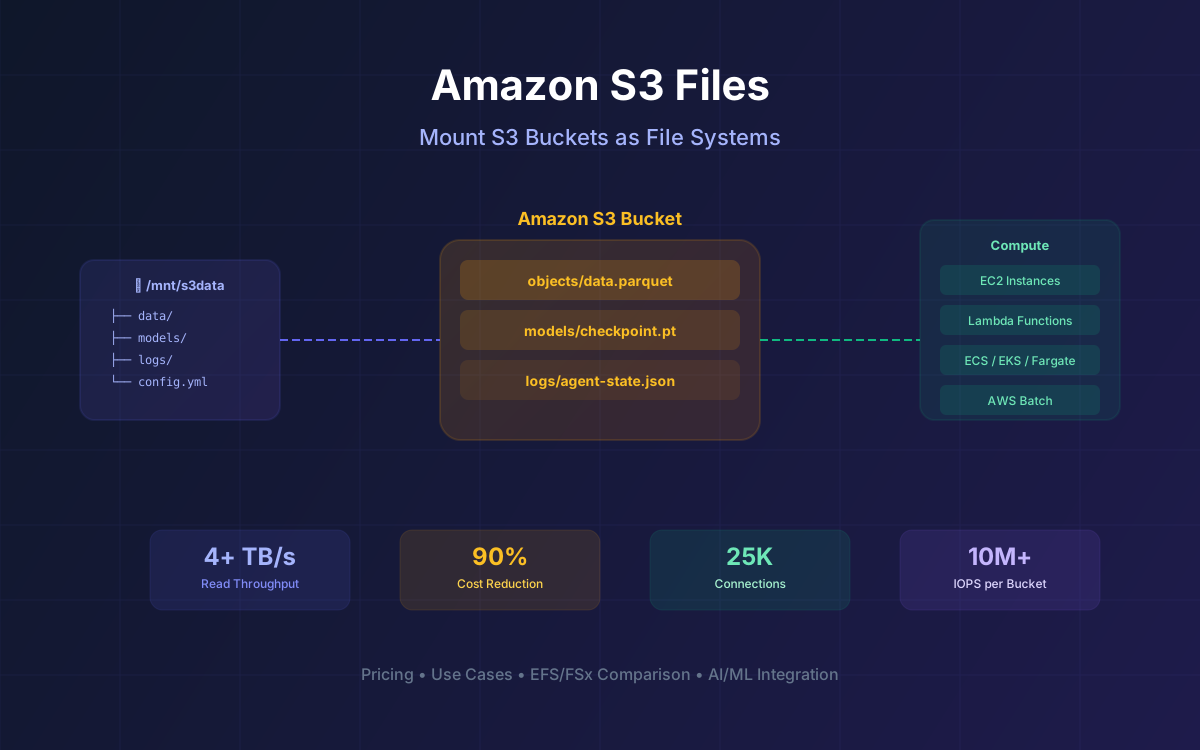
For twenty years, Amazon S3 has been the backbone of cloud storage. But accessing S3 data from applications that expect a file system has always meant one thing: copying data back and forth between object storage and a separate file system, managing duplicate copies, and building sync pipelines that inevitably break. On April 7, 2026, AWS changed that equation with the general availability of Amazon S3 Files—the first cloud object store to provide fully-featured, high-performance file system access to your data, without that data ever leaving S3.
S3 Files lets you mount any S3 bucket as a shared NFS file system on EC2, Lambda, ECS, EKS, Fargate, and AWS Batch. Your Python scripts, ML frameworks, CLI tools, and shell commands work directly with S3 data as if it were a local directory. No custom connectors, no new APIs, no data duplication. As AWS VP Andy Warfield put it: "You can work with your objects as files, and your files as objects."
This guide covers everything you need to know: how S3 Files works under the hood, real pricing breakdowns with cost comparisons against EFS and FSx, integration patterns with EC2, Lambda, and containers, use cases from AI agents to genomics, the drawbacks you should watch for, and what the developer community is saying about this launch.
What's Inside
- What Is Amazon S3 Files & How It Works
- Architecture: Stage and Commit Design
- Key Features & Performance Numbers
- S3 Files Pricing Breakdown
- Cost Comparison: S3 Files vs EFS vs FSx
- Integration with EC2, Lambda, ECS & EKS
- Use Cases: AI Agents, ML Training & Beyond
- Benefits: Why S3 Files Matters
- Drawbacks & Limitations to Watch
- What the Community Is Saying
- AWS re:Invent 2025 Context: S3's Evolution
- How Lushbinary Can Help
1What Is Amazon S3 Files & How It Works
Amazon S3 Files is a shared file system that connects any AWS compute resource directly with your data in S3. It provides NFS v4.1/v4.2 file system access to S3 buckets with full POSIX semantics—directory operations, file locking, permissions, and consistency—without requiring data to leave S3.
Under the hood, S3 Files is built on Amazon EFS infrastructure. When you mount an S3 bucket (or prefix), S3 Files creates a synchronized file system view of your objects. Here's the flow:
- Metadata import: When you first access a directory, S3 Files imports metadata from S3 and populates a file-optimized namespace. This happens lazily and in the background—you can start working immediately.
- Small file caching: Files under the configurable threshold (default 128 KB) are pulled onto high-performance EFS storage when accessed. Larger files have only metadata imported; data is fetched from S3 on read.
- Read bypass: For sequential reads of 1 MiB or larger, S3 Files reroutes reads directly to S3 via parallel GET requests, achieving up to 3 GB/s per client and terabits per second across multiple clients.
- Write aggregation: Changes are batched on high-performance storage and committed back to S3 roughly every 60 seconds as single PUT operations.
- Bidirectional sync: When other applications modify objects in the bucket via the S3 API, S3 Files detects changes and reflects them in the file system view automatically.
- Automatic eviction: Data not accessed within a configurable window (1–365 days, default 30) is evicted from the file system cache but remains in S3.
Key Distinction
S3 Files is not "S3 pretending to be a file system." Previous attempts like s3fs-fuse, goofys, and even AWS's own Mountpoint for Amazon S3 bolted FUSE layers on top of S3's object API. S3 Files takes a fundamentally different approach: a real EFS-backed file system with automatic synchronization to S3 as the authoritative data store.
2Architecture: The Stage and Commit Design
The design story behind S3 Files is fascinating. According to Andy Warfield's detailed write-up on All Things Distributed, the team initially tried to merge EFS and S3 into a single unified system (internally called "EFS3"). After months of passionate debate, they realized that collapsing file and object semantics into one system produced "the lowest common denominator" rather than the best of both worlds.
The breakthrough came when they embraced the boundary between file and object as a feature rather than a limitation. They borrowed the concept of stage and commit from version control: changes accumulate in the file system layer and are then committed to S3, with clear, published semantics for how and when data crosses the boundary.
This architecture means your authoritative data always lives in S3 at S3 prices. The file system layer is a high-performance cache that you pay for only on the data you actively touch. If there's ever a conflict where files are modified from both the file system and the S3 API simultaneously, S3 wins—the file system version moves to a lost+found directory with a CloudWatch metric flagging the event.
Consistency Model
S3 Files provides NFS close-to-open consistency on the file system side and standard S3 strong read-after-write consistency on the object side. File renames are atomic within the file system, but renaming a directory is expensive on the S3 side because S3 has no native rename—it requires copying and deleting every object under that prefix.
3Key Features & Performance Numbers
| Metric | Value |
|---|---|
| Aggregate read throughput | 4+ TB/s across clients |
| Per-client read throughput | Up to 3 GB/s (read bypass) |
| File system IOPS per bucket | 10M+ |
| Simultaneous connections | Up to 25,000 |
| Protocol | NFS v4.1 / v4.2 |
| Consistency | NFS close-to-open |
| Write sync interval | ~60 seconds |
| Eviction window | 1–365 days (default 30) |
| File size threshold | Configurable (default 128 KB) |
| Regions | 43 AWS regions at GA |
The read bypass feature deserves special attention. For large sequential reads (1 MiB+), S3 Files automatically reroutes the data path to perform parallel GET requests directly to S3, bypassing the NFS data path entirely. This means large file reads incur only standard S3 GET request costs with no file system charge—a significant cost advantage for ML training workloads that read large Parquet files or datasets.
S3 Files also supports prefix-scoped mounts. You can mount a specific S3 prefix rather than the entire bucket, so only your active dataset is placed onto the file system's high-performance storage. This is particularly useful for multi-tenant architectures or when different teams need access to different subsets of a shared data lake.
4S3 Files Pricing Breakdown
S3 Files pricing has two dimensions: file system storage (GB-month) and data access charges (per-GB reads and writes). These are on top of your standard S3 storage costs—your data still lives in S3 and you still pay S3 rates for it.
| Component | Rate (US East) | Notes |
|---|---|---|
| High-perf storage | $0.30/GB-month | Only for cached/active data |
| Data reads | $0.03/GB | 32 KB minimum per operation |
| Data writes | $0.06/GB | 32 KB minimum per operation |
| Metadata ops | 4 KB metered as read | ls, stat, create, delete |
| Commit (fsync/close) | 4 KB metered as write | Per file commit |
| Large reads (1 MiB+) | $0 (S3 Files) | Standard S3 GET costs only |
⚠️ Watch the Minimums
Every data access operation has a 32 KB minimum. Read a 1-byte file? Metered for 32 KB. Metadata operations (directory listing, stat) cost 4 KB metered as a read. An ls on a directory with 10,000 files generates 10,000 metadata reads at 4 KB each. For metadata-heavy workloads like ML checkpointing or agentic workflows, these minimums add up fast. Model your I/O patterns before committing.
First-Read Import Cost
When you first read a small file (under the 128 KB threshold), it gets imported onto the high-performance storage. This import is metered as a write at $0.06/GB. The read itself is included in that operation—you're not paying $0.06 to place it plus $0.03 to read it. So the first-read cost for small files is effectively $0.06/GB (double the headline read rate), while subsequent reads of the same cached file are $0.03/GB.
Example: 10 TB Dataset, 500 GB Active Working Set
If you mount a 10 TB S3 bucket but only actively work with 500 GB of small files and read 450 GB of large files monthly, your S3 Files cost would be roughly: 500 GB × $0.30 = $150/mo for high-perf storage, plus access charges on the 500 GB working set. The 450 GB of large file reads stream directly from S3 at $0 S3 Files charge (just standard S3 GET costs). The remaining 9.5 TB sits in S3 at standard rates (~$218/mo for S3 Standard). Total: roughly $368/mo plus access charges, compared to $3,000/mo if you stored all 10 TB on EFS Standard.
5Cost Comparison: S3 Files vs EFS vs FSx
The real question everyone asks: how does S3 Files stack up against existing AWS file storage options? The answer depends heavily on your access patterns. Here's a detailed comparison using US East (N. Virginia) pricing as of April 2026.
| Metric | S3 + S3 Files | EFS Perf-Optimized | FSx for Lustre |
|---|---|---|---|
| Hot storage | $0.30/GB (cache only) | $0.30/GB (all data) | $0.140/GB (persistent SSD) |
| Cold storage | $0.023/GB (S3 Std) or $0.0125/GB (IT-IA) | $0.008/GB (Archive) | N/A (all provisioned) |
| Read cost | $0.03/GB (small); $0 (large) | $0.03/GB + tier surcharges | Included in provisioned |
| Write cost | $0.06/GB | $0.06/GB | Included in provisioned |
| Tiering cost | Free (S3 IT) | $0.01–$0.03/GB per transition | N/A |
| Throughput | S3 throughput (effectively unlimited) | Elastic, pay-per-byte | Provisioned (200 MB/s per TiB) |
| Provisioning | None (pay-as-you-go) | None (elastic) | Must provision capacity |
When S3 Files Wins
- Large datasets, small active working set: Mount a petabyte bucket, pay file system rates only on the terabyte you touch. Everything else stays at S3 rates.
- Large file reads: Reading 450 GB of large files monthly costs $0 via S3 Files vs ~$13.50 via EFS Performance-optimized.
- Free tiering: S3 Intelligent-Tiering moves data between access tiers at no cost. EFS charges $0.01–$0.03/GB per tier transition.
- No provisioning: Unlike FSx for Lustre, there's nothing to provision. Scale is automatic.
When EFS or FSx Wins
- Small file-heavy workloads: First-read cost is $0.06/GB via S3 Files (import write) vs $0.03/GB on EFS (no import step). The 32 KB minimums widen the gap for metadata-heavy operations.
- Cold archive storage: EFS Archive at $0.008/GB beats S3 IT infrequent at ~$0.0125/GB for pure cold storage (though reading from EFS Archive costs $0.06/GB).
- Ultra-low latency HPC: FSx for Lustre provides sub-millisecond latency for HPC workloads that need consistent, provisioned performance.
- Windows workloads: FSx for Windows File Server supports SMB protocol. S3 Files is NFS-only (Linux).
6Integration with EC2, Lambda, ECS & EKS
S3 Files supports every major AWS compute service. Here's how each integration works and what to consider:
🖥️ EC2
Mount S3 buckets as NFS volumes directly on EC2 instances. Ideal for data science workstations, build servers, and legacy applications that expect POSIX file access. Standard NFS mount commands work out of the box.
⚡ Lambda
Lambda functions can mount S3 Files just like they mount EFS today. This gives serverless functions direct file system access to S3 data—no more downloading objects to /tmp. Great for data processing pipelines and AI agent tasks.
📦 ECS & Fargate
Containers on ECS and Fargate can mount S3 Files as a shared volume. Multiple containers across a cluster read and write to the same S3 data simultaneously. Eliminates the need for sidecar containers that sync S3 data.
☸️ EKS & Batch
Kubernetes pods on EKS can use S3 Files via the EFS CSI driver. AWS Batch jobs get native file system access to training data and checkpoints. Supports up to 25,000 simultaneous connections per bucket.
Shared Access Pattern
One of the most powerful aspects of S3 Files is that all these compute services can access the same mounted bucket simultaneously. A Lambda function can process data that an EC2 instance just wrote, while an ECS container reads the same dataset for a different pipeline—all without data duplication or custom sync logic.
7Use Cases: AI Agents, ML Training & Beyond
AI Agents & Agentic Workflows
This is clearly the headline use case AWS is pitching, and it makes sense. AI agents don't just read data—they act on it, generate new data, coordinate with other agents, and maintain state across tasks. Agents depend on file-based tools like Python libraries, CLI utilities, and shell scripts. S3 Files gives agents a shared workspace where they can read inputs, write outputs, persist memory and logs, and share intermediate state—all using standard file operations with no S3 API expertise required.
Deloitte's AWS Alliance AI Lead Chris Jangareddy called it "a differentiator that provides our agentic architectures with a shared workspace where agents can retain context, exchange intermediate results, and organize across complex analytics pipelines."
ML Training Pipelines
Training datasets live in S3 for scale and cost, but preprocessing pipelines, feature engineering scripts, and training frameworks all expect files. The traditional workflow: pull data from S3, move it to a file system, process it, push results back. S3 Files eliminates this copy-and-stage step entirely. Data scientists work with S3 training data directly through a file system, preprocessing writes back to the same bucket automatically, and multiple training jobs read from the same dataset simultaneously without duplication.
Life Sciences & Genomics
This use case is personal to the S3 Files team. Andy Warfield's original inspiration came from working with genomics researchers at UBC who spent more time building data-shuffling scripts than doing biology. Bayer's Senior Cloud Engineer Ben Gonzalez noted that S3 Files lets their data scientists "mount S3 data directly as a file system" so "researchers can now open datasets, run analyses, and collaborate on shared results without waiting for downloads or managing data movement."
Media & Entertainment
Production teams, VFX studios, and render farms depend on file-based tools. With S3 Files, artists and editors work directly from S3 with their existing tools, while the same content remains available via S3 APIs for transcoding and CDN delivery—all from one copy with no synchronization required.
Financial Services & Quantitative Research
QRT's Head of Cloud Infrastructure Jon Fautley described how their researchers "can now work with data directly in S3 from their workstations, running backtests, analyzing results, and iterating on strategies across larger datasets, all without copying data or managing ETL pipelines."
Legacy Application Migration
If you have applications that assume POSIX semantics and you've been running EFS or FSx just to give them something to mount, S3 Files offers an option that keeps S3 as the source of truth. No code changes, no custom connectors—the application doesn't know it's talking to S3.
8Benefits: Why S3 Files Matters
Zero Data Duplication
One copy of your data in S3, accessible through both file and object interfaces simultaneously. No sync pipelines to build or maintain.
Up to 90% Cost Reduction
AWS claims up to 90% lower costs compared to cycling data between S3 and separate file systems. You pay file system rates only on your active working set.
No Provisioning
Unlike FSx, there is nothing to provision. Storage scales automatically as your data grows, with costs proportional to what you are actively using.
Universal Compute Access
25,000 simultaneous connections across EC2, Lambda, ECS, EKS, Fargate, and Batch. Every compute service reads and writes the same data.
Free Large File Reads
Reads of 1 MiB or larger stream directly from S3 with no S3 Files charge. Only standard S3 GET costs apply. Huge for ML training workloads.
S3 as Source of Truth
Your authoritative data always lives in S3 with 11 nines of durability. The file system is a high-performance cache, not a separate data store.
Works with Existing Tools
Python libraries, ML frameworks, CLI utilities, shell scripts, and legacy applications all work unchanged. No new APIs to learn.
Free Intelligent Tiering
S3 Intelligent-Tiering moves data between access tiers at no cost. EFS charges per-transition fees. This compounds savings over time.
The broader significance is what Corey Quinn of Last Week in AWS captured well: "S3 at twenty is quietly becoming the data substrate for everything. Objects, files, tables, vectors, high-performance computing." With S3 Tables (Iceberg), S3 Vectors (similarity search), and now S3 Files, S3 is evolving from a simple object store into a universal data platform where you choose the access pattern that fits your workload.
9Drawbacks & Limitations to Watch
S3 Files is impressive, but it's not without sharp edges. Here are the limitations you need to understand before adopting it:
- 32 KB minimum metering: Every data access operation is metered at a 32 KB minimum. Read a 1-byte config file? You pay for 32 KB. Metadata operations cost 4 KB each. For workloads with millions of tiny files or heavy directory listings, these minimums compound quickly.
- Expensive renames: S3 has no native rename operation. Renaming a directory means copying and deleting every object under that prefix. Moving a folder with 50,000 files generates 50,000 individual operations. AWS warns when a mount covers more than 50 million objects for this reason.
- 60-second commit window: Writes are batched and committed to S3 roughly every 60 seconds. There's no explicit commit control at launch. If your workflow needs immediate S3 visibility of written data, this lag may be a problem.
- Namespace incompatibilities: Some S3 object keys can't be represented as valid POSIX filenames (e.g., keys ending with
/, keys with characters invalid in file paths). These objects won't appear in the file system view. S3 Files emits events for objects that can't cross the boundary. - NFS-only (Linux): S3 Files uses NFS v4.1/v4.2. There's no SMB support, so Windows workloads can't use it. You need FSx for Windows File Server for those.
- First-read import cost: The first time you read a small file, you pay the write rate ($0.06/GB) for the import, not the read rate ($0.03/GB). Subsequent reads are at the normal rate, but the first-touch cost is double.
- Conflict resolution favors S3: If the same data is modified via both the file system and the S3 API simultaneously, S3 wins. The file system version goes to
lost+found. This is the right default, but you need to design workflows to avoid concurrent writes from both interfaces. - No Glacier access: S3 Files won't access objects in Glacier Flexible Retrieval, Glacier Deep Archive, or Intelligent-Tiering archive tiers. You need to restore them via the S3 API first.
Bottom Line on Drawbacks
These aren't dealbreakers—they're the honest cost of building a file system that bridges two fundamentally different storage paradigms. As Corey Quinn noted, "that's not a criticism so much as the cost of a filesystem that tries to cheat physics." Model your workload's actual I/O patterns before committing.
10What the Community Is Saying
The launch has generated significant buzz across the developer community. Here's a sampling of reactions from industry voices and tech publications:
"I've been saying 'S3 is not a filesystem' for over a decade... Today, AWS made me a liar. Sort of."
— Corey Quinn, Last Week in AWS. Quinn praised the team for "not taking the lazy path" and building a real file system on EFS infrastructure rather than another FUSE layer, while noting the pricing nuances around 32 KB minimums.
"Well, that's a bit of a game-changer!"
— The Stack, calling it a "landmark release" that could "reduce data silos, synchronization headaches, or manual data moving" for organizations that previously maintained separate file and object storage systems.
"Amazon revamps S3 cloud storage for the AI era, removing a key barrier for apps and agents."
— GeekWire, framing S3 Files as AWS's answer to the growing demand for file-based access in AI and agentic workloads.
"AWS adds file access to S3, taking on NetApp and Qumulo."
— Blocks and Files, highlighting the competitive implications for third-party file storage vendors in the AWS ecosystem.
The general sentiment is cautiously enthusiastic. Developers appreciate that AWS built a proper file system rather than another FUSE hack, but are watching the pricing minimums and the 60-second commit window closely. The agentic AI angle resonates strongly—shared file system access for multi-agent coordination is a real pain point that S3 Files addresses directly.
Enterprise customers like Bayer, Deloitte, Cloudsmith, Snorkel AI, Torc Robotics, and QRT have already shared positive early experiences from the nine-month beta period, particularly around eliminating data duplication and simplifying ML pipelines.
11AWS re:Invent 2025 Context: S3's Evolution
S3 Files didn't appear in a vacuum. It's the latest step in a deliberate evolution of S3 from a simple object store into a multi-modal data platform. At re:Invent 2025 (December 1–5, 2025), AWS announced several S3 enhancements that set the stage:
🎤 AWS re:Invent 2025 Updates
S3 Vectors reached GA with 40x the scale of preview, supporting billion-vector similarity search natively in S3. S3 Tables gained Intelligent-Tiering and cross-region replication for Apache Iceberg tables. S3 object size increased to 50 TB. S3 Batch operations were enhanced. FSx for NetApp ONTAP gained S3 accessibility. These updates collectively position S3 as a universal data substrate—objects, tables, vectors, and now files.
📺 Related re:Invent Sessions
- AWS Storage: Beyond Data Boundaries (INV215)— Andy Warfield's keynote on S3's evolution toward multi-modal data access
- High-Performance Storage for AI/ML, Analytics & HPC (STG336)— Deep dive on storage architectures for ML training and inference workloads
- Transforming AI Storage Economics with S3 Vectors (STG318)— How S3 Vectors reduces vector storage costs by up to 90%
- Data Protection and Resilience with AWS Storage (STG338)— Defense-in-depth strategies for S3 data protection
12How Lushbinary Can Help
At Lushbinary, we specialize in AWS cloud architecture, cost optimization, and building data-intensive applications. S3 Files opens up new architectural patterns that can dramatically simplify your infrastructure and reduce costs—but getting the most out of it requires understanding the pricing nuances, access patterns, and integration points we've covered in this guide.
Here's how we can help:
- S3 Files architecture design: We'll analyze your workload's I/O patterns and design an S3 Files integration that maximizes cost savings while avoiding the pricing pitfalls (32 KB minimums, first-read import costs, rename overhead).
- EFS/FSx to S3 Files migration: If you're running EFS or FSx primarily as a bridge to S3 data, we can help you migrate to S3 Files and eliminate duplicate storage costs.
- AI/ML pipeline optimization: We build training pipelines that leverage S3 Files for direct file access to S3 datasets, eliminating the copy-and-stage step that slows down iteration cycles.
- Agentic AI infrastructure: We design multi-agent architectures that use S3 Files as a shared workspace for agent coordination, state persistence, and data exchange.
- AWS cost optimization: S3 Files is one piece of the puzzle. We audit your entire AWS bill and implement proven cost optimization techniques across compute, storage, and networking.
🚀 Free Architecture Consultation
Not sure if S3 Files is right for your workload? Book a free 30-minute consultation and we'll analyze your current storage architecture, estimate potential savings, and recommend the optimal approach—whether that's S3 Files, EFS, FSx, or a hybrid setup.
❓ Frequently Asked Questions
What is Amazon S3 Files?
Amazon S3 Files is a new S3 feature (GA April 2026) that lets you mount any S3 bucket as a shared NFS file system on EC2, Lambda, ECS, EKS, and Fargate. Built on Amazon EFS infrastructure, it provides full POSIX file semantics while keeping your data in S3.
How much does S3 Files cost?
S3 Files charges $0.30/GB-month for high-performance storage (only for cached data), $0.03/GB for reads, and $0.06/GB for writes, on top of standard S3 storage costs. Large reads (1 MiB+) stream directly from S3 at no S3 Files charge. AWS claims up to 90% lower costs vs. cycling data between S3 and separate file systems.
How does S3 Files compare to EFS and FSx?
S3 Files uses the same per-GB rates as EFS Performance-optimized ($0.30/GB Standard), but you only pay those rates on the active working set. EFS charges for all stored data. FSx for Lustre starts at $0.140/GB-month for persistent SSD. S3 Files is most cost-effective for large datasets where only a fraction is actively accessed.
Can I use S3 Files with Lambda and containers?
Yes. S3 Files supports up to 25,000 simultaneous connections across EC2, Lambda, ECS, EKS, Fargate, and AWS Batch. All compute resources can read and write to the same mounted S3 bucket concurrently.
Does S3 Files replace Mountpoint for Amazon S3?
S3 Files goes far beyond Mountpoint. While Mountpoint was a FUSE-based read-heavy tool, S3 Files provides full file system semantics including consistency, locking, POSIX permissions, and bidirectional sync. It is built on EFS infrastructure rather than a FUSE layer.
What are the main use cases for S3 Files?
Key use cases include AI/ML training pipelines, agentic AI workloads (shared agent workspace), legacy application migration, genomics and life sciences data processing, media production, and financial quantitative research.
📚 Sources
- Amazon S3 Files — Official Product Page
- AWS What's New — S3 Files GA Announcement (April 7, 2026)
- All Things Distributed — S3 Files and the Changing Face of S3
- Last Week in AWS — S3 Is Not a Filesystem (But Now There's One In Front of It)
- Amazon S3 Pricing
- Amazon EFS Pricing
- Amazon FSx for Lustre Pricing
- AWS Storage at re:Invent 2025
Content was rephrased for compliance with licensing restrictions. Pricing data sourced from official AWS pricing pages as of April 2026. Performance metrics from AWS product documentation. Pricing and features may change—always verify on the vendor's website.
Optimize Your AWS Storage Architecture
Whether you're evaluating S3 Files for ML pipelines, migrating from EFS, or building agentic AI infrastructure, our AWS-certified team can help you design the right storage strategy and cut costs.
Build Smarter, Launch Faster.
Book a free strategy call and explore how LushBinary can turn your vision into reality.

