
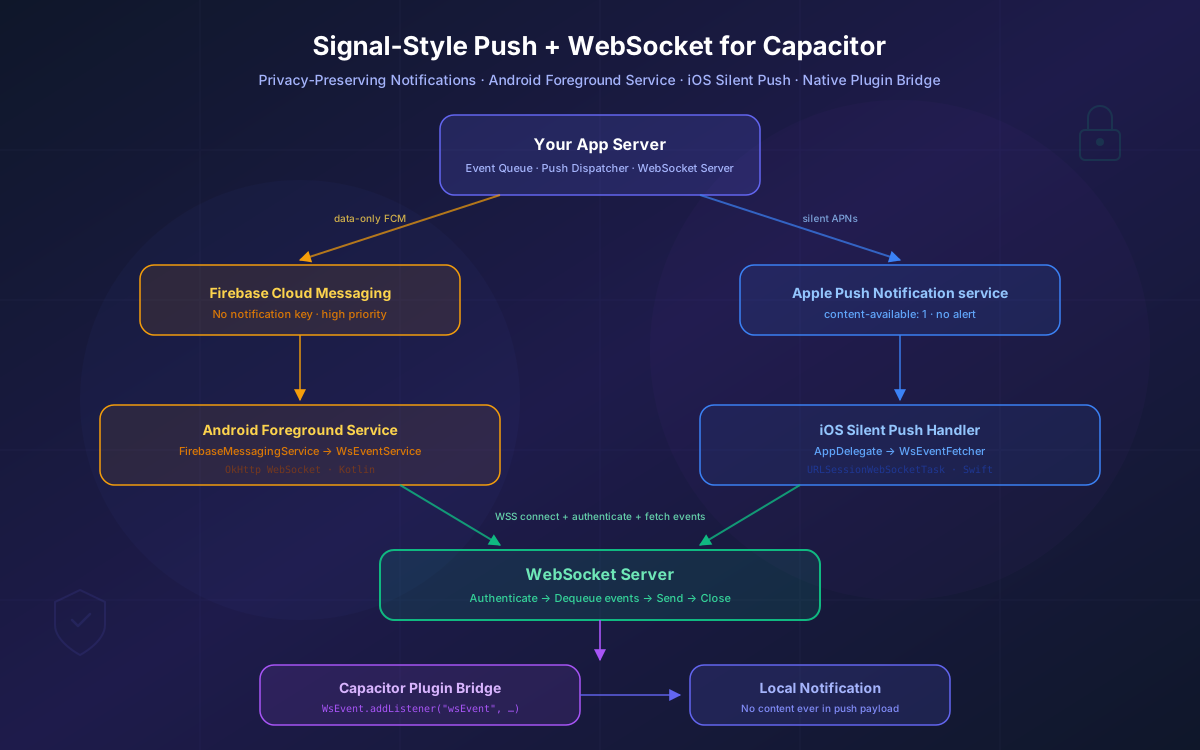
You have a Capacitor + Next.js PWA wrapped into a mobile app and you need it to behave like Signal: receive a push notification, silently wake up, open a WebSocket to your server, pull real-time events, and display a notification — all without exposing any message content to Google or Apple. That is a non-trivial native engineering problem, and it is exactly the kind of work Lushbinary specialises in.
The challenge is that Capacitor's JavaScript layer cannot do this alone. Android's battery optimisation kills background processes, and iOS suspends apps the moment they leave the foreground. The only reliable solution is a native plugin — Java/Kotlin on Android, Swift/Objective-C on iOS — that hooks into the platform's push delivery pipeline and manages the WebSocket lifecycle at the OS level, exactly the way Signal does.
This guide breaks down the full architecture: how Signal handles privacy-preserving push, how to replicate it on Android with a foreground service, how to replicate it on iOS with silent APNs and URLSession, how to bridge everything into Capacitor, and how Lushbinary can build and ship this for you.
📋 Table of Contents
- 1.How Signal Handles Push Notification Privacy
- 2.Why Capacitor's JS Layer Is Not Enough
- 3.Android: Data-Only FCM + Foreground Service + WebSocket
- 4.iOS: Silent APNs + URLSession WebSocket
- 5.The Capacitor Plugin Bridge
- 6.Server-Side Push Dispatch Architecture
- 7.Security: Configurable Server URL & Credential Handling
- 8.Testing & Debugging Native Push Flows
- 9.Architecture Diagram: End-to-End Flow
- 10.Why Lushbinary for This Integration
1How Signal Handles Push Notification Privacy
Signal's approach is elegant and well-documented in its open-source Android GCM package. The core idea: the push payload carries no message content. Instead, it carries only a minimal wake signal — sometimes just a sender hint or a flag indicating "you have new messages."
When the device receives this push, Signal's native service wakes up, opens an encrypted WebSocket to Signal's servers, authenticates with device credentials, pulls the actual encrypted message envelope, decrypts it locally using the Signal Protocol, and only then displays a local notification. Google and Apple never see the message content — they only relay a tiny wake packet.
🔒 The Privacy Guarantee
Because the push payload contains no message content, even if Google or Apple were compelled to log push traffic, they would see nothing meaningful. All sensitive data travels over the app's own authenticated WebSocket channel, end-to-end encrypted.
This pattern is what your client wants to replicate. The push is just a doorbell. The WebSocket is the actual conversation. Your server controls what gets sent over the WebSocket, and the native layer manages the connection lifecycle so the OS doesn't kill it before the data arrives.
2Why Capacitor's JS Layer Is Not Enough
Capacitor runs your Next.js app inside a native WebView. When the app is backgrounded or killed, the WebView is suspended. JavaScript execution stops. Any WebSocket you opened in JS is closed. This is by design — both Android and iOS aggressively manage background processes to preserve battery life.
The standard Capacitor Push Notifications plugin (@capacitor/push-notifications) handles foreground and background notification display, but it does not give you a hook to run arbitrary code when a push arrives while the app is killed. On Android, the system tray notification is shown automatically. On iOS, APNs delivers the notification to the system, not your app.
To intercept the push before it is displayed and run your own logic (open a WebSocket, fetch data, build a custom notification), you need to go native:
- Android: A custom
FirebaseMessagingServicesubclass that receives data-only FCM messages and starts a foreground service to manage the WebSocket connection. - iOS: A Notification Service Extension or a silent APNs push handler in
AppDelegatethat uses URLSession's WebSocket task to connect and fetch data within the OS-granted background time budget (up to 30 seconds). - Capacitor bridge: A custom Capacitor plugin that exposes the native service to your JavaScript layer for configuration, status monitoring, and event callbacks.
3Android: Data-Only FCM + Foreground Service + WebSocket
The Android implementation has three moving parts: a data-only FCM message from your server, a FirebaseMessagingService that receives it, and a foreground service that manages the WebSocket connection.
Step 1: Send a Data-Only FCM Message
The key is to send a message with only a data payload — no notification key. When a notification key is present, FCM displays the notification automatically and your service may not be called when the app is killed. A data-only message always routes to your FirebaseMessagingService.
// Server-side FCM payload (Node.js / Firebase Admin SDK)
await admin.messaging().send({
  token: deviceFcmToken,
  data: {
    type: "new_event",       // no 'notification' key
    hint: "1",               // minimal — no content
  },
  android: {
    priority: "high",        // wake device immediately
  },
});
Step 2: FirebaseMessagingService
Your custom service receives the data message and starts the foreground service. This runs even when the app is killed, as long as the device is not in Doze mode and the message has high priority.
// MyFcmService.kt
class MyFcmService : FirebaseMessagingService() {
  override fun onMessageReceived(msg: RemoteMessage) {
    if (msg.data["type"] == "new_event") {
      val intent = Intent(this, WsEventService::class.java)
      intent.putExtra("wsUrl", BuildConfig.WS_SERVER_URL)
      ContextCompat.startForegroundService(this, intent)
    }
  }
}
Step 3: Foreground Service with WebSocket
The foreground service shows a persistent notification (required by Android 8+ for any long-running background work), opens the WebSocket, processes events, posts a local notification with the result, and then stops itself. This mirrors Signal's FcmFetchManager pattern.
// WsEventService.kt (simplified)
class WsEventService : Service() {
  override fun onStartCommand(intent: Intent?, flags: Int, id: Int): Int {
    startForeground(NOTIF_ID, buildSilentNotification())
    val wsUrl = intent?.getStringExtra("wsUrl") ?: return START_NOT_STICKY
    val client = OkHttpClient()
    val request = Request.Builder().url(wsUrl).build()
    client.newWebSocket(request, object : WebSocketListener() {
      override fun onMessage(ws: WebSocket, text: String) {
        handleEvent(text)   // parse, decrypt, post local notification
        ws.close(1000, null)
        stopSelf()
      }
      override fun onFailure(ws: WebSocket, t: Throwable, r: Response?) {
        stopSelf()
      }
    })
    return START_NOT_STICKY
  }
  private fun buildSilentNotification() = NotificationCompat.Builder(this, CHANNEL_ID)
    .setContentTitle("Syncing…")
    .setSmallIcon(R.drawable.ic_sync)
    .setPriority(NotificationCompat.PRIORITY_MIN)
    .build()
}
⚠️ Android 14+ Foreground Service Types
Android 14 (API 34) requires you to declare a foregroundServiceType in your manifest. For a WebSocket event fetcher, shortService (max 3 minutes) or dataSync are the appropriate types. Omitting this causes a crash on Android 14+ devices.
4iOS: Silent APNs + URLSession WebSocket
iOS does not allow persistent background services. Instead, you use a silent push notification (content-available: 1, no alert or sound) to wake the app for a short background execution window. Apple grants up to 30 seconds of background time to complete the task.
Within that window, you open a URLSession WebSocket task, authenticate, receive the event payload, build a local notification, and schedule it via UNUserNotificationCenter. The user sees the notification — but APNs never carried the content.
APNs Payload
{
  "aps": {
    "content-available": 1   // silent push — no alert, no sound
  },
  "type": "new_event"        // your custom data key
}
AppDelegate Handler (Swift)
// AppDelegate.swift
func application(
  _ application: UIApplication,
  didReceiveRemoteNotification userInfo: [AnyHashable: Any],
  fetchCompletionHandler completionHandler: @escaping (UIBackgroundFetchResult) -> Void
) {
  guard userInfo["type"] as? String == "new_event" else {
    completionHandler(.noData); return
  }
  WsEventFetcher.shared.fetch(wsUrl: Config.wsServerUrl) { result in
    switch result {
    case .success(let event):
      LocalNotificationScheduler.schedule(event: event)
      completionHandler(.newData)
    case .failure:
      completionHandler(.failed)
    }
  }
}
URLSession WebSocket Fetcher (Swift)
class WsEventFetcher {
  static let shared = WsEventFetcher()
  private var session: URLSession = .shared

  func fetch(wsUrl: String, completion: @escaping (Result<EventPayload, Error>) -> Void) {
    guard let url = URL(string: wsUrl) else { return }
    let task = session.webSocketTask(with: url)
    task.resume()
    task.receive { result in
      switch result {
      case .success(let message):
        if case .string(let text) = message {
          // parse & decrypt text → EventPayload
          completion(.success(EventPayload(raw: text)))
        }
        task.cancel(with: .normalClosure, reason: nil)
      case .failure(let error):
        completion(.failure(error))
      }
    }
  }
}
⚠️ iOS Silent Push Reliability Caveats
Apple does not guarantee delivery of silent pushes when the device is in Low Power Mode, when the app has been force-quit by the user, or when the system decides the app is using too much background time. For mission-critical delivery, combine silent push with a VoIP PushKit integration (requires a VoIP entitlement and Apple review justification) or fall back to a visible notification with a Notification Service Extension that fetches and replaces content.
5The Capacitor Plugin Bridge
To make the native services configurable from your Next.js/Capacitor JavaScript layer, you build a thin Capacitor plugin. The plugin exposes methods to set the WebSocket server URL, register the FCM/APNs token, and listen for events that the native layer emits back to JS.
You can use the @capawesome-team/capacitor-android-foreground-service plugin as a starting point for the Android foreground service scaffolding, then extend it with your WebSocket logic. For a fully custom implementation, the plugin interface looks like this:
// src/plugins/WsEventPlugin.ts
import { registerPlugin } from "@capacitor/core";

export interface WsEventPlugin {
  configure(options: { wsUrl: string; authToken: string }): Promise<void>;
  startListening(): Promise<void>;
  stopListening(): Promise<void>;
  addListener(
    event: "wsEvent",
    handler: (data: { type: string; payload: string }) => void
  ): Promise<{ remove: () => void }>;
}

export const WsEvent = registerPlugin<WsEventPlugin>("WsEvent", {
  web: () => import("./WsEventPluginWeb").then((m) => new m.WsEventPluginWeb()),
});
On the native side, the Android plugin class extends Plugin and delegates to WsEventService. The iOS plugin class extends CAPPlugin and delegates to WsEventFetcher. Both emit a wsEvent Capacitor event that your JavaScript layer can subscribe to.
// Usage in your Next.js / Capacitor app
import { WsEvent } from "@/plugins/WsEventPlugin";

// Configure once at app startup
await WsEvent.configure({
  wsUrl: process.env.NEXT_PUBLIC_WS_SERVER_URL!,
  authToken: await getAuthToken(),
});

// Listen for events pushed from native layer
WsEvent.addListener("wsEvent", ({ type, payload }) => {
  console.log("Native WS event:", type, payload);
});6Server-Side Push Dispatch Architecture
The server side has two responsibilities: dispatching the wake push and serving the WebSocket endpoint that the native client connects to.
Push Dispatcher
Node.js service using Firebase Admin SDK (FCM) and node-apn or @parse/node-apn (APNs). Sends data-only messages with high priority.
WebSocket Server
ws or uWebSockets.js server. Authenticates the device token, pushes the pending event payload, and closes the connection.
Event Queue
Redis or SQS queue holds pending events per device. The WS server dequeues and delivers on connection.
Configurable URL
WS server URL is passed in the FCM data payload or fetched from remote config, making it fully configurable without an app update.
// WebSocket server (Node.js + ws)
wss.on("connection", async (socket, req) => {
  const token = extractBearerToken(req);
  const deviceId = await verifyToken(token);
  if (!deviceId) { socket.close(4001, "Unauthorized"); return; }

  const events = await queue.dequeue(deviceId);
  for (const event of events) {
    socket.send(JSON.stringify(event));
  }
  socket.close(1000, "Done");
});7Security: Configurable Server URL & Credential Handling
Because the WebSocket server URL is configurable, you need to ensure the native layer only connects to trusted endpoints. A few practices to enforce:
- Certificate pinning: Pin the TLS certificate of your WebSocket server in both the Android OkHttp client and the iOS URLSession configuration. This prevents MITM attacks even if the URL is changed at runtime.
- Short-lived auth tokens: The device authenticates to the WebSocket server with a JWT or HMAC-signed token that expires in minutes. The token is generated server-side and delivered via your app's existing API, not via the push payload.
- URL allowlist: The native plugin validates the configured URL against an allowlist of trusted domains before opening a connection. Reject any URL that does not match.
- No secrets in the push payload: The FCM/APNs payload should never contain auth tokens, encryption keys, or message content. It is a wake signal only.
🔐 Signal's Approach to Credentials
Signal stores device credentials in the Android Keystore and iOS Keychain — hardware-backed secure storage that survives app reinstalls but cannot be extracted. The WebSocket connection uses these credentials for mutual authentication. Replicating this in your Capacitor plugin means using KeyStore.getInstance("AndroidKeyStore") on Android and SecItemAdd / SecItemCopyMatching on iOS for credential storage.
8Testing & Debugging Native Push Flows
Testing push + WebSocket flows is notoriously painful because you need a real device, a real FCM/APNs token, and a server that can send pushes. Here is the toolchain we use at Lushbinary:
Firebase Console → Cloud Messaging
Send test data-only messages to a specific FCM token. Use the 'Additional options' panel to add custom data keys.
Apple Push Notification Tester (Knuff / PushHero)
Send APNs silent pushes directly to a device using your .p8 key. Faster than deploying a server for each test.
Android Studio Logcat
Filter by your service class name to see foreground service lifecycle events and WebSocket connection logs.
Xcode Console + os_log
Use os_log in your Swift code to trace the silent push handler and URLSession WebSocket lifecycle.
Charles Proxy / Proxyman
Intercept WebSocket traffic to verify the payload structure and authentication headers.
Battery Optimization Bypass (Android)
During development, add your app to the battery optimization whitelist to prevent Doze mode from blocking your service.
9Architecture Diagram: End-to-End Flow
The diagram below shows the full flow from your server sending a push to the user seeing a notification, with the WebSocket fetch happening invisibly in between.
10Why Lushbinary for This Integration
This is not a weekend project. Building a production-grade Signal-style push + WebSocket integration for a Capacitor app requires deep expertise across four distinct domains simultaneously: Android native (Java/Kotlin), iOS native (Swift), Capacitor plugin development, and real-time backend architecture. Most teams have one or two of these covered. Lushbinary has all four.
We have built native Capacitor plugins for clients across mobile growth, real-time communication, and wearable integrations. We understand the edge cases that bite teams in production: Android battery optimisation killing services on specific OEM ROMs (Xiaomi, Huawei, OnePlus), iOS silent push delivery failures in Low Power Mode, Capacitor version compatibility between the plugin bridge and the web layer, and certificate pinning that breaks on app updates.
Here is what a typical engagement looks like:
| Deliverable | Timeline |
|---|---|
| Discovery & architecture review | Week 1 |
| Android foreground service + FCM integration | Weeks 1–2 |
| iOS silent push + URLSession WebSocket | Weeks 2–3 |
| Capacitor plugin bridge + JS API | Week 3 |
| Server-side push dispatcher + WS server | Weeks 3–4 |
| Security hardening (cert pinning, Keystore/Keychain) | Week 4 |
| Testing on real devices + OEM battery optimisation | Weeks 4–5 |
| Documentation + handoff | Week 5–6 |
We also offer ongoing support and maintenance, including handling FCM/APNs API changes, OS version compatibility updates, and performance monitoring for the WebSocket server.
If you have a Capacitor + Next.js app and need Signal-style push notification privacy with real-time WebSocket event handling, we can scope and ship this for you. Start with a free 30-minute discovery call.
❓ Frequently Asked Questions
Can a Capacitor app maintain a persistent WebSocket connection in the background on iOS?
Not directly. iOS aggressively suspends background apps. The Signal-style approach uses a silent APNs push to wake the app, then opens a short-lived URLSession WebSocket (up to 30 seconds) to fetch events. For truly persistent connections you need a native iOS extension or a VoIP PushKit integration.
What is the difference between a data-only FCM message and a notification message on Android?
A notification message is displayed by the system tray automatically. A data-only message (no 'notification' key in the payload) is delivered exclusively to your FirebaseMessagingService.onMessageReceived(), even when the app is killed, giving you full control to start a foreground service and open a WebSocket.
How does Signal avoid exposing message content in push notifications?
Signal sends a minimal push payload containing only a sender hint and no message content. The app wakes, opens an encrypted WebSocket to Signal's servers, pulls the actual message over the secure channel, decrypts it locally, and then displays the notification — so the push provider (Google/Apple) never sees the content.
Does Capacitor support native foreground services out of the box?
No. You need a native Capacitor plugin. The @capawesome-team/capacitor-android-foreground-service plugin (v7+, Capacitor 6+) is the most maintained option. For custom WebSocket logic you typically write a thin Java/Kotlin service and expose it via a Capacitor plugin bridge.
What is the cost to build a Signal-style push + WebSocket integration for a Capacitor app?
A production-grade implementation covering Android foreground service, iOS silent push + URLSession WebSocket, Capacitor plugin bridge, and server-side push dispatch typically takes 3–6 weeks of native mobile engineering. Lushbinary offers fixed-scope engagements starting from a discovery call.
Can this architecture work with a configurable WebSocket server URL?
Yes. The server URL is passed as a plugin configuration parameter or fetched from your app's remote config at runtime. The native service reads the URL before opening the connection, making it fully configurable without an app update.
📚 Sources
- Signal Android GCM source code
- Capacitor Push Notifications Plugin API (v7)
- Capawesome Android Foreground Service Plugin
- Apple Developer: Pushing Background Updates to Your App
- Firebase Cloud Messaging — Send messages to Android
- capacitor-foreground-websocket (npm)
Content was rephrased for compliance with licensing restrictions. Technical specifications sourced from official platform documentation and open-source repositories as of March 2026. API details may change — always verify against the latest official documentation.
🚀 Free Discovery Call
Tell us about your Capacitor app and real-time requirements. We will scope the native plugin integration and give you a clear timeline and cost estimate — no obligation.
Build Signal-Style Push & WebSocket for Your App
Native Android + iOS engineering, Capacitor plugin bridge, and real-time backend — scoped, built, and shipped by Lushbinary.
Build Smarter, Launch Faster.
Book a free strategy call and explore how LushBinary can turn your vision into reality.

