
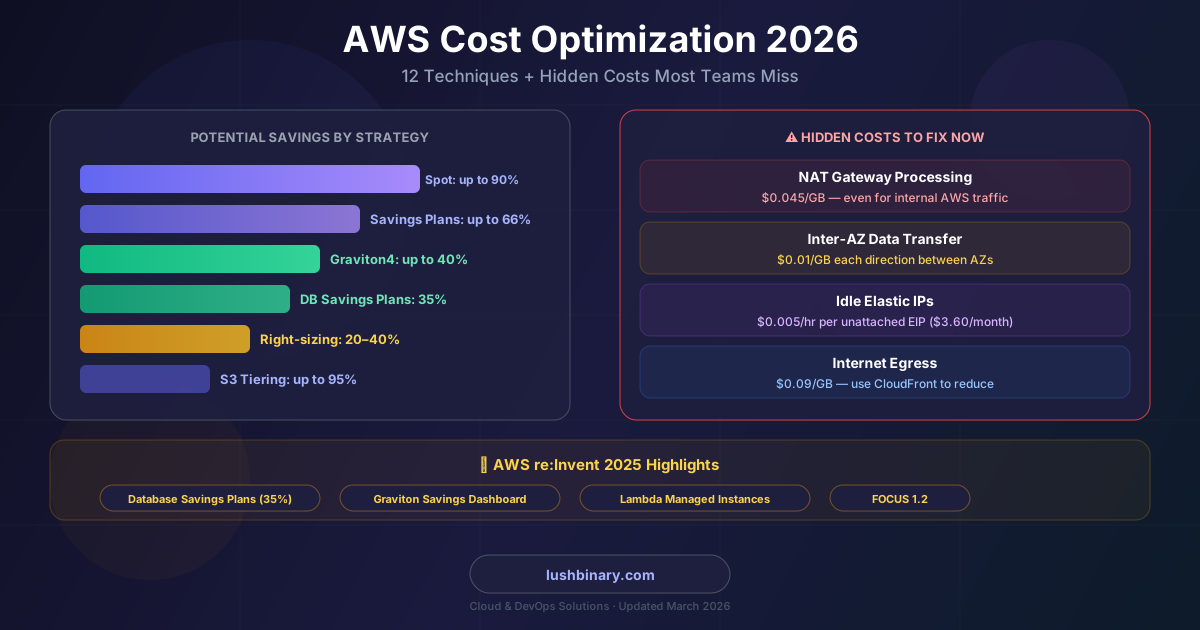
The Flexera 2025 State of the Cloud Report found that organizations estimate 32% of their cloud spend is wasted — and actual waste is likely higher because most teams lack the visibility to measure it accurately. That translates to roughly $189 billion in global cloud waste annually. If your AWS bill feels higher than it should be, you're almost certainly right.
The problem isn't that AWS is expensive. The problem is that AWS bills are built from dozens of overlapping cost dimensions — compute, storage, networking, requests, data transfer — and most teams only optimize the obvious ones. The real savings hide in the line items nobody checks: NAT Gateway processing fees, inter-AZ traffic, idle Elastic IPs, and over-provisioned RDS instances running 24/7 in dev environments.
This guide covers the most impactful AWS cost optimization techniques for 2026, including the hidden charges that quietly inflate bills, the latest commitment models from re:Invent 2025, and the tools AWS provides to automate the work. Whether you're a startup on a tight budget or an enterprise running hundreds of accounts, these strategies apply.
📋 Table of Contents
- 1.Right-Size Your Compute First
- 2.Savings Plans vs Reserved Instances in 2026
- 3.Spot Instances: 90% Off for the Right Workloads
- 4.Migrate to Graviton for Instant Price-Performance Gains
- 5.Storage Cost Optimization: S3, EBS, and Lifecycle Policies
- 6.The Hidden Networking Costs Nobody Talks About
- 7.Database Cost Optimization (RDS, Aurora, DynamoDB)
- 8.Serverless & Container Cost Patterns
- 9.AWS Native Tools: Cost Explorer, Compute Optimizer & Trusted Advisor
- 10.re:Invent 2025 FinOps Announcements
- 11.Build a FinOps Culture: Tagging, Budgets & Governance
- 12.Why Lushbinary for AWS Cost Optimization
1Right-Size Your Compute First
Right-sizing is the single highest-ROI optimization for most teams. The typical pattern: engineers provision instances for peak load, the peak never materializes, and the instance runs at 10–20% CPU utilization forever. AWS Compute Optimizer analyzes your CloudWatch metrics and recommends the optimal instance type — and as of September 2025, it supports 99 additional EC2 instance types, giving you broader coverage across the latest generation hardware.
How to right-size systematically
- Enable AWS Compute Optimizer (free) and review recommendations weekly. It analyzes 14 days of CloudWatch metrics by default; extend to 93 days for more accurate recommendations on variable workloads.
- Look for instances with average CPU below 20% and peak CPU below 40% — these are prime candidates for downsizing one instance size.
- Check memory utilization via the CloudWatch agent (not enabled by default). Many teams downsize CPU but miss that memory is the actual bottleneck.
- For Auto Scaling groups, review the target tracking policy — a target of 40% CPU is common but often too conservative. Raising it to 60–70% for stateless services reduces the number of instances running at any time.
- Schedule non-production instances to stop overnight and on weekends using AWS Instance Scheduler or EventBridge rules. Dev/test environments running 24/7 are pure waste — this alone saves 60–70% on those instances.
💡 Quick Win
Run this AWS CLI command to find EC2 instances with low CPU utilization across your account. Anything averaging below 5% CPU over 14 days is a candidate for termination or downsizing.
aws cloudwatch get-metric-statistics \
  --namespace AWS/EC2 \
  --metric-name CPUUtilization \
  --dimensions Name=InstanceId,Value=<instance-id> \
  --start-time $(date -u -d '14 days ago' +%Y-%m-%dT%H:%M:%S) \
  --end-time $(date -u +%Y-%m-%dT%H:%M:%S) \
  --period 86400 \
  --statistics Average
2Savings Plans vs Reserved Instances in 2026
Commitment-based discounts are the fastest way to cut your compute bill without changing a single line of code. AWS offers two main models: Savings Plans and Reserved Instances (RIs). For most teams in 2026, Savings Plans are the better default.
| Feature | Compute Savings Plans | Reserved Instances |
|---|---|---|
| Max discount | Up to 66% | Up to 72% |
| Commitment type | $/hour spend | Specific instance config |
| Flexibility | EC2 + Fargate + Lambda | Locked to family/region |
| Instance family lock-in | None | Yes (Convertible RIs are flexible) |
| Capacity reservation | No | Yes (zonal RIs) |
| Best for | Dynamic, multi-service workloads | Stable, predictable single-service |
Compute Savings Plans commit you to a consistent hourly spend (e.g., $10/hr) for 1 or 3 years. AWS automatically applies the discount to any eligible compute usage — EC2 regardless of instance family, size, OS, or region, plus Fargate and Lambda. This flexibility is why most teams prefer them over RIs.
EC2 Instance Savings Plans offer slightly higher discounts (up to 72%) but lock you to a specific instance family in a specific region. Use these when you have a very stable, predictable workload that won't change instance families.
Strategy: Start with Compute Savings Plans covering your baseline steady-state usage (typically 70–80% of your average compute spend). Leave the remainder on On-Demand to handle spikes. Use the AWS Savings Plans recommendations in Cost Explorer — it calculates the optimal commitment amount based on your actual usage history.
3Spot Instances: 90% Off for the Right Workloads
Spot Instances use spare AWS capacity at discounts of up to 90% vs On-Demand. The catch: AWS can reclaim them with a 2-minute warning. That makes them unsuitable for stateful or latency-sensitive production workloads — but perfect for a wide range of use cases.
Ideal Spot workloads
Batch processing
Data pipelines, ETL jobs, report generation
CI/CD build agents
GitHub Actions runners, Jenkins workers
ML training jobs
Model training with checkpointing enabled
Dev/test environments
Non-critical environments that can restart
Stateless web tier
Behind a load balancer with Auto Scaling
Big data processing
EMR clusters, Spark jobs, Athena
Use Spot Fleet or EC2 Auto Scaling with mixed instances policy to combine Spot with On-Demand fallback. Set a capacity-optimized allocation strategy so AWS picks the Spot pool with the most available capacity — this reduces interruption rates significantly.
For ECS and EKS, enable Spot capacity providers. AWS Fargate Spot offers the same interruption model at up to 70% off Fargate On-Demand pricing, with no instance management overhead.
4Migrate to Graviton for Instant Price-Performance Gains
AWS Graviton4 (powering the r8g, c8g, and m8g instance families) delivers up to 40% better price-performance than equivalent x86 instances. For most Linux workloads — web servers, APIs, containerized microservices, databases — migration is straightforward and the savings are immediate.
| Instance Family | Graviton Generation | Price-Performance vs x86 |
|---|---|---|
| m8g, c8g, r8g | Graviton4 | Up to 40% better |
| m7g, c7g, r7g | Graviton3 | Up to 25% better |
| t4g | Graviton2 | Up to 20% better (burstable) |
| RDS on Graviton4 | Graviton4 | Up to 29% better |
🎤 AWS re:Invent 2025 Update
AWS launched the Graviton Savings Dashboard at re:Invent 2025, a new tool inside the AWS console that analyzes your entire compute fleet and identifies the best Graviton migration candidates. It shows projected savings, migration complexity, and lets you create data-driven migration plans — removing the manual spreadsheet work that previously slowed Graviton adoption.
📺 Recommended re:Invent Session
"Unlock Cost Efficiency with AWS Graviton Savings Dashboard" (CMP352) — covers how to use the new dashboard to identify migration candidates and build a Graviton adoption roadmap.
Watch on AWS re:Invent On-Demand →Migration checklist: verify your application dependencies support ARM64 (most modern runtimes do — Node.js, Python, Java, Go, .NET 6+), rebuild Docker images for linux/arm64, test in staging, then swap the instance type. For RDS, it's a single parameter change during a maintenance window.
5Storage Cost Optimization: S3, EBS, and Lifecycle Policies
Storage costs compound silently. S3 buckets accumulate data for years without anyone reviewing what's actually being accessed. EBS volumes get detached and forgotten. Snapshots pile up. Here's how to clean it up.
S3: Use the Right Storage Class
S3 Standard costs ~$0.023/GB/month. Most data in S3 Standard is rarely accessed after 30–90 days. Moving it to cheaper tiers is free (via lifecycle policies) and the savings are substantial:
| Storage Class | Cost/GB/month | Retrieval | Best For |
|---|---|---|---|
| S3 Standard | ~$0.023 | Instant | Frequently accessed |
| S3 Intelligent-Tiering | ~$0.023 → $0.0125 | Instant | Unknown access patterns |
| S3 Standard-IA | ~$0.0125 | Instant | Infrequent, >128KB objects |
| S3 One Zone-IA | ~$0.01 | Instant | Reproducible infrequent data |
| S3 Glacier Instant | ~$0.004 | Instant | Archive, accessed quarterly |
| S3 Glacier Flexible | ~$0.0036 | Minutes–hours | Long-term archive |
| S3 Glacier Deep Archive | ~$0.00099 | Up to 48 hrs | Compliance, 7+ year retention |
S3 Intelligent-Tiering is the easiest win for buckets with unpredictable access patterns. It automatically moves objects between Frequent Access (~$0.023/GB) and Infrequent Access (~$0.0125/GB) tiers based on 30-day access patterns, with no retrieval fees. The only cost is a monitoring fee of $0.0025 per 1,000 objects per month — negligible for most workloads.
For buckets with predictable patterns, use S3 Lifecycle Policies to transition objects automatically:
{
  "Rules": [{
    "Status": "Enabled",
    "Transitions": [
      { "Days": 30,  "StorageClass": "STANDARD_IA" },
      { "Days": 90,  "StorageClass": "GLACIER_IR" },
      { "Days": 365, "StorageClass": "DEEP_ARCHIVE" }
    ],
    "Expiration": { "Days": 2555 }
  }]
}
EBS: Switch gp2 to gp3 and Delete Orphaned Volumes
gp3 is cheaper and faster than gp2 — $0.08/GB/month vs $0.10/GB/month, with 3,000 IOPS baseline included at no extra charge (vs gp2's burst model). Migrating is a single API call with zero downtime. For a 1TB volume, that's $20/month saved immediately.
Run a monthly audit for unattached EBS volumes (state = available) and old snapshots. These are pure waste. Use AWS Config rules or a simple CLI query to find them:
# Find unattached EBS volumes
aws ec2 describe-volumes \
  --filters Name=status,Values=available \
  --query 'Volumes[*].{ID:VolumeId,Size:Size,Type:VolumeType}' \
--output table6The Hidden Networking Costs Nobody Talks About
Networking is where AWS bills surprise teams the most. The charges are real, they compound fast, and they're almost never visible in the default Cost Explorer view. Here are the biggest culprits.
1. NAT Gateway: The Silent Bill Inflator
NAT Gateway charges $0.045/GB for every byte it processes — including traffic that never leaves the AWS network. If your EC2 instances or containers pull Docker images from ECR, fetch secrets from Secrets Manager, or read from S3 through a NAT Gateway, you're paying this tax on internal traffic.
The fix: create VPC Gateway Endpoints for S3 and DynamoDB (completely free) and VPC Interface Endpoints for ECR, Secrets Manager, SSM, and other services you use heavily. Traffic routes directly within the AWS network, bypassing NAT entirely.
# Create a free VPC Gateway Endpoint for S3
aws ec2 create-vpc-endpoint \
  --vpc-id vpc-xxxxxxxx \
  --service-name com.amazonaws.us-east-1.s3 \
  --route-table-ids rtb-xxxxxxxx
2. Inter-AZ Data Transfer
Moving data between Availability Zones in the same region costs $0.01/GB in each direction. For microservices communicating across AZs, databases replicating to standby instances, or distributed caches, this adds up fast. A service transferring 10TB of inter-AZ data per month pays $200/month in transfer fees alone.
Mitigation strategies: use AZ-aware load balancing (enable cross-zone load balancing only when needed), pin stateful services to a single AZ where possible, and use local zones for latency-sensitive workloads.
3. Idle Elastic IPs
AWS charges $0.005/hr ($3.60/month) for each Elastic IP that is not attached to a running instance. This seems small until you realize most accounts accumulate dozens of forgotten EIPs from terminated instances. Run a monthly audit and release any unattached EIPs immediately.
4. Internet Egress
Data transfer out to the internet costs $0.09/GB for the first 10TB/month (us-east-1). If your application serves large files or media directly from EC2 or S3, route it through CloudFront instead. CloudFront's first 1TB/month is always free, and beyond that, CloudFront's egress rates are lower than direct S3/EC2 egress. You also get caching, which reduces origin requests.
7Database Cost Optimization (RDS, Aurora, DynamoDB)
Databases are often the largest single line item on an AWS bill after compute. They're also the most over-provisioned — because engineers rightly fear database performance issues and provision conservatively.
RDS & Aurora
- Migrate to Graviton4: r8g-based RDS instances deliver up to 29% better price-performance. This is a maintenance window change — no data migration required.
- Switch gp2 to gp3 storage: gp3 costs the same $0.115/GB/month at baseline, but includes 3,000 IOPS and 125 MB/s throughput at no extra charge — capacity you'd pay extra for on gp2. For databases paying for provisioned IOPS on gp2, the savings can be substantial.
- Stop dev/test databases overnight: RDS supports scheduled start/stop. A dev database running 8 hours/day on weekdays instead of 24/7 saves 76% of its compute cost.
- Right-size with Performance Insights: Enable RDS Performance Insights (free for 7-day retention) to identify whether your database is CPU-bound, I/O-bound, or waiting on locks. Most over-provisioned databases are waiting on application-level issues, not hardware limits.
- Use Aurora Serverless v2 for variable workloads: it scales in 0.5 ACU increments and scales to zero when idle, making it ideal for dev environments and workloads with unpredictable traffic patterns.
🎤 AWS re:Invent 2025 Update: Database Savings Plans
The headline FinOps announcement at re:Invent 2025 was Database Savings Plans — a new flexible commitment model offering up to 35% off RDS, Aurora, ElastiCache, MemoryDB, and Neptune in exchange for a one-year spend commitment with no upfront payment. Unlike Reserved Instances, the commitment is tied to spend ($/hour), not a specific instance family or region, giving you flexibility as your database fleet evolves. This is the long-awaited alternative to RDS Reserved Instances for teams that want discounts without the rigidity.
DynamoDB
DynamoDB's two pricing modes have very different cost profiles:
- On-Demand mode: pay per request ($1.25/million write request units, $0.25/million read request units). No capacity planning, but expensive at high, consistent throughput.
- Provisioned mode: pay for reserved capacity ($0.00065/WCU/hr, $0.00013/RCU/hr). Much cheaper at steady-state traffic, especially combined with Auto Scaling.
The rule of thumb: if your DynamoDB traffic is predictable and consistent, provisioned mode with Auto Scaling is 5–10x cheaper than On-Demand. If traffic is spiky or unpredictable, On-Demand avoids over-provisioning waste. Review your DynamoDB tables in Cost Explorer grouped by table name to identify which tables are costing the most.
8Serverless & Container Cost Patterns
Serverless and containers introduce their own cost patterns that differ from traditional EC2 billing.
AWS Lambda
- Right-size memory: Lambda bills on GB-seconds. More memory = faster execution = potentially lower cost. Use AWS Lambda Power Tuning to find the optimal memory setting for each function.
- Use ARM64 (Graviton2): Lambda on ARM64 is 20% cheaper than x86 and typically faster for most workloads. A one-line change in your function configuration.
- Lambda Managed Instances (announced at re:Invent 2025): run Lambda functions on EC2 compute while AWS handles infrastructure management, unlocking Compute Savings Plans and Reserved Instances for up to 72% savings on steady-state Lambda workloads.
- Avoid Lambda for long-running tasks: Lambda has a 15-minute max timeout and bills for idle time during I/O waits. For tasks running longer than a few minutes, ECS Fargate or Step Functions are often cheaper.
ECS & EKS
- Use Fargate Spot for non-critical tasks: up to 70% off Fargate On-Demand with the same 2-minute interruption notice as EC2 Spot.
- Enable Karpenter (EKS): Karpenter provisions right-sized nodes on demand and consolidates workloads onto fewer nodes, reducing idle node capacity. Teams report 40–60% compute savings vs managed node groups.
- Set resource requests and limits: containers without resource requests lead to bin-packing failures and over-provisioned nodes. Accurate requests let the scheduler pack workloads efficiently.
- Use Graviton nodes: EKS and ECS both support Graviton instances. Most containerized workloads are ARM64-compatible with a simple image rebuild.
9AWS Native Tools: Cost Explorer, Compute Optimizer & Trusted Advisor
AWS provides a suite of free and low-cost tools that surface optimization opportunities automatically. Most teams underuse them.
AWS Cost Explorer
Visualize spend by service, account, tag, region. Use the Savings Plans and RI recommendations. Enable hourly granularity for anomaly detection.
Free (API calls $0.01/request)AWS Compute Optimizer
ML-powered right-sizing recommendations for EC2, Lambda, ECS, EBS, and Auto Scaling groups. Supports 99+ instance types as of Sept 2025.
FreeAWS Trusted Advisor
Checks for idle resources, underutilized instances, unattached EIPs, and security issues. Full checks require Business/Enterprise Support.
Basic checks freeAWS Cost Optimization Hub
Centralized dashboard consolidating recommendations from Compute Optimizer, Trusted Advisor, and Cost Explorer into a single prioritized list.
FreeAWS Budgets
Set cost and usage budgets with alerts. Use anomaly detection budgets to catch unexpected spend spikes before they become large bills.
First 2 budgets freeAWS Cost Anomaly Detection
ML-based anomaly detection that alerts you when spend deviates from expected patterns. Catches runaway resources before end-of-month billing.
Free💡 re:Invent 2024: Authenticated AWS Pricing Calculator
At re:Invent 2024, AWS launched an authenticated, in-console AWS Pricing Calculator. You can now log in with your account credentials and simulate cost impact of resource changes — migrating to a new region, adding or removing resources, switching instance types — with your actual discounts and commitments factored in. Previously this required manual spreadsheet work.
10re:Invent 2025 FinOps Announcements
AWS re:Invent 2025 delivered several significant FinOps updates that directly affect cost optimization strategies in 2026. Here's what matters most:
Database Savings Plans
🏆 Headline AnnouncementUp to 35% off RDS, Aurora, ElastiCache, MemoryDB, and Neptune with a one-year spend commitment and no upfront payment. Flexible — tied to $/hour spend, not specific instance families or regions. The long-awaited alternative to RDS Reserved Instances.
Graviton Savings Dashboard
🆕 New ToolNew console tool that analyzes your compute fleet, identifies Graviton migration candidates, shows projected savings, and helps build a migration roadmap. Removes the manual analysis work that previously slowed Graviton adoption.
Lambda Managed Instances
🆕 New FeatureRun Lambda functions on EC2 compute with AWS managing all infrastructure. Unlocks Compute Savings Plans and Reserved Instances for Lambda workloads — up to 72% savings on steady-state Lambda usage.
FOCUS 1.2 Support
📊 FinOps StandardAWS now exports cost and usage data in the FOCUS 1.2 (FinOps Open Cost and Usage Specification) standard format. This enables multi-cloud cost analysis and integrates with FinOps tooling without custom ETL pipelines.
Amazon FSx Intelligent-Tiering
💾 StorageNew storage class for Amazon FSx that costs up to 85% less than FSx SSD storage and up to 20% less than traditional HDD-based NAS on-premises. Automatically tiers data based on access patterns.
📺 Related re:Invent Sessions
- AWS re:Invent 2025: Announcing Database Savings Plans (COP401)— Deep dive on the new Database Savings Plans commitment model
- AWS re:Invent 2024: Optimizing GPU and CPU Utilization for Cost Savings (COP360)— Practical strategies for compute cost reduction
- AWS re:Invent 2024: AWS Storage Best Practices for Cost Optimization (STG210)— S3 storage classes, lifecycle policies, and EBS optimization
11Build a FinOps Culture: Tagging, Budgets & Governance
Technical optimizations only go so far. The teams that sustain low AWS bills long-term do so through process and culture, not one-time fixes.
Tagging Strategy
You can't optimize what you can't attribute. A consistent tagging strategy is the foundation of cost visibility. At minimum, tag every resource with:
Environment: production, staging, dev, testTeamorOwner: the team responsible for the costProjectorApplication: the product or featureCostCenter: for chargeback/showback to business units
Enforce tagging with AWS Config rules that flag untagged resources, and use Service Control Policies (SCPs) in AWS Organizations to require tags on resource creation. Use AWS Cost Allocation Tags to activate tags for Cost Explorer filtering.
Budgets & Anomaly Detection
Set up AWS Budgets for each team and environment with alerts at 80% and 100% of budget. Enable AWS Cost Anomaly Detection — it uses ML to detect unusual spend patterns and alerts you via SNS or email before the anomaly becomes a large bill. This is free and takes 5 minutes to configure.
Multi-Account Governance
Use AWS Organizations with separate accounts per environment (production, staging, dev). This provides natural cost isolation, makes it easy to set per-environment budgets, and prevents dev workloads from sharing Savings Plans commitments with production. Use AWS Control Tower to enforce guardrails across accounts automatically.
12Why Lushbinary for AWS Cost Optimization
AWS cost optimization is not a one-time project. Bills change as workloads evolve, new services get added, and teams grow. The organizations that sustain low bills treat cost optimization as an ongoing engineering discipline — not a quarterly finance exercise.
At Lushbinary, we've helped startups and growing businesses cut their AWS bills by 30–60% through a structured approach:
- Cost audit: full account analysis across compute, storage, networking, and databases to identify the highest-impact opportunities
- Graviton migration: ARM64 compatibility assessment, Docker image rebuilds, and phased rollout with zero downtime
- Savings Plans strategy: commitment modeling based on your actual usage history to maximize discounts without over-committing
- Networking cleanup: VPC endpoint configuration, NAT Gateway optimization, and inter-AZ traffic reduction
- FinOps tooling: tagging enforcement, budget configuration, anomaly detection, and Cost Optimization Hub setup
- Ongoing governance: monthly cost reviews, automated alerts, and architectural guidance as your infrastructure scales
We also build on AWS daily — our own projects run on the same infrastructure we optimize for clients. That means our recommendations are grounded in real-world experience, not theoretical best practices. See our RDS cost optimization guide and Aurora vs RDS guide for more depth on database cost optimization.
🎯 Free AWS Cost Audit
Not sure where your biggest savings opportunities are? Book a free 30-minute AWS cost audit with the Lushbinary team. We'll review your Cost Explorer data and identify the top 3 actions that will have the most impact on your bill — no commitment required.
❓ Frequently Asked Questions
How much can I realistically save on my AWS bill?
Most organizations waste 32% of their cloud spend (Flexera 2025 State of the Cloud Report). With a structured approach covering Savings Plans, right-sizing, storage tiering, and networking fixes, teams typically cut 30–60% of their bill within 90 days.
What are the biggest hidden costs on AWS?
The top hidden costs are NAT Gateway data processing ($0.045/GB on all traffic, even internal AWS traffic), inter-AZ data transfer ($0.01/GB each direction), idle Elastic IP addresses ($0.005/hr when unattached), and CloudWatch custom metrics that accumulate silently.
Should I use Savings Plans or Reserved Instances in 2026?
Compute Savings Plans are the better default for most teams — they offer up to 66% savings and apply automatically across EC2, Fargate, and Lambda without locking you to a specific instance type or region. Reserved Instances still make sense for very stable, predictable workloads where you need capacity reservations.
What did AWS announce at re:Invent 2025 for cost optimization?
The headline FinOps announcement at re:Invent 2025 was Database Savings Plans — a new flexible commitment model offering up to 35% off RDS, Aurora, ElastiCache, MemoryDB, and Neptune with a one-year spend commitment and no upfront payment. AWS also introduced the Graviton Savings Dashboard, Lambda Managed Instances, and FOCUS 1.2 support.
How do I stop paying NAT Gateway charges for S3 and DynamoDB traffic?
Create VPC Gateway Endpoints for S3 and DynamoDB. These are free and route traffic directly within the AWS network, bypassing the NAT Gateway entirely. This alone can eliminate thousands of dollars per month for workloads that pull large amounts of data from S3 or DynamoDB.
What is AWS Graviton and how much does it save?
AWS Graviton is Amazon's ARM-based processor family. Graviton4 (r8g, c8g, m8g instances) delivers up to 40% better price-performance than equivalent x86 instances. Most Linux workloads migrate with minimal code changes, and the Graviton Savings Dashboard (launched at re:Invent 2025) helps identify the best migration candidates.
📚 Sources
- AWS Savings Plans FAQ
- AWS VPC Pricing (NAT Gateway)
- AWS Compute Optimizer — 99 new EC2 instance types (Sept 2025)
- AWS re:Invent 2024 Cloud Financial Management Recap
- AWS re:Invent 2025: Database Savings Plans Announcement
- Flexera 2025 State of the Cloud Report
- AWS re:Invent 2024 Cost Optimization Highlights
Content was rephrased for compliance with licensing restrictions. Pricing data sourced from official AWS documentation and re:Invent announcements as of March 2026. Prices may change — always verify on the AWS pricing page.
Ready to Cut Your AWS Bill?
Lushbinary helps startups and growing teams reduce AWS costs by 30–60% through right-sizing, Graviton migration, Savings Plans strategy, and networking optimization. Book a free audit today.
Build Smarter, Launch Faster.
Book a free strategy call and explore how LushBinary can turn your vision into reality.

