
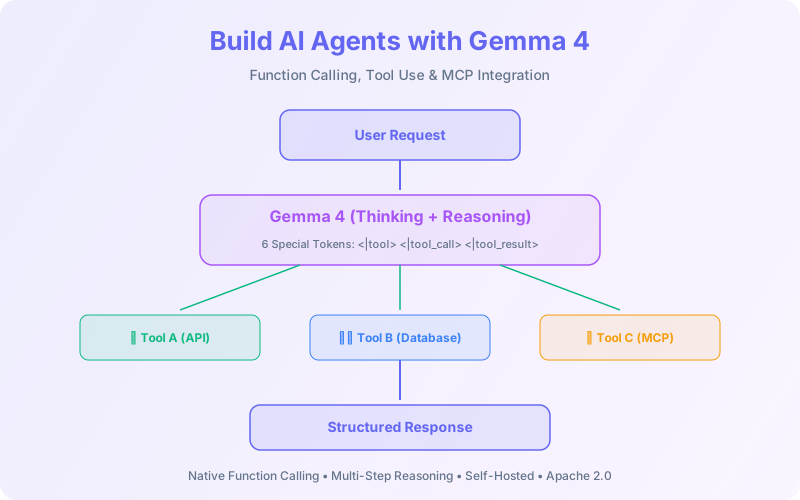
AI agents that can reason, plan, and use tools are the next frontier. But most agent frameworks depend on proprietary APIs — one rate limit or pricing change and your agent goes down. Gemma 4 changes that equation: native function calling with dedicated special tokens, configurable thinking modes, and Apache 2.0 licensing mean you can build production agents you fully own and control.
This guide covers Gemma 4's function calling architecture, the 6 special tokens, how to build a multi-step agent with tool use, MCP integration, and real-world agentic workflow patterns.
📋 Table of Contents
- 1.Gemma 4's Function Calling Architecture
- 2.The 6 Special Tokens
- 3.Defining Tools for Gemma 4
- 4.Building a Multi-Step Agent
- 5.Thinking Modes for Complex Reasoning
- 6.MCP Integration
- 7.Agent Frameworks & llama.cpp
- 8.Real-World Agentic Patterns
- 9.Limitations & Best Practices
- 10.Why Lushbinary for AI Agent Development
1Gemma 4's Function Calling Architecture
Unlike models that rely on prompt engineering for tool use, Gemma 4 was trained with dedicated special tokens that create a structured lifecycle for function calling. The model knows when it's defining a tool, requesting a tool call, and receiving a result — all through explicit token boundaries rather than implicit JSON parsing.
This approach is more reliable than prompt-based function calling because the model can't accidentally generate partial tool calls or confuse tool definitions with regular text. The special tokens act as hard boundaries that inference engines can parse deterministically.
2The 6 Special Tokens
Gemma 4 uses three token pairs to manage the tool use lifecycle:
| Token Pair | Purpose | Used By |
|---|---|---|
| <|tool> ... <tool|> | Defines a tool (name, description, parameters) | System prompt / User |
| <|tool_call> ... <tool_call|> | Model requests to use a tool with arguments | Model (generated) |
| <|tool_result> ... <tool_result|> | Returns the result of a tool execution | System / Application |
3Defining Tools for Gemma 4
Tools are defined in the system prompt using JSON schema inside <|tool> tokens. Here's a complete example:
<start_of_turn>system
You are a helpful assistant with access to tools.

<|tool>
{
  "name": "get_weather",
  "description": "Get current weather for a location",
  "parameters": {
    "type": "object",
    "properties": {
      "location": {"type": "string", "description": "City name"},
      "units": {"type": "string", "enum": ["celsius", "fahrenheit"]}
    },
    "required": ["location"]
  }
}
<tool|>

<|tool>
{
  "name": "search_web",
  "description": "Search the web for information",
  "parameters": {
    "type": "object",
    "properties": {
      "query": {"type": "string", "description": "Search query"}
    },
    "required": ["query"]
  }
}
<tool|>
<end_of_turn>4Building a Multi-Step Agent
A multi-step agent loops between the model generating tool calls and your application executing them. Here's the core loop in Python:
import json
import requests

GEMMA_URL = "http://localhost:8000/v1/chat/completions"
TOOLS = [...]  # Tool definitions

def run_agent(user_message: str, max_steps: int = 5):
    messages = [
        {"role": "system", "content": build_system_prompt(TOOLS)},
        {"role": "user", "content": user_message},
    ]

    for step in range(max_steps):
        response = requests.post(GEMMA_URL, json={
            "model": "gemma-4-31b-it",
            "messages": messages,
            "max_tokens": 1024,
        }).json()

        assistant_msg = response["choices"][0]["message"]
        messages.append(assistant_msg)

        # Check if model made a tool call
        if assistant_msg.get("tool_calls"):
            for tool_call in assistant_msg["tool_calls"]:
                result = execute_tool(
                    tool_call["function"]["name"],
                    json.loads(tool_call["function"]["arguments"])
                )
                messages.append({
                    "role": "tool",
                    "content": json.dumps(result),
                    "tool_call_id": tool_call["id"],
                })
        else:
            # Model produced a final text response
            return assistant_msg["content"]

    return "Max steps reached"

def execute_tool(name: str, args: dict):
    if name == "get_weather":
        return {"temp": 22, "condition": "sunny", "location": args["location"]}
    if name == "search_web":
        return {"results": [f"Result for: {args['query']}"]}
return {"error": f"Unknown tool: {name}"}5Thinking Modes for Complex Reasoning
Gemma 4 supports configurable thinking modes where the model shows its reasoning process before making a tool call or producing a final answer. This is critical for complex agent tasks that require multi-step planning.
💡 When to Enable Thinking
Enable thinking mode for tasks that require planning (e.g., "research this topic and write a summary") or multi-tool orchestration. Disable it for simple single-tool calls (e.g., "what's the weather?") to reduce latency. The thinking tokens are generated but can be hidden from the user.
6MCP Integration
The Model Context Protocol (MCP) standardizes how AI models connect to external tools. Gemma 4's native function calling maps directly to MCP's tool use protocol, making integration straightforward.
The setup: run Gemma 4 via llama.cpp or vLLM with an OpenAI-compatible API, then point MCP clients at your endpoint. The MCP server translates between MCP's tool discovery protocol and Gemma 4's function calling format.
# Serve Gemma 4 with OpenAI-compatible API
llama-server -m gemma-4-31b-it-Q4_K_M.gguf \
  --port 8080 --host 0.0.0.0

# MCP clients can now connect to:
# http://localhost:8080/v1/chat/completions
# Tool definitions are passed via the standard
# OpenAI tools parameter in the request body
7Agent Frameworks & llama.cpp
Gemma 4 works with popular agent frameworks through its OpenAI-compatible API:
- llama.cpp: Native Gemma 4 support with function calling via the
--jinjaflag for proper template rendering - vLLM: Full tool calling support with the
--enable-auto-tool-choiceflag - LangChain: Use
ChatOpenAIpointed at your local endpoint with tool binding - Ollama: Day-0 Gemma 4 support with tool calling via the
/api/chatendpoint
8Real-World Agentic Patterns
Research Agent
Search web → extract key facts → synthesize report. Uses search_web + read_url + write_file tools.
Code Assistant
Read codebase → identify bugs → suggest fixes → run tests. Uses file_read + file_write + run_command tools.
Data Pipeline Agent
Query database → transform data → generate charts → email report. Uses sql_query + python_exec + send_email tools.
Customer Support Agent
Look up customer → check order status → process refund → send confirmation. Uses crm_lookup + order_api + payment_api tools.
9Limitations & Best Practices
- Max tools: Keep tool definitions under 10-15 for best accuracy. More tools = more confusion about which to call.
- Hallucinated calls: The model may occasionally call tools with incorrect arguments. Always validate tool call arguments before execution.
- Parallel calls: Gemma 4 can generate multiple tool calls in a single turn, but reliability decreases with more than 3 parallel calls.
- Safety: Never give agents unrestricted access to destructive tools (delete, overwrite). Implement confirmation steps for high-risk actions.
- Context management: Long agent conversations can exceed context limits. Implement conversation summarization or sliding window strategies.
❓ Frequently Asked Questions
Does Gemma 4 support native function calling?
Yes. It uses 6 special tokens (<|tool>, <|tool_call>, <|tool_result> and their closing pairs) trained into all instruction-tuned models.
Can I use Gemma 4 with MCP?
Yes. Run Gemma 4 via llama.cpp or vLLM with an OpenAI-compatible API, then connect MCP clients to your endpoint.
Which model is best for agents?
31B Dense for complex multi-step tasks. 26B MoE for balanced intelligence/efficiency. E4B for on-device agents with audio.
Does Gemma 4 support thinking modes?
Yes. Configurable thinking modes show step-by-step reasoning before tool calls, improving accuracy on complex tasks.
📚 Sources
- Google AI — Gemma 4 Prompt Formatting
- Google AI — Function Calling with Gemma 4
- NVIDIA — Gemma 4 for Agentic AI
Content was rephrased for compliance with licensing restrictions. Technical details sourced from official documentation as of April 2026. APIs may change — always verify on the vendor's website.
10Why Lushbinary for AI Agent Development
Building reliable AI agents requires more than connecting a model to tools. It's error handling, safety guardrails, conversation management, and production monitoring. Lushbinary builds custom AI agents powered by open-weight models for clients who need full control over their AI stack.
🚀 Free Consultation
Want to build an AI agent with Gemma 4? We'll help you design the tool architecture, implement safety guardrails, and deploy to production. Free 30-minute consultation.
Build Production AI Agents with Gemma 4
From tool design to deployment — we build agents you fully own and control.
Build Smarter, Launch Faster.
Book a free strategy call and explore how LushBinary can turn your vision into reality.

