
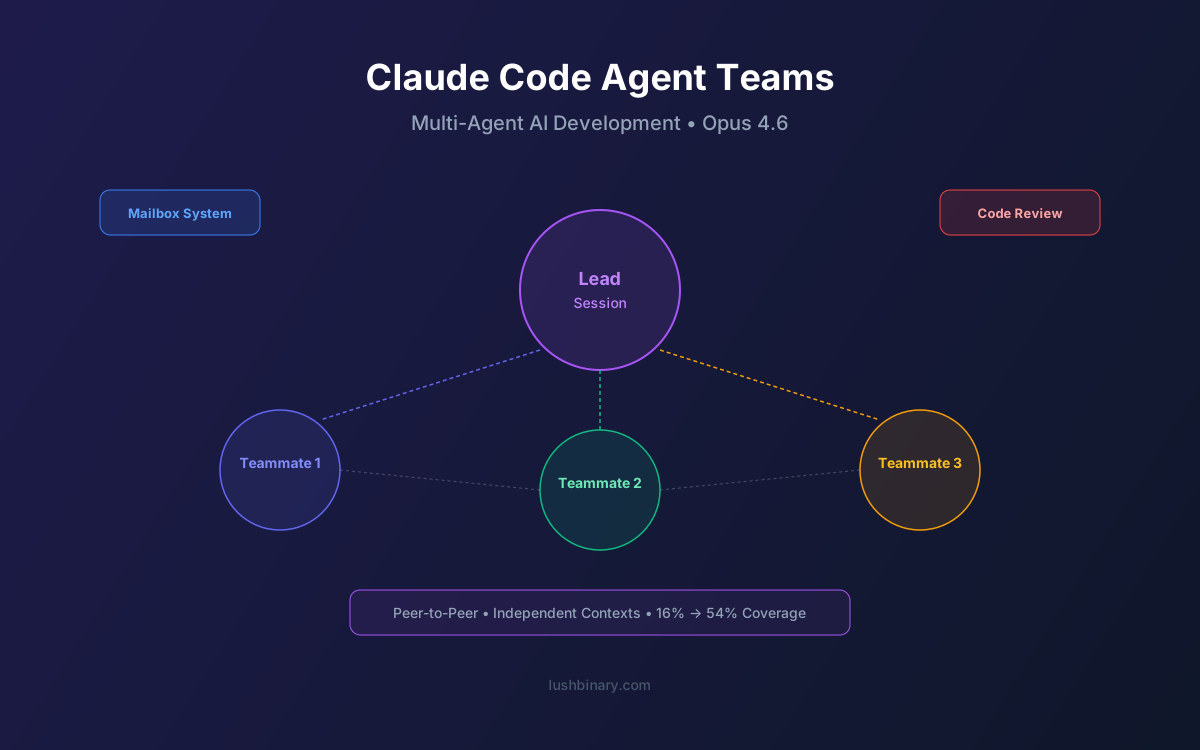
On February 5, 2026, Anthropic released Claude Opus 4.6 — and alongside it, quietly shipped one of the most ambitious features in AI-assisted development: Agent Teams. Instead of a single AI agent working through your codebase sequentially, Claude Code can now spawn a coordinated team of independent agents that work in parallel, each with its own context window, tool access, and communication channel.
The feature is still experimental — gated behind an environment variable — but the architecture is significant. One session acts as a team lead, spawning teammates that communicate through a mailbox system and shared task list. Unlike traditional subagents that only report to their parent, these teammates talk to each other peer-to-peer. It's the difference between a manager delegating tasks and a squad collaborating.
In this guide, we break down how Agent Teams work, the architecture behind them, practical team patterns, how they compare to subagents, cost considerations, and real-world use cases. Whether you're already using Claude Code or evaluating multi-agent development workflows, this is the feature that changes the game.
📋 Table of Contents
- 1.What Are Claude Code Agent Teams?
- 2.Architecture: Team Lead, Teammates & Mailbox System
- 3.How to Enable & Configure Agent Teams
- 4.Team Patterns: UI + Backend + QA Squads
- 5.Claude Code Review: Multi-Agent PR Analysis
- 6.Agent Teams vs Subagents vs Single-Agent
- 7.Cost & Token Usage Considerations
- 8.Limitations & Known Issues
- 9.Real-World Use Cases
- 10.Why Lushbinary for AI-Powered Development
1What Are Claude Code Agent Teams?
Claude Code Agent Teams is an experimental multi-agent orchestration feature that shipped in February 2026 alongside the Opus 4.6 model release. At its core, it transforms Claude Code from a single-agent tool into a coordinated development squad — one session acts as a team lead that can spawn independent teammate agents, each capable of reading files, writing code, running commands, and communicating with other teammates.
The key innovation isn't just parallelism. It's communication. Previous multi-agent approaches in Claude Code used subagents — child processes that execute a task and report back to the parent. Agent Teams go further by introducing peer-to-peer communication through a mailbox system and a shared task list. This means a frontend agent can directly tell a backend agent about an API contract change without routing through the team lead.
Think of it as the difference between a microservices architecture (where services communicate directly) and a monolithic controller (where everything routes through one process). Agent Teams bring the distributed systems model to AI-assisted development.
Key distinction: Agent Teams are not the same as subagents. Subagents follow a strict parent-child hierarchy. Teammates communicate peer-to-peer through mailboxes, enabling true collaborative workflows where agents can share context, flag blockers, and coordinate without bottlenecking through a single orchestrator.
2Architecture: Team Lead, Teammates & Mailbox System
The Agent Teams architecture has three core components: the team lead, teammates, and the communication layer. Understanding how they interact is essential to using the feature effectively.
🎯 Team Lead
The primary Claude Code session that you interact with directly. It receives your prompt, breaks it into subtasks, spawns teammates, and monitors overall progress. The team lead maintains the high-level plan and can reassign work if a teammate gets stuck or discovers something that changes the approach.
👥 Teammates
Independent agent instances spawned by the team lead. Each teammate has its own context window, tool access (file read/write, terminal commands, web search), and assigned scope. Teammates operate autonomously within their scope but can communicate with other teammates and the team lead through the mailbox system.
📬 Mailbox System
The peer-to-peer communication layer. Each teammate has a mailbox where it can receive messages from any other teammate or the team lead. Messages can include status updates, discovered blockers, API contract changes, or requests for information. This is what enables true collaboration rather than isolated parallel execution.
📋 Shared Task List
A centralized task board visible to all agents. The team lead populates it initially, but teammates can update task statuses, add subtasks, and flag dependencies. This provides a single source of truth for what's been done, what's in progress, and what's blocked.
// Simplified Agent Teams communication flow
Team Lead
  ├── Spawns: Frontend Agent (UI components)
  ├── Spawns: Backend Agent (API endpoints)
  └── Spawns: QA Agent (test coverage)

Communication:
  Frontend Agent ──mailbox──▶ Backend Agent
    "The UserProfile component expects a
     'lastLogin' field in the /api/user response"

  Backend Agent ──mailbox──▶ QA Agent
    "Added 'lastLogin' to GET /api/user —
     please add integration test coverage"

  QA Agent ──shared task list──▶ All
    "✓ 12/14 tests passing, 2 blocked on
missing auth middleware"3How to Enable & Configure Agent Teams
Agent Teams is gated behind an experimental flag. Here's how to get started:
# Enable Agent Teams via environment variable
# Option 1: Inline when launching Claude Code
CLAUDE_CODE_EXPERIMENTAL_AGENT_TEAMS=1 claude

# Option 2: Add to your shell profile (~/.zshrc or ~/.bashrc)
export CLAUDE_CODE_EXPERIMENTAL_AGENT_TEAMS=1

# Option 3: Add to your project's .env file
echo "CLAUDE_CODE_EXPERIMENTAL_AGENT_TEAMS=1" >> .env

# Verify it's enabled — you'll see "Agent Teams: enabled"
# in the Claude Code welcome screen
claude --version
Once enabled, Claude Code will automatically use Agent Teams when it determines a task would benefit from parallel execution. You can also explicitly request team-based execution in your prompts:
// Example prompts that trigger Agent Teams
> "Build a user dashboard with a React frontend,
   Express API, and comprehensive test suite.
   Use agent teams to work on all three in parallel."

> "Refactor the payment module: update the Stripe
   integration, migrate the database schema, and
   update all affected tests. Coordinate as a team."

> "Review this PR with a team — one agent for
   security, one for performance, one for correctness."
Requirements: Agent Teams requires Claude Code with Opus 4.6 or later. You'll need a Pro ($20/mo), Max ($100–$200/mo), Team ($150/user/mo), or Enterprise plan. The feature is not available on the free tier.
4Team Patterns: UI + Backend + QA Squads
The real power of Agent Teams emerges when you structure them around common development patterns. Here are the squad configurations that work well in practice:
Frontend + Backend + QA
The classic full-stack squad. One agent builds UI components, another handles API endpoints and database logic, and a third writes tests and validates integration points. The mailbox system keeps API contracts in sync.
Migration Squad
For large refactors or migrations: one agent updates the source code, another updates tests, and a third handles configuration and documentation. Particularly effective for framework upgrades or database migrations.
Security Review Team
Dedicated agents for different security concerns: one scans for injection vulnerabilities, another checks authentication flows, and a third audits dependency versions and known CVEs.
Microservices Coordinator
When changes span multiple services, each agent owns one service. They coordinate API contract changes through mailboxes, ensuring breaking changes are caught before they reach CI.
Test Coverage Blitz
Spawn multiple agents to write tests in parallel: unit tests, integration tests, and end-to-end tests. Each agent focuses on a different layer, and the QA lead agent ensures no gaps in coverage.
Documentation Squad
One agent generates API docs from code, another writes user-facing guides, and a third updates README files and changelogs. Useful for open-source projects with documentation debt.
The key to effective team patterns is clear scope boundaries. Each teammate should own a distinct area of the codebase or a distinct concern. Overlapping scopes lead to merge conflicts and wasted tokens. The team lead's job is to define these boundaries clearly in the initial task decomposition.
Pro tip: Start with 2–3 teammates for your first Agent Teams session. More agents means more coordination overhead. Scale up once you're comfortable with the mailbox patterns and understand how the team lead decomposes tasks.
5Claude Code Review: Multi-Agent PR Analysis
On March 9, 2026, Anthropic launched Claude Code Review — a production application of Agent Teams that deploys a team of AI agents on every pull request. The results were immediate: Anthropic's internal code review coverage jumped from 16% to 54%.
Claude Code Review works by spawning specialized agents for different review concerns. Instead of a single model trying to catch everything in one pass, each agent focuses on its domain:
- Correctness Agent — Verifies logic, checks for off-by-one errors, validates edge case handling, and ensures the code does what the PR description claims.
- Security Agent — Scans for injection vulnerabilities, authentication bypasses, insecure data handling, and dependency risks.
- Performance Agent — Identifies N+1 queries, unnecessary re-renders, memory leaks, and algorithmic inefficiencies.
- Style & Consistency Agent — Checks adherence to project conventions, naming patterns, and documentation standards.
- Test Coverage Agent — Evaluates whether the PR includes adequate test coverage and suggests missing test cases.
The agents work in parallel and communicate through the mailbox system. If the security agent discovers a potential SQL injection, it can notify the correctness agent to verify whether the input validation upstream is sufficient. This cross-agent communication catches issues that a single-pass review would miss.
Impact: Going from 16% to 54% code review coverage is significant. It means more than three times as many code changes receive AI-assisted review. For teams struggling with review bottlenecks, this is a force multiplier — not replacing human reviewers, but ensuring every PR gets at least a baseline analysis before a human looks at it.
6Agent Teams vs Subagents vs Single-Agent
Understanding the differences between these three approaches is critical for choosing the right tool for each task. Here's a detailed comparison:
| Feature | Single Agent | Subagents | Agent Teams |
|---|---|---|---|
| Parallelism | ❌ Sequential | ✅ Parallel | ✅ Parallel |
| Communication | N/A | Parent-child only | Peer-to-peer mailbox |
| Context Windows | 1 shared | Separate per agent | Separate per agent |
| Task Coordination | Manual | Parent orchestrates | Shared task list |
| Agent Autonomy | Full (single) | Limited scope | Autonomous within scope |
| Cross-Agent Context | N/A | ❌ Isolated | ✅ Via mailbox |
| Best For | Simple tasks | Delegated subtasks | Complex multi-concern work |
| Token Cost | Lowest | Medium | Highest |
| Setup Complexity | None | Low | Medium (env var) |
The decision framework is straightforward: use a single agent for focused, sequential tasks. Use subagents when you need to delegate isolated subtasks that don't need to communicate with each other. Use Agent Teams when the work involves multiple concerns that need to stay in sync — like building a feature that spans frontend, backend, and tests simultaneously.
Subagents are still the right choice for many workflows. If you're asking Claude to "research this API and summarize the docs," that's a subagent task. But if you're saying "build a complete user authentication system with UI, API, database schema, and tests," Agent Teams will produce better results because the agents can coordinate API contracts and shared types in real time.
7Cost & Token Usage Considerations
Agent Teams consume more tokens than single-agent or subagent workflows. Each teammate maintains its own context window, and the mailbox system adds communication overhead. Here's what to expect:
| Plan | Price | Agent Teams | Token Considerations |
|---|---|---|---|
| Pro | $20/mo | ✅ | Rate limits may constrain team size; 2-3 agents recommended |
| Max 5x | $100/mo | ✅ | Comfortable for 3-4 agent teams on most tasks |
| Max 20x | $200/mo | ✅ | Full team support; best for heavy parallel workflows |
| Team | $150/user/mo | ✅ | Per-seat pricing; shared usage pools across team members |
| Enterprise | Custom | ✅ | Custom limits; dedicated capacity available |
A rough rule of thumb: a 3-agent team will use approximately 2.5–4x the tokens of a single agent completing the same task. The overhead comes from three sources: duplicate context loading (each agent reads relevant files independently), mailbox messages (inter-agent communication), and the team lead's coordination overhead (planning, monitoring, reassigning).
However, wall-clock time drops significantly. A task that takes a single agent 15 minutes might complete in 5–7 minutes with a 3-agent team. For teams where developer time is the bottleneck (and it usually is), the token cost increase is worth the time savings.
Cost optimization tip: Use Agent Teams selectively. Not every task needs a team. Reserve them for complex, multi-concern work where parallelism and cross-agent communication provide clear value. For simple, focused tasks, a single agent is more cost-effective.
8Limitations & Known Issues
Agent Teams is still experimental. Here are the current limitations and known issues to be aware of:
- File conflict resolution — When multiple teammates edit the same file simultaneously, conflicts can occur. The team lead attempts to resolve these, but complex merge scenarios may require manual intervention. Best practice is to assign non-overlapping file scopes to each teammate.
- Context window limits — Each teammate has its own context window, but it's the same size as a single-agent session. For very large codebases, teammates may still hit context limits on their individual scopes.
- Mailbox latency — Messages between teammates aren't instant. There's a processing delay as each agent checks its mailbox between actions. Time-sensitive coordination (like "wait for me to finish before you start") can be unreliable.
- Experimental stability — As an experimental feature behind an environment variable flag, Agent Teams may have rough edges. Anthropic has noted that the feature is under active development and behavior may change between releases.
- Rate limiting on lower tiers — Pro plan users may hit rate limits faster when running multiple agents. The Max and Enterprise tiers provide more headroom for sustained team workflows.
- Debugging complexity — When something goes wrong in a multi-agent workflow, tracing the issue across multiple agents and their mailbox messages is harder than debugging a single agent session. Logging and observability tooling is still maturing.
- No persistent teams — Teams are ephemeral. Each session spawns a new team from scratch. There's no way to save a team configuration and reuse it across sessions (yet).
Despite these limitations, the feature is usable today for many workflows. The key is understanding where it excels (parallel, multi-concern tasks with clear scope boundaries) and where it doesn't (tightly coupled sequential work or tasks that require precise file-level coordination).
9Real-World Use Cases
Here are concrete scenarios where Agent Teams deliver measurable value over single-agent workflows:
🏗️ Full-Stack Feature Development
Building a complete feature — say, a user notifications system — with one agent on the React components, another on the Express/Next.js API routes, and a third writing Playwright E2E tests. The mailbox keeps the API contract synchronized between frontend and backend agents in real time.
🔄 Large-Scale Refactoring
Migrating from REST to GraphQL across a monorepo. One agent handles schema definition, another updates resolvers and data sources, a third migrates client-side fetch calls, and a fourth updates the test suite. Each agent owns a clear layer of the stack.
🔍 Comprehensive Code Audits
Running a security audit with specialized agents: one for dependency vulnerability scanning, one for code-level security patterns, one for infrastructure configuration review, and one compiling the final report. Each agent brings focused expertise to its domain.
📱 Cross-Platform Development
Building features that span web and mobile. One agent works on the shared API layer, another on the React web client, and a third on the React Native mobile client. The mailbox ensures shared types and API contracts stay consistent across platforms.
📚 Documentation Overhaul
Tackling documentation debt across a large project. One agent generates API reference docs from code comments, another writes getting-started guides, a third updates the changelog and migration guides, and a fourth validates all code examples actually compile and run.
The common thread across all these use cases is clear scope boundaries with defined communication points. Agent Teams work best when each teammate can operate independently for stretches, then sync through the mailbox when coordination is needed. If your task requires constant back-and-forth on every line of code, a single agent is still the better choice.
10Why Lushbinary for AI-Powered Development
At Lushbinary, we help teams adopt multi-agent AI development workflows that actually ship results. We've been working with Claude Code since its early days, and Agent Teams is a natural extension of the AI-first development practices we build for our clients.
Multi-Agent Strategy
We design Agent Teams configurations tailored to your codebase, team size, and workflow — so you get the parallelism benefits without the coordination overhead.
AI Workflow Integration
From Claude Code to Cursor to Kiro, we set up AI-assisted development pipelines that fit your existing processes and CI/CD systems.
Token Cost Optimization
Multi-agent workflows can get expensive fast. We audit your usage patterns, optimize team configurations, and recommend the right plan tiers.
Custom AI Solutions
Need capabilities beyond off-the-shelf tools? We build custom MCP servers, agent orchestration layers, and AI-powered features tailored to your domain.
🚀 Ready to integrate multi-agent AI workflows into your development process? Get a free 30-minute consultation. We'll assess your current setup and recommend the right Agent Teams strategy for your team.
❓ Frequently Asked Questions
What are Claude Code Agent Teams?
Claude Code Agent Teams is an experimental feature shipped in February 2026 alongside Opus 4.6. It allows one Claude Code session to act as a team lead that spawns independent teammate agents, each with its own context window and tool access. Teammates communicate peer-to-peer through a mailbox system and shared task list, enabling parallel multi-agent development workflows.
How do I enable Claude Code Agent Teams?
Set the environment variable CLAUDE_CODE_EXPERIMENTAL_AGENT_TEAMS=1 before launching Claude Code. You can add it to your shell profile or prefix it inline. The feature requires a Pro ($20/mo), Max ($100–$200/mo), Team ($150/user/mo), or Enterprise plan.
How do Agent Teams differ from subagents?
Subagents operate in a strict parent-child hierarchy where each subagent only reports back to the agent that spawned it. Agent Teams introduce peer-to-peer communication through a mailbox system and shared task list, allowing teammates to coordinate directly with each other without routing through a central orchestrator.
What is the mailbox system in Agent Teams?
The mailbox system is the peer-to-peer communication layer. Each teammate has its own mailbox for receiving messages from other teammates or the team lead. Combined with a shared task list, it enables agents to share discoveries, flag blockers, and coordinate work without bottlenecking through a single parent agent.
What is Claude Code Review and how does it use Agent Teams?
Claude Code Review, launched March 9, 2026, deploys a team of AI agents on every pull request for multi-agent code analysis. It increased Anthropic's internal code review coverage from 16% to 54%. Each agent specializes in different aspects like security, performance, correctness, and style, working in parallel to provide comprehensive PR feedback.
📚 Sources
- Anthropic Engineering — Claude Code Agent Teams
- Anthropic Research — Claude Code Review: Multi-Agent PR Analysis
- Anthropic Docs — Claude Code Documentation
- Anthropic — Claude Opus 4.6 Release (February 5, 2026)
Content was rephrased for compliance with licensing restrictions.
Build Faster with Multi-Agent AI Development
Let Lushbinary help you integrate Claude Code Agent Teams and multi-agent workflows into your development process. From strategy to implementation, we'll get your team shipping faster.
Build Smarter, Launch Faster.
Book a free strategy call and explore how LushBinary can turn your vision into reality.

