
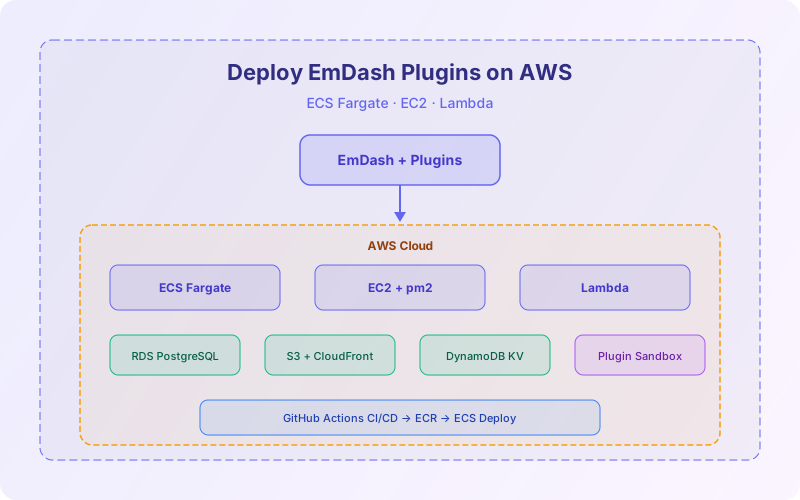
EmDash was built for Cloudflare Workers, but it's also a standard Astro 6 / TypeScript application that runs anywhere Node.js does. If your team already lives in the AWS ecosystem — or you need PostgreSQL, specific compliance regions, or integration with existing AWS services — deploying EmDash and its plugins on AWS is a solid option. This guide covers the full workflow.
We'll walk through three AWS deployment approaches (ECS Fargate, EC2, and Lambda), show how to map Cloudflare bindings to AWS equivalents (D1 → RDS/DynamoDB, R2 → S3, KV → DynamoDB/ElastiCache), configure plugin sandboxing on Node.js, set up CI/CD with GitHub Actions, and optimize costs. By the end, you'll have a production-ready EmDash site with plugins running on AWS.
This guide assumes you've already built and tested your plugin locally. If not, start with our EmDash plugin local development guide first — it covers scaffolding, capability manifests, lifecycle hooks, testing, and debugging. For a broader comparison of AWS vs Cloudflare hosting for EmDash, see our EmDash AWS vs Cloudflare comparison.
📋 Table of Contents
- 1.Why Deploy EmDash on AWS?
- 2.AWS Service Mapping: Cloudflare → AWS
- 3.Option 1: ECS Fargate Deployment
- 4.Option 2: EC2 Deployment
- 5.Option 3: Lambda Deployment
- 6.Database Setup: RDS PostgreSQL
- 7.Media Storage: S3 + CloudFront
- 8.Plugin KV Storage: DynamoDB
- 9.Plugin Sandboxing on Node.js
- 10.CI/CD with GitHub Actions
- 11.Cost Comparison & Optimization
- 12.How Lushbinary Deploys EmDash on AWS
1Why Deploy EmDash on AWS?
Cloudflare Workers is EmDash's native deployment target, and for most use cases it's the simplest path to production. But there are legitimate reasons to choose AWS instead:
- Existing AWS infrastructure — your team already manages VPCs, RDS databases, S3 buckets, and IAM policies. Adding EmDash to the same account keeps operations consolidated.
- PostgreSQL requirement — EmDash on Cloudflare uses D1 (SQLite). If your content model needs full PostgreSQL features (JSONB, full-text search, complex joins), AWS with RDS is the way.
- Compliance & data residency — some industries require data to stay in specific AWS regions. Cloudflare's edge network distributes data globally by default.
- GPU access for AI plugins — if your EmDash plugins need GPU compute (image generation, LLM inference), AWS offers g6/p5 instances that Cloudflare Workers can't match.
- Cost at scale — for high-traffic sites with predictable load, EC2 Reserved Instances or Savings Plans can undercut Cloudflare Workers pricing.
⚠️ Trade-off: Plugin Sandboxing
On Cloudflare, each plugin runs in its own V8 isolate (Dynamic Workers) with hardware-level isolation. On AWS, plugins run in the main Node.js process with application-level capability enforcement. The plugin API is identical, but the isolation boundary is weaker. For trusted first-party plugins this is fine. For untrusted third-party plugins, Cloudflare's sandboxing is stronger.
2AWS Service Mapping: Cloudflare → AWS
EmDash's architecture maps cleanly to AWS services. Here's the translation table:
| Cloudflare Service | AWS Equivalent | Notes |
|---|---|---|
| Workers (compute) | ECS Fargate / EC2 / Lambda | Node.js 20+ runtime |
| D1 (database) | RDS PostgreSQL / Aurora Serverless v2 | Full SQL with JSONB, FTS |
| R2 (object storage) | S3 + CloudFront | S3-compatible API, CDN for media |
| Workers KV | DynamoDB / ElastiCache Redis | Plugin-scoped key-value storage |
| Dynamic Workers | Node.js vm module / process isolation | Application-level sandboxing |
| Durable Objects | ElastiCache Redis / DynamoDB Streams | Stateful coordination |
The key configuration file for AWS deployment is emdash.config.ts. Instead of auto-detecting Cloudflare bindings from wrangler.toml, you explicitly configure AWS adapters:
// emdash.config.ts — AWS deployment
import { defineConfig } from "emdash";
import { awsAdapter } from "emdash/adapters/aws";

export default defineConfig({
  site: {
    name: "My EmDash Site",
    url: "https://cms.example.com",
  },
  adapter: awsAdapter({
    database: {
      type: "postgres",
      connectionString: process.env.DATABASE_URL,
    },
    storage: {
      type: "s3",
      bucket: process.env.S3_BUCKET,
      region: process.env.AWS_REGION,
    },
    kv: {
      type: "dynamodb",
      tableName: process.env.DYNAMODB_TABLE,
    },
  }),
  plugins: [
    "./plugins/my-analytics-plugin",
  ],
});3Option 1: ECS Fargate Deployment
ECS Fargate is the recommended AWS deployment option for most teams. It's serverless containers — you define a task, AWS manages the infrastructure. No EC2 instances to patch, no capacity planning.
🎤 AWS re:Invent 2025 Update
ECS shipped two major capabilities in late 2025: ECS Managed Instances (a new compute option between Fargate and self-managed EC2) and redesigned native deployment strategies (blue/green, linear, canary) that remove the dependency on AWS CodeDeploy. For EmDash, Fargate remains the simplest option, but ECS Managed Instances are worth considering if you need GPU support or instances larger than Fargate's 120 GB memory ceiling.
Dockerfile
# Dockerfile
FROM node:20-alpine AS builder
WORKDIR /app
COPY package*.json ./
RUN npm ci
COPY . .
RUN npm run build

FROM node:20-alpine AS runner
WORKDIR /app
ENV NODE_ENV=production
COPY --from=builder /app/dist ./dist
COPY --from=builder /app/node_modules ./node_modules
COPY --from=builder /app/package.json ./
COPY --from=builder /app/plugins ./plugins

EXPOSE 4321
CMD ["node", "dist/server/entry.mjs"]
ECS Task Definition
{
  "family": "emdash-site",
  "networkMode": "awsvpc",
  "requiresCompatibilities": ["FARGATE"],
  "cpu": "256",
  "memory": "512",
  "containerDefinitions": [
    {
      "name": "emdash",
      "image": "<account-id>.dkr.ecr.<region>.amazonaws.com/emdash:latest",
      "portMappings": [
        { "containerPort": 4321, "protocol": "tcp" }
      ],
      "environment": [
        { "name": "NODE_ENV", "value": "production" },
        { "name": "AWS_REGION", "value": "us-east-1" },
        { "name": "S3_BUCKET", "value": "emdash-media" },
        { "name": "DYNAMODB_TABLE", "value": "emdash-plugin-kv" }
      ],
      "secrets": [
        {
          "name": "DATABASE_URL",
          "valueFrom": "arn:aws:secretsmanager:<region>:<account>:secret:emdash/db-url"
        }
      ],
      "logConfiguration": {
        "logDriver": "awslogs",
        "options": {
          "awslogs-group": "/ecs/emdash",
          "awslogs-region": "us-east-1",
          "awslogs-stream-prefix": "emdash"
        }
      }
    }
  ]
}
Create the ECS Service
# Create ECR repository
aws ecr create-repository --repository-name emdash

# Build and push Docker image
docker build -t emdash .
docker tag emdash:latest <account-id>.dkr.ecr.<region>.amazonaws.com/emdash:latest
aws ecr get-login-password | docker login --username AWS --password-stdin <account-id>.dkr.ecr.<region>.amazonaws.com
docker push <account-id>.dkr.ecr.<region>.amazonaws.com/emdash:latest

# Register task definition
aws ecs register-task-definition --cli-input-json file://task-definition.json

# Create ECS service with ALB
aws ecs create-service \
  --cluster emdash-cluster \
  --service-name emdash-service \
  --task-definition emdash-site \
  --desired-count 1 \
  --launch-type FARGATE \
  --network-configuration "awsvpcConfiguration={subnets=[subnet-xxx],securityGroups=[sg-xxx],assignPublicIp=ENABLED}" \
  --load-balancers "targetGroupArn=arn:aws:elasticloadbalancing:...,containerName=emdash,containerPort=4321"
Cost estimate: A minimal Fargate task (0.25 vCPU, 512 MB) costs ~$0.01/hour or ~$8.50/month. With an ALB (~$16/month) and RDS db.t4g.micro (~$13/month), your total baseline is ~$37/month. This is higher than Cloudflare's free tier but gives you PostgreSQL and full AWS integration.
4Option 2: EC2 Deployment
For the lowest monthly cost with predictable traffic, a single EC2 instance running EmDash behind an Nginx reverse proxy is hard to beat. This is the simplest deployment model — SSH in, run the app, done.
# Launch an EC2 instance (Amazon Linux 2023, t4g.small)
# t4g.small: 2 vCPU, 2 GB RAM, ~$12/month

# SSH in and install Node.js 20
sudo dnf install -y nodejs20

# Clone your EmDash site
git clone https://github.com/your-org/emdash-site.git
cd emdash-site

# Install dependencies and build
npm ci
npm run build

# Install pm2 for process management
npm install -g pm2

# Start EmDash with pm2
pm2 start dist/server/entry.mjs --name emdash
pm2 save
pm2 startup
Nginx Reverse Proxy
# /etc/nginx/conf.d/emdash.conf
server {
    listen 80;
    server_name cms.example.com;

    location / {
        proxy_pass http://127.0.0.1:4321;
        proxy_http_version 1.1;
        proxy_set_header Upgrade $http_upgrade;
        proxy_set_header Connection 'upgrade';
        proxy_set_header Host $host;
        proxy_set_header X-Real-IP $remote_addr;
        proxy_set_header X-Forwarded-For $proxy_add_x_forwarded_for;
        proxy_set_header X-Forwarded-Proto $scheme;
        proxy_cache_bypass $http_upgrade;
    }
}

# Enable HTTPS with Let's Encrypt
# sudo certbot --nginx -d cms.example.com
🎤 AWS re:Invent 2025 Update
Graviton5-based M9g instances deliver up to 25% higher performance than the previous generation with 192 cores per chip. For EmDash on EC2, the t4g (Graviton3) family remains the sweet spot for cost-efficiency, but upgrading to t5g (Graviton5) when available will provide better price-performance for the same workload.
5Option 3: Lambda Deployment
Lambda is the pay-per-invocation option. EmDash can run on Lambda using the Astro Node.js adapter with a Lambda handler wrapper. This gives you true scale-to-zero — you pay nothing when nobody visits.
🎤 AWS re:Invent 2025 Update
Lambda Managed Instances, announced at re:Invent 2025, let you run Lambda functions on EC2 instances in your account while maintaining serverless simplicity. This unlocks Compute Savings Plans (up to 72% discount) for Lambda workloads. For a high-traffic EmDash site on Lambda, this can significantly reduce costs compared to standard Lambda pricing.
// lambda-handler.ts
import { handler as astroHandler } from "./dist/server/entry.mjs";

export const handler = async (event, context) => {
  // Convert API Gateway event to standard Request
  const request = new Request(
    `https://${event.headers.host}${event.rawPath}`,
    {
      method: event.requestContext.http.method,
      headers: event.headers,
      body: event.body ? event.body : undefined,
    }
  );

  const response = await astroHandler(request);

  return {
    statusCode: response.status,
    headers: Object.fromEntries(response.headers.entries()),
    body: await response.text(),
    isBase64Encoded: false,
  };
};
# Deploy with AWS SAM
# template.yaml
AWSTemplateFormatVersion: '2010-09-09'
Transform: AWS::Serverless-2016-10-31
Resources:
EmDashFunction:
Type: AWS::Serverless::Function
Properties:
Handler: lambda-handler.handler
Runtime: nodejs20.x
MemorySize: 512
Timeout: 30
Environment:
Variables:
DATABASE_URL: !Sub '{{resolve:secretsmanager:emdash/db-url}}'
S3_BUCKET: !Ref MediaBucket
DYNAMODB_TABLE: !Ref PluginKVTable
Events:
Api:
Type: HttpApiCold start caveat: Lambda cold starts for a Node.js 20 EmDash bundle are typically 200-800ms. For a CMS admin panel where occasional latency is acceptable, this is fine. For public-facing content pages, consider using CloudFront caching to minimize Lambda invocations, or use Lambda Managed Instances to eliminate cold starts entirely.
6Database Setup: RDS PostgreSQL
On Cloudflare, EmDash uses D1 (SQLite at the edge). On AWS, you get the full power of PostgreSQL via RDS. EmDash's AWS adapter handles the schema translation automatically — the content API and plugin hooks work identically.
# Create an RDS PostgreSQL instance
aws rds create-db-instance \
  --db-instance-identifier emdash-db \
  --db-instance-class db.t4g.micro \
  --engine postgres \
  --engine-version 16.4 \
  --master-username emdash_admin \
  --master-user-password <secure-password> \
  --allocated-storage 20 \
  --storage-type gp3 \
  --vpc-security-group-ids sg-xxx \
  --db-subnet-group-name emdash-db-subnet \
  --no-publicly-accessible

# Store the connection string in Secrets Manager
aws secretsmanager create-secret \
  --name emdash/db-url \
  --secret-string "postgresql://emdash_admin:<password>@<endpoint>:5432/emdash"
Run the EmDash database migrations after creating the instance:
# Run migrations (from your local machine or CI)
DATABASE_URL="postgresql://..." npx emdash db migrate

# Seed initial content (optional)
DATABASE_URL="postgresql://..." npx emdash db seed
Cost tip: A db.t4g.micro instance costs ~$13/month on-demand. For production, consider Database Savings Plans (announced at re:Invent 2025) which offer up to 35% off RDS/Aurora/ElastiCache/MemoryDB/Neptune. For variable workloads, Aurora Serverless v2 starts at 0.5 ACU (~$43/month minimum) but scales automatically.
7Media Storage: S3 + CloudFront
EmDash's R2 storage maps directly to S3. The AWS adapter uses the S3 SDK (which R2 is compatible with anyway) to store uploaded media, images, and files.
# Create S3 bucket for media
aws s3 mb s3://emdash-media-<account-id>

# Block public access (serve via CloudFront OAC)
aws s3api put-public-access-block \
  --bucket emdash-media-<account-id> \
  --public-access-block-configuration \
    BlockPublicAcls=true,IgnorePublicAcls=true,\
    BlockPublicPolicy=true,RestrictPublicBuckets=true

# Create CloudFront distribution with OAC
aws cloudfront create-distribution \
  --origin-domain-name emdash-media-<account-id>.s3.us-east-1.amazonaws.com \
  --default-cache-behavior '{"ViewerProtocolPolicy":"redirect-to-https","AllowedMethods":{"Quantity":2,"Items":["GET","HEAD"]},"CachedMethods":{"Quantity":2,"Items":["GET","HEAD"]},"TargetOriginId":"S3","ForwardedValues":{"QueryString":false,"Cookies":{"Forward":"none"}}}'
Update your emdash.config.ts to point media URLs to CloudFront:
adapter: awsAdapter({
  storage: {
    type: "s3",
    bucket: "emdash-media-123456789",
    region: "us-east-1",
    cdnUrl: "https://d1234abcdef.cloudfront.net",
  },
}),8Plugin KV Storage: DynamoDB
Cloudflare Workers KV maps to DynamoDB on AWS. Each plugin gets a scoped namespace — the adapter prefixes all keys with the plugin name automatically, just like Workers KV namespaces.
# Create DynamoDB table for plugin KV
aws dynamodb create-table \
  --table-name emdash-plugin-kv \
  --attribute-definitions \
    AttributeName=pk,AttributeType=S \
    AttributeName=sk,AttributeType=S \
  --key-schema \
    AttributeName=pk,KeyType=HASH \
    AttributeName=sk,KeyType=RANGE \
  --billing-mode PAY_PER_REQUEST

# Table schema:
# pk = "plugin:<plugin-name>"
# sk = "<key>"
# value = "<value>"
# ttl = <optional-expiry-timestamp>
The DynamoDB adapter translates plugin KV operations transparently:
// Plugin code — identical on Cloudflare and AWS
await kv.put("views:hello-world", "42");
const views = await kv.get("views:hello-world");

// On Cloudflare: Workers KV namespace "my-analytics-plugin"
// On AWS: DynamoDB item { pk: "plugin:my-analytics-plugin", sk: "views:hello-world", value: "42" }
DynamoDB pricing: With PAY_PER_REQUEST billing, you pay $1.25 per million write requests and $0.25 per million read requests. For a typical EmDash site with plugins, this is pennies per month. The first 25 GB of storage is free.
9Plugin Sandboxing on Node.js
This is the biggest architectural difference between Cloudflare and AWS deployments. On Cloudflare, each plugin runs in its own Dynamic Worker — a separate V8 isolate with hardware-level memory isolation. On AWS, plugins run in the main Node.js process.
EmDash's AWS adapter enforces capabilities at the application level using a proxy-based permission system:
// How EmDash enforces capabilities on Node.js (simplified)
// The plugin receives a Proxy-wrapped context object

const pluginContext = new Proxy(fullContext, {
  get(target, prop) {
    // Plugin declared "content:read" but not "content:write"
    if (prop === "content") {
      return new Proxy(target.content, {
        get(contentTarget, contentProp) {
          if (["create", "update", "delete"].includes(contentProp)) {
            throw new Error(
              `CapabilityViolation: Plugin "${pluginName}" \
attempted to use "content:write" (${contentProp}) \
but only "content:read" is declared.`
            );
          }
          return contentTarget[contentProp];
        },
      });
    }
    // Block undeclared capabilities entirely
    if (prop === "email" && !capabilities.includes("email:send")) {
      return undefined;
    }
    return target[prop];
  },
});
For stronger isolation on AWS, you can optionally run plugins in separate Node.js worker_threads or child processes. This adds overhead but provides memory isolation:
// emdash.config.ts — enable process isolation for plugins
adapter: awsAdapter({
  plugins: {
    isolation: "worker_thread", // "none" | "worker_thread" | "process"
    // "none": same process (fastest, weakest isolation)
    // "worker_thread": separate V8 context (good balance)
    // "process": child process (strongest, most overhead)
  },
}),
⚠️ Isolation Trade-offs
For first-party plugins you control, none isolation is fine — it's the fastest option. For third-party plugins from the EmDash registry, use worker_thread at minimum. Cloudflare's Dynamic Workers remain the gold standard for untrusted plugin isolation.
10CI/CD with GitHub Actions
A production EmDash deployment on AWS needs automated builds and deployments. Here's a GitHub Actions workflow for ECS Fargate:
# .github/workflows/deploy.yml
name: Deploy EmDash to ECS
on:
  push:
    branches: [main]

jobs:
  deploy:
    runs-on: ubuntu-latest
    permissions:
      id-token: write
      contents: read
    steps:
      - uses: actions/checkout@v4

      - name: Configure AWS credentials
        uses: aws-actions/configure-aws-credentials@v4
        with:
          role-to-assume: arn:aws:iam::<account>:role/github-deploy
          aws-region: us-east-1

      - name: Login to ECR
        uses: aws-actions/amazon-ecr-login@v2

      - name: Build and push image
        run: |
          docker build -t emdash .
          docker tag emdash:latest <account>.dkr.ecr.us-east-1.amazonaws.com/emdash:latest
          docker push <account>.dkr.ecr.us-east-1.amazonaws.com/emdash:latest

      - name: Run database migrations
        run: |
          DATABASE_URL=${{ secrets.DATABASE_URL }} npx emdash db migrate

      - name: Deploy to ECS
        uses: aws-actions/amazon-ecs-deploy-task-definition@v2
        with:
          task-definition: task-definition.json
          service: emdash-service
          cluster: emdash-cluster
          wait-for-service-stability: true
This pipeline builds the Docker image, pushes to ECR, runs database migrations, and deploys to ECS with zero-downtime rolling updates. The entire process takes 3-5 minutes — compared to ~10 seconds for a Cloudflare Workers deploy with wrangler deploy.
11Cost Comparison & Optimization
Here's a realistic monthly cost comparison across the three AWS deployment options and Cloudflare:
| Component | ECS Fargate | EC2 | Lambda | Cloudflare |
|---|---|---|---|---|
| Compute | ~$8.50 | ~$12 | ~$0-5 | $0-5 |
| Database | ~$13 | ~$13 | ~$13 | $0-5 |
| Load Balancer | ~$16 | $0 | $0 | $0 |
| Storage (S3/R2) | ~$1 | ~$1 | ~$1 | $0 |
| KV (DynamoDB/KV) | ~$0.50 | ~$0.50 | ~$0.50 | $0-5 |
| Total | ~$39/mo | ~$27/mo | ~$15/mo | $0-15/mo |
AWS cost optimization strategies for EmDash:
- Compute Savings Plans — commit to a $/hour spend for up to 66% off Fargate and Lambda pricing
- Database Savings Plans — up to 35% off RDS (announced at re:Invent 2025)
- Graviton instances — t4g/r8g instances offer up to 40% better price-performance than x86 equivalents
- gp3 storage — $0.08/GB vs gp2's $0.10/GB with free 3,000 IOPS baseline
- CloudFront caching — cache static assets and content pages to reduce compute invocations
- Lambda Managed Instances — unlock Savings Plans pricing for Lambda workloads (re:Invent 2025)
📺 Related re:Invent 2025 Sessions
- What's New with AWS Lambda (SVS201)— Managed Instances, Durable Functions, developer tooling
- Navigate the Cloud Landscape with Fargate and ECS Managed Instances (CON301)— Fargate vs ECS Managed Instances decision framework
- Building the Future with AWS Serverless (SVS301)— Serverless MCP server, Lambda Managed Instances, Durable Functions
12How Lushbinary Deploys EmDash on AWS
At Lushbinary, we deploy EmDash on both Cloudflare and AWS depending on client requirements. Our team has deep experience with the full AWS stack — ECS, Lambda, RDS, S3, CloudFront, and IAM — and we've built production EmDash deployments with custom plugins on both platforms.
What we offer:
- EmDash AWS deployment — ECS Fargate, EC2, or Lambda with full CI/CD pipeline, RDS, S3, and CloudFront configuration
- Custom plugin development — plugins that work identically on Cloudflare and AWS, with proper capability manifests and testing
- Cloudflare-to-AWS migration — moving existing EmDash sites from Workers to AWS with zero downtime
- AWS cost optimization — Savings Plans, Graviton migration, right-sizing, and FinOps setup for EmDash workloads
- WordPress-to-EmDash on AWS — full migration including content, plugins, themes, and infrastructure
🚀 Free EmDash AWS Deployment Consultation
Not sure whether to deploy EmDash on Cloudflare or AWS? We offer a free 30-minute consultation to evaluate your requirements, estimate costs, and recommend the right architecture. No commitment required.
❓ Frequently Asked Questions
Can I deploy EmDash plugins on AWS instead of Cloudflare?
Yes. EmDash is a standard Astro 6 / TypeScript application that runs on any Node.js 20+ environment. You can deploy it on AWS using ECS Fargate (~$30-50/month), EC2 (t4g.small ~$12/month), or Lambda with a custom runtime. Plugins run in the main Node.js process instead of Dynamic Workers isolates.
What AWS services do I need to host EmDash with plugins?
At minimum you need a compute service (ECS Fargate, EC2, or Lambda), RDS PostgreSQL or DynamoDB for the database, S3 for media storage, and optionally CloudFront for CDN. For plugin KV storage, use DynamoDB or ElastiCache Redis.
How much does it cost to run EmDash on AWS?
A minimal ECS Fargate setup costs ~$39/month (compute + ALB + RDS + S3). An EC2 t4g.small setup runs ~$27/month. Lambda pay-per-invocation can be ~$15/month for low-traffic sites. Cloudflare's free tier starts at $0/month.
Do EmDash plugins work the same on AWS as on Cloudflare?
Plugin code is identical. The key difference is sandboxing: on Cloudflare, plugins run in isolated Dynamic Workers V8 isolates. On AWS, plugins run in the main Node.js process with capability enforcement at the application level. The plugin API surface remains the same.
📚 Sources
- EmDash CMS Guide — emdashcms.dev
- AWS Lambda Managed Instances — AWS Blog (December 2025)
- Top Announcements of AWS re:Invent 2025 — AWS Blog
- AWS Fargate Pricing — AWS
- Amazon RDS for PostgreSQL Pricing — AWS
Content was rephrased for compliance with licensing restrictions. Technical details sourced from official AWS documentation and the EmDash CMS guide as of April 2026. AWS pricing is based on us-east-1 region and may vary. EmDash is currently v0.1.0 preview — APIs and adapter interfaces may change. Always verify against the latest EmDash GitHub repository and AWS pricing pages.
Need EmDash Deployed on AWS?
From ECS Fargate to Lambda, our team builds production-ready EmDash deployments on AWS with custom plugins, CI/CD, and cost optimization. Tell us what you need.
Build Smarter, Launch Faster.
Book a free strategy call and explore how LushBinary can turn your vision into reality.

