
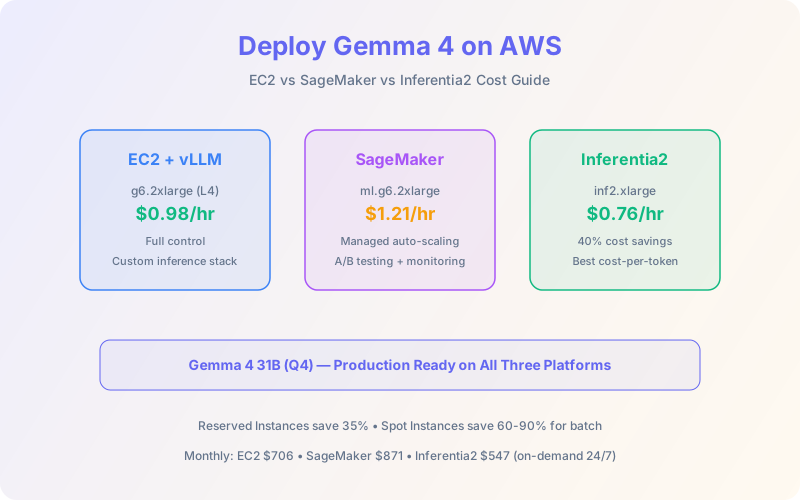
Running Gemma 4 locally is great for development. But production means reliability, auto-scaling, and cost control. AWS gives you three paths: raw EC2 GPU instances, managed SageMaker endpoints, and purpose-built Inferentia2 chips. Each has different cost profiles, operational overhead, and performance characteristics.
This guide covers real cost breakdowns for every Gemma 4 model size, instance selection, inference stack setup (vLLM, TensorRT-LLM), auto-scaling strategies, and optimization tips that can cut your inference bill by 40-60%.
📋 Table of Contents
- 1.Instance Selection by Model Size
- 2.EC2 GPU Deployment with vLLM
- 3.SageMaker Endpoint Deployment
- 4.Inferentia2 Deployment
- 5.Cost Comparison Table
- 6.Auto-Scaling Strategies
- 7.Cost Optimization Tips
- 8.Architecture Diagram
- 9.Monitoring & Observability
- 10.Why Lushbinary for AWS AI Deployment
1Instance Selection by Model Size
The right instance depends on which Gemma 4 model you're serving and whether you're using quantization. Here's the mapping:
| Gemma 4 Model | Recommended Instance | GPU / Chip | VRAM | ~$/hr (On-Demand) |
|---|---|---|---|---|
| E2B (Q4) | g6.xlarge | 1× L4 | 24 GB | $0.65 |
| E4B (Q4) | g6.xlarge | 1× L4 | 24 GB | $0.65 |
| E4B (FP16) | g6.2xlarge | 1× L4 | 24 GB | $0.98 |
| 26B MoE (Q4) | g6.2xlarge | 1× L4 | 24 GB | $0.98 |
| 31B Dense (Q4) | g6.2xlarge | 1× L4 | 24 GB | $0.98 |
| 31B Dense (FP16) | g6e.xlarge | 1× L40S | 48 GB | $1.86 |
| 31B Dense (FP16) | p5.xlarge | 1× H100 | 80 GB | $3.22 |
| 31B Dense (Q4) | inf2.xlarge | 1× Inferentia2 | 32 GB | $0.76 |
💡 Cost Tip
For most production workloads, the g6.2xlarge with Q4 quantization is the sweet spot: $0.98/hr serves the 31B Dense model with acceptable latency. Only use H100 instances if you need full-precision inference or maximum throughput for high-concurrency workloads.
2EC2 GPU Deployment with vLLM
vLLM is the recommended inference engine for Gemma 4 on EC2. It supports PagedAttention for efficient memory management, continuous batching for high throughput, and an OpenAI-compatible API out of the box.
# Launch EC2 g6.2xlarge with Deep Learning AMI
# SSH in, then:

pip install vllm

# Serve Gemma 4 31B with Q4 quantization
vllm serve google/gemma-4-31b-it \
  --quantization awq \
  --max-model-len 8192 \
  --gpu-memory-utilization 0.9 \
  --port 8000 \
  --host 0.0.0.0

# Test the endpoint
curl http://localhost:8000/v1/chat/completions \
  -H "Content-Type: application/json" \
  -d '{
    "model": "google/gemma-4-31b-it",
    "messages": [{"role": "user", "content": "Hello"}],
    "max_tokens": 256
}'3SageMaker Endpoint Deployment
SageMaker adds managed infrastructure, auto-scaling, A/B testing, and model monitoring on top of the raw compute. The trade-off is a 15-40% cost premium over EC2.
import sagemaker
from sagemaker.huggingface import HuggingFaceModel

role = sagemaker.get_execution_role()

hub = {
    "HF_MODEL_ID": "google/gemma-4-31b-it",
    "HF_TASK": "text-generation",
    "SM_NUM_GPUS": "1",
    "MAX_INPUT_LENGTH": "4096",
    "MAX_TOTAL_TOKENS": "8192",
}

model = HuggingFaceModel(
    env=hub,
    role=role,
    image_uri=sagemaker.image_uris.retrieve(
        framework="huggingface-llm",
        region="us-east-1",
        version="2.4.0",
        instance_type="ml.g6.2xlarge",
    ),
)

predictor = model.deploy(
    initial_instance_count=1,
    instance_type="ml.g6.2xlarge",
    endpoint_name="gemma4-31b-endpoint",
)4Inferentia2 Deployment
AWS Inferentia2 chips are purpose-built for inference and offer the best cost-per-token for Gemma 4. The Neuron SDK compiles the model for Inferentia's NeuronCores, and vLLM has native Neuron backend support.
# On inf2.xlarge instance with Neuron SDK
pip install vllm[neuron]

# Compile and serve
vllm serve google/gemma-4-31b-it \
  --device neuron \
  --max-model-len 4096 \
  --port 8000
Inferentia2 delivers ~40% cost savings over equivalent GPU instances for steady-state inference workloads. The trade-off: model compilation takes 15-30 minutes, and not all quantization formats are supported yet. Best for predictable, high-volume inference.
5Cost Comparison Table
Here's a monthly cost estimate for serving Gemma 4 31B (Q4) at different traffic levels, assuming 24/7 availability:
| Platform | Instance | $/hr | $/month (24/7) | With RI (1yr) |
|---|---|---|---|---|
| EC2 | g6.2xlarge | $0.98 | $706 | $~460 |
| SageMaker | ml.g6.2xlarge | $1.21 | $871 | $~570 |
| Inferentia2 | inf2.xlarge | $0.76 | $547 | $~360 |
| EC2 (H100) | p5.xlarge | $3.22 | $2,318 | $~1,510 |
6Auto-Scaling Strategies
For variable traffic, auto-scaling prevents over-provisioning. Key strategies:
- SageMaker Auto-Scaling: Scale on
InvocationsPerInstancemetric. Set target at 70% of max throughput. Min instances = 1, max based on peak traffic. - EC2 Auto Scaling Groups: Use custom CloudWatch metrics (GPU utilization, request queue depth). Scale-out at 80% GPU utilization, scale-in at 30%.
- Scale-to-Zero: SageMaker Serverless Inference supports scale-to-zero for sporadic workloads, but cold starts take 2-5 minutes for LLMs. Best for internal tools, not user-facing.
⚠️ Cold Start Warning
LLM cold starts on GPU instances take 2-5 minutes (model loading + warmup). Always keep at least 1 warm instance for user-facing applications. Use SageMaker's provisioned concurrency or EC2 warm pools to minimize cold start impact.
7Cost Optimization Tips
- Quantize aggressively: Q4_K_M quantization reduces VRAM by 75% with <2% quality loss on most tasks. This lets you use cheaper instances.
- Use Spot Instances: EC2 Spot saves 60-90% for batch inference and non-critical workloads. Not recommended for real-time serving.
- Reserved Instances / Savings Plans: 1-year commitments save 35% on steady-state workloads. Use AWS cost optimization strategies for detailed guidance.
- Right-size your model: A fine-tuned E4B often matches a prompted 31B on specific tasks at 1/7th the cost.
- Batch requests: vLLM's continuous batching handles concurrent requests efficiently. Higher batch sizes = better GPU utilization = lower cost per token.
8Architecture Diagram
9Monitoring & Observability
Key metrics to track for Gemma 4 inference in production:
- P50/P95/P99 latency: Time-to-first-token and total generation time
- Throughput: Tokens per second across all concurrent requests
- GPU utilization: Target 70-85% for optimal cost efficiency
- Queue depth: Requests waiting for processing (scale-out trigger)
- Error rate: OOM errors, timeout errors, malformed responses
❓ Frequently Asked Questions
How much does it cost to run Gemma 4 31B on AWS?
EC2 g6.2xlarge: $0.98/hr ($706/mo). SageMaker: $1.21/hr ($871/mo). Inferentia2: $0.76/hr ($547/mo). Reserved Instances save ~35%.
Can I run Gemma 4 on AWS Inferentia2?
Yes. Neuron SDK + vLLM supports Gemma 4. inf2.xlarge ($0.76/hr) handles quantized models. ~40% savings over GPU instances.
Which AWS instance is best for Gemma 4?
g6.2xlarge (L4 24GB, $0.98/hr) for Q4 quantized 31B. inf2.xlarge for best cost-per-token. p5.xlarge (H100) for full-precision or max throughput.
Should I use EC2 or SageMaker?
EC2 for full control and lower costs. SageMaker for managed auto-scaling, A/B testing, and monitoring. SageMaker adds 15-40% premium.
📚 Sources
Content was rephrased for compliance with licensing restrictions. Pricing sourced from official AWS pricing pages as of April 2026. Prices may change — always verify on the vendor's website.
10Why Lushbinary for AWS AI Deployment
Deploying LLMs on AWS is more than picking an instance type. It's networking, security, auto-scaling, cost optimization, and monitoring. Lushbinary has deployed open-weight models on AWS for clients across industries, with a focus on cost optimization and production reliability.
🚀 Free Consultation
Need Gemma 4 running in production on AWS? We'll architect the deployment, optimize costs, and set up monitoring. Free 30-minute consultation.
Deploy Gemma 4 on AWS with Confidence
From instance selection to auto-scaling — we handle the full production deployment.
Build Smarter, Launch Faster.
Book a free strategy call and explore how LushBinary can turn your vision into reality.

