
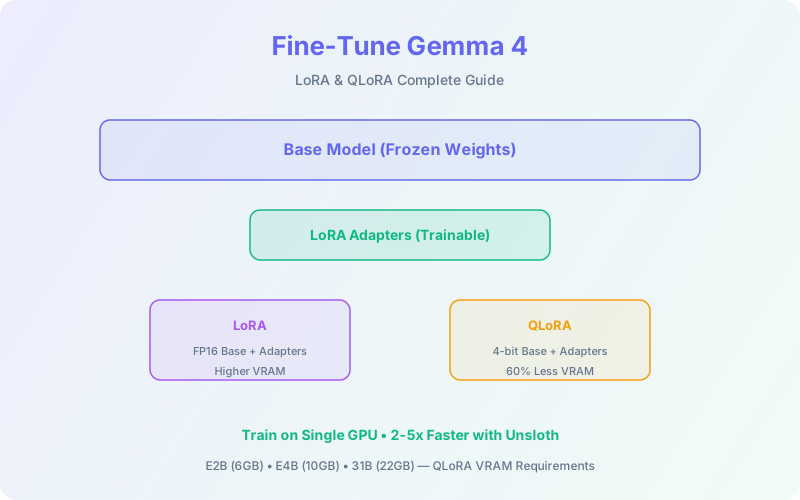
Gemma 4 is impressive out of the box, but fine-tuning unlocks its full potential for your specific domain. Whether you're building a customer support agent, a medical coding assistant, or a legal document analyzer, LoRA and QLoRA let you adapt any Gemma 4 model on a single GPU without touching the base weights.
This guide covers the complete fine-tuning workflow: choosing the right model size, preparing your dataset, configuring LoRA/QLoRA hyperparameters, training with Unsloth and Hugging Face, evaluating results, and deploying your custom model to production.
📋 Table of Contents
- 1.Why Fine-Tune Gemma 4?
- 2.LoRA vs QLoRA Explained
- 3.Choosing the Right Gemma 4 Model
- 4.Dataset Preparation
- 5.Fine-Tuning with Unsloth (Recommended)
- 6.Fine-Tuning with Hugging Face Transformers
- 7.Fine-Tuning with Keras
- 8.Hyperparameter Tuning Guide
- 9.Evaluation & Testing
- 10.Deploying Your Fine-Tuned Model
- 11.Why Lushbinary for AI Fine-Tuning
1Why Fine-Tune Gemma 4?
Gemma 4's instruction-tuned models handle general tasks well, but fine-tuning gives you three things prompting alone can't: consistent output formatting, domain-specific knowledge, and reduced latency (shorter prompts because the model already knows your context).
- Task specialization: Sentiment analysis, entity extraction, code generation in your framework
- Domain adaptation: Medical, legal, financial terminology and reasoning patterns
- Output control: Consistent JSON schemas, specific tone/style, structured responses
- Cost reduction: A fine-tuned E4B can match a prompted 31B on your specific task, at 7x lower inference cost
💡 When NOT to Fine-Tune
If your task can be solved with good prompting or RAG (retrieval-augmented generation), try that first. Fine-tuning is best when you need the model to internalize patterns, not just retrieve information. As the Hugging Face team noted, Gemma 4 models are "so good out of the box" that finding good fine-tuning examples is challenging.
2LoRA vs QLoRA Explained
Both LoRA and QLoRA are parameter-efficient fine-tuning (PEFT) methods that freeze the base model weights and train small adapter matrices instead. The difference is in memory optimization.
LoRA
- • Freezes base weights (FP16/BF16)
- • Injects low-rank matrices into attention layers
- • Trains only 0.1-1% of total parameters
- • Requires more VRAM (full precision base)
- • Slightly higher quality ceiling
QLoRA
- • Quantizes base weights to 4-bit (NF4)
- • Same LoRA adapters on top
- • ~60% less VRAM than LoRA
- • Minimal quality loss (<1% on most benchmarks)
- • Recommended for consumer GPUs
3Choosing the Right Gemma 4 Model
| Model | QLoRA VRAM | LoRA VRAM | Best For |
|---|---|---|---|
| E2B (2.3B) | ~6 GB | ~10 GB | Edge deployment, mobile, rapid prototyping |
| E4B (4.5B) | ~10 GB | ~18 GB | Best balance of quality vs cost. Start here. |
| 26B A4B MoE | ~18 GB | ~48 GB | Advanced — MoE routing adds complexity |
| 31B Dense | ~22 GB | ~60 GB | Maximum quality when you have the hardware |
4Dataset Preparation
Dataset quality is the single biggest factor in fine-tuning success. Follow these guidelines:
Format
Gemma 4 expects conversational format with user and model turns. For instruction tuning, use this structure:
{
  "messages": [
    {"role": "user", "content": "Classify the sentiment: 'This product is amazing'"},
    {"role": "model", "content": "Positive"}
  ]
}
Size Guidelines
- Task-specific (classification, extraction): 500–5,000 examples
- Domain adaptation (medical, legal): 10,000–50,000 examples
- Style/tone transfer: 200–1,000 high-quality examples
- General instruction following: 5,000–20,000 examples
⚠️ Data Quality Checklist
Remove duplicates, fix formatting inconsistencies, ensure label accuracy, and balance class distributions. One bad example can undo the benefit of 100 good ones. Always hold out 10-20% for evaluation.
5Fine-Tuning with Unsloth (Recommended)
Unsloth is the recommended tool for Gemma 4 fine-tuning on consumer hardware. It achieves 2-5x faster training and 50-80% less memory through hand-written backpropagation kernels. Gemma 4 has day-0 Unsloth support with pre-quantized GGUF and MLX models available on Hugging Face.
# Install Unsloth
pip install unsloth

# Load Gemma 4 E4B with 4-bit quantization
from unsloth import FastLanguageModel

model, tokenizer = FastLanguageModel.from_pretrained(
    model_name="unsloth/gemma-4-E4B-it",
    max_seq_length=4096,
    load_in_4bit=True,  # QLoRA
)

# Add LoRA adapters
model = FastLanguageModel.get_peft_model(
    model,
    r=16,              # LoRA rank
    lora_alpha=32,     # Scaling factor
    lora_dropout=0.05,
    target_modules=["q_proj", "k_proj", "v_proj",
                     "o_proj", "gate_proj",
                     "up_proj", "down_proj"],
)

# Train with SFTTrainer
from trl import SFTTrainer
from transformers import TrainingArguments

trainer = SFTTrainer(
    model=model,
    tokenizer=tokenizer,
    train_dataset=your_dataset,
    args=TrainingArguments(
        output_dir="./gemma4-finetuned",
        per_device_train_batch_size=4,
        gradient_accumulation_steps=4,
        num_train_epochs=3,
        learning_rate=2e-4,
        warmup_ratio=0.1,
        lr_scheduler_type="cosine",
        bf16=True,
        logging_steps=10,
        save_strategy="epoch",
    ),
)
trainer.train()6Fine-Tuning with Hugging Face Transformers
If you prefer the standard Hugging Face stack, use transformers + peft + trl:
from transformers import AutoModelForCausalLM, AutoTokenizer, BitsAndBytesConfig
from peft import LoraConfig, get_peft_model

# 4-bit quantization config
bnb_config = BitsAndBytesConfig(
    load_in_4bit=True,
    bnb_4bit_quant_type="nf4",
    bnb_4bit_compute_dtype="bfloat16",
    bnb_4bit_use_double_quant=True,
)

model = AutoModelForCausalLM.from_pretrained(
    "google/gemma-4-E4B-it",
    quantization_config=bnb_config,
    device_map="auto",
)
tokenizer = AutoTokenizer.from_pretrained("google/gemma-4-E4B-it")

# LoRA config
lora_config = LoraConfig(
    r=16, lora_alpha=32, lora_dropout=0.05,
    target_modules=["q_proj", "k_proj", "v_proj",
                     "o_proj", "gate_proj",
                     "up_proj", "down_proj"],
    task_type="CAUSAL_LM",
)
model = get_peft_model(model, lora_config)7Fine-Tuning with Keras
Google's official Keras/KerasHub integration provides a clean API for Gemma fine-tuning, especially useful if you're already in the TensorFlow/JAX ecosystem:
import keras_hub

# Load model with LoRA
gemma_lm = keras_hub.models.GemmaCausalLM.from_preset(
    "gemma4_e4b_instruct"
)
gemma_lm.backbone.enable_lora(rank=16)

# Compile and train
gemma_lm.compile(
    loss=keras.losses.SparseCategoricalCrossentropy(from_logits=True),
    optimizer=keras.optimizers.Adam(learning_rate=2e-4),
)
gemma_lm.fit(train_dataset, epochs=3)8Hyperparameter Tuning Guide
The right hyperparameters make the difference between a fine-tuned model that generalizes well and one that memorizes your training data.
| Parameter | Recommended | Notes |
|---|---|---|
| LoRA Rank (r) | 16–64 | Start at 16. Increase to 32-64 for complex tasks. Higher = more capacity but more VRAM. |
| LoRA Alpha | 2× rank | Common convention: alpha = 2 × r. Controls the scaling of adapter updates. |
| Learning Rate | 1e-4 to 3e-4 | 2e-4 is a safe default. Lower for larger models, higher for smaller. |
| Epochs | 1–5 | 3 epochs is typical. Watch for overfitting after epoch 2-3 on small datasets. |
| Batch Size | 4–16 | Use gradient accumulation to simulate larger batches on limited VRAM. |
| Warmup Ratio | 0.05–0.1 | Prevents early training instability. 0.1 is safe for most cases. |
| Dropout | 0.05 | Light dropout prevents overfitting. 0 is fine for large datasets. |
| Target Modules | All linear layers | q/k/v/o_proj + gate/up/down_proj. More modules = better quality, more VRAM. |
9Evaluation & Testing
Always evaluate on a held-out test set that the model never saw during training. Key metrics depend on your task:
- Classification: Accuracy, F1 score, precision/recall per class
- Generation: BLEU, ROUGE, human evaluation (most reliable)
- Extraction: Exact match, token-level F1
- Instruction following: Format compliance rate, factual accuracy
💡 Overfitting Detection
If training loss keeps dropping but validation loss plateaus or increases, you're overfitting. Reduce epochs, increase dropout, or add more diverse training data. With LoRA, overfitting typically appears after 3-5 epochs on datasets under 5,000 examples.
10Deploying Your Fine-Tuned Model
After training, you have two deployment options:
Option 1: Merge Adapters into Base Model
# Merge LoRA weights into base model
merged_model = model.merge_and_unload()
merged_model.save_pretrained("./gemma4-merged")

# Convert to GGUF for llama.cpp deployment
# python convert_hf_to_gguf.py ./gemma4-merged --outtype q4_k_m
Option 2: Keep Adapters Separate
Keep the base model and adapter weights separate. This lets you hot-swap adapters for different tasks without reloading the base model. Useful for multi-tenant deployments where different customers need different fine-tuned behaviors.
For production serving, deploy via AWS SageMaker or EC2 with vLLM, which supports LoRA adapter loading at runtime.
❓ Frequently Asked Questions
Can I fine-tune Gemma 4 on a single consumer GPU?
Yes. With QLoRA, you can fine-tune E4B on a 16GB GPU (T4, RTX 3090) and the 31B Dense on a 24GB GPU (RTX 4090). Unsloth reduces memory by 50-80%.
What is the difference between LoRA and QLoRA?
LoRA freezes base weights and trains small adapter matrices. QLoRA adds 4-bit quantization on top, reducing VRAM by ~60% with minimal quality loss.
Which Gemma 4 model should I fine-tune?
Start with E4B — it's fast, fits on free Colab T4 GPUs with QLoRA, and delivers strong results. Scale to 31B only if needed.
How much training data do I need?
500–5,000 examples for task-specific adaptation. 10,000–50,000 for domain knowledge. Quality matters more than quantity.
What tools support Gemma 4 fine-tuning?
Hugging Face Transformers, Unsloth (recommended for consumer hardware), Keras/KerasHub, Vertex AI, and Axolotl all have day-0 support.
📚 Sources
- Google AI — Fine-Tune Gemma with QLoRA
- Google AI — Fine-Tune Gemma with LoRA in Keras
- Unsloth — LoRA Hyperparameters Guide
- Hugging Face — Gemma 4 Blog
Content was rephrased for compliance with licensing restrictions. Technical details sourced from official documentation as of April 2026. APIs and syntax may change — always verify on the vendor's website.
11Why Lushbinary for AI Fine-Tuning
Fine-tuning is part science, part art. Getting the dataset right, choosing hyperparameters, and deploying reliably requires hands-on experience. Lushbinary has fine-tuned open-weight models for clients across healthcare, e-commerce, and fintech.
🚀 Free Consultation
Need a custom Gemma 4 model for your domain? We'll help you design the dataset, train the model, and deploy it to production. Free 30-minute consultation — no commitment.
Need a Custom Fine-Tuned Gemma 4 Model?
From dataset curation to production deployment — we handle the full fine-tuning pipeline.
Build Smarter, Launch Faster.
Book a free strategy call and explore how LushBinary can turn your vision into reality.

