
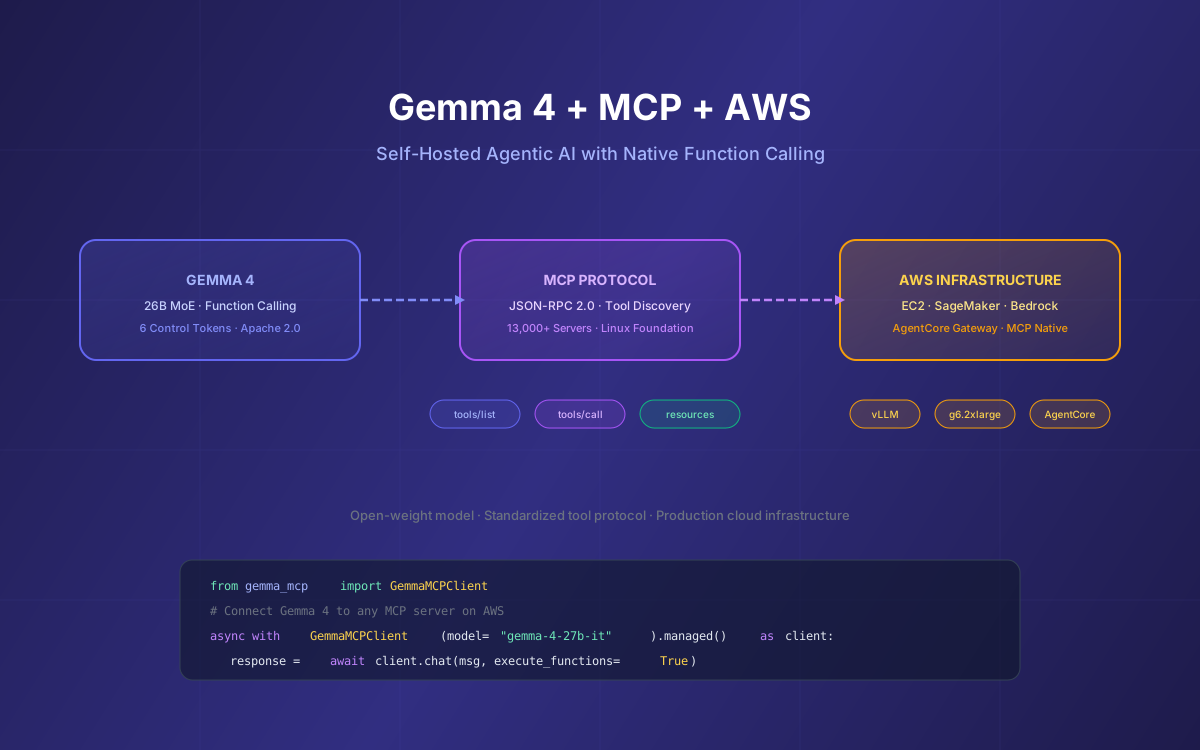
Building AI agents that can discover and use external tools is one of the most powerful patterns in modern software. But most implementations lock you into proprietary APIs with unpredictable pricing and rate limits. What if you could run the entire stack yourself — an open-weight model with native function calling, connected to any tool via the Model Context Protocol (MCP), deployed on AWS infrastructure you control?
That's exactly what Gemma 4 enables. Released April 2, 2026 under Apache 2.0, Gemma 4 ships with 6 dedicated control tokens for function calling, configurable thinking modes, and 256K context windows. Combined with MCP's standardized tool protocol and AWS's GPU infrastructure, you get a production-grade agentic AI stack with zero vendor lock-in.
This guide walks through the complete architecture: how Gemma 4's function calling maps to MCP, building MCP servers that Gemma 4 can use, deploying the full stack on AWS (EC2, SageMaker, Bedrock AgentCore), and production patterns for multi-tool agentic workflows.
📋 Table of Contents
- 1.Why Gemma 4 + MCP + AWS
- 2.Gemma 4's Function Calling ↔ MCP Mapping
- 3.The gemma-mcp Python Package
- 4.Building Custom MCP Servers for Gemma 4
- 5.Deploying Gemma 4 on AWS for MCP Workloads
- 6.AWS Bedrock AgentCore & MCP Gateway
- 7.Multi-Tool Agent Architecture
- 8.Production Patterns & Cost Optimization
- 9.Security & Guardrails
- 10.Limitations & Workarounds
- 11.Why Lushbinary for Gemma 4 + MCP on AWS
1Why Gemma 4 + MCP + AWS
Three technologies converge to create the most flexible agentic AI stack available in 2026:
Gemma 4
Open-weight model with native function calling (6 control tokens), thinking modes, 256K context, Apache 2.0 license. The 26B MoE activates only 3.8B parameters per token.
MCP
Open standard (Anthropic, now Linux Foundation) for connecting AI to tools via JSON-RPC 2.0. 13,000+ servers, 97M+ SDK downloads. Supported by Claude, Cursor, Kiro, VS Code.
AWS
GPU instances (g6, p5), SageMaker managed endpoints, Bedrock AgentCore with native MCP Gateway, and Inferentia2 chips for cost-efficient inference.
The key insight: Gemma 4's function calling tokens map directly to MCP's tool protocol. When you serve Gemma 4 via an OpenAI-compatible API (vLLM or llama.cpp), any MCP client can use it as the inference backend. You get the same tool-use capabilities as Claude or GPT, but running on your own infrastructure.
Cost comparison
Claude Opus 4.6 API: $15/M input, $75/M output tokens. GPT-5.4: $2.50/M input, $15/M output. Gemma 4 26B MoE self-hosted on AWS g6.2xlarge: ~$0.98/hr flat, unlimited tokens. For high-volume agent workloads processing 10M+ tokens/day, self-hosting can cut costs by 80-95%.
2Gemma 4's Function Calling ↔ MCP Mapping
Gemma 4 uses 6 special tokens for its tool-use lifecycle. These map cleanly to MCP's three primitives (tools, resources, prompts). Here's how the two protocols align:
| Gemma 4 Token | Purpose | MCP Equivalent |
|---|---|---|
<|tool> / <tool|> | Define a tool | tools/list response |
<|tool_call> / <tool_call|> | Model requests tool use | tools/call request |
<|tool_response> / <tool_response|> | Return tool result | tools/call response |
The translation layer is straightforward. When an MCP client sends a tools/list request, you convert each tool definition into Gemma 4's <|tool> format and inject it into the system prompt. When Gemma 4 emits a <|tool_call>, you parse the function name and arguments, execute the MCP tools/call, and feed the result back as a <|tool_response>.
Gemma 4 Tool Definition Format
<|turn>system
<|think|>You are a helpful assistant.
<|tool>declaration:get_weather{
  description:<|"|>Get current weather for a location<|"|>,
  parameters:{
    location:{type:<|"|>string<|"|>,required:true},
    units:{type:<|"|>string<|"|>,default:<|"|>celsius<|"|>}
  }
}<tool|>
<|tool>declaration:query_database{
  description:<|"|>Run a SQL query against the analytics DB<|"|>,
  parameters:{
    query:{type:<|"|>string<|"|>,required:true}
  }
}<tool|><turn|>
Note the <|"|> delimiter token — this is Gemma 4's way of escaping string values so special characters inside strings don't break the structured format. Every string literal in tool declarations, calls, and responses must use this delimiter.
Tool Call → MCP Execution → Response
# Gemma 4 emits:
<|tool_call>call:get_weather{location:<|"|>London<|"|>}<tool_call|>

# Your middleware:
# 1. Parse function name: "get_weather"
# 2. Parse args: {"location": "London"}
# 3. Execute MCP tools/call
# 4. Inject response:

<|tool_response>result:get_weather{
  temperature:<|"|>18°C<|"|>,
  condition:<|"|>partly cloudy<|"|>
}<tool_response|>3The gemma-mcp Python Package
The gemma-mcp package is the fastest way to connect Gemma models to MCP servers. It handles tool discovery, registration, and the function calling loop automatically.
Installation & Setup
# Install with uv (recommended) or pip
uv add gemma-mcp
# or
pip install gemma-mcp

# Requirements: Python 3.10+, google-genai SDK, FastMCP
Connecting to MCP Servers
from gemma_mcp import GemmaMCPClient

mcp_config = {
    "mcpServers": {
        "weather": {
            "url": "https://weather-api.example.com/mcp"
        },
        "database": {
            "command": "python",
            "args": ["./db_server.py"]
        }
    }
}

async with GemmaMCPClient(
    model="gemma-4-27b-it",  # or gemma-4-4b-it for lighter workloads
    mcp_config=mcp_config,
    temperature=0.3  # lower for deterministic tool calls
).managed() as client:
    response = await client.chat(
        "What's the weather in Tokyo and how many users signed up today?",
        execute_functions=True  # auto-execute tool calls
    )
    print(response)
Key features of gemma-mcp:
- Automatic tool discovery — connects to all configured MCP servers and registers their tools with Gemma
- Both transports — supports SSE (HTTP) and stdio MCP servers
- Local + remote tools — mix Python functions with MCP server tools in the same conversation
- Async context management — proper resource cleanup with
async with - Multi-server support — connect to multiple MCP servers simultaneously
Adding Local Functions
# Add a local Python function alongside MCP tools
async def calculate_cost(
    instance_type: str,
    hours: int,
    region: str = "us-east-1"
) -> dict:
    """Calculate AWS EC2 cost for a given instance and duration."""
    prices = {"g6.xlarge": 0.80, "g6.2xlarge": 0.98, "p5.xlarge": 3.22}
    hourly = prices.get(instance_type, 0)
    return {"total_cost": hourly * hours, "hourly_rate": hourly}

client.add_function(calculate_cost)

# Gemma 4 can now call both MCP tools AND local functions
response = await client.chat(
    "How much would it cost to run a g6.2xlarge for 720 hours?",
    execute_functions=True
)4Building Custom MCP Servers for Gemma 4
While gemma-mcp connects Gemma to existing MCP servers, you'll often need to build custom servers that expose your own APIs, databases, or internal tools. The MCP Python SDK (requires Python 3.10+) and FastMCP make this straightforward.
Example: AWS Resource MCP Server
# aws_mcp_server.py
from fastmcp import FastMCP
import boto3

mcp = FastMCP("AWS Resources")

@mcp.tool()
def list_ec2_instances(region: str = "us-east-1") -> list[dict]:
    """List all EC2 instances in a region with their status."""
    ec2 = boto3.client("ec2", region_name=region)
    response = ec2.describe_instances()
    instances = []
    for reservation in response["Reservations"]:
        for inst in reservation["Instances"]:
            instances.append({
                "id": inst["InstanceId"],
                "type": inst["InstanceType"],
                "state": inst["State"]["Name"],
                "launch_time": str(inst.get("LaunchTime", ""))
            })
    return instances

@mcp.tool()
def get_cloudwatch_metric(
    instance_id: str,
    metric: str = "CPUUtilization",
    period_hours: int = 1
) -> dict:
    """Get a CloudWatch metric for an EC2 instance."""
    cw = boto3.client("cloudwatch", region_name="us-east-1")
    from datetime import datetime, timedelta
    response = cw.get_metric_statistics(
        Namespace="AWS/EC2",
        MetricName=metric,
        Dimensions=[{"Name": "InstanceId", "Value": instance_id}],
        StartTime=datetime.utcnow() - timedelta(hours=period_hours),
        EndTime=datetime.utcnow(),
        Period=300,
        Statistics=["Average"]
    )
    return {
        "metric": metric,
        "datapoints": response.get("Datapoints", [])
    }

@mcp.tool()
def estimate_monthly_cost(
    instance_type: str,
    hours_per_day: int = 24
) -> dict:
    """Estimate monthly EC2 cost for an instance type."""
    prices = {
        "g6.xlarge": 0.80, "g6.2xlarge": 0.98,
        "g5.xlarge": 1.006, "p5.xlarge": 3.22,
        "inf2.xlarge": 0.76, "t3.small": 0.0208
    }
    hourly = prices.get(instance_type, 0)
    monthly = hourly * hours_per_day * 30
    return {
        "instance_type": instance_type,
        "hourly_rate": hourly,
        "monthly_estimate": round(monthly, 2)
    }

if __name__ == "__main__":
    mcp.run()  # starts stdio transport by default
Connecting Gemma 4 to Your Custom Server
from gemma_mcp import GemmaMCPClient

config = {
    "mcpServers": {
        "aws-resources": {
            "command": "python",
            "args": ["./aws_mcp_server.py"]
        }
    }
}

async with GemmaMCPClient(
    model="gemma-4-27b-it",
    mcp_config=config
).managed() as client:
    response = await client.chat(
        "List all EC2 instances in us-west-2 and estimate "
        "the monthly cost for each instance type",
        execute_functions=True
    )
print(response)5Deploying Gemma 4 on AWS for MCP Workloads
For production MCP agent workloads, you need Gemma 4 running on AWS with an OpenAI-compatible API. Three deployment paths, each with different cost and complexity tradeoffs:
| Approach | Instance | Cost/hr | Best For |
|---|---|---|---|
| EC2 + vLLM | g6.2xlarge (L4 24GB) | ~$0.98 | Full control, custom configs |
| SageMaker Endpoint | ml.g6.2xlarge | ~$1.21 | Managed scaling, monitoring |
| Inferentia2 | inf2.xlarge | ~$0.76 | Cost-optimized inference |
Option A: EC2 + vLLM (Recommended for MCP)
vLLM provides an OpenAI-compatible API out of the box, which is exactly what MCP middleware needs. Here's the setup for the 26B MoE model:
# Launch EC2 g6.2xlarge with Deep Learning AMI (Ubuntu)
# SSH in, then:

# Install vLLM
pip install vllm

# Serve Gemma 4 26B MoE with OpenAI-compatible API
vllm serve google/gemma-4-26b-a4b-it \
  --host 0.0.0.0 \
  --port 8000 \
  --max-model-len 32768 \
  --tensor-parallel-size 1 \
  --gpu-memory-utilization 0.90 \
  --enable-auto-tool-choice \
  --tool-call-parser hermes

# Test the endpoint
curl http://localhost:8000/v1/chat/completions \
  -H "Content-Type: application/json" \
  -d '{
    "model": "google/gemma-4-26b-a4b-it",
    "messages": [{"role": "user", "content": "Hello"}],
    "tools": [{
      "type": "function",
      "function": {
        "name": "get_weather",
        "description": "Get weather for a location",
        "parameters": {
          "type": "object",
          "properties": {
            "location": {"type": "string"}
          },
          "required": ["location"]
        }
      }
    }]
  }'
⚠️ VRAM Requirements
The 26B MoE model needs ~16GB VRAM with Q4 quantization or ~24GB at FP16. A single L4 GPU (g6.2xlarge) handles Q4 comfortably. The 31B Dense model requires ~24GB+ VRAM at Q4 or ~60GB at FP16 — use a g6e.2xlarge (L40S 48GB) for Q4 or a multi-GPU setup for FP16.
Option B: SageMaker Managed Endpoint
import sagemaker
from sagemaker.huggingface import HuggingFaceModel

role = sagemaker.get_execution_role()

model = HuggingFaceModel(
    model_data="s3://your-bucket/gemma-4-26b-a4b-it/",
    role=role,
    transformers_version="4.51",
    pytorch_version="2.6",
    py_version="py312",
    env={
        "HF_MODEL_ID": "google/gemma-4-26b-a4b-it",
        "SM_NUM_GPUS": "1",
        "MAX_INPUT_LENGTH": "32768",
        "MAX_TOTAL_TOKENS": "65536"
    }
)

predictor = model.deploy(
    initial_instance_count=1,
    instance_type="ml.g6.2xlarge",
    endpoint_name="gemma4-mcp-endpoint"
)
SageMaker adds auto-scaling, CloudWatch monitoring, and A/B testing out of the box. The tradeoff is ~23% higher hourly cost ($1.21 vs $0.98) and less control over the serving configuration. For MCP workloads where you need custom vLLM flags like --enable-auto-tool-choice, EC2 is usually the better path.
6AWS Bedrock AgentCore & MCP Gateway
AWS has gone all-in on MCP. At re:Invent 2025 and throughout early 2026, they shipped several MCP-native services that integrate directly with Gemma 4 deployments:
🎤 AWS re:Invent 2025 Update
AWS announced Bedrock AgentCore at re:Invent 2025, providing managed infrastructure for deploying AI agents with built-in MCP support. AgentCore Gateway can route MCP requests to custom endpoints, including self-hosted Gemma 4 instances. They also added 18 new open-weight models to Bedrock (from Google, Mistral, OpenAI, Qwen, and others), bringing the total to nearly 100 serverless models.
AgentCore Gateway + MCP
AgentCore Gateway acts as a single control plane for routing, authentication, and tool management across MCP servers. Key capabilities:
- MCP proxy for API Gateway — transform existing REST APIs into MCP-compatible endpoints without rewriting code (launched December 2025)
- MCP server deployment in AgentCore Runtime — deploy MCP servers as managed services with automatic session management
- Custom endpoint routing — route MCP requests to your self-hosted Gemma 4 vLLM endpoint on EC2
- Built-in auth — OAuth 2.1 and IAM-based authentication for MCP connections
Architecture: Gemma 4 + AgentCore Gateway
📺 Recommended re:Invent Session
"Modernize containers for AI agents using AgentCore Gateway" covers how to expose existing Kubernetes microservices to AI agents via MCP without rewriting application code.
Search re:Invent Sessions on YouTube →7Multi-Tool Agent Architecture
Real-world agents need multiple tools. Here's a complete architecture for a DevOps agent that uses Gemma 4 with multiple MCP servers to monitor infrastructure, query logs, and take remediation actions:
# devops_agent.py — Multi-tool agent with Gemma 4 + MCP
from gemma_mcp import GemmaMCPClient

MCP_CONFIG = {
    "mcpServers": {
        # AWS infrastructure tools
        "aws-infra": {
            "command": "python",
            "args": ["./servers/aws_mcp_server.py"]
        },
        # Log analysis tools
        "logs": {
            "command": "python",
            "args": ["./servers/cloudwatch_logs_server.py"]
        },
        # PagerDuty integration
        "pagerduty": {
            "url": "https://mcp.pagerduty.example.com/sse"
        },
        # GitHub for PR creation
        "github": {
            "command": "npx",
            "args": ["-y", "@modelcontextprotocol/server-github"]
        }
    }
}

SYSTEM_PROMPT = """You are a DevOps agent. When investigating issues:
1. Check CloudWatch metrics first
2. Query relevant logs
3. Identify root cause
4. Propose and execute remediation
5. Update the PagerDuty incident
Always explain your reasoning before taking action."""

async def run_devops_agent():
    async with GemmaMCPClient(
        model="gemma-4-27b-it",
        mcp_config=MCP_CONFIG,
        system_prompt=SYSTEM_PROMPT,
        temperature=0.2
    ).managed() as client:
        response = await client.chat(
            "CPU on prod-api-3 has been above 95% for 20 minutes. "
            "Investigate and fix.",
            execute_functions=True
        )
        print(response)
The agent flow for this scenario:
- Gemma 4 activates thinking mode to plan the investigation
- Calls
get_cloudwatch_metric(aws-infra MCP) to confirm CPU spike - Calls
search_logs(logs MCP) to find error patterns - Identifies a memory leak from a recent deployment
- Calls
create_pull_request(github MCP) with a fix - Calls
update_incident(pagerduty MCP) with root cause and remediation status
Thinking mode is critical for multi-tool agents
Enable thinking with <|think|> in the system prompt. Gemma 4 will reason through which tools to call and in what order before executing. This dramatically reduces hallucinated tool calls and improves multi-step accuracy. The thinking output appears in <|channel>thought...<channel|> blocks that you can log for debugging.
8Production Patterns & Cost Optimization
Model Routing for Cost Efficiency
Not every MCP tool call needs the full 31B Dense model. Use a routing layer to match request complexity to model size:
| Task Complexity | Model | AWS Instance | Monthly Cost (24/7) |
|---|---|---|---|
| Simple lookups, single tool | Gemma 4 E4B | g6.xlarge | ~$580 |
| Multi-tool, moderate reasoning | Gemma 4 26B MoE | g6.2xlarge | ~$706 |
| Complex multi-step, planning | Gemma 4 31B Dense | g6e.2xlarge (L40S 48GB) | ~$1,614 |
Spot Instances for Non-Critical Workloads
For development, testing, and batch agent workloads, EC2 Spot Instances can cut costs by 70-90%. The g6 family typically sees 60-75% savings in us-east-1:
# Launch Spot Instance for Gemma 4 MCP workloads
aws ec2 run-instances \
  --instance-type g6.2xlarge \
  --image-id ami-0abcdef1234567890 \  # Deep Learning AMI
  --instance-market-options '{"MarketType":"spot","SpotOptions":{"SpotInstanceType":"persistent","InstanceInterruptionBehavior":"stop"}}' \
  --block-device-mappings '[{"DeviceName":"/dev/sda1","Ebs":{"VolumeSize":100,"VolumeType":"gp3"}}]'

# Estimated Spot price: ~$0.29/hr (vs $0.98 On-Demand)
# Monthly savings: ~$497/month
Auto-Scaling MCP Endpoints
For variable workloads, use SageMaker auto-scaling or an EC2 Auto Scaling Group behind an ALB:
- Scale-to-zero — use SageMaker Serverless Inference for sporadic MCP workloads (cold start ~60s)
- Scheduled scaling — scale up during business hours, scale down at night (saves ~50%)
- Request-based scaling — use CloudWatch metrics on vLLM's
/metricsendpoint to trigger scaling
🎤 AWS re:Invent 2025 Update
AWS launched Graviton5 processors with 192 cores and 25% higher performance than Graviton4. While Graviton5 is CPU-only (no GPU), the new M9g instances are ideal for running MCP server middleware, API gateways, and orchestration layers at lower cost. Pair a Graviton5 instance for your MCP servers with a GPU instance for Gemma 4 inference.
9Security & Guardrails
Running an open-weight model with tool access to your AWS infrastructure requires careful security design. Here are the non-negotiable guardrails:
Network Isolation
- Run Gemma 4 vLLM in a private subnet — no public IP, no internet access
- MCP servers in the same VPC, communicating over private IPs
- Use VPC endpoints for S3, DynamoDB, CloudWatch (free for Gateway endpoints, avoids NAT Gateway costs)
- ALB or API Gateway as the only public-facing entry point, with WAF rules
IAM Least Privilege
{
  "Version": "2012-10-17",
  "Statement": [
    {
      "Effect": "Allow",
      "Action": [
        "ec2:DescribeInstances",
        "cloudwatch:GetMetricStatistics",
        "logs:FilterLogEvents"
      ],
      "Resource": "*",
      "Condition": {
        "StringEquals": {
          "aws:RequestedRegion": "us-east-1"
        }
      }
    }
  ]
}
// Read-only by default. Write actions (ec2:StopInstances,
// ec2:StartInstances) require explicit human approval.
Tool Execution Guardrails
- Allowlist tools — only register specific MCP tools with Gemma 4, never expose a wildcard
- Human-in-the-loop for destructive actions — any tool that modifies state (delete, stop, terminate) should require human approval
- Rate limiting — cap tool calls per minute to prevent runaway agent loops
- Output validation — validate Gemma 4's tool call arguments against the schema before execution
- Audit logging — log every tool call, its arguments, and the result to CloudWatch Logs or S3
MCP Authentication
MCP spec 2025-06-18 added OAuth 2.1 support. For AWS deployments, use AgentCore Gateway's built-in IAM authentication for MCP connections. For custom MCP servers, implement token-based auth with short-lived JWTs and rotate credentials via AWS Secrets Manager.
10Limitations & Workarounds
| Limitation | Impact | Workaround |
|---|---|---|
| No native MCP client in Gemma 4 | Need middleware to translate between Gemma 4 tokens and MCP protocol | Use gemma-mcp package or vLLM's OpenAI-compatible API with MCP client libraries |
| Tool call accuracy varies by model size | E2B/E4B may hallucinate tool arguments on complex schemas | Use 26B MoE or 31B Dense for production. Enable thinking mode. Validate args before execution |
| No streaming tool calls | Model must finish generating the full tool_call block before execution | Acceptable for most MCP workloads. Stream the final response after tool execution |
| Context window consumed by tool definitions | Many tools = less room for conversation history | Dynamic tool loading — only inject relevant tools per request. Use 256K context (26B/31B) |
| Cold start on SageMaker Serverless | ~60s cold start for GPU inference | Keep a warm instance for latency-sensitive workloads. Use provisioned concurrency |
11Why Lushbinary for Gemma 4 + MCP on AWS
We've been building AI agent infrastructure since the early days of MCP and open-weight models. Our team has deployed Gemma 4 on AWS for production workloads, built custom MCP servers for enterprise clients, and optimized inference costs across EC2, SageMaker, and Inferentia.
- End-to-end architecture — from model selection and deployment to MCP server development and AgentCore integration
- AWS cost optimization — we've helped teams cut inference costs by 60-80% through model routing, Spot Instances, and right-sizing
- Security-first — IAM least privilege, VPC isolation, audit logging, and human-in-the-loop guardrails built into every deployment
- Open-weight expertise — deep experience with Gemma 4, Llama 4, Qwen 3.5, and multi-model routing architectures
🚀 Free Architecture Consultation
Planning a Gemma 4 + MCP deployment on AWS? Book a free 30-minute call with our AI infrastructure team. We'll review your use case, recommend the right model size and deployment strategy, and estimate your monthly AWS costs. Book now →
❓ Frequently Asked Questions
Can Gemma 4 act as an MCP client to call external tools?
Yes. Gemma 4 has native function calling with 6 dedicated control tokens. When served via an OpenAI-compatible API (vLLM, llama.cpp), MCP clients can route tool calls through Gemma 4 as the inference backend.
How do I build an MCP server powered by Gemma 4 on AWS?
Deploy Gemma 4 on an EC2 GPU instance (g6.2xlarge with L4 GPU, ~$0.98/hr) or SageMaker endpoint using vLLM. Then build an MCP server in Python or TypeScript that exposes tools, and connect it to Gemma 4 for inference.
What is the gemma-mcp Python package?
gemma-mcp is an open-source Python package that combines Gemma models with MCP server integration. It supports both local Python functions and remote MCP tools, automatic tool discovery, and async context management. Install with pip install gemma-mcp.
Which Gemma 4 model size is best for MCP tool use on AWS?
The 26B MoE model offers the best cost-to-performance ratio. It activates only 3.8B parameters per token while scoring 82.6% on MMLU Pro. It runs on a single L4 GPU (g6.2xlarge, ~$0.98/hr). The 31B Dense is better for complex multi-step reasoning.
Does AWS Bedrock support Gemma 4 models?
AWS Bedrock added 18 new open-weight models at re:Invent 2025 from providers including Google. You can also deploy Gemma 4 via SageMaker JumpStart or Bedrock Marketplace for managed inference with Bedrock's agent tooling.
📚 Sources
- Gemma 4 Prompt Formatting & Control Tokens — Google AI for Developers
- Function Calling with Gemma 4 — Google AI for Developers
- gemma-mcp GitHub Repository — MCP Client for Gemma
- Deploy MCP Servers in AgentCore Runtime — AWS Documentation
- Connect API Gateway to AgentCore Gateway with MCP — AWS Machine Learning Blog
- Gemma 4 Model Card — Google AI for Developers
Content was rephrased for compliance with licensing restrictions. Technical specifications sourced from official Google AI and AWS documentation as of April 2026. Pricing and feature availability may change — always verify on the vendor's website.
Build Your Gemma 4 + MCP Agent on AWS
From model deployment to custom MCP server development and AWS cost optimization — let's architect your agentic AI stack together.
Build Smarter, Launch Faster.
Book a free strategy call and explore how LushBinary can turn your vision into reality.

