
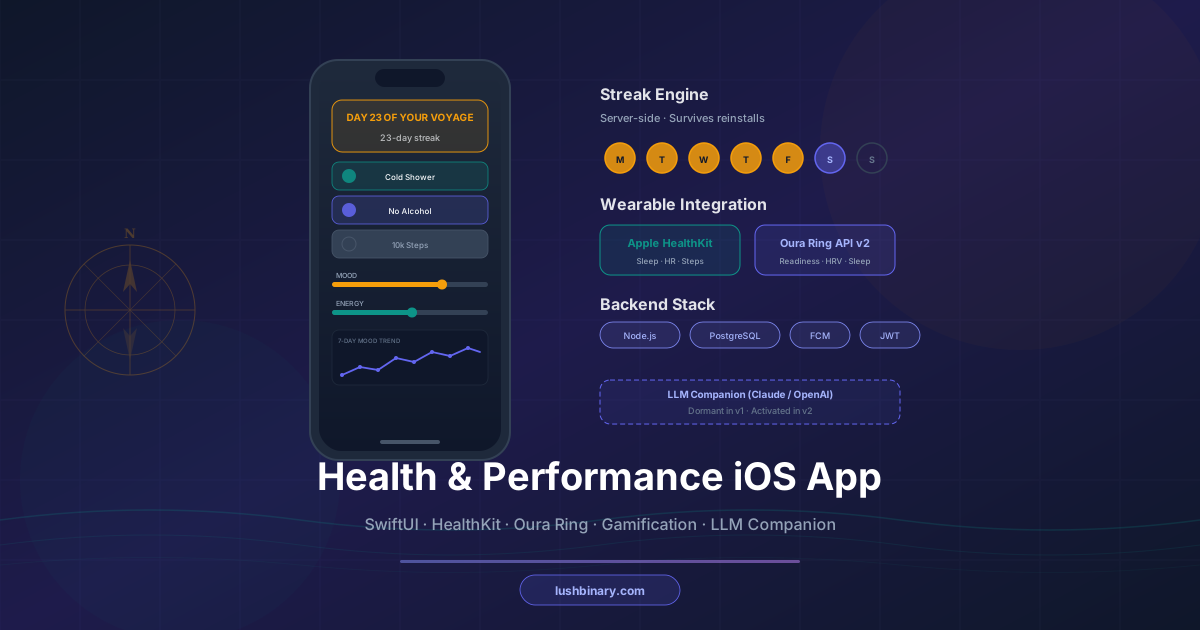
The brief is specific: a gamified iOS health and performance companion for high-performing men in their 40s–60s. Bold nautical visual identity. A named character guide. Habit tracking, sleep optimization, milestone unlocks, a private community feed, and a push notification engine driven by backend-controlled content. Optional Oura Ring and Apple HealthKit integration. A dormant LLM hook ready to activate in v2.
This is not a generic wellness app. It's a precision-built product for a specific audience with a specific aesthetic — and that specificity is exactly what makes it interesting to build. The technical decisions that matter here are not the obvious ones. They are the ones that determine whether the app feels alive or feels like every other health app on the App Store.
This guide breaks down the full architecture: framework choice, backend design, gamification mechanics, wearable integrations, the notification content engine, and the LLM integration point. Whether you're evaluating a developer for this kind of project or building one yourself, here is what the right decisions look like and why.
📋 Table of Contents
- 1.SwiftUI vs React Native: The Right Call for This App
- 2.Architecture Overview: iOS + Backend
- 3.Narrative-Driven Onboarding Flow
- 4.Daily Habit Tracking & Streak System
- 5.Sleep Optimization Check-In System
- 6.Milestone Unlock & Celebration Sequences
- 7.Private Community Story Feed
- 8.Push Notification Content Engine
- 9.Wearable Integration: Oura Ring & Apple HealthKit
- 10.LLM AI Companion Integration Point
- 11.Backend Stack & Deployment
- 12.Why Lushbinary for Your Health App Build
1SwiftUI vs React Native: The Right Call for This App
This is an iOS-only app targeting a premium audience. The visual identity is bold and character-driven. The feature set includes HealthKit integration, custom animations, and gamification sequences. The answer is SwiftUI, and the reasoning is not close.
SwiftUI renders through the native iOS rendering engine. Animations run at 120fps on ProMotion displays without a JavaScript bridge introducing latency. Full-screen milestone celebration sequences — the kind that feel like a reward, not a loading spinner — require frame-perfect timing that SwiftUI delivers natively. React Native averages 70ms per transaction vs SwiftUI's ~50ms, a 30% gap that users feel even if they can't name it.
HealthKit access is native to iOS. React Native requires a bridge library (typically react-native-health) that adds a dependency layer, limits access to a subset of HealthKit data types, and lags behind Apple's SDK updates. SwiftUI talks directly to HealthKit with full type coverage and zero bridge overhead.
The character-driven visual identity — bold nautical aesthetic, custom UI components, illustrated avatar — is easier to execute in SwiftUI. Custom Shape conformances, Canvas API, and matchedGeometryEffect give you precise control over every pixel. React Native's styling model is more constrained for highly custom UIs.
| Factor | SwiftUI | React Native |
|---|---|---|
| HealthKit access | ✅ Native, full coverage | ⚠️ Bridge library, partial |
| Animation performance | ✅ 120fps native | ⚠️ JS bridge latency |
| Custom UI components | ✅ Full control | ⚠️ More constrained |
| iOS 26 SDK features | ✅ Day-one access | ⚠️ Delayed support |
| Android parity | ❌ iOS only | ✅ Cross-platform |
| Developer pool | ⚠️ Smaller | ✅ Larger |
React Native is the right call only if Android is on the roadmap within 6 months. For an iOS-first MVP targeting a premium audience with a bold visual identity and HealthKit integration, SwiftUI is the correct choice.
2Architecture Overview: iOS + Backend
The app has two distinct layers: the iOS client and a lightweight backend API. Getting the boundary between them right is the most important architectural decision in the project.
The rule: anything that needs to survive a device change, reinstall, or multi-device access lives on the backend. This includes the voyage day counter, check-in history, streak state, and notification message content. Anything that is purely presentational or session-local lives on the client.
The backend exposes a clean REST API. The iOS app is a consumer of that API — it never owns authoritative state. This means:
- Streak counts survive reinstalls and device switches
- Notification messages update without App Store submissions
- Check-in history is queryable for analytics and coaching
- The LLM companion in v2 has full context history to work with
3Narrative-Driven Onboarding Flow
The onboarding is not a form. It is the first chapter of the user's voyage. The companion character introduces themselves, establishes the stakes, and guides the user through setup as a narrative sequence — not a series of permission dialogs.
The technical implementation uses a state machine with named steps. Each step is a full-screen SwiftUI view with a defined entry animation, character dialogue, and a single primary action. The character avatar is an illustrated asset rendered as a Image with a spring animation on appearance. Dialogue text types in character using a custom TypewriterText view modifier.
// Onboarding state machine
enum OnboardingStep {
    case welcome          // Character intro + app pitch
    case nameEntry        // "What should I call you, Captain?"
    case goalSetting      // 3 performance goals selection
    case habitSelection   // Choose 3 daily habits to track
    case notificationTime // Set evening reminder time
    case wearablePrompt   // Optional: connect Oura / HealthKit
    case complete         // "Your voyage begins now"
}
Each step collects exactly one piece of information. The user never sees a multi-field form. Progress is saved to the backend after each step, so if the user abandons onboarding and returns, they resume exactly where they left off.
The wearable prompt is positioned last and marked optional. Users who skip it can connect later from settings. This is important: requiring wearable connection during onboarding is a known drop-off point. Position it as a bonus, not a gate.
4Daily Habit Tracking & Streak System
The habit check-in is the core daily loop. Three toggleable habits, a mood slider (1–5), and an energy slider (1–5). The UI components are custom — not default iOS toggles. The nautical theme calls for something that feels like a ship's log, not a settings screen.
Custom Toggle Design
Each habit toggle is a custom HabitToggleButton — a rounded card with the habit name, an icon, and a fill animation on tap. When toggled on, the card fills with the brand's warm gold color and a checkmark animates in using withAnimation(.spring(response: 0.3)). The tactile feedback uses UIImpactFeedbackGenerator with .medium style.
Streak Engine (Server-Side)
Streaks are computed server-side on every check-in submission. The backend stores last_checkin_date and current_streak per user. The logic is simple and explicit:
function computeStreak(user, today) {
  const last = user.last_checkin_date;
  if (!last) return 1; // first check-in
  const diff = daysBetween(last, today);
  if (diff === 0) return user.current_streak; // already checked in today
  if (diff === 1) return user.current_streak + 1; // consecutive day
  return 1; // streak broken, reset
}
The streak visualization uses a horizontal scroll of the last 7 days. Each day is a circle: filled gold for completed, outlined for missed, pulsing indigo for today. A flame icon appears at streak milestones (7, 14, 30, 60, 90 days) with a brief particle animation.
Design note: Loss aversion > reward anticipation
Research from RevenueCAT's 2025 gamification study shows that streak mechanics work primarily through loss aversion — users are more motivated to protect an existing streak than to start a new one. The UI should make the current streak prominent and the cost of breaking it viscerally clear. A subtle "streak at risk" notification at 8pm if the user hasn't checked in is more effective than a generic reminder.
5Sleep Optimization Check-In System
The sleep system has two touchpoints per day: an evening prep check-in (before bed) and a morning debrief (on wake). This mirrors the structure used in evidence-based sleep coaching protocols.
Evening Prep (9–10pm)
A short 3-question check-in: planned bedtime, screen-off time, and one optional note. The companion character delivers a contextual message based on the user's recent sleep trend — not a generic "good luck tonight." This is where the backend-controlled notification content engine earns its keep: the evening push notification pulls a message from the backend that can reference the user's streak, recent mood scores, or upcoming milestones.
Morning Debrief (7–9am)
Four inputs: actual sleep time, wake time, sleep quality (1–5), and one optional note. If Oura Ring or HealthKit is connected, the app pre-fills sleep duration and quality from wearable data — the user just confirms or adjusts. This reduces friction dramatically and increases morning check-in completion rates.
All sleep data is stored server-side with timestamps. The 7-day history view shows a simple line chart of sleep quality scores using Swift Charts (available since iOS 16, no third-party dependency needed).
6Milestone Unlock & Celebration Sequences
Milestone celebrations are the highest-impact moment in the app. Done right, they create the emotional peak that users remember and talk about. Done wrong, they feel like a loading screen with confetti.
The implementation uses a full-screen modal with a layered animation sequence:
- Background pulse: the screen flashes the brand gold color with a radial gradient expanding from center (0.3s)
- Badge drop: the milestone badge scales in from 0 to 1.1 then settles to 1.0 with a spring animation (0.5s)
- Character reaction: the companion avatar animates in from the bottom with a celebratory pose (0.4s, delayed 0.3s)
- Particle burst: a
Canvas-based particle system emits 40–60 particles in brand colors (0.8s) - Milestone text: title and description fade in with a typewriter effect (0.6s, delayed 0.5s)
- Share prompt: optional share sheet for the community feed (appears after 1.5s)
// Milestone trigger check (called after each check-in save)
func checkMilestones(user: User) -> Milestone? {
    let milestones: [(Int, String, String)] = [
        (7,  "First Week",    "7 days on the voyage"),
        (14, "Two Weeks",     "Halfway to your first month"),
        (30, "First Month",   "30 days. The habit is real."),
        (60, "Two Months",    "60 days. You're different now."),
        (90, "The Centurion", "90 days. Welcome to the crew."),
    ]
    return milestones
        .first { user.current_streak == $0.0 }
        .map { Milestone(days: $0.0, title: $0.1, desc: $0.2) }
}
Milestone state is stored server-side. The backend returns an unlocked_milestone field in the check-in response when a milestone is hit. The iOS app checks this field and triggers the celebration sequence if present. This prevents duplicate celebrations on the same milestone across sessions.
7Private Community Story Feed
The community feed is a closed, first-name-only story feed for enrolled members. It is not a social network. It is a signal that others are on the same journey — a motivational layer, not a distraction.
The feed shows recent milestone unlocks, streak achievements, and optional user-posted notes. Each entry shows first name only, the achievement, and a timestamp. No profile photos, no follower counts, no likes. The design is intentionally minimal — the content is the signal.
Backend Design
The feed is a simple append-only table: community_events(id, user_first_name, event_type, event_data, created_at). Events are written automatically when milestones unlock or streaks hit key numbers. Users can optionally post a note (max 280 chars) that appears as a community event.
The GET /community/feed endpoint returns the last 50 events, paginated. The iOS app polls this endpoint on app foreground and displays new events with a subtle slide-in animation. No WebSocket needed for MVP — polling every 5 minutes on foreground is sufficient for a 10-user pilot.
Privacy note
Store only the first name in the community events table — never the full name or user ID. This is both a privacy best practice and a product decision: first-name-only creates a sense of intimacy without exposing identity. Ensure your privacy policy covers community data sharing before launch.
8Push Notification Content Engine
This is the feature that separates a thoughtful product from a generic one. The notification content engine allows the app's messaging to evolve — new copy, seasonal themes, streak-aware messages — without a single App Store update.
How It Works
The backend stores notification templates in a notification_templates table with fields: id, type (evening_reminder, morning_nudge, streak_at_risk, milestone_tease), body, and active. A GET /notifications/content?type=evening_reminder endpoint returns the active template for that type.
The notification scheduler (a cron job or AWS EventBridge rule) runs at the user's configured reminder time. It fetches the current template, personalizes it with the user's first name and streak count, and sends it via Firebase Cloud Messaging (FCM), which handles APNs routing.
// Notification dispatch (Node.js)
async function sendEveningReminder(user) {
  const template = await db.query(
    "SELECT body FROM notification_templates WHERE type = 'evening_reminder' AND active = true LIMIT 1"
  );
  const body = template.body
    .replace("{{name}}", user.first_name)
    .replace("{{streak}}", user.current_streak);

  await fcm.send({
    token: user.apns_token,
    notification: { title: "Captain's Log", body },
  });
}
To update the notification copy, you change one row in the database. No app update. No review cycle. The message the user receives tomorrow is different from the one they received last week — and you control that entirely from the backend.
For the MVP, FCM is the right choice over direct APNs. FCM handles token refresh, delivery receipts, and the APNs authentication complexity. The Firebase SDK for iOS is mature and well-documented. Direct APNs is worth considering at scale, but adds unnecessary complexity for a 10-user pilot.
9Wearable Integration: Oura Ring & Apple HealthKit
Wearable integration is optional at launch but architecturally important to get right. The integration point needs to be clean enough that adding or removing a wearable source doesn't require touching the rest of the app.
Apple HealthKit
HealthKit requires native iOS access — there is no remote API. The app requests read permissions for specific data types on first connection. HealthKit data is stored encrypted in a SQLite database on the device; your app must request per-type permissions, not blanket access.
For this app, the relevant types are: HKObjectType.quantityType(forIdentifier: .heartRate), .stepCount, .activeEnergyBurned, and HKObjectType.categoryType(forIdentifier: .sleepAnalysis). Sleep data from HealthKit is sourced from Apple Watch if paired, or from third-party apps that write to HealthKit (including Oura's own iOS app).
// HealthKit sleep query (Swift)
let sleepType = HKObjectType.categoryType(
    forIdentifier: .sleepAnalysis
)!
let predicate = HKQuery.predicateForSamples(
    withStart: Calendar.current.startOfDay(for: Date()),
    end: Date()
)
let query = HKSampleQuery(
    sampleType: sleepType,
    predicate: predicate,
    limit: HKObjectQueryNoLimit,
    sortDescriptors: nil
) { _, samples, _ in
    let asleepMinutes = samples?
        .compactMap { $0 as? HKCategorySample }
        .filter { $0.value == HKCategoryValueSleepAnalysis.asleepUnspecified.rawValue }
        .reduce(0) { $0 + $1.endDate.timeIntervalSince($1.startDate) / 60 }
    // Pre-fill morning debrief with asleepMinutes
}
Oura Ring API v2
The Oura API v2 is a REST API hosted at https://api.ouraring.com/v2. Authentication uses OAuth 2.0 — Personal Access Tokens are being deprecated by Oura and should not be used for new production apps. The most relevant endpoints for this app:
/v2/usercollection/daily_sleepSleep score, efficiency, latency, timing
/v2/usercollection/daily_readinessReadiness score, HRV balance, recovery
/v2/usercollection/heartrateContinuous HR data (5-min intervals)
/v2/usercollection/daily_activitySteps, active calories, activity score
The Oura API call happens on the backend, not the iOS client. The user authenticates with Oura via OAuth in a WKWebView sheet, your backend stores the refresh token, and subsequent data fetches happen server-to-server. This keeps the Oura credentials off the device and allows background data sync.
The Oura API provides a sandbox environment at https://api.ouraring.com/v2/sandbox with sample data, so you can build and test the full integration without a physical Oura Ring.
10LLM AI Companion Integration Point
The LLM companion is dormant at launch and activates in v2. Getting the integration point right in v1 means v2 activation is a feature flag flip, not a refactor.
The architecture: every check-in, sleep entry, and milestone event is stored with a structured schema that an LLM can consume as context. The companion character's personality is defined in a system prompt stored in the backend (not hardcoded in the app). The iOS app has a chat interface component that is hidden behind a feature flag in v1.
// LLM context builder (Node.js) — ready in v1, activated in v2
async function buildCompanionContext(userId) {
  const [user, recentCheckins, streak, milestones] = await Promise.all([
    db.getUser(userId),
    db.getRecentCheckins(userId, 7),
    db.getStreak(userId),
    db.getUnlockedMilestones(userId),
  ]);
  return {
    user: { name: user.first_name, streak, goals: user.goals },
    recentMood: recentCheckins.map(c => ({ date: c.date, mood: c.mood, energy: c.energy })),
    milestones: milestones.map(m => m.title),
    sleepTrend: recentCheckins.map(c => c.sleep_quality),
  };
}
When v2 activates, the backend calls the Anthropic Claude or OpenAI API with this context as the user message prefix. The companion character's system prompt defines their personality, tone, and knowledge boundaries. The iOS chat interface streams the response using Server-Sent Events.
Why Claude for the companion?
Anthropic's Claude models have strong instruction-following for character consistency — the companion stays in voice across long conversations. Claude's constitutional AI training also makes it less likely to give harmful health advice, which matters for a health app. The Anthropic API offers competitive per-token pricing for Claude Haiku 3.5, making it cost-effective for a companion that responds to short daily check-ins.
11Backend Stack & Deployment
For a 10-user MVP, the backend needs to be fast to deploy, cheap to run, and easy to hand off. Over-engineering the backend at this stage is a common mistake that delays launch without adding value.
Recommended Stack
Runtime
Node.js + Fastify
Fast, low overhead, TypeScript-native
Database
PostgreSQL (Supabase)
Managed, free tier, built-in auth
Push Notifications
Firebase Cloud Messaging
Handles APNs routing, free tier
Hosting
Railway or Render
Deploy from GitHub, free SSL, affordable tiers
Auth
JWT + refresh tokens
Stateless, works with mobile clients
Scheduler
node-cron or Railway cron
Simple, no extra infrastructure
Core API Endpoints
| Endpoint | Purpose |
|---|---|
| POST /auth/register | Create account, return JWT |
| POST /auth/login | Authenticate, return JWT + refresh token |
| GET /user/voyage | Voyage day count + streak + milestones |
| POST /checkin | Submit daily habit check-in |
| GET /checkin/history?days=7 | Last N days of check-ins |
| POST /sleep/evening | Evening prep check-in |
| POST /sleep/morning | Morning debrief check-in |
| GET /notifications/content | Active notification template by type |
| POST /device/token | Register APNs device token |
| GET /community/feed | Last 50 community events |
| POST /wearable/oura/connect | Initiate Oura OAuth flow |
Database Schema (Core Tables)
-- Users
users(id, first_name, email, password_hash, goals jsonb,
      current_streak, last_checkin_date, voyage_start_date,
      apns_token, notification_time, created_at)

-- Daily check-ins
checkins(id, user_id, date, habit_1 bool, habit_2 bool,
         habit_3 bool, mood int, energy int, created_at)

-- Sleep entries
sleep_entries(id, user_id, date, type, bedtime, wake_time,
              quality int, notes text, source, created_at)

-- Milestones
milestones(id, user_id, milestone_key, unlocked_at)

-- Community events
community_events(id, user_first_name, event_type,
                 event_data jsonb, created_at)

-- Notification templates
notification_templates(id, type, body, active, updated_at)12Why Lushbinary for Your Health App Build
Building a health and performance app that feels alive — not generic — requires a team that understands both the technical architecture and the product decisions that make users come back. The difference between an app that gets deleted after a week and one that becomes a daily ritual is not the feature list. It is the quality of the execution at every layer.
Lushbinary has built native iOS apps with HealthKit integration, custom gamification systems, and backend-controlled content engines. We have shipped wearable integrations for enterprise clients (see our MSP Disposal Meta Glasses case study) and built mobile apps with real users across consumer and B2B contexts.
For a project like this — iOS-only, character-driven, gamified, wearable-connected, with an LLM companion on the roadmap — we bring:
- SwiftUI expertise for custom UI components, animations, and HealthKit integration
- Full-stack ownership from iOS client through backend API to deployment
- LLM integration experience with Anthropic Claude and OpenAI for AI companion features
- Gamification architecture that drives retention, not just engagement metrics
- Clean, documented code you can hand to any developer and they can continue building
❓ Frequently Asked Questions
How much does it cost to build a health and performance iOS app in 2026?
Health app development costs vary significantly based on scope, integrations, and feature complexity. Factors like wearable integrations (HealthKit, Oura Ring), gamification, community features, and AI coaching all influence the investment. Book a free consultation with Lushbinary to get a tailored estimate for your specific project.
Should I use SwiftUI or React Native for a health performance app?
SwiftUI is the stronger choice for iOS-only health apps in 2026. It provides direct HealthKit access, native CoreMotion integration, smoother animations for gamification sequences, and 30–50ms faster render times than React Native. React Native makes sense only if you need Android parity from day one.
How do you integrate Oura Ring data into an iOS app?
Oura Ring provides a REST API v2 at cloud.ouraring.com. You authenticate users via OAuth 2.0, then call endpoints like /v2/usercollection/daily_sleep and /v2/usercollection/daily_readiness. The API returns sleep scores, readiness scores, HRV, and activity data. A sandbox environment is available for development without a physical ring.
How do you build a push notification system where message content is controlled from the backend?
Store notification message templates in your backend database. When your scheduler fires at the user's configured time, it fetches the current template, personalizes it with the user's name and streak count, and sends it via FCM/APNs. Changing the message in the database updates all future notifications without any app update.
How do you implement streak tracking that survives app reinstalls?
Store streak state server-side, not in UserDefaults. Your backend tracks last_checkin_date and current_streak per user. On each check-in, the server compares dates: same day = no change, yesterday = streak + 1, older = streak reset to 1. The app fetches streak state on launch, so reinstalls never break the count.
What backend stack works best for a health app MVP?
Node.js with Fastify on Railway or Render is the fastest path to a live backend. Use PostgreSQL (Supabase managed) for structured data and Firebase Cloud Messaging for push notifications. This stack deploys in under an hour with affordable hosting tiers and scales to thousands of users without architectural changes.
📚 Sources
- Oura API v2 Documentation
- Apple HealthKit Developer Documentation
- Firebase Cloud Messaging for iOS
- Swift Charts (iOS 16+)
- Anthropic Claude API Pricing
- RevenueCAT Gamification Guide
Content was rephrased for compliance with licensing restrictions. Technical specifications sourced from official API documentation and developer guides as of March 2026. Pricing and API details may change — always verify on the vendor's website.
🚀 Free consultation for health app projects
Building a health or performance app? We offer a free 30-minute architecture review to help you make the right framework, backend, and integration decisions before you write a line of code. Book your free call →
Ready to Build Your Health App?
Tell us about your project. We'll respond within 24 hours with a clear path forward — no sales pitch, just honest technical guidance.
Build Smarter, Launch Faster.
Book a free strategy call and explore how LushBinary can turn your vision into reality.

