
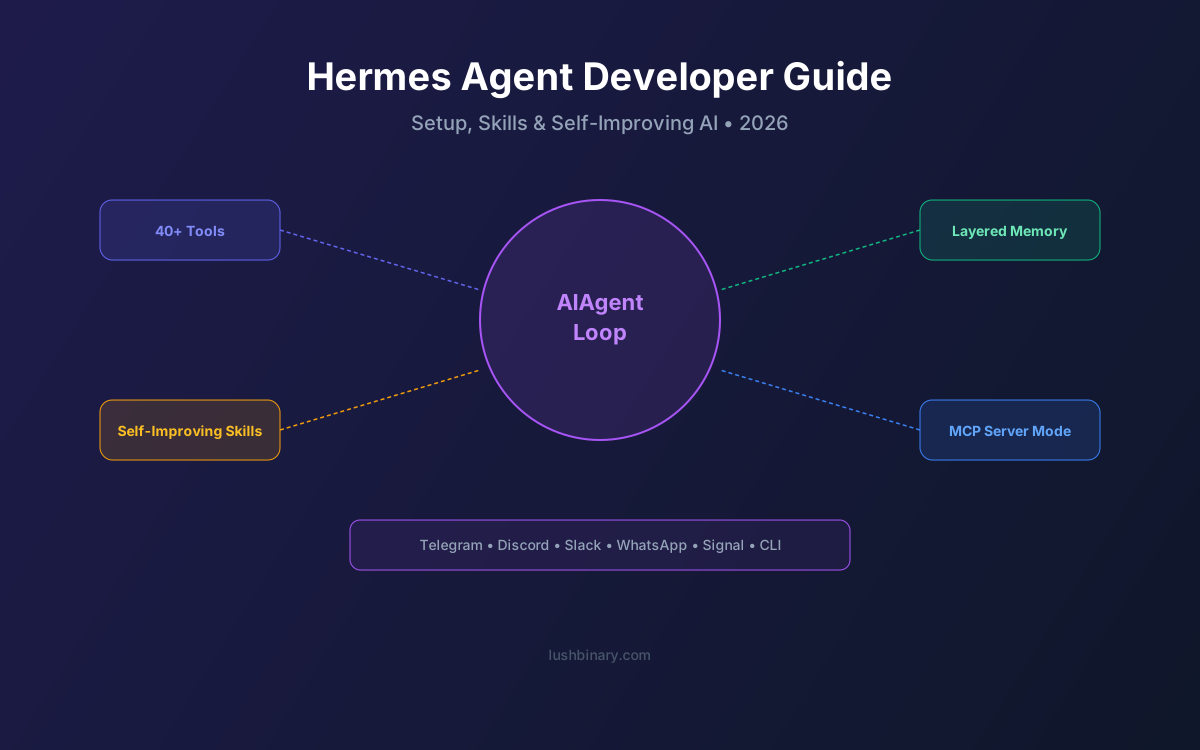
Hermes Agent is the first self-hosted AI agent with a built-in learning loop. Built by Nous Research (the lab behind the Hermes model family and Atropos RL environments), it runs persistently on your machine, connects to your messaging apps, and gets smarter the longer you use it.
Released in February 2026 under MIT license, Hermes Agent has quickly become the primary alternative to OpenClaw for developers who want an agent that compounds through use rather than staying static. As of v0.7.0 (April 3, 2026), it features pluggable memory backends, 40+ built-in tools, MCP server mode, and six terminal backends.
This guide covers everything you need to go from zero to a production Hermes Agent deployment: installation, configuration, skill development, memory architecture, and deployment options.
📑 What This Guide Covers
1What Is Hermes Agent?
Hermes Agent is an open-source, model-agnostic personal AI agent designed to run persistently, remember across sessions, schedule recurring work, and improve its behavior over time. Unlike chatbots that reset after every conversation, Hermes maintains persistent memory, creates new skills from experience, and refines those skills during use.
Key capabilities:
Self-Improving Skills
Autonomously creates and refines reusable skills from completed tasks
Persistent Memory
FTS5 search + LLM summarization across sessions, platforms, and devices
User Modeling
Honcho dialectic modeling builds a deepening understanding of you
40+ Built-in Tools
File management, browser, terminal, email, calendar, and more
6 Terminal Backends
Local, Docker, SSH, Daytona, Singularity, Modal
MCP Server Mode
Expose Hermes as an MCP server for IDE and tool integration
Multi-Channel
Telegram, Discord, Slack, WhatsApp, Signal, CLI
200+ LLM Models
OpenRouter, OpenAI, Nous Portal, Ollama, and more
2Installation & Setup
Hermes Agent runs on Linux, macOS, and WSL2. Windows users need WSL2 installed first.
Quick Install
# macOS
brew install hermes-agent
# Linux / WSL2
pip install hermes-agent
# Verify
hermes --version # Should show v0.7.0+
First-Time Setup
# Initialize your agent
hermes init
# This walks you through:
# 1. Choosing an LLM provider
# 2. Setting your API key
# 3. Configuring a messaging channel (optional)
# 4. Setting up your persona
# Start the agent
hermes start
The setup wizard is interactive and takes about 5 minutes. For a minimal start, you only need an LLM provider API key (OpenRouter is recommended for access to 200+ models).
3Architecture Deep Dive
Hermes Agent's architecture centers on the AIAgent loop rather than a gateway control plane. This is a deliberate design choice: the learning cycle is a first-class architectural concern.
The core components:
- AIAgent Loop: The synchronous orchestration engine. Handles reasoning, tool execution, skill creation, and self-evaluation.
- Gateway: Routes messages from messaging platforms into the agent loop. Supports multi-channel with a single process.
- Cron Scheduler: Runs recurring tasks in fresh sessions, delivering outputs automatically.
- Tooling Runtime: Executes tools across six terminal backends (local, Docker, SSH, Daytona, Singularity, Modal).
- ACP Integration: Agent Communication Protocol for external tool integration (code editors, IDEs).
- SQLite Persistence: Session history, memory, and skill metadata stored in SQLite with FTS5 full-text search.
- RL Environments: Atropos integration for reinforcement learning training and trajectory export.
4The Self-Improving Learning Loop
The learning loop is what makes Hermes fundamentally different from every other self-hosted agent. Here's how it works in practice:
- Task Completion: You ask Hermes to do something complex (e.g., “research competitor pricing and create a comparison spreadsheet”)
- Pattern Extraction: After completing the task, Hermes analyzes the steps it took and identifies reusable patterns
- Skill Creation: It writes a Markdown skill file capturing the workflow as a reusable procedure
- Skill Refinement: Next time a similar task comes up, Hermes uses the skill and refines it based on the outcome
- Periodic Nudge: Every 15 tasks, Hermes evaluates its overall performance, analyzing successes and failures
The key innovation is procedural memory — Hermes remembers methods, not just facts. It converts successful workflows into reusable procedures that get loaded the next time a similar problem appears.
💡 Cache-Aware Learning
The memory architecture is cache-aware: it freezes the system prompt snapshot at session initialization so high-frequency model calls use cached context windows efficiently. Learning doesn't keep growing your token bill.
5Memory Architecture
Hermes uses a layered memory system with strict separation between “hot” prompt memory and “cold” archival storage:
| Layer | Purpose | Storage |
|---|---|---|
| Persistent Notes | Agent-curated knowledge that survives sessions | SQLite + files |
| Session History | Searchable conversation history | FTS5 full-text search |
| User Model | Deepening understanding of user preferences | Honcho dialectic |
| Procedural Memory | Reusable skills as methods | Markdown files |
| Archival Storage | Cold storage for old sessions | SQLite |
Since v0.7.0, memory is fully pluggable. You can swap backends using:
hermes memory setup
# Choose from: built-in, Honcho, vector store, custom DB
6Skills & Tools
Hermes skills follow the agentskills.io open standard. Skills are Markdown files that describe a reusable procedure. Unlike OpenClaw's static skills, Hermes skills can be:
- Auto-generated: Created by the agent after completing complex tasks
- Self-improving: Refined during subsequent use based on outcomes
- Manually authored: You can still write skills by hand
Hermes also ships with 40+ built-in tools covering file management, browser automation, terminal execution, email, calendar, web search, and more. Tools are accessible across all six terminal backends.
Subagents
Hermes supports isolated subagents — each gets its own conversation, terminal, and Python RPC scripts for zero-context-cost pipelines. This is useful for parallel workstreams where you don't want tasks interfering with each other.
7Messaging Channels
Hermes connects to your existing messaging apps from a single gateway process. Supported channels:
Telegram
Full bot API with inline keyboards and media
Discord
Bot with thread support and voice channels
Slack
App with OAuth, slash commands, and threads
Business API with media and templates
Signal
Privacy-first messaging (not available in OpenClaw)
CLI
TUI with multiline editing, autocomplete, and history
Start on one channel, pick up on another — Hermes maintains context across platforms. The CLI includes a text user interface (TUI) with multiline editing, autocomplete, conversation history, and the ability to interrupt or redirect the agent mid-process.
8LLM Provider Configuration
Hermes is model-agnostic. Switch models with a command, no code changes:
hermes model # Interactive model selector
Supported providers:
- OpenRouter: 200+ models including Claude, GPT, Gemini, Llama, DeepSeek
- OpenAI: GPT-5.4, GPT-5.4 Thinking
- Nous Portal: Hermes models optimized for agent use
- Ollama: Local models (Gemma 4, Llama 4, Qwen 3.5, DeepSeek)
- z.ai, Kimi Moonshot, MiniMax, GLM: Additional providers
- Custom endpoints: Any OpenAI-compatible API
9MCP Integration
Hermes supports MCP (Model Context Protocol) in two directions:
- MCP Client: Connect to external MCP servers to access tools (databases, APIs, file systems)
- MCP Server Mode (v0.6.0+): Expose Hermes itself as an MCP server, allowing IDEs and other tools to use Hermes as a backend
For a deep dive into MCP, see our MCP developer guide.
10Deployment Options
Hermes is portable — it's not tied to one app or one machine. Deployment options:
| Option | Cost | Best For |
|---|---|---|
| Local (your machine) | $0 | Development and testing |
| VPS ($5 plan) | ~$5/mo | Always-on personal agent |
| Docker on VPS | ~$5-15/mo | Isolated, reproducible deployment |
| AWS EC2 (t3.small) | ~$15/mo | Production with AWS ecosystem |
| Modal (serverless) | Pay-per-use | Cost optimization (no idle costs) |
| Daytona (cloud dev) | Pay-per-use | Cloud development environments |
11Security Best Practices
Hermes ships with safer defaults than most agent frameworks, but you should still follow these practices:
- Use Docker backend for production deployments with read-only root and dropped capabilities
- Enable prompt injection scanning (on by default in v0.7.0)
- Review tool permissions — restrict which tools the agent can use unsupervised
- Use credential filtering to prevent API keys from appearing in agent context
- Monitor agent logs regularly:
hermes logs --follow - Keep Hermes updated — security patches are released frequently
For sensitive deployments, consider running Hermes in a dedicated VPC with restricted network access. See our Hermes vs OpenClaw security comparison for more details.
12How Lushbinary Can Help
We've been deploying AI agents since the early days of OpenClaw and were among the first to adopt Hermes Agent for client projects. We can help with:
- Custom agent development: Purpose-built Hermes agents for your specific workflows
- MCP server development: Connect Hermes to your databases, APIs, and internal tools
- AWS deployment: Production infrastructure with monitoring and auto-scaling
- Skill development: Custom skills for your industry and use cases
- Migration from OpenClaw: Smooth transition with zero downtime
🚀 Free Consultation
Book a free 30-minute call to discuss your AI agent needs. We'll help you design the right architecture and get Hermes running in production.
❓ Frequently Asked Questions
What is Hermes Agent?
An open-source, self-hosted AI agent from Nous Research with a built-in learning loop. It runs persistently, connects to messaging apps, and improves its skills over time. MIT-licensed, supports 200+ models.
How do I install Hermes Agent?
macOS: brew install hermes-agent. Linux/WSL2: pip install hermes-agent. Then run hermes init to configure your LLM provider and channels.
How does the self-improving loop work?
After complex tasks, Hermes extracts reusable patterns and writes them as skills. Skills self-improve during use. Every 15 tasks, the agent evaluates its performance.
How much does it cost?
Free software (MIT). VPS hosting from $5/mo. LLM costs from $0 (Ollama) to $65/mo (premium models).
What models work with Hermes?
200+ via OpenRouter, plus OpenAI, Nous Portal, z.ai, Kimi, MiniMax, GLM, Ollama, and custom endpoints.
📚 Sources
Content was rephrased for compliance with licensing restrictions. Technical details sourced from official Hermes Agent documentation and release notes as of April 2026. Features may change — always verify on the official docs.
Ready to Build with Hermes Agent?
We deploy custom Hermes agents with MCP integrations, AWS infrastructure, and purpose-built skills for your business.
Build Smarter, Launch Faster.
Book a free strategy call and explore how LushBinary can turn your vision into reality.

