
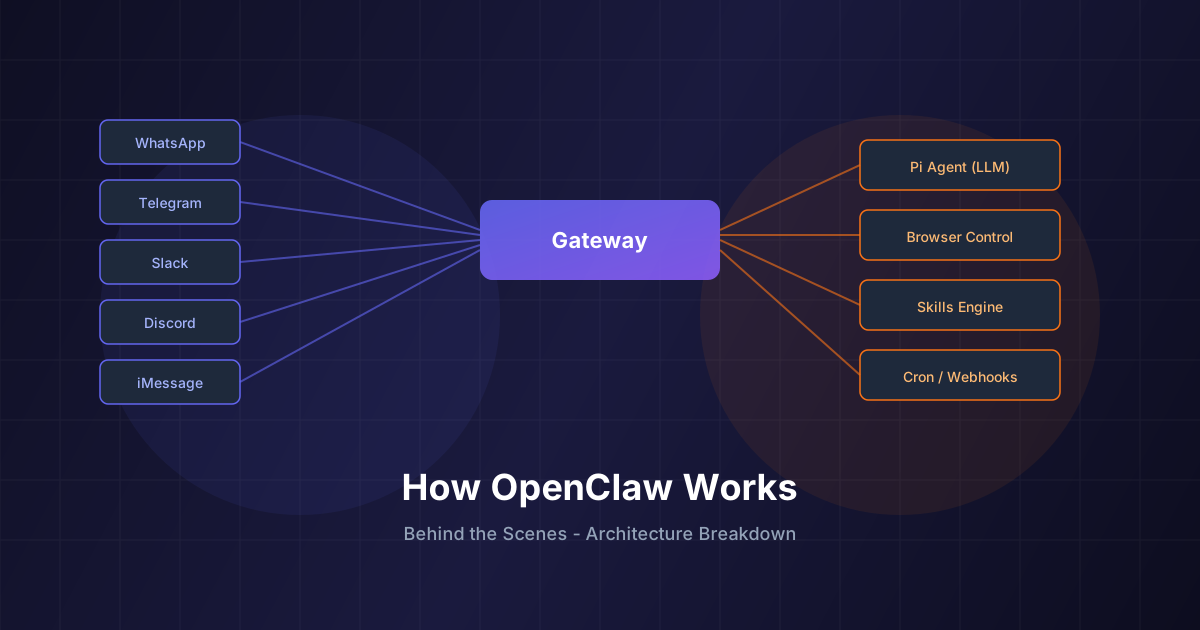
If you've been anywhere near the AI community in early 2026, you've probably heard of OpenClaw, the open-source personal AI assistant that has grown to over 186,000 GitHub stars since launching in late January 2026. Created by Peter Steinberger (founder of PSPDFKit), OpenClaw has been called "everything Siri was supposed to be" and "the first software that truly feels like living in the future."
But what actually makes it tick? In this post, we break down OpenClaw's architecture, walk through every major subsystem, and show you how to deploy it on AWS without burning money.
📋 Table of Contents
- 1.What Is OpenClaw?
- 2.The Gateway: OpenClaw's Control Plane
- 3.Multi-Channel Messaging Architecture
- 4.The Pi Agent Runtime
- 5.Skills, SOUL.md & the Workspace System
- 6.Browser Control, Canvas & Voice
- 7.Security Model: DM Pairing & Sandboxing
- 8.Multi-Agent Routing & Sessions
- 9.Deploying OpenClaw on AWS
- 10.Why Lushbinary for Your OpenClaw Deployment
1What Is OpenClaw?
OpenClaw (formerly known as Clawdbot and Moltbot) is a free, open-source, self-hosted AI assistant that runs on your own devices. Unlike ChatGPT or Claude's web interfaces, OpenClaw connects to the messaging apps you already use (WhatsApp, Telegram, Slack, Discord, Signal, iMessage, Microsoft Teams, Google Chat, and more) and turns them into a command center for an autonomous AI agent.
It's not just a chatbot. OpenClaw can autonomously manage your email, organize your calendar, control your browser, execute code, manage files, and even make phone calls. It's MIT-licensed, so it's completely free to use. You just bring your own LLM API key or subscription (Anthropic Claude, OpenAI, DeepSeek, etc.).
"At this point I don't even know what to call OpenClaw. It is something new. This is the first time I have felt like I am living in the future since the launch of ChatGPT." - @davemorin
2The Gateway: OpenClaw's Control Plane
At the heart of OpenClaw is the Gateway, a WebSocket-based control plane that acts as the central nervous system. It binds to ws://127.0.0.1:18789 by default and manages:
- Sessions: isolated conversation contexts for each chat, group, or agent
- Channel routing: directing messages from WhatsApp, Telegram, Slack, etc. to the right agent
- Presence & typing indicators: real-time status across all connected platforms
- Tool orchestration: browser, canvas, cron jobs, webhooks, and node actions
- Config, cron, and webhooks: scheduled tasks and external trigger handling
- Control UI & WebChat: a built-in web dashboard served directly from the Gateway
The Gateway is the only process you need to run. Everything else (the agent, the channels, the tools) connects to it. Think of it as a message router with superpowers.
3Multi-Channel Messaging Architecture
OpenClaw supports a wide range of messaging channels, each implemented with battle-tested libraries:
Each channel supports group routing with mention gating, reply tags, per-channel chunking, and configurable activation modes. Messages flow into the Gateway, get routed to the appropriate agent session, and responses are streamed back to the originating channel.
The multi-channel design means you can message your AI assistant from WhatsApp on your phone, continue the conversation on Slack at your desk, and check in via Telegram later, all with persistent context.
4The Pi Agent Runtime
The actual AI reasoning happens in the Pi agent runtime, which runs in RPC mode connected to the Gateway. It supports:
- Tool streaming: the agent can invoke tools (browser, file system, shell, etc.) and stream results back in real-time
- Block streaming: long responses are chunked and delivered progressively
- Model flexibility: works with Anthropic Claude (recommended: Opus 4.6 for long-context strength), OpenAI GPT models, DeepSeek, MiniMax, and others
- Model failover: automatic rotation between OAuth subscriptions and API keys with fallback chains
- Session pruning: intelligent context management to stay within token limits
The recommended model configuration is Anthropic Claude Pro/Max with Opus 4.6, which provides strong long-context performance and better resistance to prompt injection attacks. This matters a lot for an agent that processes untrusted inbound messages.
// Minimal config (~/.openclaw/openclaw.json)
{
  "agent": {
    "model": "anthropic/claude-opus-4-6"
  }
}5Skills, SOUL.md & the Workspace System
One of OpenClaw's best features is its workspace and skills system. The agent's personality, knowledge, and capabilities are defined by files in the workspace directory (~/.openclaw/workspace):
- SOUL.md: defines the agent's personality, tone, and behavioral guidelines. This is injected into the system prompt at runtime, giving the agent a persistent "soul" across all conversations.
- AGENTS.md: configures agent behavior, routing rules, and multi-agent coordination
- TOOLS.md: documents available tools and their usage patterns
- Skills: modular capabilities stored in
skills/<skill>/SKILL.md. Skills can be bundled, managed via ClawHub (the skill registry), or created in your workspace.
The skills system is what makes OpenClaw extensible. Users have built skills for everything from flight tracking to health metric monitoring, Todoist automation, and even controlling air purifiers. The agent can even create new skills for itself on demand. You just describe what you need in natural language.
6Browser Control, Canvas & Voice
OpenClaw goes well beyond text. It includes several subsystems worth knowing about:
🌐 Browser Control
OpenClaw manages a dedicated Chrome/Chromium instance via CDP (Chrome DevTools Protocol). The agent can navigate websites, take snapshots, fill forms, click buttons, upload files, and manage browser profiles, all autonomously.
🎨 Live Canvas (A2UI)
The Canvas is an agent-driven visual workspace. The agent can push content, reset the canvas, evaluate code, and take snapshots. It renders on macOS, iOS, and Android companion apps.
🎙️ Voice Wake & Talk Mode
On macOS, iOS, and Android, OpenClaw supports always-on voice activation and continuous conversation mode powered by ElevenLabs TTS. You can literally talk to your AI assistant like a coworker.
7Security Model: DM Pairing & Sandboxing
Since OpenClaw connects to real messaging platforms, security is critical. The default security model includes:
- DM Pairing: unknown senders receive a short pairing code. Messages aren't processed until you approve them via
openclaw pairing approve. This prevents unauthorized access. - Allowlists: per-channel allowlists control who can interact with the assistant
- Docker Sandboxing: for group/channel sessions, you can run non-main sessions inside per-session Docker containers, isolating bash execution
- Tool allowlists/denylists: sandbox mode restricts which tools are available (e.g., allowing bash but denying browser access in sandboxed sessions)
- Elevated access control: per-session toggles for elevated bash permissions
The openclaw doctor command audits your configuration and surfaces risky or misconfigured DM policies, making it easy to keep things locked down.
8Multi-Agent Routing & Sessions
OpenClaw supports multi-agent routing, allowing you to run multiple isolated agents with separate workspaces and sessions. Inbound channels, accounts, or peers can be routed to different agents.
Agents can coordinate using built-in session tools:
sessions_list: discover active sessions and their metadatasessions_history: fetch transcript logs from another sessionsessions_send: message another session with optional reply-back coordination
This lets you set up workflows like having one agent manage your email while another handles code reviews, with both able to communicate and hand off tasks.
9Deploying OpenClaw on AWS
While OpenClaw is designed to run locally, many users want a 24/7 always-on assistant, and that means cloud deployment. Running OpenClaw on AWS is a natural fit, but doing it cost-effectively takes some planning. Here's the architecture we use at Lushbinary:
🏗️ Recommended AWS Architecture
EC2 (t4g.small or t4g.medium)
ARM-based Graviton instances offer the best price-performance for the Gateway. A t4g.small (~$12/month) handles single-user setups comfortably. Use Spot Instances for dev/test environments to save up to 90%.
EBS gp3 Storage
20-50GB gp3 volume for the workspace, credentials, and session data. gp3 is cheaper than gp2 with better baseline performance.
Tailscale or AWS Systems Manager
Secure remote access without exposing ports to the internet. Tailscale Serve integrates natively with OpenClaw's Gateway.
CloudWatch + SNS Alerts
Monitor Gateway health, set up alarms for CPU/memory spikes, and get notified if the process crashes.
S3 for Backups
Automated daily backups of ~/.openclaw to S3 with lifecycle policies for cost-effective retention.
Optional: ECS Fargate
For multi-agent setups or teams, containerize the Gateway with Docker and run on Fargate for auto-scaling without managing EC2 instances.
💰 Cost Breakdown (Single User, Always-On)
| Resource | Monthly Cost |
|---|---|
| EC2 t4g.small (Reserved 1yr) | ~$8 |
| EBS gp3 30GB | ~$2.40 |
| S3 backups (5GB) | ~$0.12 |
| Data transfer | ~$1-3 |
| CloudWatch basic | Free tier |
| Total | ~$12-14/month |
That's a 24/7 personal AI assistant for roughly the cost of a single ChatGPT Plus subscription, except you own the infrastructure, control the data, and can scale it to multiple agents.
10Why Lushbinary for Your OpenClaw Deployment
At Lushbinary, we specialize in deploying and orchestrating AI infrastructure on AWS. We've helped businesses of all sizes set up production-grade AI systems that are secure, cost-optimized, and built to scale.
Here's what we bring to the table:
Architecture Design
Custom AWS architecture tailored to your team size, usage patterns, and budget
Security Hardening
VPC configuration, IAM policies, encryption at rest/transit, and DM policy auditing
Cost Optimization
Reserved instances, Spot strategies, right-sizing, and ongoing cost monitoring
CI/CD & Automation
Automated deployments, rolling updates, backup automation, and health monitoring
Multi-Agent Scaling
ECS Fargate orchestration for teams running multiple OpenClaw agents
Ongoing Support
24/7 monitoring, incident response, and regular optimization reviews
Whether you're an individual looking for a personal always-on AI assistant, a startup wanting to integrate OpenClaw into your workflow, or an enterprise needing multi-agent orchestration across teams, we can design, deploy, and manage the entire stack.
🚀 Get started with a free 30-minute consultation. We'll look at your needs and put together a deployment plan with cost estimates. No strings attached.
Related reading: OpenClaw Latest Updates 2026 · Personal AI Agents Compared
Ready to Deploy OpenClaw on AWS?
Let Lushbinary handle the infrastructure so you can focus on what matters. Get a cost-effective, secure, always-on AI assistant running in the cloud.
Build Smarter, Launch Faster.
Book a free strategy call and explore how LushBinary can turn your vision into reality.

