
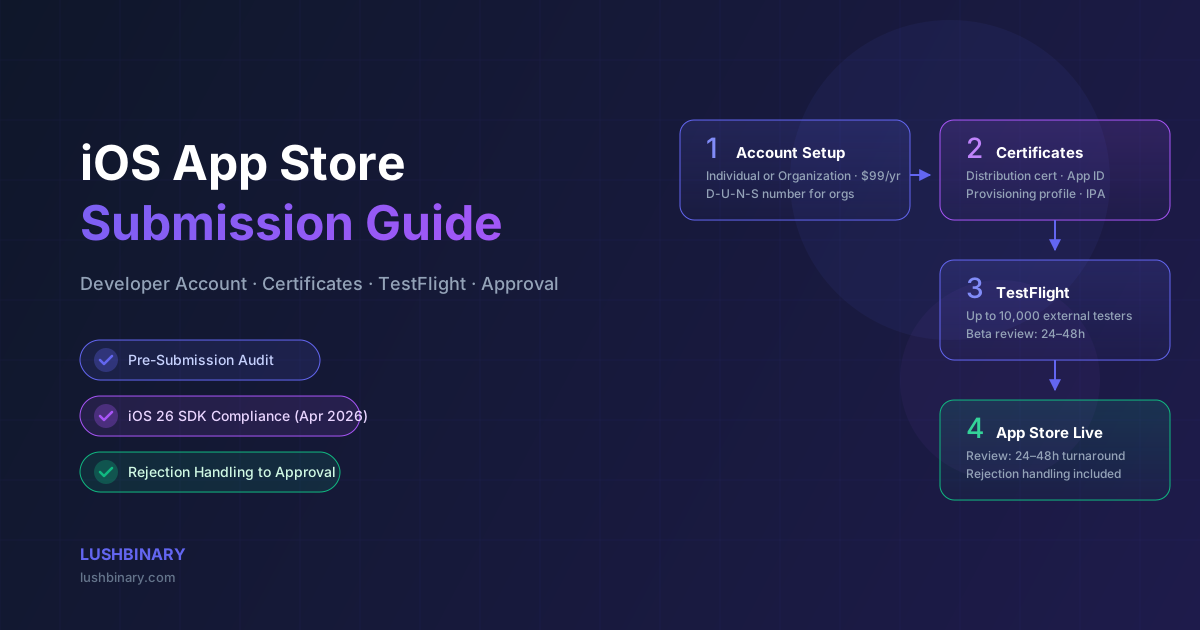
You've built the app. The code is done, the design is polished, and the team is ready to ship. Then you hit the Apple Developer portal and realize the submission process is a world of its own: certificates, provisioning profiles, App Store Connect, TestFlight, review guidelines, and a rejection queue that can stall your launch for weeks if you get it wrong.
This is exactly the problem LushBinary solves. We handle the entire Apple-side process — from setting up or verifying your Apple Developer Organization account through final App Store approval — so your team can stay focused on the product, not the paperwork.
In this guide, we walk through every step of the iOS App Store submission process, the most common rejection pitfalls, and how LushBinary's submission specialists get apps approved fast.
⚠️ Critical 2026 Deadline
Starting April 28, 2026, all new app submissions and updates must be built with the iOS 26 SDK or later (requires Xcode 16+). Apps built with older SDKs will be rejected at upload. If your app was built before this date, it needs to be recompiled before submission. Source: Apple Developer News
📋 Table of Contents
- 1.Apple Developer Account Setup (Individual vs Organization)
- 2.Certificates, Provisioning Profiles & App Signing
- 3.Preparing Your IPA: Validation & Compliance Checks
- 4.Setting Up TestFlight for Beta Testing
- 5.Configuring App Store Connect
- 6.Creating a High-Converting App Store Listing
- 7.Submitting to Apple for Review
- 8.Handling Rejections & Getting to Approval
- 9.Why LushBinary for Your App Store Submission
1Apple Developer Account Setup (Individual vs Organization)
The first decision is whether to enroll as an Individual or an Organization. Both cost $99/year, but the differences matter for how your app appears on the App Store and who can manage it.
| Factor | Individual | Organization |
|---|---|---|
| App Store seller name | Your legal name | Your company name |
| D-U-N-S number required | No | Yes |
| Team members | Just you | Multiple roles |
| Enrollment time | Minutes | 5–14 business days |
| Best for | Solo developers | Businesses & startups |
Getting Your D-U-N-S Number
If you're enrolling as an organization, you need a D-U-N-S number — a free 9-digit business identifier issued by Dun & Bradstreet. Apple uses it to verify your legal entity. You can request one at no cost through the Apple D-U-N-S lookup tool. Standard processing takes 5–14 business days, though expedited options exist.
💡 Pro Tip
Use a shared company email (e.g., appledev@yourcompany.com) rather than a personal address when creating your Apple ID for the developer account. This prevents access issues if the person who created the account leaves the company.
2Certificates, Provisioning Profiles & App Signing
App signing is the most technically complex part of the submission process for non-developers. Apple requires every app to be cryptographically signed before it can be distributed. Here's what you need:
- Distribution Certificate: proves the build came from your developer account. Created in Xcode or the Apple Developer portal under Certificates, Identifiers & Profiles.
- App ID: a unique identifier for your app (e.g.,
com.yourcompany.appname). Registered in the developer portal and must match your Xcode project's bundle identifier exactly. - App Store Distribution Provisioning Profile: ties your App ID to your distribution certificate. This is what Xcode uses to sign the final IPA for App Store submission.
Xcode can manage most of this automatically via Automatic Signing when you're signed in with your Apple ID. For CI/CD pipelines or manual control, you'll manage certificates and profiles manually through the developer portal or tools like fastlane match.
A common issue: if multiple developers on your team have created certificates independently, you can hit the limit (2 distribution certificates per account). LushBinary audits your certificate state before starting any submission work to avoid this.
3Preparing Your IPA: Validation & Compliance Checks
Before uploading to App Store Connect, your IPA needs to pass several validation checks. Skipping these is the fastest way to get a rejection on day one.
Technical Validation
- Xcode Validate App: run Product → Archive → Validate App before distributing. This catches signing issues, missing entitlements, and API usage violations.
- iOS 26 SDK requirement: as of April 28, 2026, all submissions must use the iOS 26 SDK (Xcode 16+). Older builds will be rejected at upload.
- Privacy manifest: apps using certain APIs (file timestamp, system boot time, disk space, active keyboard, user defaults) must include a
PrivacyInfo.xcprivacyfile declaring usage reasons. - App Transport Security: all network connections must use HTTPS. Any HTTP exceptions must be declared in
Info.plistwith justification. - 64-bit architecture: 32-bit apps have been rejected since iOS 11. Confirm your build targets arm64.
Content & Compliance Checks
- Remove all placeholder content, test data, and debug UI
- Ensure all features described in metadata are fully implemented
- Verify your privacy policy URL is live and accessible (required for all apps)
- If your app has a login screen, prepare demo account credentials for the Apple reviewer
- Check that in-app purchase products are configured in App Store Connect if your app uses them
💡 LushBinary Pre-Submission Audit
Before every submission, we run a structured pre-submission audit covering all technical, content, and compliance requirements. This catches the issues that cause 80% of first-submission rejections before Apple ever sees your app.
4Setting Up TestFlight for Beta Testing
TestFlight is Apple's official beta testing platform. It's free, built into App Store Connect, and lets you distribute pre-release builds to up to 10,000 external testers via email or a public link — no device registration required.
TestFlight is valuable for two reasons beyond just testing: it lets you catch real-world bugs before the public launch, and it gives you a live build to reference when responding to Apple review questions.
TestFlight Setup Steps
- Upload your build to App Store Connect via Xcode or
xcrun altool/xcrun notarytool - Navigate to TestFlight in App Store Connect and select your build
- Add internal testers (up to 100 team members with App Store Connect roles) — no review required
- For external testers, submit the build for TestFlight review (typically 24–48 hours, separate from App Store review)
- Share the public TestFlight link or invite testers by email
TestFlight builds expire after 90 days. Plan your beta timeline accordingly, especially if you're running a longer beta before the public launch.
5Configuring App Store Connect
App Store Connect is Apple's platform for managing everything about your app's presence on the App Store. Think of it as the backend dashboard for your app's commercial life. Here's what needs to be configured before submission:
6Creating a High-Converting App Store Listing
Your App Store listing is both a review requirement and a marketing asset. Apple reviewers check that your metadata accurately represents your app. Users decide whether to download based on it. Getting it right matters on both fronts.
Required Metadata
- App Name: up to 30 characters. Include your primary keyword if it fits naturally.
- Subtitle: up to 30 characters. Appears below the app name in search results — use it for a secondary keyword or value proposition.
- Description: up to 4,000 characters. The first three lines are visible before "More" — lead with your strongest hook.
- Keywords: up to 100 characters total. Comma-separated, no spaces after commas. Don't repeat words already in your app name.
- Support URL: must be a live, accessible URL.
- Privacy Policy URL: required for all apps.
Screenshots & Preview Videos
Screenshots are the single biggest driver of App Store conversion. Apple requires specific sizes for each device class:
| Device | Required Size (portrait) | Required? |
|---|---|---|
| iPhone 6.9" (iPhone 16 Pro Max) | 1320 × 2868 px | Required |
| iPhone 6.5" (iPhone 14 Plus) | 1290 × 2796 px | Required |
| iPhone 5.5" (iPhone 8 Plus) | 1242 × 2208 px | Required |
| iPad Pro 13" | 2064 × 2752 px | If iPad supported |
| iPad Pro 11" | 1668 × 2388 px | If iPad supported |
App preview videos (up to 30 seconds) are optional but significantly boost conversion rates. They must be recorded on a real device or simulator and cannot use marketing overlays that misrepresent the actual UI.
7Submitting to Apple for Review
Once your build is uploaded and your metadata is complete, you're ready to submit. Here's the final checklist before hitting "Submit for Review":
- Build is uploaded and processed in App Store Connect
- All required screenshots are uploaded for every device class
- Privacy nutrition labels are complete and accurate
- Export compliance answered (does your app use encryption beyond standard HTTPS?)
- Content rights confirmed (you own or have rights to all content)
- Demo account credentials added in the "Notes for App Review" field if your app requires login
- Any special instructions for the reviewer added (e.g., how to trigger a specific feature)
- Age rating questionnaire completed
After submission, most reviews complete within 24–48 hours. You can track status in App Store Connect under the Activity tab. Apple will email you when the review is complete or if they need more information.
💡 Expedited Review
If you have a time-sensitive launch (e.g., tied to a press announcement or event), you can request an expedited review through the Resolution Center. Apple grants these for legitimate reasons and typically responds within 24 hours. Don't abuse this — it won't help if your app has real issues.
8Handling Rejections & Getting to Approval
Rejection is common, especially on first submissions. Apple rejected over 1.7 million app submissions in 2023 alone. The key is knowing the most common reasons and how to respond effectively.
Top Rejection Reasons & Fixes
Guideline 2.1 — Performance: App Completeness
❌ Crashes, bugs, or broken features during review
✅ Test on a clean device with the exact build submitted. Provide demo credentials. Add reviewer notes explaining any non-obvious flows.
Guideline 2.3 — Performance: Accurate Metadata
❌ Screenshots don't match the app, or description is inaccurate
✅ Update screenshots to reflect the current UI. Remove any claims in the description that aren't implemented.
Guideline 5.1 — Legal: Privacy
❌ Missing or inadequate privacy policy, or data collection not disclosed
✅ Ensure your privacy policy URL is live and covers all data your app collects. Update your privacy nutrition labels in App Store Connect.
Guideline 3.1 — Business: Payments
❌ Using external payment links for digital goods instead of Apple IAP
✅ All digital goods and subscriptions must use Apple's in-app purchase system. Physical goods and services can use external payment.
Guideline 4.3 — Design: Spam
❌ App is too similar to existing apps or has minimal functionality
✅ Clearly differentiate your app's value proposition. Add meaningful features that justify its existence on the App Store.
Responding to Apple Review
When you receive a rejection, you have two options in the Resolution Center:
- Reply to Apple: if you disagree with the rejection or need clarification, respond professionally with specific references to the guidelines. Apple reviewers are humans — a clear, respectful explanation often resolves misunderstandings.
- Fix and resubmit: address the issue, upload a new build if needed, and resubmit. The review clock resets.
If you believe a rejection is incorrect, you can also escalate to the App Review Board for a second opinion. This is a formal appeals process and should be used when you have a strong case, not as a first response to every rejection.
❓ Frequently Asked Questions
How much does it cost to submit an app to the Apple App Store?
The Apple Developer Program costs $99/year for individuals and organizations. There are no per-submission fees. Enterprise accounts (for internal distribution only) cost $299/year.
How long does Apple App Store review take in 2026?
Most app reviews complete within 24–48 hours. Expedited reviews can be requested for critical bug fixes or time-sensitive launches and are typically resolved within 24 hours.
What is a D-U-N-S number and do I need one?
A D-U-N-S number is a free 9-digit business identifier from Dun & Bradstreet. It is required for organization enrollment in the Apple Developer Program. Obtaining one is free but can take 5–14 business days.
What are the most common reasons Apple rejects apps?
The top rejection reasons are crashes and bugs (Guideline 2.1), incomplete metadata or placeholder content (Guideline 2.3), missing or inadequate privacy policy (Guideline 5.1), inaccurate app descriptions, and missing demo account credentials for apps with login screens.
What SDK is required for App Store submissions in 2026?
Starting April 28, 2026, all new app submissions and updates must be built with the iOS 26 SDK or later, which requires Xcode 16 or later. Apps built with older SDKs will be rejected at upload.
Can LushBinary handle the entire App Store submission process?
Yes. LushBinary provides end-to-end App Store submission services including Apple Developer account setup, certificate and provisioning profile configuration, IPA validation, App Store Connect listing creation, TestFlight setup, submission, and handling any Apple review feedback until approval.
📚 Sources
- Apple Developer Program — Enrollment
- App Store Review Guidelines
- Apple — Upcoming App Store Requirements (iOS 26 SDK)
- App Store Connect Help — TestFlight
- Apple — Submitting Apps to the App Store
Content was rephrased for compliance with licensing restrictions. App Store requirements and pricing sourced from official Apple documentation as of March 2026. Requirements may change — always verify on developer.apple.com.
9Why LushBinary for Your App Store Submission
The App Store submission process looks straightforward on paper. In practice, it's a minefield of certificate conflicts, metadata rejections, privacy label requirements, and review guideline interpretations that can stall your launch for weeks.
LushBinary's submission specialists have navigated this process for apps across every category — consumer apps, enterprise tools, health & fitness, e-commerce, and more. Here's what we bring to your submission:
We also integrate with your existing development workflow. Whether your app is built in Swift, React Native, Flutter, or any other framework, our submission process is framework-agnostic. We work with what you've built.
If you're also looking for help with the broader mobile development picture, check out our guides on building iOS health apps, RevenueCat in-app purchase integration, and Branch.io deep linking.
🚀 Free Consultation
Tell us about your app and where you are in the submission process. We'll give you a free assessment of what needs to happen to get it live on the App Store — no commitment required.
Ready to Get Your App on the App Store?
Tell us about your app and we'll handle the entire Apple submission process — from account setup to final approval.
Build Smarter, Launch Faster.
Book a free strategy call and explore how LushBinary can turn your vision into reality.

