
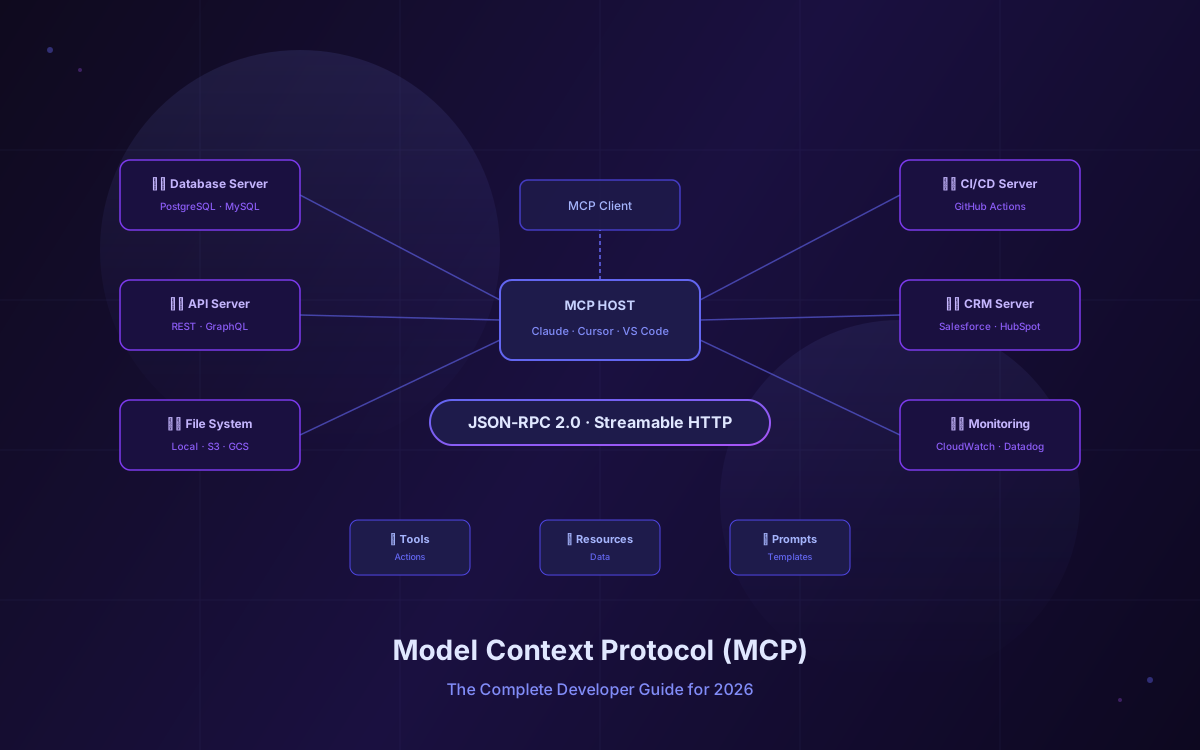
Every AI integration you've built so far has the same problem: it's a one-off. You write custom code to connect Claude to your database, then write different custom code to connect GPT to the same database, then do it all over again when you switch to Gemini. Each integration is fragile, hard to maintain, and impossible to reuse.
The Model Context Protocol (MCP) fixes this. Created by Anthropic and released as an open standard in November 2024, MCP is a universal protocol that lets any AI application connect to any external tool, database, or API through a single, standardized interface. Build an MCP server once, and every MCP-compatible client (Claude Desktop, Cursor, VS Code, Kiro, Windsurf, and more) can use it immediately.
The adoption numbers tell the story: over 97 million SDK downloads, 13,000+ MCP servers on GitHub, and Gartner predicting that 75% of API gateway vendors will include MCP support by the end of 2026. In December 2025, Anthropic donated MCP to the Linux Foundation's Agentic AI Foundation, cementing it as a vendor-neutral industry standard. This guide covers everything you need to know to build, deploy, and secure MCP servers in production.
📋 Table of Contents
- 1.What Is MCP and Why It Matters
- 2.How MCP Works: Architecture & Core Concepts
- 3.MCP Primitives: Tools, Resources & Prompts
- 4.Transport Layers: stdio vs Streamable HTTP
- 5.Building Your First MCP Server (TypeScript)
- 6.Building an MCP Server in Python
- 7.Connecting to MCP Clients
- 8.The MCP Spec: 2025-06-18 and Beyond
- 9.Security Best Practices for Production
- 10.Real-World MCP Use Cases
- 11.MCP Ecosystem & Community
- 12.How Lushbinary Builds MCP Integrations
1What Is MCP and Why It Matters
MCP stands for Model Context Protocol. It's an open standard built on JSON-RPC 2.0 that defines how AI applications (clients) communicate with external services (servers). Think of it as USB-C for AI: a single, universal connector that replaces the mess of custom integrations every team was building independently.
Before MCP, connecting an LLM to your tools meant writing bespoke API wrappers for each model provider. If you wanted Claude to query your PostgreSQL database, you'd write a function-calling integration. If you then wanted GPT-4 to do the same thing, you'd write a different integration with a different schema. This created an N×M problem: N AI models times M tools, each requiring its own glue code.
MCP collapses this to N+M. Build one MCP server for your database, and every MCP client can use it. Add a new AI client, and it instantly gets access to all your existing MCP servers. The protocol handles capability negotiation, authentication, error handling, and transport automatically.
Key stat: As of early 2026, approximately 28% of Fortune 500 companies have implemented MCP servers in their AI stacks, and 76% of software providers are exploring or implementing MCP as their connectivity standard for AI models.
2How MCP Works: Architecture & Core Concepts
MCP uses a client-server architecture with three distinct roles:
🖥️ Host
The LLM application that initiates connections. Examples: Claude Desktop, Cursor, VS Code, Kiro. The host manages the lifecycle of MCP clients.
🔌 Client
A connector within the host that maintains a 1:1 stateful session with a single MCP server. Each client handles capability negotiation and message routing.
⚙️ Server
A service that exposes tools, resources, and prompts to clients. You build these. They can wrap databases, APIs, file systems, or any external service.
The connection lifecycle follows a clear pattern:
- Initialization: Client sends an
initializerequest with its supported protocol version and capabilities. - Negotiation: Server responds with its own capabilities (which primitives it supports, what features are available).
- Ready: Client sends an
initializednotification, and the session is active. - Operation: Client and server exchange JSON-RPC messages: requests, responses, and notifications.
- Shutdown: Either side can terminate the connection cleanly.
All communication uses JSON-RPC 2.0 messages. This means every message has a well-defined structure with jsonrpc, method, params, and either result or error fields. The protocol is stateful: once a session is established, both sides maintain context about the connection.
3MCP Primitives: Tools, Resources & Prompts
MCP servers expose three types of capabilities to clients:
| Primitive | Controlled By | Purpose | Example |
|---|---|---|---|
| Tools | Model (LLM decides when to call) | Actions the AI can perform | query_database, send_email, create_ticket |
| Resources | Application (client decides when to fetch) | Data the AI can read | file://config.json, db://users/123 |
| Prompts | User (explicitly selected) | Reusable prompt templates | summarize_pr, review_code |
Tools are the most commonly used primitive. They're functions that the LLM can invoke, with a JSON Schema defining the input parameters. The model decides when to call a tool based on the user's request and the tool's description. Every tool call requires explicit user consent in the host application.
Resources are read-only data sources identified by URIs. Unlike tools, resources are fetched by the application (not the model) and injected into the conversation context. They're ideal for providing background information like documentation, configuration files, or database records.
Prompts are reusable templates that users can select explicitly. They're useful for standardizing common workflows like code reviews, bug reports, or data analysis tasks. Prompts can include dynamic arguments that get filled in at runtime.
4Transport Layers: stdio vs Streamable HTTP
MCP supports two transport mechanisms, and choosing the right one depends on your deployment model:
stdio (Standard I/O)
- Server runs as a local subprocess
- Communication via stdin/stdout
- Simplest setup, no network config
- Best for: local dev tools, IDE integrations
- Used by: Claude Desktop, Cursor, VS Code
Streamable HTTP
- Server runs as a remote HTTP service
- Single endpoint handles all requests
- Supports both sync responses and streaming
- Best for: remote servers, multi-user, production
- Replaced SSE transport in spec 2025-03-26
Note: The older HTTP+SSE (Server-Sent Events) transport was deprecated in the March 2025 spec update. If you're starting a new project, use Streamable HTTP for remote servers. Existing SSE implementations will continue to work but won't receive new features.
5Building Your First MCP Server (TypeScript)
The official TypeScript SDK (@modelcontextprotocol/sdk) is the most popular way to build MCP servers. It requires Node.js v18 or later. Here's a complete example of a server that exposes a tool and a resource:
// server.ts
import { McpServer } from "@modelcontextprotocol/sdk/server/mcp.js";
import { StdioServerTransport } from "@modelcontextprotocol/sdk/server/stdio.js";
import { z } from "zod";

const server = new McpServer({
  name: "my-first-server",
  version: "1.0.0",
});

// Register a tool
server.tool(
  "get_weather",
  "Get current weather for a city",
  { city: z.string().describe("City name") },
  async ({ city }) => {
    // Replace with real API call
    return {
      content: [
        {
          type: "text",
          text: `Weather in ${city}: 72°F, sunny`,
        },
      ],
    };
  }
);

// Register a resource
server.resource(
  "config",
  "config://app",
  async (uri) => ({
    contents: [
      {
        uri: uri.href,
        mimeType: "application/json",
        text: JSON.stringify({ version: "1.0", env: "production" }),
      },
    ],
  })
);

// Start the server
const transport = new StdioServerTransport();
await server.connect(transport);
To set this up from scratch:
npm init -y
npm install @modelcontextprotocol/sdk zod
npx tsc --init
The McpServer class is the high-level API that handles all the protocol details for you. You register tools with server.tool(), resources with server.resource(), and prompts with server.prompt(). The SDK validates inputs against your Zod schemas automatically and returns properly formatted JSON-RPC responses.
For production servers, you'll want to add error handling, logging, and potentially switch to the Streamable HTTP transport. The SDK also provides a lower-level Server class if you need more control over the protocol handling.
6Building an MCP Server in Python
The Python ecosystem offers two main options: the official mcp SDK and FastMCP, a higher-level framework that simplifies server creation. Here's the same server using FastMCP:
# server.py
from fastmcp import FastMCP

mcp = FastMCP("my-first-server")

@mcp.tool()
def get_weather(city: str) -> str:
    """Get current weather for a city."""
    # Replace with real API call
    return f"Weather in {city}: 72°F, sunny"

@mcp.resource("config://app")
def get_config() -> str:
    """Application configuration."""
    return '{"version": "1.0", "env": "production"}'

if __name__ == "__main__":
    mcp.run()
Install with:
pip install fastmcp
# or using uv:
uv pip install fastmcp
FastMCP uses Python decorators and type hints to automatically generate the JSON Schema for your tools. It handles serialization, error formatting, and transport setup. For teams already working in Python, it's the fastest path to a working MCP server.
The official Python SDK (pip install mcp) gives you more control but requires more boilerplate. Choose FastMCP for rapid prototyping and the official SDK when you need fine-grained control over the protocol layer.
7Connecting to MCP Clients
Once your server is built, you need to connect it to an MCP client. The configuration format is similar across most clients. Here's how to set it up in the most popular ones:
Claude Desktop
Edit claude_desktop_config.json (found in ~/Library/Application Support/Claude/ on macOS):
{
  "mcpServers": {
    "my-server": {
      "command": "node",
      "args": ["path/to/server.js"]
    }
  }
}
VS Code / Kiro
Create a .kiro/settings/mcp.json (or .vscode/mcp.json) in your workspace:
{
  "mcpServers": {
    "my-server": {
      "command": "node",
      "args": ["path/to/server.js"],
      "disabled": false,
      "autoApprove": []
    }
  }
}
Cursor
Go to Settings → MCP and add your server, or create a .cursor/mcp.json file:
{
  "mcpServers": {
    "my-server": {
      "command": "node",
      "args": ["path/to/server.js"]
    }
  }
}
For Python servers, use uvx (the Python package runner from the uv tool) to run servers without manual installation:
{
  "mcpServers": {
    "my-python-server": {
      "command": "uvx",
      "args": ["my-mcp-server@latest"]
    }
  }
}8The MCP Spec: 2025-06-18 and Beyond
The MCP specification is actively evolving. The latest stable version is 2025-06-18, which introduced several important features (official spec):
| Feature | What It Does |
|---|---|
| OAuth 2.1 Auth | MCP servers now act as OAuth Resource Servers (not Authorization Servers). Integrates with existing IdPs like Auth0, Okta, and Keycloak. |
| Elicitation | Servers can request additional input from users mid-workflow. Enables interactive, human-in-the-loop patterns. |
| Structured Output | Tools can return structured JSON alongside text content, making it easier to build pipelines that chain tool outputs. |
| Resource Links in Tools | Tool responses can include links to resources, enabling richer context passing between tools and the conversation. |
The spec timeline so far:
- November 2024: Anthropic releases MCP as an open standard
- March 2025 (2025-03-26): Streamable HTTP replaces SSE transport
- June 2025 (2025-06-18): OAuth 2.1, elicitation, structured output
- November 2025 (2025-11-25): Latest stable release with refinements
- December 2025: MCP donated to Linux Foundation's Agentic AI Foundation
The TypeScript SDK v2 stable release is expected in Q1 2026. Until then, v1.x remains the recommended version for production use.
9Security Best Practices for Production
In February 2026, OWASP released "A Practical Guide for Secure MCP Server Development," highlighting the security considerations every team should address. Here are the key practices:
Input Validation
Validate all tool inputs against strict schemas. Never pass user input directly to shell commands, SQL queries, or file system operations without sanitization.
Least Privilege
MCP servers should only have access to the resources they need. Use scoped API keys, read-only database connections, and restricted file system paths.
User Consent
Every tool invocation must require explicit user approval in the host application. Never auto-approve destructive operations like writes, deletes, or sends.
Rate Limiting
Implement rate limits on tool calls to prevent abuse. A runaway AI loop can generate thousands of API calls in seconds.
Transport Security
For remote servers, always use HTTPS with TLS 1.3. For stdio servers, ensure the subprocess is sandboxed and can't access unintended resources.
Audit Logging
Log every tool invocation with timestamps, parameters, and results. This is critical for debugging, compliance, and detecting anomalous behavior.
Critical: The 2025-06-18 spec changed how authentication works. MCP servers are now OAuth Resource Servers, not Authorization Servers. This means they consume access tokens issued by your existing identity provider (Auth0, Okta, etc.) rather than issuing their own tokens. This is a significant security improvement that aligns MCP with established enterprise auth patterns.
10Real-World MCP Use Cases
MCP isn't theoretical. Here are the patterns we see teams deploying in production:
| Use Case | MCP Server Does | Value |
|---|---|---|
| Database Assistant | Exposes read-only SQL query tool + schema resource | Developers query production data in natural language without writing SQL |
| CI/CD Integration | Wraps GitHub Actions API as tools | AI can trigger builds, check status, and read logs from the IDE |
| Documentation Search | Indexes internal docs as resources | AI answers questions using your actual docs, not hallucinated answers |
| Customer Support | Connects to CRM + ticketing system | Support agents get AI-powered context from Salesforce, Zendesk, etc. |
| Infrastructure Ops | Wraps AWS/GCP APIs as tools | DevOps teams manage cloud resources through natural language |
| Code Review | Exposes linting, testing, and static analysis tools | AI performs automated code reviews with real tool output |
The common thread: MCP servers turn existing APIs and data sources into AI-accessible capabilities without modifying the underlying systems. Your database doesn't need to know about MCP. Your CI/CD pipeline doesn't need to change. The MCP server sits in between and translates.
11MCP Ecosystem & Community
The MCP ecosystem has grown rapidly since the protocol's release:
- 13,000+ servers on GitHub: Covering databases (PostgreSQL, MySQL, MongoDB), cloud providers (AWS, GCP, Azure), SaaS tools (Slack, GitHub, Jira, Notion), web scraping, file systems, and more.
- 97M+ SDK downloads: The TypeScript and Python SDKs are the most popular, but community SDKs exist for Go, Rust, Java (Quarkus), C#, and Kotlin.
- Major adopters: OpenAI added MCP support to their Agents SDK. Google, Microsoft, IBM, and Amazon have all implemented MCP in various products.
- Registries: Platforms like Smithery, MintMCP, and the official MCP server list help developers discover and share servers.
- Frameworks: FastMCP (TypeScript and Python), EasyMCP, MCP-Framework, and Higress MCP provide higher-level abstractions for building servers.
Finding servers: The official list is at modelcontextprotocol.io/examples. For a broader catalog, check github.com/modelcontextprotocol.
12How Lushbinary Builds MCP Integrations
At Lushbinary, we've been building MCP servers for clients since the protocol's early days. Our approach covers the full lifecycle:
- Discovery & Design: We audit your existing APIs, databases, and internal tools to identify which capabilities should be exposed via MCP. Not everything needs an MCP server. We focus on the integrations that deliver the highest ROI for your AI workflows.
- Server Development: We build production-grade MCP servers in TypeScript or Python with proper error handling, input validation, rate limiting, and audit logging. Every server ships with comprehensive tests and documentation.
- Security Hardening: We implement OAuth 2.1 authentication, scoped permissions, and transport security following the OWASP MCP security guidelines. For enterprise deployments, we integrate with your existing identity provider.
- Deployment & Monitoring: We deploy MCP servers on AWS (ECS, Lambda, or EC2) with CloudWatch monitoring, alerting, and auto-scaling. For teams that need it, we set up multi-region deployments with failover.
- Client Integration: We configure MCP clients across your team's tools (Claude Desktop, Cursor, VS Code, Kiro, or custom applications) and train your developers on how to use and extend the servers.
Whether you need a single MCP server to connect your AI assistant to a database, or a full suite of servers covering your entire internal toolchain, we can help you ship it fast and keep it running reliably.
Free consultation: Want to explore how MCP can accelerate your AI workflows? Book a free 30-minute call with our team. We'll review your current stack, identify the highest-impact MCP integrations, and give you a clear roadmap to production. Book your call →
Related reading: How OpenClaw Works Behind the Scenes · Gemini 3.1 Pro Developer Guide
Ready to Build Your MCP Integration?
Tell us about your AI workflow and we'll design the MCP architecture that fits. From single-server prototypes to enterprise-wide deployments.
Build Smarter, Launch Faster.
Book a free strategy call and explore how LushBinary can turn your vision into reality.

