
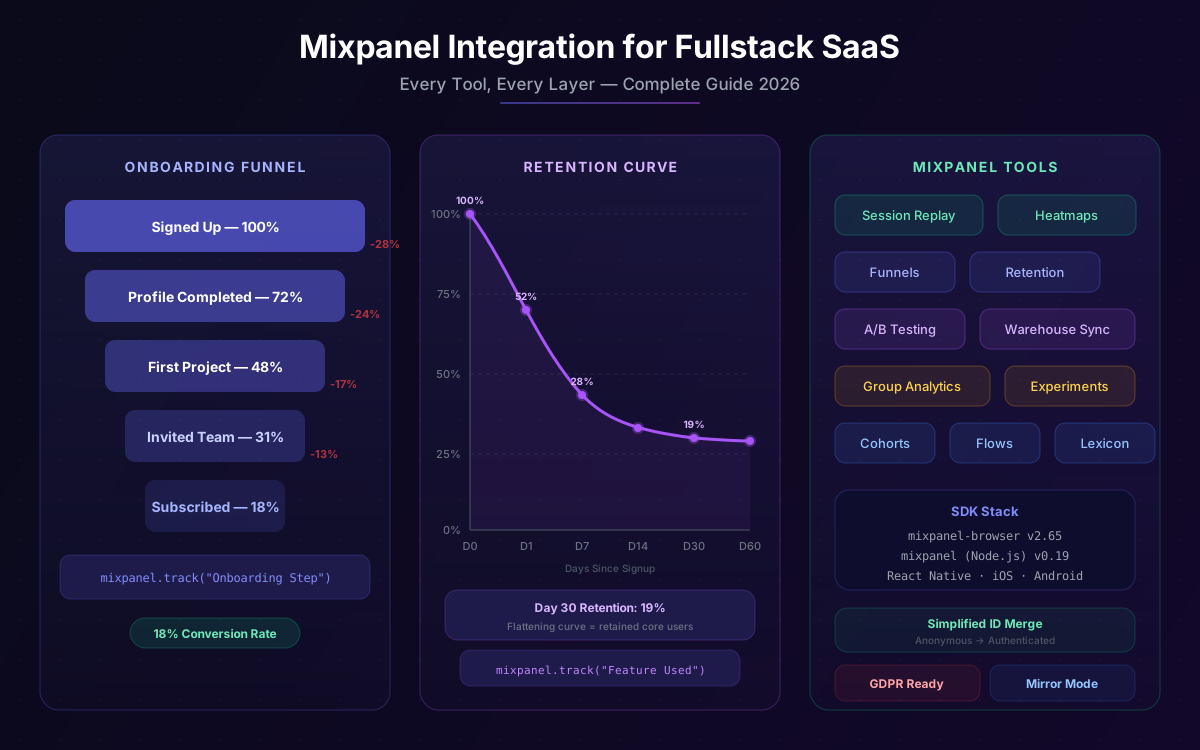
You shipped your SaaS. Users are signing up. But you have no idea which features they actually use, where they drop off in onboarding, or why your trial-to-paid conversion is stuck at 8%. Mixpanel is the product analytics platform that answers those questions — and in 2026, it covers the full stack: client-side event tracking, server-side ingestion, session replay, heatmaps, A/B testing, warehouse sync, and AI-powered summaries.
This guide is a complete, code-first walkthrough of integrating every major Mixpanel tool into a fullstack SaaS. We cover Next.js client setup, server-side tracking with Node.js, identity management, funnels, retention, session replay, heatmaps, A/B experiments, warehouse connectors, and data governance. By the end, you'll have a production-ready analytics layer that tells you exactly what your users are doing and why.
All SDK versions and pricing figures are verified as of March 2026. Mixpanel's browser SDK is currently at v2.72.0 and the Node.js server SDK at v0.19.x (npm).
📋 Table of Contents
- 1.Why Mixpanel for SaaS Analytics
- 2.Installation & SDK Setup (Next.js + Node.js)
- 3.Identity Management: Anonymous to Authenticated
- 4.Event Taxonomy: What to Track in a SaaS
- 5.User Profiles & Super Properties
- 6.Funnels: Diagnosing Conversion Drop-Off
- 7.Retention Analysis: Measuring Stickiness
- 8.Session Replay, Heatmaps & Frustration Signals
- 9.A/B Testing & Experiments
- 10.Warehouse Connectors & Mirror Mode
- 11.Group Analytics for B2B SaaS
- 12.Data Governance, Privacy & GDPR
- 13.Pricing & Plan Selection
- 14.Why Lushbinary for Your Mixpanel Integration
1Why Mixpanel for SaaS Analytics
Google Analytics tells you how many people visited a page. Mixpanel tells you what they did once they got there, whether they came back, and which actions predict long-term retention. For SaaS products, that distinction is everything.
Mixpanel is used by over 9,000 companies including Netflix, Uber, DocuSign, Yelp, and Expedia. It processes billions of events per month and has become the go-to platform for product-led growth teams. Here's why it stands out for SaaS specifically:
Event-Based Model
Every user action is a trackable event with arbitrary properties. No schema constraints, no sampling.
Generous Free Tier
1M events/month free, 10K session replays, unlimited reports. Most SaaS teams never outgrow the free plan in early stages.
Full-Stack Coverage
Browser SDK, iOS, Android, React Native, Node.js, Python, Ruby, Go, Java — every layer of your stack is covered.
Session Replay + Analytics
Watch real user sessions alongside your funnel data. No need for a separate tool like FullStory or Hotjar.
Warehouse Sync
Mirror mode keeps Mixpanel in perfect sync with Snowflake, BigQuery, Databricks, and Redshift via CDC.
B2B Group Analytics
Track metrics at the account/company level, not just individual users. Essential for B2B SaaS.
The 2025-2026 product releases have been significant: Session Replay expanded to React Native, Heatmaps launched for web (July 2025), Rage Click and Dead Click detection shipped (November 2025), and Mirror mode for warehouse connectors reached general availability. Mixpanel is no longer just an analytics tool — it's a full product intelligence platform.
2Installation & SDK Setup (Next.js + Node.js)
A fullstack SaaS needs both client-side and server-side tracking. Client-side captures UI interactions; server-side captures business events (payments, API calls, background jobs) that happen outside the browser and are immune to ad blockers.
Install the SDKs
# Client-side (browser)
npm install mixpanel-browser@^2.65.0

# Server-side (Node.js / Next.js API routes)
npm install mixpanel@^0.19.0

# TypeScript types
npm install --save-dev @types/mixpanel-browser
Client-Side: Mixpanel Provider (Next.js App Router)
Create a singleton provider that initializes Mixpanel once and exposes it via context. Use persistence: 'localStorage' so the anonymous ID survives page refreshes.
// lib/mixpanel.ts
"use client";
import mixpanel from "mixpanel-browser";

let initialized = false;

export function initMixpanel() {
  if (initialized || typeof window === "undefined") return;
  mixpanel.init(process.env.NEXT_PUBLIC_MIXPANEL_TOKEN!, {
    persistence: "localStorage",
    // Route tracking calls through your own domain to bypass ad blockers
    api_host: "/mp",
    // Enable session replay (20K replays/month on Growth plan)
    record_sessions_percent: 100,
    // Enable heatmap data collection
    record_heatmap_data: true,
    // Stop persisting UTM params in super properties (modern behavior)
    stop_utm_persistence: true,
    debug: process.env.NODE_ENV === "development",
  });
  initialized = true;
}

export { mixpanel };
// components/analytics-provider.tsx
"use client";
import { useEffect } from "react";
import { usePathname } from "next/navigation";
import { initMixpanel, mixpanel } from "@/lib/mixpanel";
export function AnalyticsProvider({ children }: { children: React.ReactNode }) {
const pathname = usePathname();
useEffect(() => {
initMixpanel();
}, []);
// Track page views on route change
useEffect(() => {
if (typeof window !== "undefined") {
mixpanel.track("Page Viewed", {
path: pathname,
url: window.location.href,
referrer: document.referrer,
});
}
}, [pathname]);
return <>{children}</>;
}Wrap your root layout with the provider and add a Next.js rewrite to proxy Mixpanel requests through your domain (bypasses most ad blockers):
// next.config.ts
const nextConfig = {
  async rewrites() {
    return [
      {
        source: "/mp/:path*",
        destination: "https://api.mixpanel.com/:path*",
      },
    ];
  },
};
Server-Side: Node.js SDK Setup
// lib/mixpanel-server.ts
import Mixpanel from "mixpanel";

// Singleton — reuse across requests
export const mp = Mixpanel.init(process.env.MIXPANEL_TOKEN!, {
  // Use EU data residency if needed
  // host: "api-eu.mixpanel.com",
});

// Helper: track a server-side event
export function trackServer(
  distinctId: string,
  event: string,
  properties?: Record<string, unknown>
) {
  mp.track(event, {
    distinct_id: distinctId,
    ...properties,
  });
}
💡 Client vs Server Tracking
Use client-side tracking for UI interactions (button clicks, form submissions, feature usage). Use server-side tracking for business events (subscription changes, payment processing, API usage) where accuracy matters and ad blockers are a concern. Server-side events are more reliable and cannot be blocked.
3Identity Management: Anonymous to Authenticated
Identity management is the most common source of data quality issues in Mixpanel. Get it wrong and you'll have duplicate user profiles, broken funnels, and inflated user counts. Mixpanel uses a Simplified ID Merge system (the recommended approach for new projects as of 2025).
How It Works
// hooks/useAuth.ts — call these at the right lifecycle moments

import { mixpanel } from "@/lib/mixpanel";

// After successful login or signup
export function onUserAuthenticated(user: {
  id: string;
  email: string;
  name: string;
  plan: string;
  createdAt: string;
}) {
  // Link anonymous session to authenticated user
  mixpanel.identify(user.id);

  // Set persistent user profile properties
  mixpanel.people.set({
    $email: user.email,
    $name: user.name,
    plan: user.plan,
    created_at: user.createdAt,
  });

  // Set super properties — attached to every future event
  mixpanel.register({
    user_id: user.id,
    plan: user.plan,
  });
}

// After logout
export function onUserLoggedOut() {
  mixpanel.track("User Logged Out");
  // Clear identity — critical for shared devices
  mixpanel.reset();
}
Server-Side Identity (for server-tracked events)
// app/api/webhooks/stripe/route.ts
import { trackServer } from "@/lib/mixpanel-server";

export async function POST(req: Request) {
  const event = await parseStripeWebhook(req);

  if (event.type === "customer.subscription.created") {
    const { userId, plan, mrr } = extractSubscriptionData(event);

    // Server-side event — use the authenticated user ID as distinct_id
    trackServer(userId, "Subscription Started", {
      plan_name: plan,
      mrr_usd: mrr,
      billing_interval: "monthly",
      source: "stripe_webhook",
    });
  }
}4Event Taxonomy: What to Track in a SaaS
The biggest mistake teams make is tracking everything or tracking nothing. A good SaaS event taxonomy covers the full user lifecycle: acquisition, activation, engagement, retention, and revenue.
Core SaaS Events
| Event Name | Trigger | Key Properties | Side |
|---|---|---|---|
| Signed Up | Registration complete | method, referrer, plan | Server |
| Trial Started | Trial period begins | trial_days, plan | Server |
| Onboarding Step Completed | Each onboarding step | step_name, step_number | Client |
| Feature Used | Core feature interaction | feature_name, context | Client |
| Invite Sent | User invites teammate | invitee_email, role | Server |
| Subscription Started | First payment | plan_name, mrr_usd, interval | Server |
| Plan Upgraded | Upgrade event | from_plan, to_plan, mrr_delta | Server |
| Plan Downgraded | Downgrade event | from_plan, to_plan, reason | Server |
| Trial Converted | Trial → paid | plan_name, trial_days_used | Server |
| Subscription Cancelled | Cancellation | plan_name, reason, mrr_lost | Server |
| API Key Created | Developer action | key_name, permissions | Server |
| Export Downloaded | Data export | format, record_count | Client |
Tracking a Feature Usage Event
// Example: track when a user runs a report
import { mixpanel } from "@/lib/mixpanel";

function ReportBuilder() {
  const handleRunReport = async (config: ReportConfig) => {
    const startTime = Date.now();
    const result = await runReport(config);

    mixpanel.track("Report Run", {
      report_type: config.type,
      date_range_days: config.dateRangeDays,
      filters_applied: config.filters.length,
      result_count: result.rows.length,
      duration_ms: Date.now() - startTime,
    });
  };

  return <button onClick={() => handleRunReport(config)}>Run Report</button>;
}5User Profiles & Super Properties
Mixpanel has two mechanisms for attaching persistent data to users: People profiles (stored on the user record) and super properties (attached to every event automatically).
People Profiles
// Set profile properties (client-side)
mixpanel.people.set({
  $email: user.email,
  $name: user.name,
  $avatar: user.avatarUrl,
  plan: user.plan,
  company: user.company,
  role: user.role,
  created_at: user.createdAt,
});

// Increment a numeric property (e.g., total reports run)
mixpanel.people.increment("reports_run", 1);

// Append to a list property (e.g., features used)
mixpanel.people.union("features_used", ["report_builder"]);

// Server-side profile update (Node.js)
mp.people.set(userId, {
  plan: newPlan,
  mrr: newMrr,
  last_payment_at: new Date().toISOString(),
});
Super Properties
Super properties are registered once and automatically appended to every subsequent event. Use them for properties that are always relevant: plan tier, user role, app version.
// Register super properties after login
mixpanel.register({
  plan: user.plan,           // "free" | "growth" | "enterprise"
  user_role: user.role,      // "admin" | "member" | "viewer"
  app_version: APP_VERSION,  // "2.4.1"
  environment: process.env.NODE_ENV,
});

// Register a one-time property (won't overwrite if already set)
mixpanel.register_once({
  first_seen_at: new Date().toISOString(),
  acquisition_channel: getUtmSource(),
});6Funnels: Diagnosing Conversion Drop-Off
Funnels are the most powerful tool for SaaS teams. They show you exactly where users drop off in a multi-step flow — onboarding, checkout, feature activation, or any custom sequence.
Setting Up an Onboarding Funnel
Track each onboarding step as a distinct event. Mixpanel will calculate conversion rates between steps and show you where users abandon.
// Track each onboarding step
const ONBOARDING_STEPS = [
  "account_created",
  "profile_completed",
  "first_project_created",
  "first_team_member_invited",
  "first_feature_used",
] as const;

function trackOnboardingStep(
  step: (typeof ONBOARDING_STEPS)[number],
  properties?: Record<string, unknown>
) {
  mixpanel.track("Onboarding Step Completed", {
    step_name: step,
    step_number: ONBOARDING_STEPS.indexOf(step) + 1,
    total_steps: ONBOARDING_STEPS.length,
    ...properties,
  });
}
In the Mixpanel UI, create a Funnel report with these five events in sequence. You'll immediately see your activation rate and the biggest drop-off point. Common findings:
- 60-80% drop between account creation and profile completion — your onboarding form is too long
- Large drop before first feature use — users don't understand the value proposition
- Low invite rate — your product isn't naturally collaborative yet
Subscription Conversion Funnel
// Track the full trial-to-paid funnel (server-side)
// 1. Trial Started
trackServer(userId, "Trial Started", { plan: "growth", trial_days: 14 });

// 2. Pricing Page Viewed (client-side)
mixpanel.track("Pricing Page Viewed", { source: "in_app_banner" });

// 3. Upgrade CTA Clicked (client-side)
mixpanel.track("Upgrade CTA Clicked", { plan: "growth", cta_location: "sidebar" });

// 4. Checkout Started (client-side)
mixpanel.track("Checkout Started", { plan: "growth", mrr: 49 });

// 5. Subscription Started (server-side, from Stripe webhook)
trackServer(userId, "Subscription Started", {
  plan_name: "growth",
  mrr_usd: 49,
  billing_interval: "monthly",
  trial_converted: true,
  trial_days_used: 11,
});7Retention Analysis: Measuring Stickiness
Retention is the single most important metric for SaaS. Mixpanel offers three retention report types: N-Day Retention (did users return on day N?), Unbounded Retention (did users return at any point after day N?), and Bracket Retention (did users return within a time window?).
Defining Your Retention Event
The key decision is choosing the right "return event." For most SaaS products, this should be a meaningful action, not just a page view. Examples:
Project Management
Task Created or Updated
Analytics Tool
Report Viewed or Run
CRM
Contact Updated or Deal Moved
Dev Tool
API Call Made or Deploy Triggered
Communication
Message Sent
E-Commerce
Product Listed or Order Processed
Build a Retention report in Mixpanel with "Signed Up" as the birth event and your core action as the return event. A healthy SaaS typically shows:
- Day 1 retention: 40-60%
- Day 7 retention: 20-35%
- Day 30 retention: 15-25%
- Flattening curve after day 30 (indicates a retained core)
8Session Replay, Heatmaps & Frustration Signals
Mixpanel's Session Replay lets you watch real user sessions alongside your quantitative data. Instead of guessing why users drop off at step 3 of your funnel, you can watch it happen. As of 2026, Session Replay supports web, iOS, Android, and React Native.
🆕 2025-2026 Session Replay Updates
Mixpanel launched Heatmaps for web in July 2025, showing click density across your pages. In November 2025, they added Rage Click and Dead Click detection — these frustration signals are automatically surfaced in Session Replay and as quantifiable events in your reports. React Native support launched in early 2026, bringing full parity across all platforms.
Enabling Session Replay & Heatmaps
// Full session replay + heatmap config
mixpanel.init(process.env.NEXT_PUBLIC_MIXPANEL_TOKEN!, {
  // Record 100% of sessions (reduce for high-traffic apps)
  record_sessions_percent: 100,
  // Enable heatmap data collection
  record_heatmap_data: true,
  // Mask sensitive inputs by default (PII protection)
  // record_mask_text_selector: ".sensitive, input[type=password]",
});

// Manually start/stop recording for specific flows
mixpanel.start_session_recording();
mixpanel.stop_session_recording();

// Link a replay to a specific event for easy lookup
mixpanel.track("Checkout Started", {
  plan: "growth",
  // Mixpanel automatically links this event to the active replay
});
Querying Frustration Signals
Rage clicks and dead clicks are automatically tracked as Mixpanel events ($mp_rage_click and $mp_dead_click). You can build Insights reports to find the most-raged-on elements:
// In Mixpanel Insights: filter by frustration signals
// Event: $mp_rage_click
// Breakdown by: $mp_element_text, $mp_page_url
// This shows you which buttons/links users are rage-clicking most

// You can also filter Session Replays by these events:
// Replays > Filter > Event contains "$mp_rage_click"
// → Watch exactly what frustrated users were trying to do
9A/B Testing & Experiments
Mixpanel's Experiments report lets you measure the impact of A/B tests on any metric. It's not a feature flag tool itself — you run the experiment with your flag provider (LaunchDarkly, Statsig, Vercel Flags, or a custom implementation) and use Mixpanel to analyze the results.
Tracking Experiment Exposure
// Track when a user is assigned to an experiment variant
function trackExperimentExposure(
  experimentName: string,
  variant: "control" | "treatment"
) {
  mixpanel.track("Experiment Viewed", {
    experiment_name: experimentName,
    variant,
    // Mixpanel Experiments report uses these property names
    $experiment_started: experimentName,
    $variant: variant,
  });

  // Also register as super property so all subsequent events
  // carry the experiment context
  mixpanel.register({
    ["experiment_" + experimentName]: variant,
  });
}

// Usage: call when the feature flag is evaluated
const variant = featureFlags.getVariant("onboarding_v2");
trackExperimentExposure("onboarding_v2", variant);
Analyzing Results in Mixpanel
In the Mixpanel UI, go to Experiments and create a new experiment analysis. Set:
- Exposure event: "Experiment Viewed" where experiment_name = "onboarding_v2"
- Variant property: "variant"
- Primary metric: Conversion to "Subscription Started" within 14 days
- Secondary metrics: Onboarding completion rate, Day 7 retention
Mixpanel will calculate statistical significance and show you whether the treatment variant outperforms control. The Experiments report supports both frequentist and Bayesian statistical methods.
10Warehouse Connectors & Mirror Mode
If your team already has a data warehouse (Snowflake, BigQuery, Databricks, or Redshift), Mixpanel's Warehouse Connectors let you sync that data directly into Mixpanel without re-instrumenting your app. This is the fastest path to analytics for teams with existing data infrastructure.
🔄 Mirror Mode (GA 2025)
Mirror mode uses change data capture (CDC) to keep Mixpanel in perfect sync with your warehouse. Any addition, update, or deletion in your warehouse table is automatically reflected in Mixpanel. Supported for Snowflake (via Snowflake Streams), BigQuery (via table snapshots), and Databricks. This eliminates the stale data problem that plagued earlier batch-sync approaches.
What You Can Answer with Warehouse Connectors
- What percentage of Enterprise revenue uses the features we shipped last quarter?
- Did our app redesign reduce support ticket volume?
- Which account demographics have the best 90-day retention?
- We spent $50K on a marketing campaign — did those users stick around?
- Which CRM deal stages correlate with highest product engagement?
Setting Up a Warehouse Connector (Snowflake Example)
-- 1. Create a Mixpanel service user in Snowflake
CREATE USER mixpanel_connector
  PASSWORD = '<secure_password>'
  DEFAULT_ROLE = mixpanel_role;

-- 2. Grant read access to your events table
GRANT SELECT ON TABLE analytics.events TO ROLE mixpanel_role;

-- 3. For Mirror mode, grant stream creation privileges
GRANT CREATE STREAM ON SCHEMA analytics TO ROLE mixpanel_role;

-- 4. In Mixpanel UI:
--    Settings > Warehouse Connectors > Add Connection
--    Select Snowflake, enter credentials
--    Map columns: distinct_id, event_name, time, properties
--    Choose sync mode: "Mirror" for real-time CDC sync
11Group Analytics for B2B SaaS
If you're building a B2B SaaS, you need to analyze behavior at the account level, not just the individual user level. Mixpanel's Group Analytics lets you define a group key (e.g., company_id) and analyze metrics across all users in an account.
Setting Up Group Analytics
// 1. Initialize with group key (must match Mixpanel project settings)
mixpanel.init(token, {
  // ... other config
});

// 2. Set the group for the current user session
mixpanel.set_group("company_id", user.companyId);

// 3. Set group profile properties
mixpanel.get_group("company_id", user.companyId).set({
  company_name: company.name,
  plan: company.plan,
  mrr: company.mrr,
  employee_count: company.size,
  industry: company.industry,
  created_at: company.createdAt,
});

// 4. All events now carry the group key automatically
// You can analyze: "How many companies used Feature X this week?"
// instead of "How many users used Feature X this week?"
Group Analytics is available on the Growth plan and above. It's essential for tracking account health, identifying expansion opportunities, and building customer success dashboards.
12Data Governance, Privacy & GDPR
Mixpanel provides several tools for data governance and privacy compliance. Here's what every SaaS team needs to configure:
Lexicon: Your Event Dictionary
Lexicon is Mixpanel's data dictionary. Use it to document every event and property, mark deprecated events, and prevent analysts from using stale data. Access it at Settings > Data Management > Lexicon.
GDPR: User Deletion & Opt-Out
// Opt a user out of tracking (GDPR right to object)
mixpanel.opt_out_tracking();

// Check if user has opted out
const hasOptedOut = mixpanel.has_opted_out_tracking();

// Opt back in
mixpanel.opt_in_tracking();

// Delete a user's data (GDPR right to erasure)
// Use the Mixpanel GDPR API — server-side only
const response = await fetch(
  "https://mixpanel.com/api/app/data-deletions/v3.0/",
  {
    method: "POST",
    headers: {
      Authorization: `Basic ${btoa(process.env.MIXPANEL_SERVICE_ACCOUNT!)}`,
      "Content-Type": "application/json",
    },
    body: JSON.stringify({
      distinct_ids: [userId],
      compliance_type: "GDPR",
    }),
  }
);
PII Scrubbing in Session Replay
// Mask sensitive elements in session replay
mixpanel.init(token, {
  // Mask all text by default (most conservative)
  record_mask_text_selector: "*",
  // Or mask only specific elements
  // record_mask_text_selector: ".pii, input[type=email], input[type=password]",
  // Block specific elements from being recorded entirely
  record_block_selector: ".credit-card-form, .ssn-field",
});13Pricing & Plan Selection
Mixpanel's pricing is event-based. As of March 2026 (source):
| Plan | Events/Month | Session Replays | Price |
|---|---|---|---|
| Free | 1M included | 10K/month | $0 |
| Growth | 1M free, then $0.28/1K | 20K/month | Usage-based |
| Enterprise | Custom | Custom | ~$20K+/year |
At 10 million events/month on the Growth plan, your bill would be approximately $2,520/month ($0.28 × 9,000 additional thousands). Volume discounts kick in at higher tiers. Enterprise pricing starts around $20,000/year and includes unlimited events, advanced access controls, data governance features, dedicated onboarding, and account management.
💡 Cost Optimization Tip
Use server-side event batching to reduce API calls. Avoid tracking high-frequency events like scroll depth or mouse moves unless absolutely necessary. Use Mixpanel's Data Views to restrict which events count toward your quota for different teams. Most early SaaS products stay well within the 1M free event limit for the first 6-12 months.
14Why Lushbinary for Your Mixpanel Integration
A Mixpanel integration is only as good as the event taxonomy behind it. Bad tracking plans lead to dirty data, broken funnels, and decisions made on noise. Getting it right from the start — with proper identity management, server-side tracking, and a clean event schema — saves months of cleanup later.
At Lushbinary, we've implemented Mixpanel across SaaS products at every stage, from pre-launch MVPs to products processing tens of millions of events per month. We handle:
- Tracking plan design — defining the right events, properties, and naming conventions for your product
- Full-stack implementation — Next.js client SDK, Node.js server SDK, and API route proxy setup
- Identity management — correct anonymous-to-authenticated merge, group analytics for B2B, and multi-workspace setups
- Session replay & heatmaps — PII masking, sampling configuration, and frustration signal analysis
- Warehouse connector setup — Mirror mode configuration for Snowflake, BigQuery, or Databricks
- Dashboard & report creation — onboarding funnels, retention curves, revenue dashboards, and experiment analysis
❓ Frequently Asked Questions
How do I integrate Mixpanel into a Next.js fullstack SaaS?
Install mixpanel-browser (v2.72+) for client-side tracking and the mixpanel npm package (v0.19+) for server-side. Initialize the browser SDK in a client component with persistence: 'localStorage', then use a Next.js API route or server action for server-side event ingestion. Use mixpanel.identify() after login to link anonymous and authenticated sessions.
What is Mixpanel's free plan limit in 2026?
As of 2026, Mixpanel's free plan includes 1 million monthly events, 10,000 monthly session replays, unlimited reports (Insights, Funnels, Retention, Flows), and cohort analysis. The Growth plan charges $0.28 per 1,000 events after the first million, with volume discounts available.
How does Mixpanel identity management work for SaaS apps?
Mixpanel uses a Simplified ID Merge system. Before login, events are tracked with an anonymous $device_id. After login, call mixpanel.identify(userId) to link the anonymous session to the authenticated user. On the server side, set both $device_id and $user_id in event properties so Mixpanel can merge the identity graph automatically.
Does Mixpanel support session replay and heatmaps?
Yes. Mixpanel added Session Replay for web in 2024, extended it to iOS, Android, and React Native in 2025-2026, and launched Heatmaps for web in July 2025. Rage Click and Dead Click detection was added in November 2025. Enable session replay by setting record_sessions_percent: 100 during SDK init. Heatmaps require record_heatmap_data: true.
Can Mixpanel sync data from Snowflake, BigQuery, or Databricks?
Yes. Mixpanel Warehouse Connectors support Snowflake, BigQuery, Databricks, and Redshift. The Mirror sync mode uses change data capture (CDC) to keep Mixpanel in perfect sync with your warehouse — any additions, updates, or deletions in the warehouse are automatically reflected in Mixpanel.
How do I track SaaS-specific events like subscription upgrades in Mixpanel?
Track subscription events server-side using the mixpanel Node.js SDK or direct API calls to avoid ad-blocker interference. Key events include: Subscription Started, Plan Upgraded, Plan Downgraded, Trial Started, Trial Converted, and Subscription Cancelled. Include properties like plan_name, mrr, billing_interval, and trial_days for meaningful funnel and retention analysis.
📚 Sources
- Mixpanel Pricing
- Mixpanel Session Replay Docs
- Mixpanel Heatmaps Changelog
- Mixpanel Frustration Signals Changelog
- Mixpanel Warehouse Connectors
- Mirror Mode Announcement
- mixpanel-browser npm
- Mixpanel Next.js Integration Docs
Content was rephrased for compliance with licensing restrictions. Pricing and feature data sourced from official Mixpanel documentation and product pages as of March 2026. Pricing may change — always verify on mixpanel.com.
🚀 Free Mixpanel Integration Consultation
Not sure where to start with your tracking plan? Book a free 30-minute call with the Lushbinary team. We'll review your current setup, identify gaps, and give you a concrete action plan — no strings attached.
Ready to Build a World-Class Analytics Layer?
Tell us about your SaaS and we'll design a Mixpanel integration that gives you the data you need to grow.
Build Smarter, Launch Faster.
Book a free strategy call and explore how LushBinary can turn your vision into reality.

