
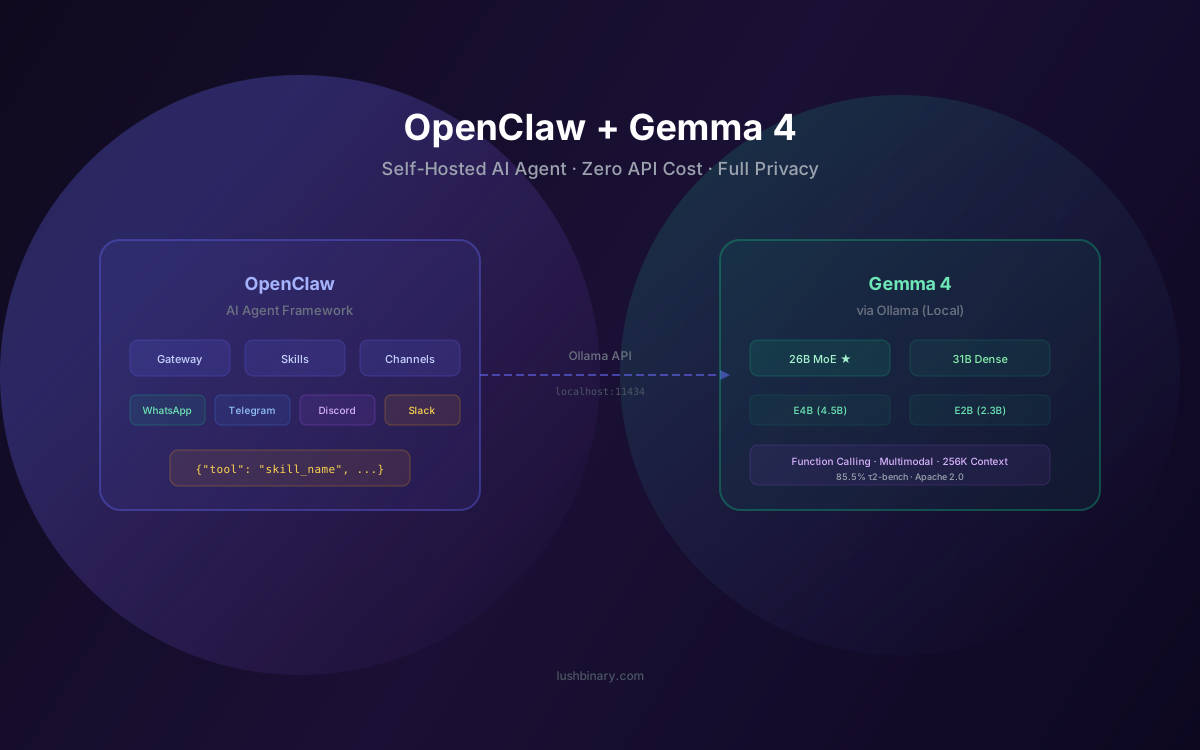
Running an AI agent that actually does things on your machine is powerful. Running it with a model you fully control, on your own hardware, with zero API costs? That's a different level entirely. OpenClaw — the open-source AI agent framework with 250K+ GitHub stars — paired with Google's Gemma 4 gives you exactly that: a self-hosted, privacy-first AI assistant powered by one of the most capable open-weight models available in 2026.
The timing couldn't be better. Gemma 4 launched on April 2, 2026 under the Apache 2.0 license with native function calling, multimodal input, and benchmark scores that rival models 20x its size. OpenClaw already supports Ollama as a local LLM provider, meaning you can connect the two in under 10 minutes. No API keys. No monthly bills. No data leaving your network.
This guide walks you through the complete setup: choosing the right Gemma 4 model size for your hardware, installing Ollama, configuring OpenClaw, building custom skills that leverage Gemma 4's strengths, and optimizing performance for real-world agentic workflows. Whether you're automating DevOps tasks, building a personal assistant on WhatsApp, or running code review agents — this is the playbook.
What This Guide Covers
- Why Gemma 4 + OpenClaw Is a Strong Combination
- Gemma 4 Model Sizes: Which One to Pick
- Hardware Requirements & Realistic Expectations
- Installing Ollama & Pulling Gemma 4
- Configuring OpenClaw for Gemma 4
- Function Calling & Tool Use with Gemma 4
- Building Custom OpenClaw Skills for Gemma 4
- Performance Tuning & Model Routing
- Gemma 4 vs Cloud APIs for OpenClaw
- Security & Privacy Considerations
- Troubleshooting Common Issues
- Why Lushbinary for AI Agent Development
1Why Gemma 4 + OpenClaw Is a Strong Combination
OpenClaw is a self-hosted AI agent framework that connects large language models to messaging platforms (WhatsApp, Telegram, Discord, Slack, iMessage), developer tools, and custom automation workflows. It runs on your machine, processes everything locally, and uses skills — modular units of functionality — to extend what the agent can do. The project has grown to 250K+ GitHub stars and 800+ community skills since its January 2026 rebrand.
Until now, most OpenClaw users relied on cloud APIs like Claude, GPT-5.4, or DeepSeek for the LLM backend. That works, but it means every message you send through your "self-hosted" agent still routes through a third-party API. Gemma 4 changes the equation:
- Truly local inference — No data leaves your machine. Your conversations, files, and automation outputs stay on your hardware.
- Zero API costs — No per-token billing. Run as many queries as your hardware can handle.
- Native function calling — Gemma 4 supports structured tool use out of the box, which is critical for OpenClaw's skill system. The 26B MoE model scores 85.5% on the τ2-bench agentic tool use benchmark (source).
- Apache 2.0 license — Use it commercially, modify it, distribute it. No restrictions.
- Multimodal input — Process images, audio (on E2B/E4B), and text in a single prompt. Useful for skills that analyze screenshots, receipts, or voice messages.
The combination gives you a fully self-contained AI agent stack: OpenClaw handles orchestration, messaging, and skill execution; Gemma 4 via Ollama handles reasoning, planning, and tool selection. No external dependencies beyond your own hardware.
2Gemma 4 Model Sizes: Which One to Pick
Gemma 4 ships in four sizes. Each has different trade-offs for OpenClaw use cases. Here's the practical breakdown based on Google DeepMind's official benchmarks (source):
| Model | Params (Active) | Context | τ2-bench | Best For |
|---|---|---|---|---|
| E2B | 2.3B | 128K | 29.4% | Mobile, IoT, edge |
| E4B | 4.5B | 128K | 57.5% | Laptops, quick tasks |
| 26B MoE ★ | 3.8B active / 26B total | 256K | 85.5% | Sweet spot for OpenClaw |
| 31B Dense | 31B | 256K | 86.4% | Max quality, serious hardware |
Our recommendation
For most OpenClaw users, the 26B MoE model is the best choice. It activates only 3.8B parameters per inference, so it runs at roughly 4B speed while delivering quality comparable to a 13B model. It scores 85.5% on τ2-bench (agentic tool use) and 82.6% on MMLU — more than enough for reliable skill execution, code generation, and multi-step planning.
The E4B model is a solid fallback if you're on limited hardware. At 57.5% on τ2-bench, it handles simple tasks (quick Q&A, text formatting, basic automation) but may struggle with complex multi-tool chains. The 31B Dense model is the powerhouse — 86.4% on τ2-bench, 89.2% on AIME 2026 math — but requires 24GB+ VRAM. For a deeper dive into all four models, see our Gemma 4 Developer Guide.
3Hardware Requirements & Realistic Expectations
OpenClaw itself is lightweight — it runs on a t3.small EC2 instance or any modern laptop. The hardware bottleneck is Ollama running the Gemma 4 model. Here's what you actually need:
Gemma 4 E4B (8GB+ RAM)
Runs on basically any modern laptop. MacBook Air with 8GB unified memory, a 2020-era gaming PC, or a Raspberry Pi 5 with 8GB. Response times are fast (50-100+ tokens/second on Apple Silicon). Good for simple OpenClaw skills: quick answers, text formatting, basic code review, calendar management.
Gemma 4 26B MoE (20GB+ RAM) ★ Recommended
This is where it gets interesting. With Q4_K_M quantization (which cuts memory usage by ~55-60%), the 26B MoE model fits on:
- Apple Silicon Mac with 16GB+ unified memory — runs comfortably with quantization
- NVIDIA RTX 3070/4070 with 12GB VRAM — handles the quantized version
- NVIDIA RTX 4080/A4000 with 16GB VRAM — runs it with room to spare
Real-world performance: developers report the 26B MoE model running at ~7 tokens/second on an A17 Pro chip with 8GB, and significantly faster on M-series Macs with 16GB+. The llama.cpp creator demonstrated 300 tokens/second on a three-year-old Mac Studio with the smaller models.
Gemma 4 31B Dense (24GB+ VRAM)
Serious hardware territory. NVIDIA RTX 3090/4090 with 24GB VRAM, or Apple Silicon with 32GB+ unified memory. With Q4 quantization it squeezes onto ~18-20GB. This is the model to use if you're running complex multi-step agentic workflows where accuracy on every tool call matters. For most OpenClaw use cases, the 26B MoE model delivers 99% of the value at half the hardware cost.
4Installing Ollama & Pulling Gemma 4
Ollama is the easiest way to run local models. One install, one command to pull a model, and you're running. OpenClaw integrates with Ollama's native /api/chat endpoint, supporting streaming and tool calling.
Step 1: Install Ollama
# macOS
brew install ollama
# Linux
curl -fsSL https://ollama.com/install.sh | sh
# Windows — download from ollama.com
Step 2: Pull Gemma 4
# Default E4B (good for most people, ~8GB)
ollama pull gemma4
# 26B MoE (recommended for OpenClaw, ~20GB)
ollama pull gemma4:26b
# 31B Dense (max quality, ~24GB+)
ollama pull gemma4:31b
Step 3: Verify It Works
# Quick test
ollama run gemma4:26b "What is 2+2?"
# Check the API is running
curl http://localhost:11434/api/tags
5Configuring OpenClaw for Gemma 4
OpenClaw stores all configuration in ~/.openclaw/openclaw.json. You need to set Ollama as a provider and point the default model to your Gemma 4 instance.
⚠️ Important: Use the Native Ollama API
Do not use the /v1 OpenAI-compatible URL (http://localhost:11434/v1) with OpenClaw. This breaks tool calling and models may output raw tool JSON as plain text. Always use the native Ollama API URL: http://localhost:11434 (no /v1).
Option A: Interactive Setup (Easiest)
# Launch the setup wizard
openclaw onboard
# Select "Ollama" as your provider
# Choose gemma4:26b as the default model
Option B: Manual Configuration
Edit ~/.openclaw/openclaw.json directly. Here's the minimal config to get Gemma 4 running:
{
  "agents": {
    "defaults": {
      "model": "ollama/gemma4:26b"
    }
  },
  "models": {
    "providers": {
      "ollama": {
        "baseUrl": "http://localhost:11434"
      }
    }
  }
}
OpenClaw uses the provider/model format for model references. So ollama/gemma4:26b tells OpenClaw to use the Ollama provider with the gemma4:26b model tag.
Verify the Connection
After saving the config, send a test message through any connected channel (or use the OpenClaw CLI). If Gemma 4 responds, you're set. If you see errors, check that:
- Ollama is running (
ollama serveor the Ollama app) - The model is downloaded (
ollama listshould showgemma4:26b) - The baseUrl uses the native API (
http://localhost:11434, not/v1) - No other process is using port 11434
6Function Calling & Tool Use with Gemma 4
Function calling is the backbone of OpenClaw's skill system. When you ask OpenClaw to "check my calendar" or "review this PR," the LLM decides which tool (skill) to invoke, formats the parameters as structured JSON, and OpenClaw executes it. This only works well if the model reliably produces valid tool calls.
Gemma 4 excels here. The 26B MoE model scores 85.5% on τ2-bench (retail agentic tool use), and the 31B Dense hits 86.4%. For comparison, Gemma 3 27B scored just 6.6% on the same benchmark. The improvement is massive — Gemma 4 was designed from the ground up for agentic workflows with native support for function calling and structured JSON output.
OpenClaw's Ollama integration uses the native /api/chat endpoint, which supports tool calling natively. When Gemma 4 decides a skill is needed, it returns a structured tool call in the response. OpenClaw parses this, executes the skill, and feeds the result back to Gemma 4 for the next reasoning step. This loop continues until the task is complete.
Thinking mode for complex tasks
Gemma 4 supports configurable thinking modes for step-by-step reasoning. For complex multi-tool chains (e.g., "review this PR, check the CI status, and post a summary to Slack"), the model can reason through each step before committing to a tool call. This significantly reduces errors in multi-step workflows.
7Building Custom OpenClaw Skills for Gemma 4
Skills are how you extend OpenClaw's capabilities. A skill is a self-contained unit of functionality defined by a SKILL.md file that teaches the agent how to use it through natural language instructions. Unlike MCP servers (which are separate processes exposing tools through a standardized protocol), skills are plain-language instructions the agent reads and follows at runtime.
Gemma 4's strong function calling and reasoning capabilities make it well-suited for custom skill development. Here's a practical example — a skill that monitors a GitHub repository and summarizes new issues:
# ~/.openclaw/skills/github-issue-monitor/SKILL.md
# GitHub Issue Monitor

## Description
Monitor a GitHub repository for new issues and
provide daily summaries.

## Trigger
Slash command: /issues <repo>

## Steps
1. Use the GitHub API to fetch open issues from
   the specified repository (last 24 hours)
2. For each issue, extract: title, author, labels,
   and first 200 characters of the body
3. Group issues by label (bug, feature, question)
4. Format a summary with counts per category and
   a brief description of each issue
5. If no new issues, respond with
   "No new issues in the last 24 hours"

## Output Format
Markdown summary with sections per label category.
Include direct links to each issue.
The key insight: Gemma 4's 256K context window (on the 26B and 31B models) means it can process large amounts of issue data in a single pass without truncation. Combined with its native function calling, the model can reliably chain multiple API calls — fetch issues, filter by date, group by label — without losing track of the overall task.
Skill Ideas That Play to Gemma 4's Strengths
Code Review Agent
Analyze PRs, check for common issues, suggest improvements. Gemma 4 scores 80.0% (31B) on LiveCodeBench v6.
Log Analyzer
Parse application logs, identify error patterns, suggest fixes. The 256K context handles large log files.
Meeting Summarizer
Process meeting transcripts and extract action items. E4B supports audio input for direct transcription.
Infrastructure Monitor
Check AWS/GCP resource status, alert on anomalies, suggest cost optimizations via API calls.
Documentation Generator
Scan codebases and generate API docs. Gemma 4's multimodal input can process architecture diagrams too.
Expense Tracker
Parse receipt images (multimodal), extract amounts, categorize spending. Works via WhatsApp photo messages.
8Performance Tuning & Model Routing
Running a local model means you control every aspect of performance. Here are the key levers for optimizing Gemma 4 with OpenClaw:
Quantization
Ollama automatically applies quantization when you pull a model. The default is usually Q4_K_M, which offers a good balance between quality and memory usage. For the 26B MoE model, Q4_K_M reduces memory from ~52GB (full precision) to ~15-16GB while retaining most of the model's capability. If you have the VRAM, Q8 gives better quality at roughly double the memory.
Context Window Management
Gemma 4's 256K context window is impressive, but using the full window on local hardware is slow and memory-intensive. For most OpenClaw skills, set a practical context limit in your Ollama configuration:
# Create a custom Modelfile for OpenClaw use
FROM gemma4:26b
PARAMETER num_ctx 8192
PARAMETER temperature 0.3
PARAMETER top_p 0.9
# Build the custom model
ollama create gemma4-openclaw -f Modelfile
An 8K context window is sufficient for most skill interactions. Bump to 16K or 32K for skills that process longer documents. Lower temperature (0.3) improves consistency for tool calling — you want deterministic JSON output, not creative prose.
Model Routing: Cheap + Premium Hybrid
OpenClaw supports model routing, which lets you use different models for different task complexities. A practical setup with Gemma 4:
{
  "agents": {
    "defaults": {
      "model": "ollama/gemma4:26b",
      "models": [
        "ollama/gemma4:26b",
        "ollama/gemma4"
      ]
    }
  }
}
This config uses the 26B MoE as the primary model and falls back to the E4B for simpler tasks or when the larger model is busy. You can also mix local and cloud models — use Gemma 4 locally for routine tasks and fall back to a cloud API (like DeepSeek V3.2 at $0.28/M input tokens) for tasks that exceed local model capabilities. For a detailed cost breakdown of cloud API options, see our OpenClaw with Open-Source LLMs guide.
9Gemma 4 vs Cloud APIs for OpenClaw
Should you run Gemma 4 locally or stick with a cloud API? It depends on your priorities. Here's an honest comparison:
| Factor | Gemma 4 (Local) | Cloud API (Claude/GPT) |
|---|---|---|
| Cost | $0/month (hardware you own) | $2-50+/month depending on usage |
| Privacy | 100% local, no data leaves your machine | Data sent to third-party servers |
| Latency | Depends on hardware (7-300+ tok/s) | Network-dependent, typically fast |
| Quality (tool use) | 85.5% τ2-bench (26B MoE) | Higher (Claude/GPT top-tier) |
| Availability | Always on (your hardware) | Subject to API outages/rate limits |
| Offline | Works without internet | Requires internet |
The practical answer for most users: use both. Configure Gemma 4 as your primary model for routine tasks (quick answers, simple automations, code formatting) and set a cloud API as the fallback for complex reasoning tasks. OpenClaw's model routing makes this seamless — the agent automatically falls back when the primary model can't handle a request.
The hybrid approach in practice
One developer reported running 90% of their OpenClaw interactions through Gemma 4 26B MoE locally, with only complex coding tasks falling back to a cloud API. Their monthly API bill dropped from ~$40 to under $5. The local model handled calendar management, message drafting, quick lookups, and simple code review without issues.
10Security & Privacy Considerations
Running Gemma 4 locally with OpenClaw gives you a significant privacy advantage over cloud APIs, but there are still security considerations to keep in mind:
What You Gain
- No data exfiltration — Conversations, files, and automation outputs never leave your machine. This matters for sensitive business data, personal information, and proprietary code.
- No API key exposure — No cloud API keys to manage, rotate, or worry about leaking. Ollama runs on localhost.
- Audit trail — Everything runs locally, so you have full visibility into what the agent does. No black-box cloud processing.
What to Watch For
- Skill permissions — OpenClaw skills can execute code, make API calls, and access files. Review any community skill before enabling it. The CVE-2026-25253 vulnerability (discovered in February 2026) highlighted the risks of unrestricted tool execution in AI agents.
- Ollama network exposure — By default, Ollama listens on
localhost:11434. If you expose it to your network (e.g., for remote access), add authentication and firewall rules. - Model output validation — Even with 85.5% tool-use accuracy, the model will occasionally produce malformed tool calls. OpenClaw handles this gracefully with retry logic, but for critical automations, add validation in your custom skills.
For enterprise deployments, consider running OpenClaw + Ollama inside a Docker container with restricted network access. NVIDIA offers an enterprise sandbox for OpenClaw that adds additional isolation layers. For more on OpenClaw security hardening, see our OpenClaw integrations guide.
11Troubleshooting Common Issues
Here are the most common issues when running OpenClaw with Gemma 4 via Ollama, and how to fix them:
❌ Tool calls return raw JSON as text instead of executing
✅ You're using the /v1 OpenAI-compatible endpoint. Switch to the native Ollama API URL: baseUrl: "http://localhost:11434" (no /v1). This is the most common mistake.
❌ Model is very slow or runs out of memory
✅ Reduce the context window (num_ctx) in your Modelfile. Try 4096 or 8192 instead of the full 256K. Also ensure no other GPU-intensive processes are running.
❌ OpenClaw can't connect to Ollama
✅ Verify Ollama is running (ollama serve or check the Ollama app). Test with: curl http://localhost:11434/api/tags. Check that port 11434 isn't blocked by a firewall.
❌ Model hallucinates tool names that don't exist
✅ Lower the temperature to 0.2-0.3 for more deterministic output. Ensure your skill descriptions are clear and specific. The 26B MoE model is more reliable than E4B for tool calling.
❌ Channel is required error on startup
✅ OpenClaw needs at least one messaging channel configured. Run openclaw onboard to set up Telegram, WhatsApp, or another channel before testing the LLM connection.
12Why Lushbinary for AI Agent Development
At Lushbinary, we build production AI agent systems for businesses. We've deployed OpenClaw-based solutions with local LLMs, cloud APIs, and hybrid routing architectures. Our team has hands-on experience with Gemma 4, Llama 4, DeepSeek V3, and every major model provider — we know which model fits which use case and how to optimize for cost, latency, and reliability.
Whether you need a custom OpenClaw deployment with Gemma 4 for privacy-sensitive workflows, a multi-model routing setup that balances cost and quality, or custom skills tailored to your business processes — we can help you get there faster.
Free 30-Minute Consultation
Want to run OpenClaw with Gemma 4 in production? Book a free call with our AI engineering team. We'll review your use case, recommend the right model and deployment architecture, and give you a clear roadmap. Book your call →
❓ Frequently Asked Questions
Can you run OpenClaw with Gemma 4 completely free?
Yes. OpenClaw supports Ollama as a local LLM provider, and Gemma 4 is available under the Apache 2.0 license. You can run the E4B model on 8GB RAM or the 26B MoE model on 20GB+ RAM with zero API costs.
Which Gemma 4 model size is best for OpenClaw?
The 26B MoE model is the sweet spot. It activates only 3.8B parameters per inference but delivers near-13B quality, scoring 85.5% on τ2-bench agentic tool use. It runs on 20GB+ RAM with Q4 quantization.
Does Gemma 4 support function calling with OpenClaw?
Yes. All Gemma 4 models have native function calling with structured JSON output. OpenClaw's Ollama integration uses the native /api/chat endpoint which supports tool calling. The 26B MoE scores 85.5% on τ2-bench.
How do I configure OpenClaw to use Gemma 4 via Ollama?
Run 'ollama pull gemma4:26b', then set the default model to 'ollama/gemma4:26b' in ~/.openclaw/openclaw.json. Use the native Ollama API URL (http://localhost:11434) — do not use the /v1 endpoint.
What hardware do I need to run OpenClaw with Gemma 4?
For E4B: 8GB RAM. For 26B MoE (recommended): 16GB+ Apple Silicon or 12GB+ NVIDIA GPU. For 31B Dense: 24GB+ VRAM or 32GB+ Apple Silicon.
📚 Sources
- Google DeepMind — Gemma 4 Official Model Page
- Hugging Face — Gemma 4 26B A4B Model Card
- Google AI for Developers — Gemma 4 Model Card
- Wikipedia — OpenClaw
Content was rephrased for compliance with licensing restrictions. Benchmark data sourced from official Google DeepMind documentation as of April 2026. OpenClaw statistics sourced from GitHub and Wikipedia as of April 2026. Pricing and specifications may change — always verify on the vendor's website.
Build Your Self-Hosted AI Agent Stack
Need help deploying OpenClaw with Gemma 4 in production? Our team builds custom AI agent solutions with local LLMs, cloud APIs, and hybrid architectures. Let's talk about your use case.
Build Smarter, Launch Faster.
Book a free strategy call and explore how LushBinary can turn your vision into reality.

