
In-app purchases are the engine behind the majority of top-grossing mobile apps, yet the implementation is notoriously painful. Apple and Google each have their own billing APIs, receipt validation rules, sandbox environments, and edge cases. Build it yourself and you are looking at weeks of work, a server-side validation layer, and an ongoing maintenance burden every time either platform ships a breaking change. That is the problem RevenueCat was built to solve.
But RevenueCat is not the only option. Apple's StoreKit 2 and Google's Play Billing Library v8 are both mature, well-documented native APIs. For some teams, going native is the right call. For others, RevenueCat's unified SDK, hosted receipt validation, and analytics dashboard are worth the 1% revenue share.
This guide covers the full picture: how RevenueCat works, how to integrate it in React Native, iOS, and Android, the honest pros and cons versus going native, pricing, and a decision framework to help you pick the right approach for your app.
📋 Table of Contents
- 1.What Is RevenueCat and How Does It Work?
- 2.RevenueCat Pricing in 2026
- 3.Core Concepts: Products, Offerings & Entitlements
- 4.Integration Guide: React Native
- 5.Integration Guide: iOS (Swift / StoreKit 2)
- 6.Integration Guide: Android (Kotlin / Play Billing v8)
- 7.RevenueCat vs Native: Honest Pros & Cons
- 8.Cross-Platform Subscription Sharing
- 9.Paywalls, A/B Testing & Analytics
- 10.Security, Webhooks & Server-Side Validation
- 11.Decision Framework: When to Use RevenueCat vs Native
- 12.Why Lushbinary for Your Mobile Monetization
1What Is RevenueCat and How Does It Work?
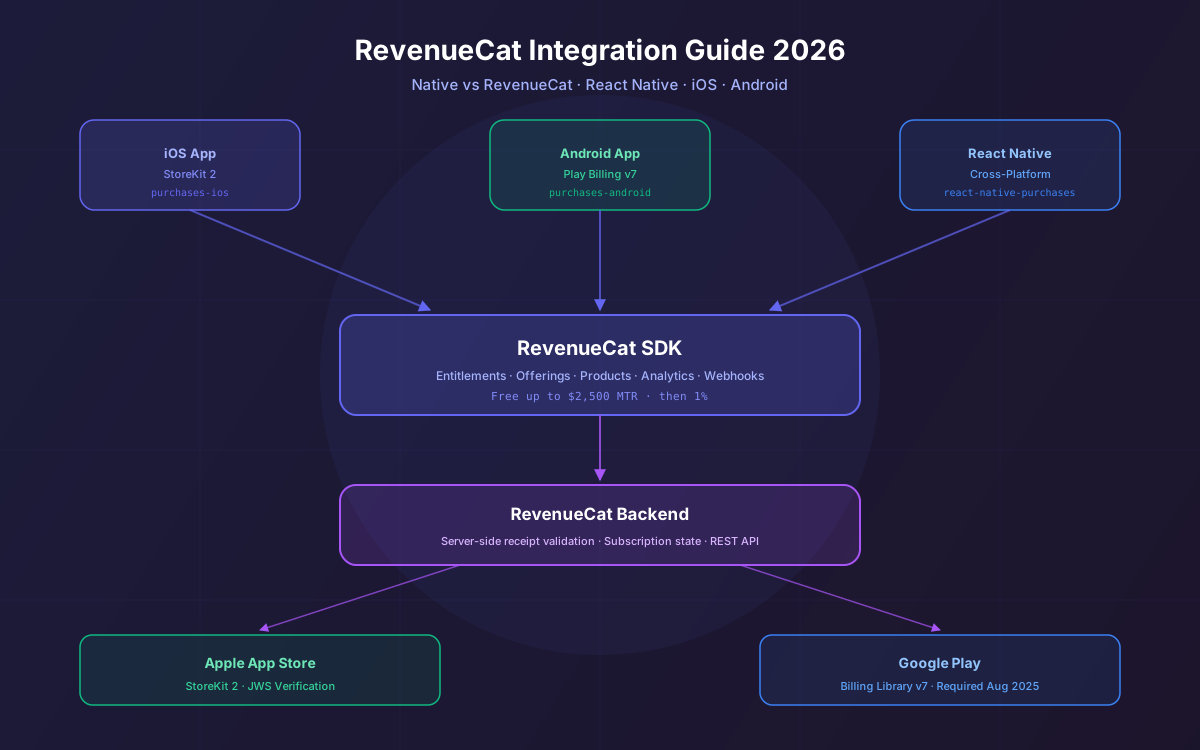
RevenueCat is a subscription management platform that sits between your app and the native billing APIs (Apple's StoreKit and Google's Play Billing). Instead of talking directly to the store, your app talks to RevenueCat's SDK, which handles:
- Purchase initiation — wrapping the native purchase flow in a unified API
- Receipt validation — server-side validation against Apple and Google backends so you never trust the client
- Entitlement tracking — a single source of truth for whether a user has an active subscription, regardless of platform
- Subscription lifecycle events — renewals, cancellations, billing retries, grace periods, and refunds, all surfaced via webhooks
- Analytics — MRR, churn, LTV, conversion funnels, and cohort analysis out of the box
The architecture is straightforward. Your app initializes the RevenueCat SDK with your API key, fetches the current user's entitlements, and checks whether a given entitlement (e.g., pro_access) is active before showing premium content. RevenueCat's backend handles all the receipt validation and subscription state management.
2RevenueCat Pricing in 2026
RevenueCat's pricing model is simple and developer-friendly:
| Plan | Monthly Tracked Revenue (MTR) | Cost |
|---|---|---|
| Pro (Free tier) | Up to $2,500/month | Free |
| Pro (Paid) | Above $2,500/month | 1% of total MTR |
| Scale | High volume | Starting at $1,700/month (annual) |
| Enterprise | Custom | Custom pricing |
The 1% fee is calculated on gross monthly tracked revenue — the full amount before the app store takes its 15-30% cut. On $100,000 in gross MTR, RevenueCat charges $1,000. After the standard 30% store commission, your net is $70,000, making the effective rate about 1.43% of net proceeds. For most apps, this is well worth the engineering time saved.
Note: If your MTR drops below $2,500 in a subsequent month, RevenueCat automatically returns to the free tier for that month. You only pay in months you earn above the threshold. Pricing sourced from revenuecat.com/pricing as of March 2026. Always verify current pricing on their website.
3Core Concepts: Products, Offerings & Entitlements
Before writing any code, you need to understand RevenueCat's three-layer model:
Products
SKUs you create in App Store Connect or Google Play Console. Examples: monthly_pro_4_99, annual_pro_39_99. These are the actual billable items.
Offerings
A collection of packages you present to users at a given time. You can have multiple offerings and switch between them remotely without an app update.
Entitlements
Logical access levels in your app (e.g., pro_access, premium_content). You map products to entitlements. Your app code only checks entitlements, never product IDs.
This separation is the key insight behind RevenueCat's design. Your app logic never hardcodes product IDs. It only asks: "does this user have the pro_access entitlement?" That means you can add new products, run A/B tests on pricing, or change your subscription structure without shipping a new app version.
4Integration Guide: React Native
RevenueCat's React Native SDK (react-native-purchases) requires React Native 0.73 or higher. Install it alongside the RevenueCatUI package if you want pre-built paywalls:
npm install react-native-purchases react-native-purchases-ui
# iOS: pod install
Initialize RevenueCat early in your app lifecycle, typically in your root component or app entry point. Use separate API keys for iOS and Android:
import Purchases, { LOG_LEVEL } from 'react-native-purchases';
import { Platform } from 'react-native';

// Initialize once at app startup
const API_KEY = Platform.select({
  ios: 'appl_xxxxxxxxxxxxxxxxxxxxxxxxxxxxxxxx',
  android: 'goog_xxxxxxxxxxxxxxxxxxxxxxxxxxxxxxxx',
});

Purchases.setLogLevel(LOG_LEVEL.DEBUG); // remove in production
await Purchases.configure({ apiKey: API_KEY! });

// Identify the user (use your own user ID)
await Purchases.logIn('user_123');
Fetching the current user's entitlements and checking access:
import Purchases from 'react-native-purchases';

async function checkProAccess(): Promise<boolean> {
  const customerInfo = await Purchases.getCustomerInfo();
  return customerInfo.entitlements.active['pro_access'] !== undefined;
}

// Fetch offerings and present a paywall
async function showPaywall() {
  const offerings = await Purchases.getOfferings();
  const current = offerings.current;
  if (!current) return;

  // current.availablePackages contains monthly, annual, etc.
  const monthly = current.monthly;
  if (!monthly) return;

  await Purchases.purchasePackage(monthly);
}
For pre-built paywalls using RevenueCatUI, you can render a full-screen paywall with a single component — no custom UI required:
import { RevenueCatUI } from 'react-native-purchases-ui';

// Full-screen paywall modal
<RevenueCatUI.Paywall
  onDismiss={() => setShowPaywall(false)}
  onPurchaseCompleted={({ customerInfo }) => {
    // user is now subscribed
    setShowPaywall(false);
  }}
/>5Integration Guide: iOS (Swift / StoreKit 2)
Add RevenueCat to your iOS project via Swift Package Manager or CocoaPods. The iOS SDK uses StoreKit 2 by default for users on iOS 16+, with automatic fallback to StoreKit 1 for older OS versions.
// Package.swift or via Xcode SPM
// https://github.com/RevenueCat/purchases-ios

// AppDelegate.swift or App.swift
import RevenueCat

@main
struct MyApp: App {
  init() {
    Purchases.logLevel = .debug // remove in production
    Purchases.configure(withAPIKey: "appl_xxxxxxxxxxxxxxxxxxxxxxxx")
  }
  var body: some Scene {
    WindowGroup { ContentView() }
  }
}
Checking entitlements and making a purchase in SwiftUI:
import RevenueCat

// Check entitlement
func checkProAccess() async -> Bool {
  do {
    let customerInfo = try await Purchases.shared.customerInfo()
    return customerInfo.entitlements["pro_access"]?.isActive == true
  } catch {
    return false
  }
}

// Purchase a package
func purchaseMonthly(package: Package) async {
  do {
    let result = try await Purchases.shared.purchase(package: package)
    if result.customerInfo.entitlements["pro_access"]?.isActive == true {
      // unlock premium content
    }
  } catch {
    // handle PurchasesError
  }
}
StoreKit 2 note: RevenueCat's iOS SDK v5.0+ uses StoreKit 2 APIs by default for iOS 16+ users, which provides ~200ms faster receipt validation at the p95 level compared to the StoreKit 1 implementation. StoreKit 1 APIs are being progressively deprecated by Apple, so this migration is handled automatically by RevenueCat.
6Integration Guide: Android (Kotlin / Play Billing v8)
RevenueCat's Android SDK supports Google Play Billing Library v8, which is the current major version (latest stable: 8.2.1, December 2025). Add the dependency to your build.gradle:
// build.gradle (app)
dependencies {
  implementation 'com.revenuecat.purchases:purchases:8.x.x'
  implementation 'com.revenuecat.purchases:purchases-ui:8.x.x' // optional paywalls
}

// AndroidManifest.xml — add billing permission
<uses-permission android:name="com.android.vending.BILLING" />
Initialize in your Application class:
import com.revenuecat.purchases.Purchases
import com.revenuecat.purchases.PurchasesConfiguration

class MyApplication : Application() {
  override fun onCreate() {
    super.onCreate()
    Purchases.debugLogsEnabled = true // remove in production
    Purchases.configure(
      PurchasesConfiguration.Builder(this, "goog_xxxxxxxxxxxxxxxxxxxxxxxx")
        .build()
    )
  }
}

// Check entitlement
suspend fun checkProAccess(): Boolean {
  val customerInfo = Purchases.sharedInstance.awaitCustomerInfo()
  return customerInfo.entitlements["pro_access"]?.isActive == true
}
⚠️ Google Play Billing Library v8 Migration
PBL v8 introduces multiple purchase options for one-time products, non-expiring subscriptions, and improved error handling, while also deprecating several APIs from v6/v7. If you are using RevenueCat, their Android SDK v9.0+ already handles PBL8 compatibility — you do not need to manually migrate the billing APIs. If you are using native Play Billing directly, follow Google's official migration guide.
7RevenueCat vs Native: Honest Pros & Cons
This is the question most developers actually want answered. Here is an honest breakdown:
RevenueCat Pros
- Cross-platform in one SDK. One API for iOS, Android, React Native, Flutter, Unity, and web. No platform-specific billing code to maintain.
- Server-side receipt validation included. You do not need to build or host your own validation server. RevenueCat handles Apple and Google receipt verification on their backend.
- Entitlement management. The entitlement layer decouples your app logic from product IDs, making pricing changes and A/B tests trivial.
- Analytics out of the box. MRR, churn, LTV, trial conversion, and cohort analysis without building a data pipeline.
- Remote paywall configuration. Update your paywall copy, pricing, and layout without an app store review cycle.
- Webhooks for every lifecycle event. Renewals, cancellations, billing retries, refunds — all delivered to your backend in real time.
- Platform change insulation. When Apple or Google updates their billing APIs (like the PBL v8 migration), RevenueCat ships SDK updates so you do not have to scramble.
- Cross-platform subscription sharing. A user who subscribes on iOS can access their entitlement on Android via a shared App User ID.
RevenueCat Cons
- 1% revenue share above $2,500 MTR. At scale, this adds up. On $1M/month gross revenue, that is $10,000/month to RevenueCat. Some teams at this scale build in-house.
- Third-party dependency. Your subscription infrastructure depends on RevenueCat's uptime and continued operation. If they have an outage, your purchase flow is affected.
- Data leaves your infrastructure. Purchase events and customer data flow through RevenueCat's servers. For highly regulated industries, this may require additional compliance review.
- Less control over edge cases. Native APIs give you direct access to every billing edge case. RevenueCat abstracts these away, which is usually good but occasionally limits what you can do.
- Estimated revenue metrics. Some developers have noted that RevenueCat's revenue figures can differ slightly from App Store Connect and Google Play Console due to estimation methodology.
Native StoreKit 2 / Play Billing v8 Pros
- Zero revenue share. No third-party fee on top of the store commission.
- Full control. Direct access to every API, edge case, and platform feature the moment it ships.
- No external dependency. Your purchase flow only depends on Apple and Google, not a third party.
- StoreKit 2 is genuinely good. Apple's modern async/await API is clean, well-documented, and includes built-in transaction verification with JWS signatures.
Native Cons
- You build everything. Server-side receipt validation, entitlement tracking, subscription state management, analytics, and webhook handling — all on you.
- Two separate codebases. StoreKit 2 and Play Billing v8 have completely different APIs. Cross-platform apps need platform abstraction layers.
- Maintenance burden. Every time Apple or Google deprecates an API or changes behavior, you need to update your code.
- No built-in analytics. You need to build or integrate a separate analytics pipeline for subscription metrics.
8Cross-Platform Subscription Sharing
One of RevenueCat's most useful features for cross-platform apps is the ability to share subscription state between iOS and Android. Apple and Google have no native interoperability — a subscription purchased on iOS is invisible to Android and vice versa.
RevenueCat solves this with the App User ID. When a user logs in, you call Purchases.logIn(yourUserId) on both platforms. RevenueCat's backend links all purchases to that user ID, so when you check entitlements on Android, it sees the iOS subscription and grants access.
// React Native — call this after your auth flow
import Purchases from 'react-native-purchases';

async function onUserLogin(userId: string) {
  const { customerInfo } = await Purchases.logIn(userId);
  const hasPro = customerInfo.entitlements.active['pro_access'] !== undefined;
  // hasPro is true regardless of which platform the user subscribed on
}
This works because RevenueCat is the source of truth for entitlements, not the individual stores. The stores only know about their own purchases; RevenueCat aggregates them under a single user identity.
9Paywalls, A/B Testing & Analytics
RevenueCat includes a paywall editor and A/B testing framework (Experiments) that lets you test different pricing, copy, and layouts without shipping a new app version. The workflow is:
- Create multiple Offerings in the RevenueCat dashboard (e.g., "control" with monthly pricing, "variant_a" with annual pricing highlighted)
- Set up an Experiment assigning a percentage of users to each offering
- Your app fetches
Purchases.getOfferings()— RevenueCat automatically returns the correct offering for each user based on the experiment assignment - Monitor conversion, trial starts, and revenue per user in the RevenueCat dashboard
The analytics dashboard tracks 15+ subscription metrics automatically:
10Security, Webhooks & Server-Side Validation
Never trust the client for entitlement decisions in high-value scenarios. RevenueCat provides two mechanisms for server-side verification:
REST API
Query a user's entitlements from your backend using the RevenueCat REST API:
GET https://api.revenuecat.com/v1/subscribers/:app_user_id

Authorization: Bearer YOUR_SECRET_API_KEY

// Response includes entitlements, subscriptions, and purchase history
Webhooks
Configure a webhook endpoint in the RevenueCat dashboard to receive real-time events for every subscription lifecycle change:
INITIAL_PURCHASE— new subscriberRENEWAL— successful renewalCANCELLATION— user cancelled (subscription still active until period end)BILLING_ISSUE— payment failed, grace period startedPRODUCT_CHANGE— user upgraded or downgradedREFUND— refund issuedEXPIRATION— subscription fully expired
Always validate the webhook signature using the X-RevenueCat-Signature header to prevent spoofed events. RevenueCat signs all webhook payloads with HMAC-SHA256.
11Decision Framework: When to Use RevenueCat vs Native
Use this framework to decide which approach fits your situation:
| Scenario | RevenueCat | Native |
|---|---|---|
| iOS + Android cross-platform app | ✅ Recommended | ⚠️ Complex |
| iOS-only app | ✅ Good | ✅ Good |
| Android-only app | ✅ Good | ✅ Good |
| React Native / Flutter app | ✅ Recommended | ⚠️ Complex |
| Early-stage startup (< $2,500 MTR) | ✅ Free | ✅ Free |
| High-revenue app (> $500K MTR) | ⚠️ Evaluate cost | ✅ Consider |
| Need analytics without extra tools | ✅ Built-in | ❌ Build it |
| Need remote paywall updates | ✅ Built-in | ❌ Build it |
| Strict data residency requirements | ⚠️ Review ToS | ✅ Full control |
| Small team, fast shipping | ✅ Recommended | ⚠️ Slower |
| Large team, full control needed | ⚠️ Evaluate | ✅ Consider |
The break-even point where building native becomes financially attractive is roughly when your RevenueCat bill exceeds the cost of the engineering time to build and maintain an equivalent in-house solution. For most teams, that is well above $500K/month in gross revenue — and even then, the ongoing maintenance cost of native billing is often underestimated.
❓ Frequently Asked Questions
Is RevenueCat free to use?
RevenueCat is free until your app earns over $2,500 in monthly tracked revenue (MTR). Above that threshold, the Pro plan charges 1% of your total MTR. There is no per-seat fee or per-transaction charge.
Should I use RevenueCat or native StoreKit 2 / Google Play Billing?
Use RevenueCat if you ship on both iOS and Android, need a unified dashboard, or want to avoid building server-side receipt validation. Use native StoreKit 2 or Google Play Billing Library v8 if you are iOS-only or Android-only, want zero third-party dependencies, and have the engineering bandwidth to maintain your own entitlement logic.
Does RevenueCat support React Native and Flutter?
Yes. RevenueCat publishes official SDKs for React Native (react-native-purchases, minimum RN 0.73), Flutter (purchases_flutter), Unity, Capacitor, and Cordova in addition to native iOS (Swift) and Android (Kotlin/Java) SDKs.
What is the difference between RevenueCat entitlements and products?
Products are the SKUs you create in App Store Connect or Google Play Console (e.g., 'monthly_pro_usd'). Entitlements are logical access levels you define in RevenueCat (e.g., 'pro_access'). You map one or more products to an entitlement so your app code only checks the entitlement, not individual product IDs.
How does RevenueCat handle cross-platform subscription sharing between iOS and Android?
RevenueCat uses a shared App User ID to link purchases across platforms. If a user subscribes on iOS and logs in on Android with the same App User ID, RevenueCat's backend recognizes the active entitlement and grants access on Android automatically.
What is Google Play Billing Library v8 and do I need to migrate?
Google Play Billing Library v8 (latest stable: 8.2.1, December 2025) is the current major version. It introduces multiple purchase options for one-time products, non-expiring subscriptions, and improved error handling. RevenueCat's Android SDK v9.0+ already supports PBL8, so if you use RevenueCat you are covered without manual migration.
12Why Lushbinary for Your Mobile Monetization
Implementing in-app purchases correctly is harder than it looks. The happy path is straightforward, but the edge cases — billing retries, grace periods, subscription upgrades, refund handling, sandbox testing across both stores, and App Store Review compliance — take real experience to get right.
At Lushbinary, we build mobile apps with RevenueCat and native billing integrations for clients across iOS, Android, and React Native. We handle the full stack: product configuration in App Store Connect and Google Play Console, SDK integration, server-side webhook handling, entitlement logic, paywall design, and A/B test setup.
- React Native & Flutter cross-platform apps with RevenueCat integration
- Native iOS (Swift) apps with StoreKit 2 or RevenueCat
- Native Android (Kotlin) apps with Play Billing v8 or RevenueCat
- Paywall design & A/B testing setup for conversion optimization
- Webhook & backend integration for subscription lifecycle management
- Migration from legacy StoreKit 1 or Play Billing v5/v6 to modern APIs
Whether you are launching a new subscription app or migrating an existing one, we can get you to production faster and with fewer surprises.
🚀 Free Consultation
Not sure whether RevenueCat or native billing is right for your app? Book a free 30-minute call with our team. We will review your requirements and give you a straight answer. Book a call →
📚 Sources
- RevenueCat Pricing & Plans
- RevenueCat Docs: Account Management & Billing
- RevenueCat iOS SDK: StoreKit 2 Update (v5.0)
- Google Play Billing Library v8 Migration Guide
- Google Play Billing Library Deprecation FAQ
- react-native-purchases Docs
- RevenueCat: Cross-Platform Subscription Sharing
Content was rephrased for compliance with licensing restrictions. Pricing and SDK version data sourced from official RevenueCat and Google documentation as of March 2026. Pricing and version numbers may change — always verify on the vendor's website.
Ready to Ship In-App Purchases?
Tell us about your app and we'll help you choose the right approach and get it live fast.
Build Smarter, Launch Faster.
Book a free strategy call and explore how LushBinary can turn your vision into reality.

