

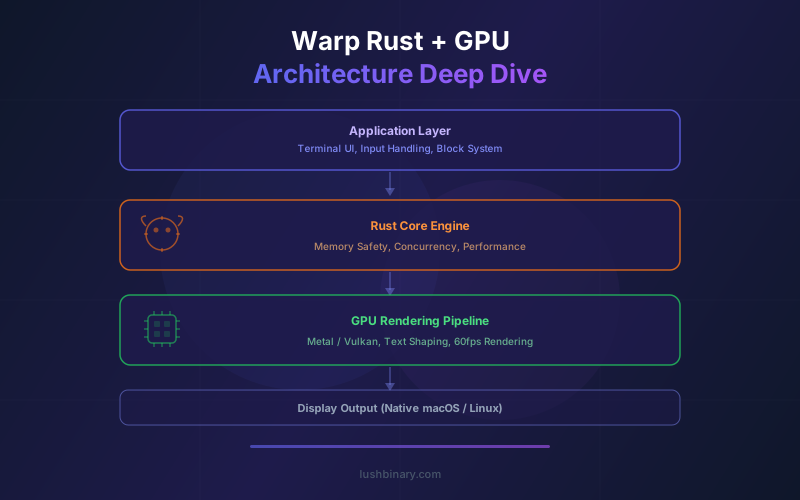
Warp is not just another terminal emulator with a fresh coat of paint. It is a ground-up reimplementation of the terminal experience, built entirely in Rust with GPU-accelerated rendering via wgpu. Since its open-source release in April 2026 under AGPL-3.0, the codebase has accumulated over 26,000 GitHub stars and given the developer community full visibility into how a modern, high-performance terminal works at the systems level.
This article is a deep technical exploration of Warp's architecture. We will walk through why Rust was chosen over C++ and Electron, how the GPU rendering pipeline works with wgpu, the internal design of the block engine, the IDE-style input editor, the shell parser and autocompletion system, cross-platform abstractions, real performance benchmarks, and a tour of the open-source codebase. If you are a systems programmer, a Rust enthusiast, or a developer evaluating Warp for your workflow, this is the reference you need.
For a broader overview of Warp's open-source release, features, and pricing, see our Warp Open-Source Developer Guide.
📋 Table of Contents
- 01Why Warp Chose Rust for a Terminal
- 02GPU-Accelerated Rendering with wgpu
- 03The Block Engine: Reinventing Terminal Output
- 04IDE-Style Input Editor Architecture
- 05Shell Parser & Autocompletion System
- 06Cross-Platform Abstractions
- 07Performance Characteristics
- 08Open-Source Codebase Tour
- 09Contributing to Warp's Rust Codebase
- 10Why Lushbinary for Rust & Systems Development
1Why Warp Chose Rust for a Terminal
The terminal emulator space has been dominated by C and C++ codebases for decades. xterm, GNOME Terminal, and iTerm2 are all written in C or Objective-C. When Warp's team set out to build a new terminal in 2020, they evaluated C++, Go, Swift, and Rust. Rust won for four specific technical reasons.
Memory Safety Without Garbage Collection
Terminal emulators manage complex state: scrollback buffers, PTY file descriptors, GPU texture handles, and concurrent I/O streams. In C++, this is a minefield of use-after-free bugs, double frees, and data races. Rust's ownership model eliminates these at compile time. There is no garbage collector introducing pause times, which matters when you are targeting sub-5ms input latency. Every allocation is deterministic, and the borrow checker ensures that no two threads hold mutable references to the same data simultaneously.
Zero-Cost Abstractions
Rust's trait system and generics compile down to monomorphized machine code with no runtime dispatch overhead. Warp uses traits extensively to abstract over platform-specific behavior (Metal vs. Vulkan vs. DirectX, macOS PTY vs. Linux PTY) without paying a vtable lookup cost at runtime. The compiler inlines and optimizes these abstractions away, producing binaries that perform like hand-tuned C while maintaining clean, modular source code.
No GC Pauses
Languages like Go and Java introduce stop-the-world garbage collection pauses that can spike to several milliseconds. For a terminal that needs to render at 60fps (16.6ms per frame) and respond to keystrokes in under 5ms, even a 2ms GC pause is unacceptable. Rust's compile-time memory management means allocation and deallocation happen deterministically, with no runtime pauses. This is why both Warp and Alacritty chose Rust over Go for terminal development.
Cross-Platform Compilation
Rust's toolchain (rustup, cargo) makes cross-compilation straightforward. Warp compiles to native binaries on macOS (aarch64 and x86_64), Linux (x86_64, with Wayland and X11 support), and Windows (x86_64). The same codebase produces optimized binaries for each target without the overhead of a runtime or VM. Conditional compilation with #[cfg(target_os)] attributes lets Warp include platform-specific code paths cleanly.
Rust in the Terminal Ecosystem
Warp is not alone in choosing Rust. Alacritty (the first GPU-accelerated terminal) and Rio are also Rust-based. Ghostty chose Zig for similar low-level control. The trend is clear: modern terminal emulators are moving away from C/C++ toward memory-safe systems languages that still deliver native performance.
2GPU-Accelerated Rendering with wgpu
Traditional terminals render text using CPU-based rasterization. Each character is drawn pixel by pixel on the CPU, composited into a framebuffer, and then sent to the display. This works fine for simple output, but it becomes a bottleneck when rendering thousands of lines, handling complex Unicode, or animating UI elements like cursors and selection highlights.
Warp takes a fundamentally different approach by offloading all rendering to the GPU. The rendering pipeline is built on wgpu, a Rust-native graphics library that provides a safe, cross-platform abstraction over the native GPU APIs.
How wgpu Abstracts GPU Backends
wgpu implements the WebGPU specification in Rust and maps it to native backends: Metal on macOS, Vulkan on Linux, and DirectX 12 on Windows. Warp writes rendering code against the wgpu API once, and the library translates those calls to the appropriate native API at runtime. This means Warp's rendering code does not contain any direct Metal, Vulkan, or DirectX calls. The abstraction layer handles shader compilation, buffer management, texture creation, and command submission for each platform.
The Glyph Atlas
Rendering text on the GPU requires converting font glyphs into textures. Warp maintains a glyph atlas - a large texture that contains pre-rasterized images of every character the terminal needs to display. When a character appears for the first time, Warp rasterizes it on the CPU (using a font shaping library like swash or cosmic-text), uploads the glyph bitmap to the atlas texture on the GPU, and records its position and dimensions. On subsequent frames, the renderer simply looks up the glyph's coordinates in the atlas and draws a textured quad at the correct screen position. This avoids re-rasterizing the same character every frame.
Batched Draw Calls
Drawing each character individually would require thousands of separate GPU draw calls per frame, which is inefficient. Warp batches all visible characters into a single vertex buffer, where each character is represented as a textured quad (two triangles) with position, atlas coordinates, and color attributes. The entire visible terminal content is rendered in one or two draw calls per frame. This batching is what allows Warp to maintain 60fps even when displaying dense output from commands like find / or large log files.
| GPU Backend | Platform | Shader Language | Notes |
|---|---|---|---|
| Metal | macOS | MSL (via naga) | Primary development target, Apple Silicon optimized |
| Vulkan | Linux | SPIR-V (via naga) | Supports Wayland and X11 window systems |
| DirectX 12 | Windows | HLSL (via naga) | Windows 10+ required for DX12 support |
Warp's rendering pipeline: keystrokes flow through the parser and block engine before being batched into GPU draw calls via wgpu.
3The Block Engine: Reinventing Terminal Output
Traditional terminals treat output as a continuous stream of characters written to a scrollback buffer. There is no semantic boundary between one command's output and the next. Warp's block engine replaces this model with structured, addressable output units.
How Blocks Work Internally
When you execute a command in Warp, the block engine creates a new block data structure. This block captures the input command string, the working directory at execution time, a timestamp, and a reference to the PTY output stream. As stdout and stderr data arrives from the child process, the block engine appends it to the block's output buffer rather than a global scrollback. When the process exits, the block records the exit code and total execution duration.
Each block is a self-contained unit. In Rust terms, you can think of it as a struct that owns its data:
// Simplified block representation
struct Block {
id: BlockId,
command: String,
working_dir: PathBuf,
output: TerminalOutput,
exit_code: Option<i32>,
started_at: Instant,
duration: Option<Duration>,
}
State Management
The block engine maintains an ordered list of blocks representing the session history. Each block transitions through states: Pending (user is typing), Running (process is executing), and Completed (process has exited). The engine tracks which block is currently active, handles block selection for copy/share operations, and manages the relationship between blocks and the AI agent context. When Agent Mode reads command output, it references specific blocks by ID rather than scraping raw scrollback text.
Scrollback and Memory
Traditional terminals keep a fixed-size scrollback buffer (typically 10,000 lines) and discard older content. Warp's block model allows more intelligent memory management. Blocks that scroll out of view can have their rendered glyph data evicted from the GPU atlas while keeping the raw text in memory. If the user scrolls back, the glyphs are re-rasterized on demand. For very long sessions, older blocks can be serialized to disk and loaded lazily. This approach keeps memory usage predictable (around 120MB at idle) while supporting effectively unlimited history.
4IDE-Style Input Editor Architecture
The command input area in Warp is not a readline wrapper. It is a custom text editor built in Rust, designed to feel like a code editor embedded in the terminal. This is one of the most complex subsystems in the codebase.
Multi-Line Editing
Unlike traditional terminals where pressing Enter immediately executes the command, Warp's editor supports multi-line input with Shift+Enter for newlines. The editor maintains a rope data structure (or a similar efficient text buffer) for the input text, supporting O(log n) insertions and deletions at arbitrary positions. This is the same approach used by code editors like xi-editor (also written in Rust) and Zed.
Syntax Highlighting
As you type, the editor tokenizes the input and applies syntax highlighting for shell commands, flags, strings, variables, pipes, and redirections. The tokenizer runs incrementally, re-highlighting only the changed portion of the input rather than the entire buffer. This keeps the highlighting responsive even for complex multi-line scripts. Colors are applied as attributes on the text spans, which the GPU renderer reads when building the vertex buffer for the input area.
Cursor Management
The editor supports multiple cursor positions, selection ranges, and standard keyboard shortcuts (Cmd+A for select all, Cmd+D for select next occurrence, Option+Arrow for word navigation on macOS). Cursor state is tracked as a set of (position, selection_anchor) pairs. The cursor blink animation is GPU-rendered, using a simple time-based alpha interpolation in the fragment shader. This avoids CPU timer callbacks that can introduce jitter.
The editor also handles clipboard integration, undo/redo with a command history stack, and bracket matching. All of this is implemented in Rust with no dependency on platform text editing frameworks like NSTextView (macOS) or GtkTextView (Linux), giving Warp full control over the editing experience across platforms.
5Shell Parser & Autocompletion System
Warp's autocompletion is not a simple prefix match against command history. It is a context-aware system that understands shell syntax, CLI tool argument structures, and the current cursor position within a command pipeline.
400+ CLI Tool Completions
Warp ships with completion specifications for over 400 CLI tools, including git, docker, kubectl, aws, npm, cargo, terraform, helm, and many more. Each spec defines the tool's subcommands, flags, argument types, and descriptions. These specs are structured data (not regex patterns), which allows the completion engine to provide rich, contextual suggestions with documentation inline.
Context-Aware Completions
The parser tracks where the cursor is within the command structure. If you type git checkout -, the parser knows you are in the flag position for the checkout subcommand and suggests -b, -B, --track, and other relevant flags. If you type git checkout main and press Tab, it knows you are in the branch name position and suggests branches from your local repo. This positional awareness is what makes Warp's completions feel intelligent rather than just alphabetical.
How the Parser Works
The shell parser operates in several stages. First, it performs lexical analysis to tokenize the input into words, operators, pipes, redirections, and quoted strings. Then it builds a lightweight AST (abstract syntax tree) representing the command structure: which tokens are commands, which are arguments, and how they relate through pipes and logical operators. The completion engine walks this AST to determine the current context and queries the appropriate completion spec.
The parser also handles shell-specific constructs like variable expansion ($VAR), command substitution ($(cmd)), globbing patterns, and here-documents. It does not need to be a full POSIX shell parser since it only needs enough understanding to provide accurate completions and syntax highlighting, not to execute commands.
Extensible Completion Specs
With the codebase now open source, developers can add completion specs for custom CLI tools. If your team has internal CLIs that Warp does not recognize, you can write a spec following the existing format and submit a PR. The spec format is declarative JSON/YAML that describes the command tree, making it accessible even to developers who are not familiar with Rust.
6Cross-Platform Abstractions
Running a terminal emulator on three operating systems requires abstracting over significant platform differences. Warp uses Rust traits and conditional compilation to isolate platform-specific code behind clean interfaces.
PTY Management
A pseudo-terminal (PTY) is the OS-level mechanism that connects the terminal emulator to the shell process. On macOS and Linux, Warp uses the POSIX openpty() / forkpty() APIs to create PTY pairs. On Windows, it uses the ConPTY API introduced in Windows 10. The PTY abstraction layer exposes a unified interface for reading output, writing input, resizing the terminal, and managing the child process lifecycle. Internally, each platform implementation handles the OS-specific details: signal handling on Unix, job control, and Windows-specific process creation flags.
Clipboard Integration
Clipboard access varies significantly across platforms. macOS uses NSPasteboard, Linux uses X11 selections (PRIMARY and CLIPBOARD) or the Wayland clipboard protocol, and Windows uses the Win32 clipboard API. Warp abstracts these behind a trait that provides get_text() and set_text() methods. The implementation handles format negotiation (plain text vs. rich text), clipboard change notifications, and the quirks of each platform (like X11's asynchronous clipboard model where the data is only transferred when another application requests it).
Window Management
Warp needs to create native windows, handle resize events, manage DPI scaling, and integrate with the platform's window management system (tabs on macOS, tiling on Linux compositors, snap layouts on Windows). The windowing layer likely uses a crate like winit for cross-platform window creation and event handling, with platform-specific extensions for features like macOS native tabs and traffic light button positioning.
| Abstraction | macOS | Linux | Windows |
|---|---|---|---|
| GPU Backend | Metal | Vulkan | DirectX 12 |
| PTY API | POSIX openpty | POSIX openpty | ConPTY |
| Clipboard | NSPasteboard | X11/Wayland | Win32 Clipboard |
| Windowing | AppKit + winit | winit (X11/Wayland) | Win32 + winit |
7Performance Characteristics
Performance claims are meaningless without numbers. Here are the key metrics that define Warp's performance profile, based on the architecture described above.
Input Latency
Warp targets approximately 5ms input-to-display latency. This is the time from when a keystroke event is received by the application to when the corresponding character appears on screen. The pipeline is: OS keyboard event, event loop dispatch, editor state update, GPU vertex buffer update, draw call submission, and display. By keeping the editor update and GPU submission on the same thread (or using lock-free communication between threads), Warp avoids the inter-thread synchronization overhead that can add milliseconds of latency.
Rendering Throughput
Warp sustains 60fps rendering during heavy output scrolling. The batched draw call approach means that rendering 100 visible lines costs roughly the same as rendering 10 lines, since both result in a single GPU draw call with a different-sized vertex buffer. The bottleneck shifts to glyph atlas updates when new characters appear for the first time, but this is amortized over the session since most characters are cached after the first few commands.
Memory Usage
Warp uses approximately 120MB of memory at idle. This includes the Rust runtime, the GPU context and glyph atlas texture, the block engine state, and the completion spec database. For comparison, Alacritty uses around 30-50MB at idle (it has no block engine, completion system, or AI features), while Electron-based terminals like Hyper can use 200-400MB. Warp's memory usage scales linearly with session length as blocks accumulate, but the lazy eviction strategy keeps it manageable for multi-hour sessions.
Startup Time
Warp starts up in under 500ms on modern hardware (Apple M-series, recent Intel/AMD). This includes initializing the GPU context, loading the glyph atlas, parsing completion specs, and spawning the shell process. Rust's lack of a runtime initialization phase (no JVM startup, no V8 engine boot) contributes to the fast cold start. Subsequent launches can be faster if the OS caches the binary in memory.
| Metric | Warp | Alacritty | iTerm2 |
|---|---|---|---|
| Input Latency | ~5ms | ~3ms | ~10-15ms |
| Idle Memory | ~120MB | ~35MB | ~80MB |
| Startup Time | <500ms | <100ms | ~800ms |
| GPU Accelerated | Yes (wgpu) | Yes (OpenGL) | Partial (Metal) |
8Open-Source Codebase Tour
With the codebase now public on GitHub, let's walk through the key directories and modules that make up Warp's Rust architecture. Understanding the project layout is essential before diving into contributions or studying specific subsystems.
Key Directories
Warp/
src/ # Main application source
renderer/ # GPU rendering pipeline (wgpu)
block_engine/ # Block model and state management
editor/ # IDE-style input editor
parser/ # Shell parser and tokenizer
completions/ # CLI tool completion specs
pty/ # Platform PTY abstractions
platform/ # OS-specific code (macOS/Linux/Win)
shaders/ # WGSL shader source files
Cargo.toml # Workspace manifest
build.rs # Build script for platform setup
Core Modules
- renderer - Contains the wgpu initialization code, glyph atlas management, vertex buffer construction, shader compilation, and the main render loop. This is where draw calls are batched and submitted to the GPU.
- block_engine - Implements the Block struct, block state machine (Pending/Running/Completed), block list management, and the interface between blocks and the AI agent context.
- editor - The text editing subsystem with rope-based text storage, cursor management, selection handling, syntax highlighting, and keyboard shortcut dispatch.
- parser - The shell lexer and lightweight AST builder that powers syntax highlighting and context-aware completions.
- pty - Platform-specific PTY creation, I/O handling, process spawning, and signal management. Uses conditional compilation to select the right implementation per OS.
Entry Points
The main entry point is src/main.rs, which initializes the application, creates the window, sets up the GPU context, spawns the shell process, and enters the event loop. The event loop is the heart of the application: it receives keyboard/mouse events, PTY output, and timer ticks, then dispatches them to the appropriate subsystems (editor, block engine, renderer).
For a deeper walkthrough of the open-source release, licensing, and feature overview, see our Warp Open-Source Developer Guide.
9Contributing to Warp's Rust Codebase
Contributing to a large Rust codebase can be intimidating, but Warp's project is well-structured and the team actively encourages community participation. Here is a practical guide to getting set up and submitting your first contribution.
Development Setup
# Clone the repository
git clone https://github.com/warpdotdev/Warp.git
# Install Rust toolchain (if not already installed)
curl --proto '=https' --tlsv1.2 -sSf https://sh.rustup.rs | sh
# Build in debug mode
cargo build
# Build optimized release binary
cargo build --release
# Run the application
cargo run --release
Code Quality Tools
Before submitting a PR, run the standard Rust quality checks:
# Format code with rustfmt
cargo fmt --all
# Run clippy linter
cargo clippy --all-targets --all-features -- -D warnings
# Run the test suite
cargo test --all
Testing
Warp's test suite includes unit tests for individual modules (parser, editor, block engine), integration tests for the PTY layer, and snapshot tests for the renderer. GPU-dependent tests may require a display server or headless GPU context. On CI, these typically run with software rendering backends. When adding new features, include tests that cover the happy path, edge cases, and error conditions.
PR Process
- Fork the repository and create a feature branch from
main - Make your changes with clear, atomic commits
- Ensure
cargo fmt,cargo clippy, andcargo testall pass - Write a descriptive PR title and description explaining what changed and why
- The Warp team reviews PRs with both human engineers and Oz AI agents, aiming to merge quality contributions within days
- For larger changes, open an issue or discussion first to align on the approach before writing code
10Why Lushbinary for Rust & Systems Development
🚀 Rust & Systems Programming Expertise
Lushbinary's engineering team builds high-performance systems in Rust, Go, and C++. We understand GPU rendering pipelines, cross-platform abstractions, and the kind of low-level systems work that powers tools like Warp. If you need Rust expertise for your project, we are ready to help.
At Lushbinary, we work with teams building performance-critical software where language choice and architecture decisions have measurable impact on latency, throughput, and reliability. Whether you are building a GPU-accelerated application, a cross-platform desktop tool, a high-throughput data pipeline, or integrating AI agents into your development workflow, our team brings deep systems programming experience to the table.
We help clients evaluate technology choices (Rust vs. Go vs. C++ for your use case), design cross-platform architectures, implement GPU rendering pipelines, and set up agentic development workflows with tools like Warp, MCP, and cloud agent orchestration. Our approach is practical: we focus on shipping working software, not theoretical architecture documents.
If you are evaluating Rust for a new project, need help contributing to an open-source Rust codebase, or want to integrate GPU-accelerated rendering into your application, reach out for a free consultation. We will assess your requirements and recommend the right approach with no obligation.
❓ Frequently Asked Questions
Why did Warp choose Rust instead of C++ or Electron for building a terminal?
Warp chose Rust for its memory safety guarantees without garbage collection, zero-cost abstractions that compile to native performance, and a strong type system that prevents entire classes of bugs at compile time. Rust eliminates the memory leaks and segfaults common in C++ terminals while avoiding the overhead of Electron-based alternatives.
How does Warp use GPU acceleration for terminal rendering?
Warp uses the wgpu library to abstract over Metal (macOS), Vulkan (Linux), and DirectX 12 (Windows). The renderer batches glyph draws into a texture atlas, submits draw calls to the GPU, and composites the final frame. This approach achieves sub-5ms input-to-pixel latency and handles thousands of output lines without frame drops.
What is the Block Engine in Warp and how does it work?
The Block Engine groups every command and its output into a discrete block data structure. Each block stores the input command, stdout/stderr output, exit code, timing metadata, and working directory. Blocks are individually selectable, copyable, and shareable, replacing the traditional continuous scrollback buffer with structured, addressable output units.
What performance benchmarks does Warp achieve with its Rust and GPU architecture?
Warp achieves approximately 5ms input-to-display latency, sustains 60fps rendering during heavy output scrolling, uses around 120MB of memory at idle, and starts up in under 500ms on modern hardware. These numbers are competitive with minimal GPU-accelerated terminals like Alacritty while offering significantly more features.
Is Warp open source and can I contribute to the Rust codebase?
Yes. Warp open-sourced its terminal client in April 2026 under the AGPL-3.0 license. The repository has over 26,000 GitHub stars. Contributors can clone the repo, build with cargo, run clippy and rustfmt for linting, and submit pull requests. The team reviews contributions with both human engineers and Oz AI agents.
📚 Sources
- Warp GitHub Repository
- wgpu - Rust GPU Library Documentation
- The Rust Programming Language (Official Documentation)
- Warp Engineering Blog
Content was rephrased for compliance with licensing restrictions. Architecture details are based on publicly available source code, documentation, and engineering blog posts from Warp and the wgpu project. Performance figures are approximate and may vary by hardware and configuration. Always verify against the latest source code on GitHub.
Need Rust or Systems Programming Expertise?
Lushbinary builds high-performance systems in Rust, GPU-accelerated applications, and cross-platform desktop tools. Let's discuss your project.
Ready to Build Something Great?
Get a free 30-minute strategy call. We'll map out your project, timeline, and tech stack - no strings attached.
Prefer email? Reach us directly:


