
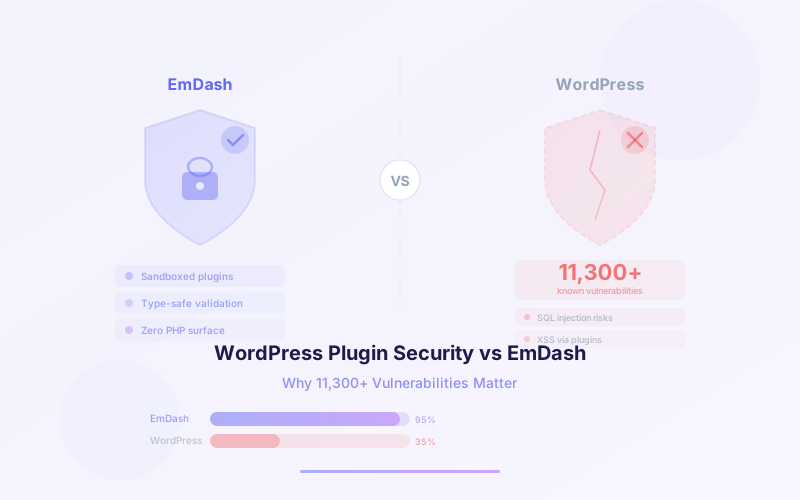
WordPress powers roughly 43% of all websites on the internet. It is also the single largest source of web application vulnerabilities in the world. In 2025, researchers tracked over 11,300 new vulnerabilities in the WordPress ecosystem — a 42% increase year-over-year — with 91% originating from plugins. By January 2026, the rate had accelerated to 333 new vulnerabilities per week.
This isn't a problem that better code review can fix. The WordPress plugin architecture is fundamentally insecure by design: every plugin runs as unsandboxed PHP with full access to the database, filesystem, and network. No amount of patching changes that structural reality.
Cloudflare's EmDash takes a different approach entirely. Built from scratch in TypeScript, EmDash sandboxes every plugin in its own isolated Dynamic Worker with a capability-based permission model. This guide breaks down why WordPress plugins are insecure, how EmDash's architecture solves the problem, and what this means for the future of CMS security.
📋 Table of Contents
- 1.The WordPress Security Crisis by the Numbers
- 2.Why WordPress Plugins Are Fundamentally Insecure
- 3.The 2025 Vulnerability Explosion
- 4.Common WordPress Attack Vectors
- 5.The Marketplace Lock-In Problem
- 6.How EmDash’s Capability-Based Sandbox Works
- 7.Dynamic Workers Isolation Explained
- 8.Real-World Attack Scenarios: WordPress vs EmDash
- 9.The Future of CMS Plugin Security
- 10.How Lushbinary Secures CMS Deployments
1The WordPress Security Crisis by the Numbers
The scale of WordPress's security problem is staggering. The Patchstack database now tracks 64,782 total vulnerabilities across the WordPress ecosystem. In 2025 alone, 11,300+ new vulnerabilities were added — more than any previous year and a 42% increase over 2024.
Here are the numbers that matter:
- 11,300+ new vulnerabilities discovered in 2025
- 42% increase year-over-year from 2024
- 91% from plugins — not WordPress core, not themes
- 1,966 high-severity vulnerabilities (17% of total)
- 333 new vulnerabilities per week by January 2026
- 64,782 total tracked vulnerabilities in the ecosystem
- 43% of all websites run on WordPress
WordPress core itself is relatively secure. The WordPress security team patches core vulnerabilities quickly and responsibly. The problem is the plugin ecosystem: tens of thousands of third-party PHP scripts running with unrestricted access to every site that installs them.
To put this in perspective: if you run a WordPress site with 20 plugins (a typical number), you are trusting 20 independent codebases with full access to your database, your users' data, and your server's filesystem. Any one of them can be compromised at any time.
2Why WordPress Plugins Are Fundamentally Insecure
WordPress's plugin architecture was designed in 2004 when the web was a very different place. Plugins are PHP files that WordPress loads directly into its own process. There is no sandbox, no isolation, and no permission system. Every plugin gets:
- Full database access: Any plugin can read, write, or delete any table in the WordPress database, including user credentials and private content
- Full filesystem access: Plugins can read and write any file the web server process can access, including other plugins' code and WordPress core files
- Unrestricted network access: Plugins can make HTTP requests to any external server, enabling data exfiltration without any logging or controls
- Code execution: Plugins can execute arbitrary PHP code, including
eval(),exec(), and shell commands - Hook system without boundaries: WordPress's action and filter hooks let any plugin modify any part of the system, including other plugins' behavior
This is the equivalent of giving every app on your phone root access to the entire operating system. Modern operating systems solved this decades ago with sandboxing and permission models. WordPress never made that transition.
The result is that a single vulnerable plugin — even one with a minor cross-site scripting flaw — can be leveraged to compromise the entire site, exfiltrate the database, install backdoors, and pivot to other sites on the same server.
3The 2025 Vulnerability Explosion
The 2025 numbers represent a structural acceleration, not a one-time spike. According to Patchstack's State of WordPress Security 2026 report, the breakdown of 11,300+ new vulnerabilities is alarming:
- 91% from plugins: The overwhelming majority of vulnerabilities come from third-party plugin code
- 7% from themes: WordPress themes also run unsandboxed PHP via
functions.php, creating similar attack surfaces - 2% from WordPress core: Core remains relatively well-maintained
Of the 11,300+ vulnerabilities, 1,966 were classified as high-severity (17% of total). These include remote code execution, SQL injection, and authentication bypass flaws that can be exploited without any user interaction. The rate continued to climb into 2026, reaching 333 new vulnerabilities per week by January.
The 42% year-over-year increase is driven by several factors: improved vulnerability scanning tools, more security researchers focusing on WordPress, the growing complexity of popular plugins, and the sheer volume of plugins in the ecosystem (over 60,000 on WordPress.org alone).
The vulnerability growth rate is outpacing the WordPress community's ability to patch. Many plugin developers are solo maintainers who cannot respond to security disclosures quickly enough, leaving sites exposed for weeks or months.
4Common WordPress Attack Vectors
WordPress plugin vulnerabilities cluster around four primary attack vectors. Understanding these is critical for evaluating why architectural changes — not just better coding practices — are necessary.
🔒 SQL Injection
Plugins that construct database queries using unsanitized user input allow attackers to read, modify, or delete any data in the WordPress database. Because plugins have unrestricted database access, a SQL injection in one plugin exposes the entire database — including user credentials, private posts, and configuration data from every other plugin.
📤 Malicious File Upload
Plugins that handle file uploads without proper validation allow attackers to upload PHP web shells. Once a shell is on the server, the attacker has full control: they can read the database credentials from wp-config.php, install backdoors, and pivot to other sites on the same hosting account.
📦 Data Exfiltration
Because plugins have unrestricted network access, a compromised plugin can silently send data to external servers. This includes user emails, payment information, session tokens, and any content stored in the database. There is no built-in mechanism in WordPress to detect or prevent outbound data transfers from plugins.
⛓️ Supply Chain Attacks
Attackers increasingly target plugin developers directly. By compromising a developer's WordPress.org account or injecting malicious code into a plugin's dependency chain, attackers can push malicious updates to thousands of sites simultaneously. The WordPress update mechanism trusts plugin updates implicitly — there is no code signing, no capability diff, and no sandbox to contain the damage.
All four vectors share a common root cause: WordPress gives plugins unlimited trust. The architecture assumes every plugin is benign and competently written. In an ecosystem with 60,000+ plugins maintained by developers of varying skill levels, that assumption is catastrophically wrong.
5The Marketplace Lock-In Problem
WordPress.org attempts to mitigate plugin security through manual code review. Every plugin submitted to the official repository goes through a human review process. The result is a review queue of 800+ plugins with wait times stretching to two weeks or more.
This creates a marketplace lock-in cycle:
- Plugins must be hosted on WordPress.org to be discoverable and trusted by users
- WordPress.org requires GPL licensing for all plugins, limiting commercial models
- The manual review process creates bottlenecks that slow innovation
- Developers who want to distribute outside WordPress.org lose the trust signal of the official repository
- Even reviewed plugins can introduce vulnerabilities in subsequent updates, which are not re-reviewed
The GPL licensing requirement is particularly significant. Because WordPress is GPL v2, all plugins distributed through WordPress.org must also be GPL-licensed. This means plugin developers cannot use proprietary licenses, limiting their ability to build sustainable commercial businesses around their plugins.
The fundamental issue is that WordPress.org is trying to solve a technical problem (plugin security) with a process solution (manual review). Process solutions don't scale. A technical solution — sandboxing plugins so they cannot cause harm regardless of code quality — is the only approach that works at ecosystem scale.
6How EmDash's Capability-Based Sandbox Works
EmDash takes the opposite approach to WordPress. Instead of trusting plugins by default and trying to catch bad behavior after the fact, EmDash trusts nothing by default and requires plugins to declare exactly what they need.
Every EmDash plugin includes a capability manifest that declares its required permissions:
import { definePlugin } from "emdash";

export default () =>
  definePlugin({
    id: "analytics-tracker",
    version: "1.0.0",
    capabilities: [
      "read:content",
      "net:analytics.example.com"
    ],
    hooks: {
      "content:afterSave": async (event, ctx) => {
        await ctx.net!.fetch(
          "https://analytics.example.com/track",
          { method: "POST", body: JSON.stringify({
            contentId: event.content.id,
            action: "published"
          })}
        );
      },
    },
  });
This plugin can only read content and make network requests to analytics.example.com. It cannot:
- Write or delete any content
- Access the database directly
- Read or write files on the filesystem
- Make network requests to any other domain
- Send emails or access user credentials
- Modify other plugins' behavior
The capability model works like OAuth scopes: administrators see exactly what a plugin requests before installation and can reject plugins that request excessive permissions. For more details on building plugins with this system, see our EmDash plugin development guide.
EmDash plugins use the MIT license by default. Because each plugin runs in its own isolate and shares no code with EmDash core, there is no GPL copyleft requirement. Plugin developers retain full control over their licensing and distribution.
7Dynamic Workers Isolation Explained
The technical foundation of EmDash's security model is Cloudflare's Dynamic Workers — lightweight V8 isolates that provide process-level isolation for each plugin. This is the same isolation technology that powers Cloudflare Workers, battle-tested across millions of deployments.
Here's how the isolation works:
- Separate V8 isolates: Each plugin runs in its own V8 isolate with its own memory space. One plugin cannot read another plugin's memory or variables.
- Capability bindings: The only way a plugin interacts with the outside world is through capability bindings injected by the EmDash runtime based on the manifest.
- No shared state: Plugins cannot share global variables, modify shared objects, or interfere with each other's execution.
- Resource limits: Each isolate has CPU time and memory limits, preventing a single plugin from consuming all available resources.
- Network allowlisting: Outbound network requests are restricted to explicitly declared hostnames in the manifest.
On Cloudflare Workers, this isolation is hardware-enforced by the V8 engine's security boundary. On Node.js deployments, EmDash uses worker threads with restricted module access to approximate the same isolation model. For a complete walkthrough of setting up EmDash on Cloudflare, see our Cloudflare EmDash developer guide.
The key insight is that EmDash's security doesn't depend on plugin code quality. A plugin with a SQL injection vulnerability in its own logic simply cannot exploit it because it has no direct database access. A plugin with an outbound data exfiltration attempt is blocked because it can only reach declared hostnames. The sandbox makes entire categories of vulnerabilities unexploitable.
8Real-World Attack Scenarios: WordPress vs EmDash
The best way to understand the security difference is to walk through real attack scenarios and compare how each platform responds.
| Attack Scenario | WordPress | EmDash |
|---|---|---|
| SQL injection in plugin | Full database compromised — all tables accessible | No database access — plugin has no SQL capability |
| Malicious file upload | PHP shell uploaded, full server control | No filesystem access — plugin runs in isolate |
| Data exfiltration attempt | Plugin sends data to any external server silently | Network restricted to declared hostnames only |
| Supply chain compromise | Malicious update has full system access | Compromised code limited to declared capabilities |
| Cross-plugin interference | Plugin modifies other plugins via shared hooks | Isolated memory — plugins cannot see each other |
| Credential theft | Plugin reads wp-config.php or user table directly | No filesystem or credential access available |
| Cryptomining injection | Plugin runs arbitrary code on server | CPU limits enforced per isolate, no shell access |
| Backdoor installation | Plugin writes PHP files to server | No write access to filesystem or other plugins |
In every scenario, EmDash's sandbox contains the blast radius. Even a completely compromised plugin can only do what its manifest declares. WordPress, by contrast, treats every plugin as a trusted extension of core — meaning any compromise is a total compromise.
9The Future of CMS Plugin Security
The WordPress security crisis is not going to resolve itself. The plugin ecosystem is growing, vulnerability discovery is accelerating, and the fundamental architecture cannot be changed without breaking backward compatibility with millions of existing plugins.
EmDash represents a new generation of CMS design where security is architectural, not aspirational. The key principles that will define the future of CMS plugin security include:
- Default-deny permissions: Plugins should have zero access by default and must explicitly request every capability
- Process isolation: Each plugin should run in its own sandbox with separate memory, CPU limits, and network controls
- Capability transparency: Users should see exactly what a plugin can do before installation, similar to mobile app permission dialogs
- Decentralized trust: Security should not depend on a centralized review process that creates bottlenecks and single points of failure
- License freedom: Plugin developers should be able to choose their own licensing without copyleft requirements imposed by the platform
EmDash is the first major CMS to implement all of these principles. As the platform matures beyond its v0.1.0 preview, it has the potential to fundamentally shift how the industry thinks about CMS extensibility and security.
10How Lushbinary Secures CMS Deployments
At Lushbinary, we've spent years helping businesses navigate WordPress security challenges — from hardening existing installations to migrating high-risk sites to modern architectures. With EmDash, we now offer a fundamentally more secure path forward.
Our CMS security services include:
- WordPress security audits and vulnerability assessments for existing sites
- WordPress-to-EmDash migration with full content, media, and custom post type preservation
- Custom EmDash plugin development with minimal-capability manifests and security review
- Cloudflare Workers deployment architecture for serverless, scale-to-zero hosting
- Ongoing security monitoring and incident response for CMS platforms
🚀 Free CMS Security Assessment
Running a WordPress site with security concerns? We'll audit your plugin stack, identify high-risk vulnerabilities, and recommend whether hardening or migrating to EmDash is the right path. Book a free 30-minute consultation with our team.
❓ Frequently Asked Questions
Why are WordPress plugins so insecure?
WordPress plugins run as unsandboxed PHP code with full access to the database, filesystem, and network. There is no isolation between plugins or between a plugin and WordPress core, meaning a single vulnerable plugin can compromise an entire site.
How many WordPress vulnerabilities were discovered in 2025?
Over 11,300 new vulnerabilities were discovered in the WordPress ecosystem in 2025, a 42% increase year-over-year. 91% of those vulnerabilities originated from plugins, with 1,966 classified as high-severity.
What is EmDash’s sandboxed plugin architecture?
EmDash runs each plugin in an isolated Dynamic Worker sandbox on Cloudflare’s V8 isolate runtime. Plugins must declare capabilities in a manifest and can only access resources explicitly granted. There is no direct database or filesystem access.
How does EmDash prevent supply chain attacks on plugins?
EmDash’s capability-based manifest system means even if a plugin’s code is compromised via a supply chain attack, it can only perform actions declared in its manifest. A plugin with read:content capability cannot exfiltrate data to external servers or access the database directly.
Can EmDash replace WordPress for enterprise websites?
EmDash is designed as a modern successor to WordPress with enterprise-grade security, serverless scalability, and TypeScript-native development. It supports WordPress content migration, custom schemas, and runs on Cloudflare Workers or any Node.js server.
📚 Sources
- Patchstack: State of WordPress Security 2026
- Cloudflare Blog: Introducing EmDash
- Lushbinary: Cloudflare EmDash Developer Guide
- Lushbinary: EmDash Plugin Development Guide
Content was rephrased for compliance with licensing restrictions. Vulnerability statistics sourced from Patchstack's annual security report. Technical details sourced from official Cloudflare documentation as of April 2026. Features and availability may change — always verify on the official EmDash documentation.
Secure Your CMS Architecture
Whether you need a WordPress security audit or a full migration to EmDash, our team can help you build a CMS that's secure by design.
Build Smarter, Launch Faster.
Book a free strategy call and explore how LushBinary can turn your vision into reality.

