
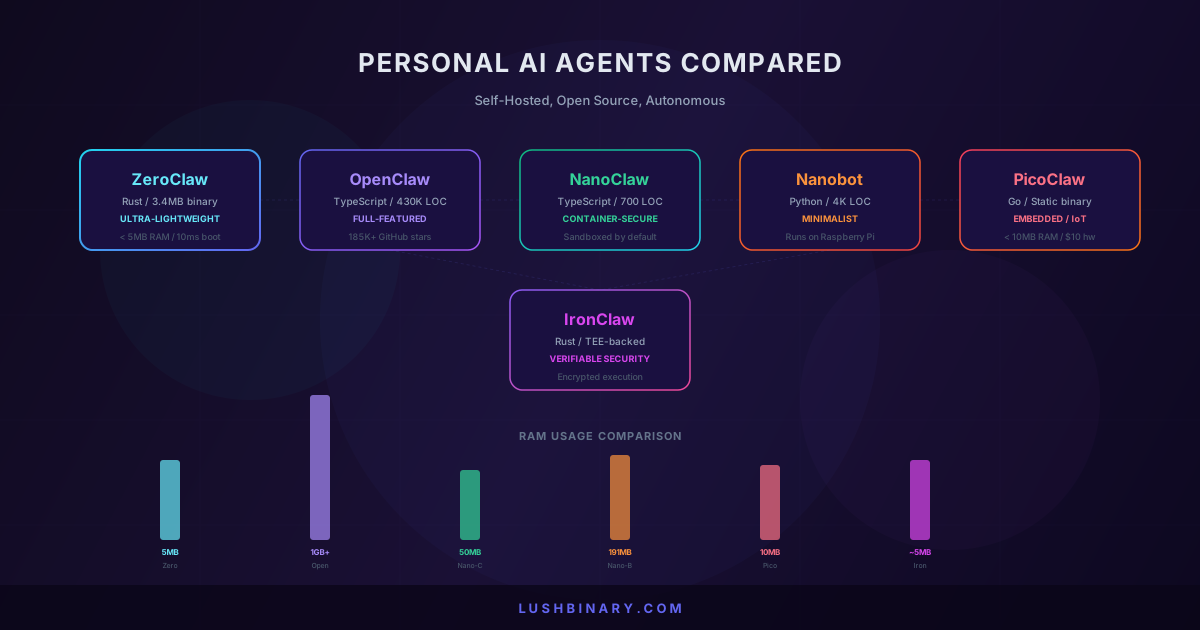
The personal AI agent space has gone from one viral project to a full ecosystem in a matter of weeks. OpenClaw proved the concept: a self-hosted AI assistant that connects to your messaging apps and actually does things on your behalf. But its 430,000-line TypeScript codebase, 1GB+ memory footprint, and a string of security incidents left a gap that half a dozen projects rushed to fill.
ZeroClaw rewrote the runtime in Rust and squeezed it into a 3.4MB binary. NanoClaw took the opposite approach and built container-first security in 700 lines of TypeScript. Nanobot stripped everything down to 4,000 lines of Python that runs on a Raspberry Pi. PicoClaw went even further, targeting $10 embedded boards with under 10MB of RAM. And IronClaw brought cryptographic verification and trusted execution environments to the table.
Each of these tools solves a different problem. This guide compares all six across the things that actually matter: resource usage, security model, messaging integrations, deployment complexity, and real-world cost. At the end, we cover how LushBinary deploys and manages these agents for production use.
What We Cover
- 1.Quick Comparison Table
- 2.OpenClaw: The One That Started It All
- 3.ZeroClaw: The Rust Rewrite That Fits in 3.4MB
- 4.NanoClaw: Container-First Security in 700 Lines
- 5.Nanobot: 4K Lines of Python, Runs on a Pi
- 6.PicoClaw: AI on $10 Hardware
- 7.IronClaw: Verifiable Security with TEEs
- 8.Head-to-Head: Benchmarks, Security & Cost
- 9.How LushBinary Deploys Personal AI Agents
- 10.Which Agent Should You Pick?
1Quick Comparison Table
All six are open source, self-hosted, and designed to act as personal AI assistants. The differences are in how they get there.
| Agent | Language | Binary Size | RAM | Startup | Channels | Security Model |
|---|---|---|---|---|---|---|
| OpenClaw | TypeScript | ~28MB dist | 1GB+ | Seconds | 10+ (WhatsApp, Telegram, Slack, etc.) | DM pairing, allowlists |
| ZeroClaw | Rust | 3.4MB | <5MB | ~10ms | 8+ (Telegram, Discord, WhatsApp, etc.) | Allowlists, workspace scoping, encrypted secrets |
| NanoClaw | TypeScript | Small (npm) | ~50MB | Fast | WhatsApp (Baileys) | Container isolation per chat group |
| Nanobot | Python | N/A (scripts) | 191MB | Fast | Telegram, WhatsApp, Discord, Feishu | Docker container only |
| PicoClaw | Go | ~8MB | <10MB | ~1s | Telegram, Discord | Minimal (embedded focus) |
| IronClaw | Rust | Small | ~5MB | Fast | Similar to OpenClaw | TEE-backed, encrypted vault, per-tool sandboxing |
2OpenClaw: The One That Started It All
OpenClaw (formerly Clawdbot, then Moltbot) was built by Peter Steinberger as a weekend project in November 2025. It crossed 100,000 GitHub stars within two months of launch and sits at 186,000+ stars as of late February 2026, with over 100,000 active installations.
The architecture is centered around a WebSocket-based Gateway that handles session management, channel routing, and tool orchestration. The Pi agent runtime does the reasoning. A skills system lets you extend the agent with modular capabilities, and a community marketplace (ClawHub) hosts hundreds of user-built skills for everything from flight check-ins to CRM management.
OpenClaw connects to WhatsApp, Telegram, Slack, Discord, Signal, iMessage, Microsoft Teams, Google Chat, and more. It supports browser control via CDP, voice activation through ElevenLabs, a live canvas for visual output, and multi-agent routing where different agents handle different channels or tasks.
Security note: A critical RCE vulnerability (CVE-2026-25253) was found in February 2026 with over 135,000 instances found publicly exposed by security researchers. The team patched it in v2026.2.2, but the incident highlighted the risks of running a 430K-line codebase with deep system access. Microsoft published a security advisory specifically about running OpenClaw safely.
OpenClaw
Pros
- +Most feature-rich personal AI agent available
- +10+ messaging platform integrations
- +Extensive skills marketplace (ClawHub)
- +Browser control, voice, canvas, multi-agent routing
- +Massive community (186K+ stars, active Discord)
- +MIT licensed, free to use
Cons
- -1GB+ RAM, heavy Node.js runtime
- -430K lines of code, complex to debug or audit
- -API costs can spike ($30-50 per session reported)
- -Security hardening is entirely on you
- -Startup takes seconds, not instant
- -Requires ongoing maintenance and patching
3ZeroClaw: The Rust Rewrite That Fits in 3.4MB
ZeroClaw is a ground-up rewrite of the personal AI agent concept in Rust. The entire runtime compiles to a single 3.4MB static binary that boots in under 10 milliseconds and uses less than 5MB of RAM. That is 99% smaller than OpenClaw's footprint.
The architecture is trait-based. Every subsystem (providers, channels, memory, tools, tunnels) is defined by a Rust trait, which means you can swap components through configuration without touching code. Want to switch from OpenAI to Anthropic? Change one line in the config. Need to add a new messaging channel? Implement the trait.
ZeroClaw supports 22+ AI providers including OpenRouter, Anthropic, OpenAI, Ollama, Groq, Mistral, xAI, DeepSeek, Together, Fireworks, Perplexity, Cohere, and AWS Bedrock. For messaging, it connects to Telegram, Discord, Slack, WhatsApp, iMessage, Matrix, and webhooks.
The memory system is built on SQLite with hybrid search that combines vector similarity (cosine distance) and keyword matching (FTS5 with BM25 scoring). No external dependencies like Pinecone or Elasticsearch needed. It also supports the AI Entity Object Specification (AIEOS) for portable agent identities, and can import OpenClaw's SOUL.md and IDENTITY.md files directly via zeroclaw migrate openclaw.
Security defaults
ZeroClaw takes a restrictive-by-default approach. The gateway binds to localhost and refuses public exposure without explicit tunnel configuration. Filesystem access is scoped to the workspace directory with path traversal protection (null bytes, symlinks, and .. sequences are blocked). Only explicitly allowlisted commands can be executed. API keys are encrypted at rest using a local key file.
# Quick start
git clone https://github.com/openagen/zeroclaw.git
cd zeroclaw
cargo build --release
cargo install --path . --force

# Onboard with your API key
zeroclaw onboard --api-key sk-... --provider openrouter

# Start the agent
zeroclaw daemon
ZeroClaw
Pros
- +3.4MB binary, <5MB RAM, 10ms startup
- +22+ AI providers supported out of the box
- +Rust memory safety eliminates entire classes of bugs
- +Security-first defaults (localhost binding, workspace scoping, encrypted secrets)
- +Built-in SQLite memory with hybrid vector + keyword search
- +Direct migration path from OpenClaw
Cons
- -Smaller community than OpenClaw (newer project)
- -Fewer messaging integrations than OpenClaw (8 vs 10+)
- -No browser control or canvas features yet
- -Skills ecosystem is still growing
- -Requires Rust toolchain to build from source
- -Less documentation and tutorials available
4NanoClaw: Container-First Security in 700 Lines
NanoClaw was created by developer Gavriel C as a direct response to OpenClaw's security problems. The entire project is about 700 lines of TypeScript. It launched under an MIT license on January 31, 2026 and crossed 7,000 GitHub stars in its first week. It has continued to grow steadily since.
The key design decision: every chat group gets its own sandboxed Docker container with separate memory and filesystem access. This prevents data leakage between contexts and limits the blast radius if something goes wrong. NanoClaw connects to WhatsApp via the Baileys library and uses Anthropic's Claude Agent SDK for reasoning.
The philosophy is the opposite of OpenClaw's "Swiss Army knife" approach. NanoClaw focuses on a single user's exact needs with security built into the foundation rather than bolted on after the fact. If you want WhatsApp integration with strong isolation guarantees and you do not need 10 messaging platforms, NanoClaw is worth a look.
NanoClaw
Pros
- +Container isolation per chat group (security by design)
- +Only 700 lines of code, easy to audit and understand
- +Built specifically to fix OpenClaw's security gaps
- +WhatsApp integration via battle-tested Baileys library
- +Minimal attack surface
- +Already powering the creator's own business
Cons
- -WhatsApp only (no Telegram, Slack, Discord, etc.)
- -Requires Docker for the sandboxing model
- -Smaller feature set than OpenClaw or ZeroClaw
- -Anthropic Claude only (no multi-provider support)
- -Very new project, small community
- -No skills marketplace or plugin system
5Nanobot: 4K Lines of Python, Runs on a Pi
Nanobot comes from the Data Intelligence Lab at the University of Hong Kong (HKUDS). Released on February 2, 2026, it has grown to over 9,000 GitHub stars and delivers core agent functionality in roughly 4,000 lines of Python. That is 99% smaller than OpenClaw's codebase.
The standout feature is resource efficiency. Nanobot runs on a Raspberry Pi 3B+ with just 191MB of memory. It supports multiple LLM providers (OpenRouter, Anthropic, OpenAI, DeepSeek, Gemini, Groq, plus local models via vLLM and Ollama) and connects to Telegram, WhatsApp, Discord, and Feishu/Lark.
Nanobot includes natural language cron jobs for scheduling, MCP tool server support, and built-in tools for file management and shell execution. Because it is pure Python, it is the easiest of the bunch to hack on if you want to understand how AI agents work under the hood or build custom extensions quickly.
Nanobot
Pros
- +4,000 lines of clean Python, perfect for learning
- +Runs on Raspberry Pi 3B+ (191MB RAM)
- +Multiple LLM providers including local models (Ollama, vLLM)
- +Natural language cron jobs for scheduling
- +MCP tool server support
- +Fastest deployment of any option here
Cons
- -Very new project (days old at launch), rapid iteration
- -Smaller community than OpenClaw or ZeroClaw
- -Fewer built-in skills and integrations
- -No container sandboxing (runs in Docker but not isolated per chat)
- -Python runtime overhead vs Rust/Go alternatives
- -Less battle-tested in production environments
6PicoClaw: AI on $10 Hardware
PicoClaw pushes the minimalism concept to its logical extreme. Written in Go, it compiles to a single static binary (~8MB) that runs on embedded Linux boards with under 10MB of RAM. The target hardware costs about $10, like the Sipeed LicheeRV Nano with its RISC-V SoC.
Despite the tiny footprint, PicoClaw supports planning, logging, web searches, and automation workflows. It integrates with Telegram and Discord for messaging, and the single binary works across RISC-V, ARM, and x86 architectures. Startup time is around one second.
PicoClaw is not trying to compete with OpenClaw on features. It is answering a different question: what is the absolute minimum hardware you need to run a useful AI agent? If you are building IoT deployments, home automation gateways, or just want an always-on agent running on the cheapest possible hardware, PicoClaw is the only option that makes sense.
PicoClaw
Pros
- +Runs on $10 hardware (RISC-V, ARM, x86)
- +Under 10MB RAM, ~8MB binary
- +Go-based, simple and portable
- +Single binary, no dependency management
- +Ideal for IoT, embedded, and edge deployments
- +Battery-friendly for constrained environments
Cons
- -Fewer high-level integrations than other options
- -Limited messaging platform support (Telegram, Discord)
- -No container sandboxing or advanced security features
- -Smaller ecosystem for complex logical flows
- -Less suited for desktop or server power-user scenarios
- -Community is still very small
7IronClaw: Verifiable Security with TEEs
IronClaw takes a fundamentally different approach to the security problem. Announced at NEARCON 2026 by the NEAR AI team, it is a Rust-based agent runtime that runs inside encrypted Trusted Execution Environments (TEEs). The core principle: your AI assistant should never be able to see your raw credentials.
Secrets are stored in an encrypted vault (AES-256-GCM) and injected only at host boundaries. The LLM never touches raw credentials directly. Every untrusted or third-party tool runs in its own sandbox, limited to only the resources it is explicitly authorized to access. Network calls are restricted to approved destinations. 22 regex patterns with Aho-Corasick optimization scan all requests and responses for credential leaks in real time.
IronClaw builds on the OpenClaw vision but replaces the trust model. Instead of asking users to trust an opaque runtime, it shifts toward verifiable execution where data and inference stay protected at the hardware level. If you are in a regulated industry or handling sensitive data, IronClaw is the only personal AI agent that offers this level of security guarantee.
IronClaw
Pros
- +TEE-backed execution (hardware-level data protection)
- +Encrypted credential vault (AES-256-GCM)
- +Per-tool sandboxing with explicit authorization
- +Real-time credential leak scanning
- +Rust-based with memory safety guarantees
- +Designed for regulated industries and sensitive data
Cons
- -Requires TEE-capable hardware or cloud infrastructure
- -Newer project, smaller community
- -Tied to NEAR AI Cloud for TEE deployment
- -More complex setup than simpler alternatives
- -Fewer messaging integrations documented so far
- -Enterprise-focused, may be overkill for personal use
8Head-to-Head: Benchmarks, Security & Cost
Performance Benchmarks
The performance gap between these agents is dramatic. ZeroClaw and PicoClaw can run on hardware that would not even boot OpenClaw. Here are the numbers from local benchmarks (macOS arm64, February 2026, normalized for 0.8GHz edge hardware):
| Metric | OpenClaw | ZeroClaw | NanoClaw | Nanobot | PicoClaw | IronClaw |
|---|---|---|---|---|---|---|
| Language | TypeScript | Rust | TypeScript | Python | Go | Rust |
| RAM | >1GB | <5MB | ~50MB | 191MB | <10MB | ~5MB |
| Startup | >500ms | <10ms | Fast | Fast | ~1s | Fast |
| Binary | ~28MB | 3.4MB | npm pkg | Scripts | ~8MB | Small |
| Min Hardware | Mac Mini | $10 SBC | Any Docker host | Raspberry Pi | $10 board | TEE host |
Security Comparison
Security is the single biggest differentiator in this space. OpenClaw gives you maximum power with maximum risk. The February 2026 CVE and Microsoft's security advisory made that clear. The alternatives each address this differently:
DM pairing codes, per-channel allowlists, optional Docker sandboxing. Powerful but risky by default. Security is opt-in, not built-in.
Localhost-only binding, workspace-scoped filesystem, command allowlists, encrypted secrets at rest. Restrictive defaults that you relax as needed.
Container isolation per chat group. Each conversation gets its own sandboxed environment with separate memory and filesystem. Security is the architecture.
Runs in Docker but without per-chat isolation. Simpler model, but the agent has access to everything within the container.
Minimal security features. Designed for embedded use where the threat model is different (physical access, not network attacks).
TEE-backed execution, encrypted credential vault, per-tool sandboxing, real-time credential leak scanning. The most secure option by a wide margin.
Real-World Costs
Every agent on this list is free to use. The real costs come from three places: the hardware you run it on, the LLM API fees, and the time you spend on setup and maintenance.
| Agent | Min Hardware Cost | Typical API Cost |
|---|---|---|
| OpenClaw | Mac Mini ~$599 or VPS ~$20/mo | $30-50/session possible with Claude Opus |
| ZeroClaw | $10 SBC or VPS ~$5/mo | Same API costs, but runs on cheaper hardware |
| NanoClaw | Any Docker host, VPS ~$5/mo | Anthropic Claude API costs |
| Nanobot | Raspberry Pi ~$35 or VPS ~$5/mo | Flexible (supports cheap providers like DeepSeek) |
| PicoClaw | $10-15 embedded board | API costs only (no hosting cost) |
| IronClaw | TEE cloud instance ~$20+/mo | API costs + TEE infrastructure |
9How LushBinary Deploys Personal AI Agents
At LushBinary, we have deployed personal AI agents for individuals, startups, and teams across all of these platforms. The common thread: getting from "this looks cool" to "this runs my business reliably" takes more than a git clone.
Agent Selection
We assess your use case, security requirements, hardware constraints, and budget to recommend the right agent. Sometimes the answer is ZeroClaw on a $5/month VPS. Sometimes it is OpenClaw on a dedicated EC2 instance with full security hardening. Sometimes it is a combination.
Production Deployment
We deploy on AWS with proper VPC isolation, IAM policies, automated backups to S3, CloudWatch monitoring, and cost optimization. For ZeroClaw and PicoClaw, we can deploy on ARM-based Graviton instances for the best price-performance ratio.
Security Hardening
DM pairing policies, network isolation, Docker sandboxing, credential rotation, vulnerability scanning, and regular security audits. We apply the lessons from OpenClaw's CVE to every deployment.
Custom Skills & Integrations
We build custom skills that connect your agent to your specific tools: CRM systems, project management, databases, internal APIs, and third-party services. The agent becomes part of your workflow, not a separate tool.
Cost Management
API costs are the hidden killer. We implement model routing strategies, caching layers, and usage monitoring to keep costs predictable. For ZeroClaw and Nanobot, we configure local model support via Ollama to eliminate API costs entirely for routine tasks.
Ongoing Operations
Patching, monitoring, scaling, and optimization. When the next CVE drops, we patch it before you read about it on Hacker News.
A setup we deploy often: ZeroClaw as the always-on lightweight runtime handling messaging and quick tasks on a $5/month ARM VPS, with OpenClaw available on a larger instance for complex multi-agent workflows when needed. The ZeroClaw instance handles 90% of daily interactions at a fraction of the cost.
10Which Agent Should You Pick?
The right choice depends on what you value most. Here is the decision framework we use with clients:
You want maximum features and do not mind the complexity
Pick: OpenClaw - Nothing else matches its breadth of messaging integrations, skills ecosystem, and community support.
You want efficiency, security, and a clean migration from OpenClaw
Pick: ZeroClaw - 99% smaller footprint, restrictive security defaults, and direct OpenClaw migration support. The best balance of capability and resource efficiency.
Security is your top priority and you use WhatsApp
Pick: NanoClaw - Container isolation per chat group is the strongest security model for messaging-based agents.
You want to learn, hack, or run on minimal hardware
Pick: Nanobot - 4,000 lines of readable Python. Runs on a Raspberry Pi. Supports local models via Ollama.
You are deploying on embedded or IoT hardware
Pick: PicoClaw - The only option that runs on $10 boards with under 10MB of RAM.
You handle sensitive data or work in a regulated industry
Pick: IronClaw - TEE-backed execution and encrypted credential vaults provide verifiable security guarantees no other agent offers.
The personal AI agent space is moving fast. Six months ago, none of these projects existed. Today, you can run an autonomous AI assistant on a $10 board or inside a hardware-encrypted enclave. The tools are real, the use cases are practical, and the ecosystem is only getting deeper.
If you want help choosing the right agent, deploying it securely, or building custom integrations around it, get in touch. We have done this enough times to know what works and what does not.
🚀 Book a free 30-minute consultation. We'll help you pick the right agent for your use case, plan the deployment, and handle the security hardening so you can focus on what the agent actually does for you.
Related reading: How OpenClaw Works Behind the Scenes · OpenClaw Latest Updates 2026
Sources & Further Reading
- OpenClaw GitHub Repository
- ZeroClaw Official Site
- ZeroClaw Technical Overview (scriptbyai.com) - Content was rephrased for compliance with licensing restrictions
- NanoClaw Security Analysis (tech1media.com) - Content was rephrased for compliance with licensing restrictions
- Nanobot GitHub Repository (HKUDS)
- PicoClaw Official Site
- IronClaw NEARCON Announcement (cryptonews.net) - Content was rephrased for compliance with licensing restrictions
- OpenClaw Alternatives Report (grigio.org) - Content was rephrased for compliance with licensing restrictions
- Microsoft Security Blog: Running OpenClaw Safely
Need a Personal AI Agent Running in Production?
Whether it is ZeroClaw on a $5 VPS, OpenClaw with full security hardening, or IronClaw in a TEE, LushBinary deploys and manages personal AI agents that actually work. Let's figure out the right setup for you.
Build Smarter, Launch Faster.
Book a free strategy call and explore how LushBinary can turn your vision into reality.

