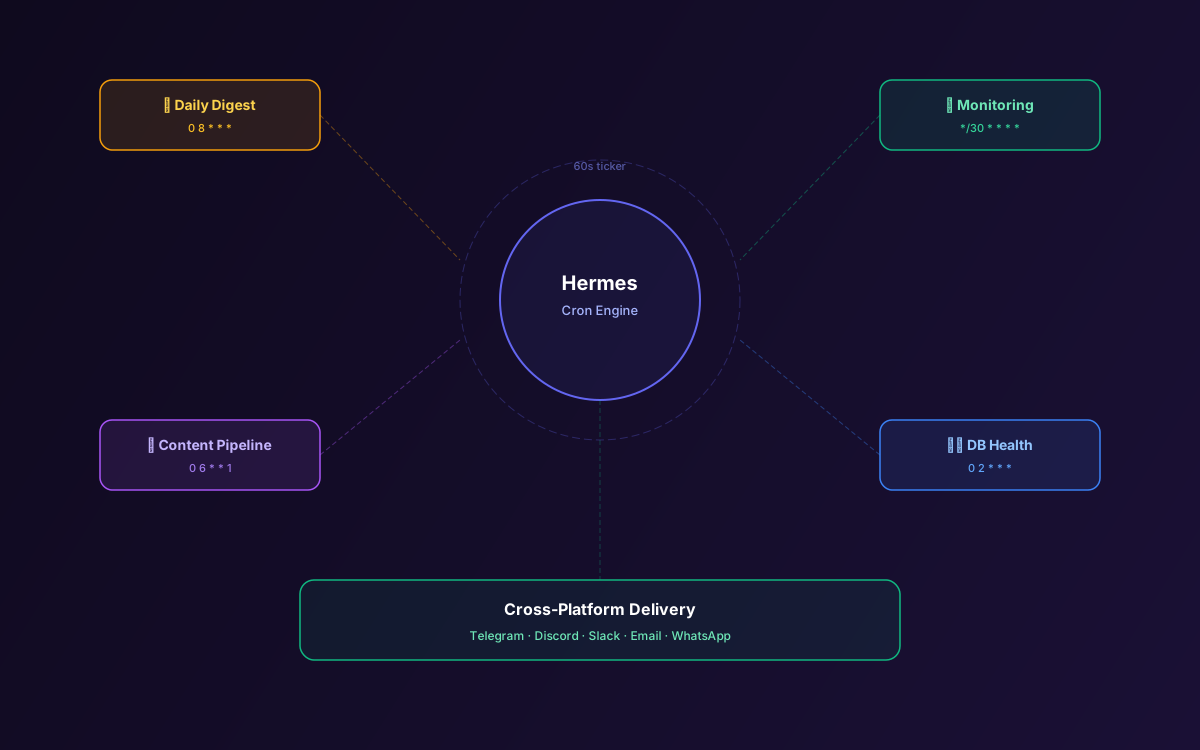
An AI agent that only works when you ask it to is just a chatbot with extra steps. The real value of Hermes Agent shows up at 3am when it checks your production logs, finds an anomaly, and sends you a Telegram message before your users notice anything.
Hermes's cron subsystem lets you schedule tasks with natural language or standard cron expressions. Jobs run in fresh agent sessions with full tool access, skill injection, and cross-platform delivery. The gateway's background ticker fires every 60 seconds, so your agent works around the clock even when your laptop is closed.
This guide covers the cron subsystem architecture, scheduling syntax, five real-world automation patterns, skill injection for domain-specific tasks, cross-platform delivery, and production reliability tips.
📋 Table of Contents
- 1.How the Cron Subsystem Works
- 2.Scheduling with Natural Language
- 3.Scheduling with Cron Expressions
- 4.The cronjob Tool Interface
- 5.Pattern 1: Daily News & Research Digest
- 6.Pattern 2: Infrastructure Monitoring
- 7.Pattern 3: Content Pipeline Automation
- 8.Pattern 4: Database Health Checks
- 9.Pattern 5: Competitive Intelligence
- 10.Skill Injection for Cron Jobs
- 11.Cross-Platform Delivery
- 12.Production Reliability Tips
- 13.Why Lushbinary for Hermes Automation
1How the Cron Subsystem Works
Hermes's cron system is built into the gateway process, not the CLI. This is an important distinction: if you only run hermes (the CLI), cron jobs won't fire. You need the gateway running via hermes gateway or as a system service.
The gateway maintains a background ticker thread that checks every 60 seconds for due jobs. When a job fires, it creates a fresh agent session with the job's prompt, executes it with full tool access, and optionally delivers the result to a messaging channel.
⚠️ Important
Cron jobs run in fresh sessions with no memory of your current chat. Prompts must be completely self-contained — include everything the agent needs to know. Don't say "check that thing from earlier"; say "query the PostgreSQL database at localhost:5432/mydb for slow queries over 500ms in the last hour."
2Scheduling with Natural Language
The simplest way to create a scheduled task is to ask Hermes in plain English:
> Schedule a task to check Hacker News for AI agent news
  every morning at 8am and send me a summary on Telegram

✓ Created cron job "hn-ai-digest"
  Schedule: 0 8 * * * (daily at 8:00 AM)
  Delivery: Telegram
  Next run: tomorrow at 8:00 AM
Hermes parses the natural language, extracts the schedule, creates the cron expression, and sets up the delivery channel. You can also say things like "every 30 minutes," "every weekday at 5pm," or "on the first of every month."
3Scheduling with Cron Expressions
For precise control, use standard cron expressions directly with the cronjob tool:
# Every 30 minutes during business hours
*/30 9-17 * * 1-5

# Daily at midnight
0 0 * * *

# Every Monday at 9am
0 9 * * 1

# First day of every month at 6am
0 6 1 * *
4The cronjob Tool Interface
Hermes exposes cron management through a single cronjob tool with action-style operations:
| Action | Description |
|---|---|
| create | Create a new scheduled task with name, schedule, prompt, and optional delivery channel |
| list | List all active cron jobs with their schedules and next run times |
| remove | Delete a cron job by name |
| run | Manually trigger a cron job immediately (useful for testing) |
5Pattern 1: Daily News & Research Digest
Schedule Hermes to scan news sources, filter for relevant topics, and deliver a curated digest every morning:
Prompt: "Search Hacker News, TechCrunch, and ArXiv for news
about AI agents, MCP protocol, and self-hosted AI from the
last 24 hours. Summarize the top 5 most relevant items with
links. Format as a clean digest with bullet points."

Schedule: 0 8 * * * (daily at 8am)
Delivery: Telegram
6Pattern 2: Infrastructure Monitoring
Use Hermes with MCP-connected databases and monitoring tools to check infrastructure health:
Prompt: "Check the PostgreSQL database at the configured
MCP server for: (1) queries running longer than 5 seconds,
(2) table bloat over 20%, (3) connection count vs max.
If any metric is concerning, explain why and suggest a fix.
Only message me if something needs attention."

Schedule: */30 * * * * (every 30 minutes)
Delivery: Slack #ops-alerts
7Pattern 3: Content Pipeline Automation
Automate content creation workflows — research, drafting, and scheduling:
Prompt: "Check the content calendar in the shared Google
Sheet (via Composio MCP). For any post due this week that
doesn't have a draft, research the topic using web search,
create an outline with 8-10 sections, and save it to the
drafts folder. Send me a summary of what was created."

Schedule: 0 6 * * 1 (every Monday at 6am)
Delivery: Email
8Pattern 4: Database Health Checks
Combine the PostgreSQL MCP server with scheduled checks for proactive database maintenance:
Prompt: "Run these checks against the production database:
1. Tables with more than 1M dead tuples (need VACUUM)
2. Indexes with less than 50% usage (candidates for removal)
3. Tables growing faster than 10% per week
4. Replication lag if replicas are configured
Format as a maintenance report with priority levels."

Schedule: 0 2 * * * (daily at 2am)
Delivery: Slack #dba-reports
9Pattern 5: Competitive Intelligence
Monitor competitors' public activity and surface relevant changes:
Prompt: "Search for recent news, blog posts, and product
updates from [Competitor A], [Competitor B], and
[Competitor C]. Check their GitHub repos for new releases.
Compare any pricing changes to our current pricing.
Highlight anything that requires a response from our team."

Schedule: 0 9 * * 1,4 (Monday and Thursday at 9am)
Delivery: Telegram
10Skill Injection for Cron Jobs
Cron jobs can specify which skills to load, giving the agent domain-specific knowledge for automated tasks. This is configured in the job creation:
> Create a cron job that runs the weekly security audit
  using the "security-audit" and "aws-best-practices" skills
  every Friday at 3pm, deliver to Slack #security
Skill injection ensures the agent has the right context for specialized tasks without loading every skill in the library. This keeps token usage low and responses focused.
11Cross-Platform Delivery
Every cron job can specify a delivery channel. The result of the job — whatever the agent produces — is sent to that channel after execution. Supported delivery targets:
- Telegram — Direct message to paired user
- Discord — Message to a specific channel
- Slack — Message to a channel or DM
- Email — Send to configured email address
- WhatsApp — Message to paired number
- None — Results are logged but not delivered (useful for background maintenance tasks)
12Production Reliability Tips
- Self-contained prompts — Cron jobs run in fresh sessions. Include all context in the prompt.
- Test with manual runs — Use the
runaction to test a job before relying on the schedule. - Monitor gateway logs — Failed jobs are logged with error details. Set up log monitoring for
[cron]entries. - Avoid overlapping jobs — If a job takes 10 minutes, don't schedule it every 5 minutes. The gateway doesn't prevent overlapping executions.
- Use the no-LLM trick — For simple tasks (run a script, check a URL), you can configure cron jobs that execute shell commands directly without an LLM call, saving API costs.
13Why Lushbinary for Hermes Automation
Building reliable automation pipelines with Hermes requires more than scheduling a few cron jobs. Lushbinary designs end-to-end automation workflows — from infrastructure monitoring to content pipelines to competitive intelligence — with proper error handling, alerting, and skill development.
🚀 Free Consultation
Want a Hermes Agent that monitors your infrastructure, generates reports, and handles routine tasks 24/7? Lushbinary builds production automation pipelines — no obligation.
❓ Frequently Asked Questions
How do I schedule tasks in Hermes Agent?
Use natural language ('every morning at 8am') or standard cron expressions. Hermes exposes scheduling through the cronjob tool with create, list, remove, and run actions.
Do Hermes cron jobs require the CLI to be open?
No. Cron jobs are fired by the gateway's background ticker, not the CLI. You need hermes gateway running for scheduled tasks to execute.
Can Hermes deliver cron results to Telegram?
Yes. Specify a delivery channel when creating the job. Results are sent to Telegram, Discord, Slack, Email, or WhatsApp after execution.
Do cron jobs have access to Hermes skills?
Yes. Skill injection lets you specify which skills to load for a scheduled task, giving the agent domain-specific knowledge.
How reliable are Hermes Agent cron jobs?
The gateway ticker checks every 60 seconds. Failed jobs are logged but not auto-retried. Add verification steps in prompts and monitor logs for critical workflows.
Sources
- Scheduled Tasks (Cron) — Hermes Agent Docs
- Automate Anything with Cron Guide
- Cron Internals — Developer Guide
- Cron Troubleshooting Guide
Content was rephrased for compliance with licensing restrictions. Technical details sourced from official Nous Research documentation as of April 2026. Features may change — always verify on the official documentation.
Automate Your Workflows With AI
Need Hermes Agent running 24/7 automation for your team? Let's design your pipeline.
Ready to Build Something Great?
Get a free 30-minute strategy call. We'll map out your project, timeline, and tech stack - no strings attached.
Prefer email? Reach us directly: