Most AI agents live in a walled garden. They can chat, maybe run a terminal command, but connecting them to your actual infrastructure — your GitHub repos, databases, browser stacks, internal APIs — requires custom glue code for every integration. The Model Context Protocol (MCP) was designed to fix that, and Hermes Agent speaks it natively.
Since v0.2.0, Hermes has included a built-in MCP client that discovers and calls tools from external servers at startup. Since v0.6.0, it also runs as an MCP server, exposing its conversations and session data to clients like Claude Desktop and Cursor. No bridge CLI, no wrapper scripts — MCP tools appear alongside built-in tools like terminal and read_file.
This guide covers both sides: connecting Hermes to external MCP servers (client mode) and exposing Hermes itself as an MCP server. We'll walk through configuration, tool filtering, real-world server recommendations, and production patterns.
📋 Table of Contents
- 1.What MCP Means for Hermes Agent
- 2.MCP Client Mode: Connecting External Tools
- 3.Configuring MCP Servers in config.yaml
- 4.Tool Filtering & Security
- 5.Best MCP Servers for Hermes Agent
- 6.MCP Server Mode: Exposing Hermes to Other Clients
- 7.Setting Up hermes mcp serve
- 8.Real-World MCP Workflow Patterns
- 9.Troubleshooting MCP Connections
- 10.Why Lushbinary for Your Hermes MCP Setup
1What MCP Means for Hermes Agent
MCP is an open standard (originally from Anthropic, now under the Linux Foundation) that defines how AI applications connect to external tools and data sources through a single protocol. Think of it as USB-C for AI tools — one connector, any device.
Before MCP, every agent framework had its own plugin system. Hermes had built-in tools (40+ as of v0.10.0), but adding a new integration meant writing Python code, registering it in the tool registry, and restarting the agent. MCP changes that equation: any tool server that speaks the protocol is instantly available.
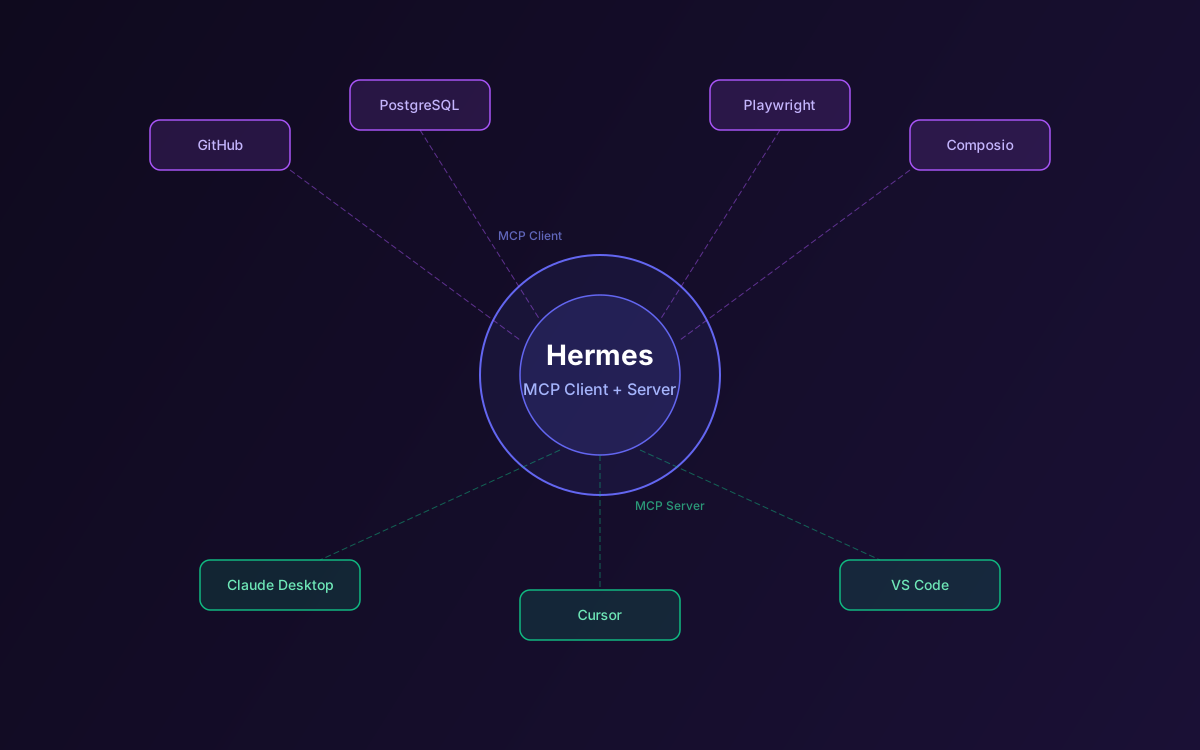
Hermes's MCP implementation is bidirectional. As a client, it connects to external MCP servers and uses their tools. As a server, it exposes its own conversation history, session search, and attachment management to external MCP clients. This means you can use Hermes from Claude Desktop, Cursor, or any MCP-compatible IDE while keeping Hermes's persistent memory and skills intact.
2MCP Client Mode: Connecting External Tools
When Hermes starts, it reads the mcp_servers section of your config.yaml, launches each configured server process, performs the MCP handshake, and discovers available tools. Those tools then appear in the agent's tool list alongside built-in tools like terminal, read_file, and web_search.
The agent doesn't need to know anything about the server implementation. It sees a tool name, a description, and an input schema — exactly the same interface as its native tools. When the LLM decides to call an MCP tool, Hermes routes the call to the appropriate server process via JSON-RPC over stdio or SSE.
💡 Key Design Choice
Hermes's MCP philosophy is "connect the right thing, with the smallest useful surface." Rather than exposing every tool from every server, it encourages filtering to only the tools the agent actually needs. This reduces token usage and prevents the LLM from being overwhelmed by too many options.
3Configuring MCP Servers in config.yaml
MCP servers are configured in your Hermes config.yaml file (typically at ~/.hermes/config.yaml). Here's the structure:
mcp_servers:
  github:
    command: "npx"
    args: ["-y", "@modelcontextprotocol/server-github"]
    env:
      GITHUB_PERSONAL_ACCESS_TOKEN: "ghp_your_token_here"
    allowed_tools:
      - "create_issue"
      - "search_repositories"
      - "get_file_contents"
      - "create_pull_request"

  filesystem:
    command: "npx"
    args: ["-y", "@modelcontextprotocol/server-filesystem", "/home/user/projects"]

  postgres:
    command: "npx"
    args: ["-y", "@modelcontextprotocol/server-postgres"]
    env:
      POSTGRES_CONNECTION_STRING: "postgresql://user:pass@localhost:5432/mydb"
    allowed_tools:
      - "query"
      - "list_tables"
Each server entry supports these fields:
- command — The executable to launch (e.g.,
npx,uvx,python) - args — Arguments passed to the command
- env — Environment variables for the server process
- allowed_tools — Optional whitelist of tool names to expose (omit to expose all)
- transport — Either
stdio(default) orssefor remote servers
After editing config.yaml, restart Hermes or run hermes mcp list to verify the connection. You'll see each server's tools listed with their descriptions.
4Tool Filtering & Security
MCP servers can expose dozens of tools. The GitHub server alone has 20+. Exposing all of them wastes tokens (every tool description goes into the system prompt) and increases the chance of the LLM calling something unintended.
The allowed_tools field is your primary defense. Only list the tools the agent actually needs for its workflows. For a code review agent, you might only need get_file_contents, create_issue, and create_pull_request. For a database analyst, just query and list_tables.
⚠️ Security Note
MCP servers run with the permissions of the Hermes process. A database MCP server with write access can modify data if the LLM decides to. Always use read-only credentials for MCP servers unless write access is explicitly needed, and use allowed_tools to restrict the surface area.
Hermes also supports capability-aware resource and prompt registration from MCP servers. If a server exposes resources (like file listings or database schemas), Hermes can use them as context. If it exposes prompts (like templates for common queries), the agent can invoke them directly.
5Best MCP Servers for Hermes Agent
Based on community adoption and practical utility, here are the MCP servers that pair best with Hermes:
| Server | Use Case | Key Tools |
|---|---|---|
| GitHub | Repo management, PRs, issues | create_issue, create_pull_request, search_repositories |
| Filesystem | File operations outside workspace | read_file, write_file, list_directory |
| PostgreSQL | Database queries, schema inspection | query, list_tables, describe_table |
| Playwright | Browser automation, scraping | navigate, screenshot, click, fill |
| Composio | 250+ SaaS integrations | Gmail, Slack, Notion, Jira, and more |
| SQLite | Local database access | read_query, write_query, list_tables |
The Composio MCP integration is particularly powerful because it gives Hermes access to hundreds of SaaS tools through a single MCP server. You can build financial agents that pull data from QuickBooks, content agents that post to WordPress, or DevOps agents that manage AWS resources — all through MCP.
For a complete list of available MCP servers, check the official MCP servers repository on GitHub.
6MCP Server Mode: Exposing Hermes to Other Clients
The other side of Hermes's MCP story is server mode. When you run hermes mcp serve, Hermes exposes its own data as MCP tools that any compatible client can call. This is useful when you want to access Hermes's conversation history, search across sessions, or manage attachments from Claude Desktop, Cursor, VS Code, or any other MCP client.
The exposed tools include:
- browse_conversations — List and paginate through Hermes sessions
- read_messages — Read the full message history of a specific session
- search_sessions — Full-text search across all Hermes conversations
- manage_attachments — Access files and artifacts from past sessions
This turns Hermes into a knowledge base that other AI tools can query. Imagine asking Claude Desktop "What did my Hermes agent find about the production database issue last Tuesday?" and getting the full context from that session.
7Setting Up hermes mcp serve
To expose Hermes as an MCP server, run:
hermes mcp serve
Then add Hermes to your Claude Desktop configuration at ~/Library/Application Support/Claude/claude_desktop_config.json (macOS):
{
  "mcpServers": {
    "hermes": {
      "command": "hermes",
      "args": ["mcp", "serve"]
    }
  }
}
For Cursor or VS Code, add the equivalent entry to your MCP configuration file. The server communicates over stdio by default, so no network ports are needed.
Once connected, you can search Hermes sessions, read past conversations, and pull context from your agent's history directly into your IDE workflow. This is especially powerful for developers who use Hermes for research and want to reference findings later in their coding sessions.
8Real-World MCP Workflow Patterns
Here are three production-tested patterns that combine Hermes's self-improving skills with MCP tool access:
Pattern 1: GitHub Code Review Agent
Connect the GitHub MCP server with allowed_tools set to get_file_contents, create_issue, and create_review. Schedule a cron job that checks for new PRs every 30 minutes. Hermes reviews the diff, creates skills from its review patterns, and gets better at catching issues over time.
Pattern 2: Database Monitoring Agent
Connect the PostgreSQL MCP server with read-only credentials. Schedule hourly queries for slow query logs, table bloat, and connection counts. Hermes learns your database's normal patterns and creates skills for identifying anomalies. Results get delivered to Telegram or Slack via the messaging gateway.
Pattern 3: Financial Data Pipeline
Use Composio MCP to connect QuickBooks, Stripe, and Google Sheets. Hermes pulls transaction data, reconciles accounts, and generates weekly financial summaries. The self-improving loop means it learns your categorization preferences and gets faster at processing each week.
9Troubleshooting MCP Connections
Common issues and fixes:
- Server not starting — Check that the command (
npx,uvx) is in your PATH. Run the command manually to see error output. - Tools not appearing — Run
hermes mcp listto see connected servers and their tools. If a server shows 0 tools, the handshake may have failed. - Timeout errors — Some MCP servers (especially those using
npx) take time to download on first run. Increase the connection timeout or pre-install the package. - SSE transport issues — For remote MCP servers using SSE, ensure the URL is accessible and CORS headers are configured correctly.
- Environment variables not passed — Double-check the
envsection in your config. Variables are only passed to the server process, not inherited from your shell.
For deeper debugging, check the Hermes logs at ~/.hermes/logs/. MCP connection events are logged with the [mcp] prefix.
10Why Lushbinary for Your Hermes MCP Setup
MCP integration sounds straightforward in a blog post, but production deployments involve credential management, server lifecycle monitoring, tool access policies, and scaling across multiple agent profiles. Lushbinary has deployed Hermes Agent with MCP integrations for clients across fintech, e-commerce, and DevOps — we know where the edge cases hide.
We handle the full stack: MCP server selection and configuration, custom MCP server development for internal APIs, security hardening with tool filtering and credential rotation, and ongoing monitoring to ensure your agent's tool connections stay healthy.
🚀 Free Consultation
Want to connect Hermes Agent to your infrastructure via MCP? Lushbinary specializes in AI agent deployments with production-grade tool integrations. We'll scope your MCP setup, recommend the right servers, and give you a realistic timeline — no obligation.
❓ Frequently Asked Questions
Does Hermes Agent support MCP natively?
Yes. Since v0.2.0, Hermes includes a built-in MCP client. Since v0.6.0, it also supports MCP server mode via hermes mcp serve.
How do I add an MCP server to Hermes Agent?
Add a server entry to the mcp_servers section of your config.yaml with command, args, and optional env variables. Hermes supports stdio and SSE transports.
Can I use Hermes Agent as an MCP server for Claude Desktop?
Yes. Run hermes mcp serve and add the entry to Claude Desktop's config. You can browse conversations, search sessions, and manage attachments.
What MCP servers work best with Hermes Agent?
GitHub, filesystem, PostgreSQL, Playwright, and Composio are the most popular. Composio alone gives access to 250+ SaaS integrations.
Does Hermes support MCP tool filtering?
Yes. Use the allowed_tools field in each server config to expose only the tools you need, reducing token usage and improving security.
Sources
- Hermes Agent MCP Documentation
- Use MCP with Hermes Guide
- Hermes Agent Integrations
- Composio MCP + Hermes Agent
- Model Context Protocol Specification
Content was rephrased for compliance with licensing restrictions. Technical details sourced from official Nous Research documentation and MCP specification as of April 2026. Features and configuration may change — always verify on the official documentation.
Connect Hermes Agent to Your Entire Stack
Need help setting up MCP integrations for your Hermes Agent deployment? Let's talk architecture.
Ready to Build Something Great?
Get a free 30-minute strategy call. We'll map out your project, timeline, and tech stack - no strings attached.
Prefer email? Reach us directly: