One agent doing everything is like one employee handling sales, engineering, ops, and customer support. It works for a while, but eventually the context gets muddled, the skills conflict, and the agent starts giving your DevOps questions marketing answers.
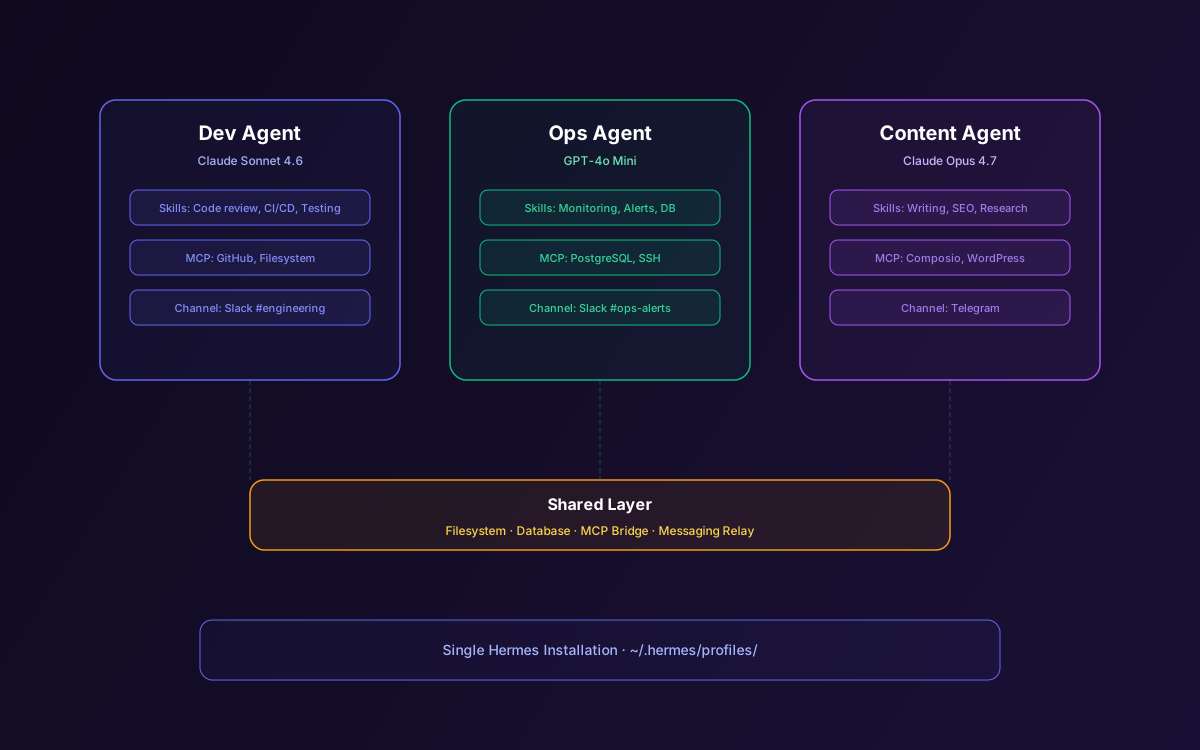
Since v0.6.0, Hermes Agent supports profile-based multi-instance deployment. Each profile is a fully independent agent with its own configuration, memory, skills, sessions, and messaging channels. Run a dev agent, an ops agent, and a content agent from the same machine — each specialized, each learning independently, each reachable on different channels.
This guide covers creating profiles, configuring them for different roles, use case patterns, resource management, inter-agent communication strategies, and scaling to production.
📋 Table of Contents
- 1.Why Multi-Agent Profiles?
- 2.Creating & Managing Profiles
- 3.Profile Directory Structure
- 4.Configuring Profiles for Different Roles
- 5.Use Case: The Dev Agent
- 6.Use Case: The Ops Agent
- 7.Use Case: The Content Agent
- 8.Inter-Agent Communication Patterns
- 9.Resource Management & Cost Control
- 10.Scaling Profiles in Production
- 11.Why Lushbinary for Multi-Agent Hermes
1Why Multi-Agent Profiles?
A single Hermes agent accumulates skills and memory from every task it handles. Over time, this creates a generalist that knows a little about everything but isn't deeply specialized in anything. Profiles solve this by letting you create focused agents:
- Isolated memory — Each profile has its own MEMORY.md and USER.md. The dev agent doesn't know about your marketing campaigns.
- Specialized skills — Each profile has its own skills directory. The ops agent has infrastructure skills; the content agent has writing skills.
- Different LLM providers — Use Claude for coding, GPT-4o for research, and a local model for sensitive data.
- Separate messaging channels — The dev agent lives in #engineering on Slack; the ops agent lives in #ops-alerts.
- Independent cron schedules — Each profile runs its own scheduled tasks without interference.
2Creating & Managing Profiles
Profile management uses the hermes profile command:
# Create a new profile
hermes profile create dev-agent

# List all profiles
hermes profile list

# Switch to a profile for CLI use
hermes profile use dev-agent

# Start the gateway for a specific profile
hermes gateway --profile dev-agent

# Delete a profile (preserves data by default)
hermes profile delete old-agent
Each profile is fully independent. Creating a profile sets up a new directory with its own config.yaml, skills folder, memory files, and session storage. You can run the setup wizard (hermes setup --profile dev-agent) to configure the LLM provider and messaging channels for each profile.
3Profile Directory Structure
Profiles are stored under ~/.hermes/profiles/:
~/.hermes/
├── profiles/
│   ├── dev-agent/
│   │   ├── config.yaml        # LLM provider, MCP servers
│   │   ├── skills/            # Dev-specific skills
│   │   ├── memory/            # MEMORY.md, USER.md
│   │   ├── sessions/          # Conversation history
│   │   └── gateway.yaml       # Messaging channels
│   ├── ops-agent/
│   │   ├── config.yaml
│   │   ├── skills/
│   │   ├── memory/
│   │   ├── sessions/
│   │   └── gateway.yaml
│   └── content-agent/
│       ├── config.yaml
│       ├── skills/
│       ├── memory/
│       ├── sessions/
│       └── gateway.yaml
├── config.yaml                # Default profile config
└── skills/                    # Default profile skills
4Configuring Profiles for Different Roles
The power of profiles comes from specialization. Here's how to configure each profile for its role:
💡 Configuration Strategy
For each profile, configure three things: (1) the LLM provider best suited for the role, (2) the MCP servers the agent needs, and (3) the messaging channels where the agent should be reachable. Everything else — skills, memory, sessions — builds up naturally through use.
5Use Case: The Dev Agent
The dev agent handles coding tasks, code reviews, debugging, and development workflow automation:
# dev-agent/config.yaml
provider: anthropic
model: claude-sonnet-4.6  # Best for coding tasks

mcp_servers:
  github:
    command: "npx"
    args: ["-y", "@modelcontextprotocol/server-github"]
    env:
      GITHUB_PERSONAL_ACCESS_TOKEN: "ghp_..."
    allowed_tools:
      - "get_file_contents"
      - "create_pull_request"
      - "create_issue"
      - "search_code"

terminal_backend: docker  # Sandboxed execution
Pre-load the dev agent with skills for your team's coding standards, PR review checklist, deployment procedures, and testing requirements. Over time, it learns your codebase patterns and becomes faster at reviews and debugging.
Connect it to Slack #engineering and schedule cron jobs for daily PR review summaries and dependency update checks.
6Use Case: The Ops Agent
The ops agent monitors infrastructure, handles alerts, and automates maintenance tasks:
# ops-agent/config.yaml
provider: openai
model: gpt-4o  # Good balance of speed and capability

mcp_servers:
  postgres:
    command: "npx"
    args: ["-y", "@modelcontextprotocol/server-postgres"]
    env:
      POSTGRES_CONNECTION_STRING: "postgresql://readonly:..."
    allowed_tools:
      - "query"
      - "list_tables"

terminal_backend: ssh  # Access to production servers
ssh_host: "ops@monitoring.internal"
The ops agent runs cron jobs for database health checks, log analysis, and uptime monitoring. It delivers alerts to Slack #ops-alerts and Telegram for urgent issues. Skills accumulate around your specific infrastructure patterns — the agent learns what "normal" looks like for your systems.
7Use Case: The Content Agent
The content agent handles research, writing, social media, and content pipeline management:
# content-agent/config.yaml
provider: anthropic
model: claude-opus-4.7  # Best for long-form writing

mcp_servers:
  composio:
    command: "npx"
    args: ["-y", "composio-mcp"]
    env:
      COMPOSIO_API_KEY: "..."
    allowed_tools:
      - "google_sheets_read"
      - "wordpress_create_post"
      - "twitter_post"
Pre-load with skills for your brand voice, content guidelines, SEO requirements, and publishing workflows. Schedule weekly content calendar reviews and daily social media post drafting. The agent learns your writing style and gets better at matching your tone over time.
8Inter-Agent Communication Patterns
Profiles don't have a built-in communication channel, but there are practical patterns for coordination:
- Shared filesystem — Profiles can read/write to a shared directory. The dev agent writes a deployment report; the ops agent reads it for monitoring context.
- MCP server bridge — Run one profile in MCP server mode (
hermes mcp serve --profile dev-agent) and connect another profile as an MCP client. The ops agent can search the dev agent's session history. - Messaging channel relay — Both agents in the same Slack channel. The dev agent posts a deployment notification; the ops agent picks it up and starts monitoring.
- Database intermediary — Both agents connect to the same database via MCP. One writes status updates; the other reads them.
9Resource Management & Cost Control
Running multiple profiles means multiple LLM API calls. Here's how to keep costs manageable:
- Model tiering — Use expensive models (Claude Opus, GPT-4o) only for profiles that need them. Use cheaper models (GPT-4o Mini, local Ollama) for routine tasks.
- Cron frequency — Don't schedule every job every 5 minutes. Most monitoring tasks work fine at 30-minute or hourly intervals.
- Skill efficiency — Well-developed skills reduce the number of LLM calls per task. Invest time in skill quality for high-frequency workflows.
- Local models for private data — Use Ollama with Gemma 4 or Qwen 3.6 for profiles that handle sensitive data. Zero API cost, full privacy.
| Profile | Model | Est. Monthly Cost |
|---|---|---|
| Dev Agent | Claude Sonnet 4.6 | $30-$60 |
| Ops Agent | GPT-4o Mini | $5-$15 |
| Content Agent | Claude Opus 4.7 | $40-$80 |
| Private Data Agent | Ollama (Gemma 4) | $0 (local) |
10Scaling Profiles in Production
For production deployments with multiple profiles:
- Separate gateway processes — Run each profile's gateway as a separate systemd service:
hermes gateway install --profile dev-agent - Dedicated VPS per role — For high-traffic profiles, run each on its own VPS. A $5/month Hetzner instance handles one profile comfortably.
- Centralized logging — Aggregate logs from all profiles into a central location for monitoring and debugging.
- Backup strategy — Back up each profile's directory independently. Skills and memory are the most valuable data.
- Version control skills — Keep each profile's skills directory in Git for versioning and team collaboration.
11Why Lushbinary for Multi-Agent Hermes
Designing a multi-agent system that actually works requires understanding role boundaries, communication patterns, and cost optimization. Lushbinary architects multi-profile Hermes deployments for teams — from role definition to skill development to production monitoring.
🚀 Free Consultation
Want a team of specialized Hermes agents working for your business? Lushbinary designs multi-agent architectures with proper role separation, skill development, and production deployment — no obligation.
❓ Frequently Asked Questions
What are Hermes Agent profiles?
Independent agent instances from a single installation. Each gets its own config, memory, skills, sessions, and gateway. Introduced in v0.6.0.
How do I create a new Hermes Agent profile?
Run hermes profile create <name>. Each profile gets its own directory under ~/.hermes/profiles/ with separate configuration.
Can different profiles use different LLM providers?
Yes. Each profile has its own config.yaml. Use Claude for coding, GPT-4o for research, Ollama for private data - all from one machine.
How many profiles can I run simultaneously?
No hard limit. A typical VPS handles 3-5 concurrent profiles. The bottleneck is usually LLM API costs, not compute.
Can Hermes profiles communicate with each other?
Not directly built-in, but you can use shared filesystem paths, MCP server bridge, messaging channel relay, or a database intermediary.
Sources
- Hermes Agent v0.6.0 Multi-Agent Profiles
- Hermes v0.6.0 Multi-Instance Profiles & MCP Server Mode
- Hermes Agent Documentation
- TokenMix.ai Hermes Agent Review
Content was rephrased for compliance with licensing restrictions. Technical details sourced from official Nous Research documentation and community reviews as of April 2026. Features may change — always verify on the official documentation.
Build Your AI Agent Team
Need specialized Hermes agents for dev, ops, and content? Let's architect your multi-agent system.
Ready to Build Something Great?
Get a free 30-minute strategy call. We'll map out your project, timeline, and tech stack - no strings attached.
Prefer email? Reach us directly: