An AI agent that only lives in your terminal is an AI agent you forget about. The real power of Hermes Agent kicks in when you can reach it from anywhere — a Telegram message on your phone, a Discord channel with your team, a Slack thread during standup, or a WhatsApp voice memo while driving.
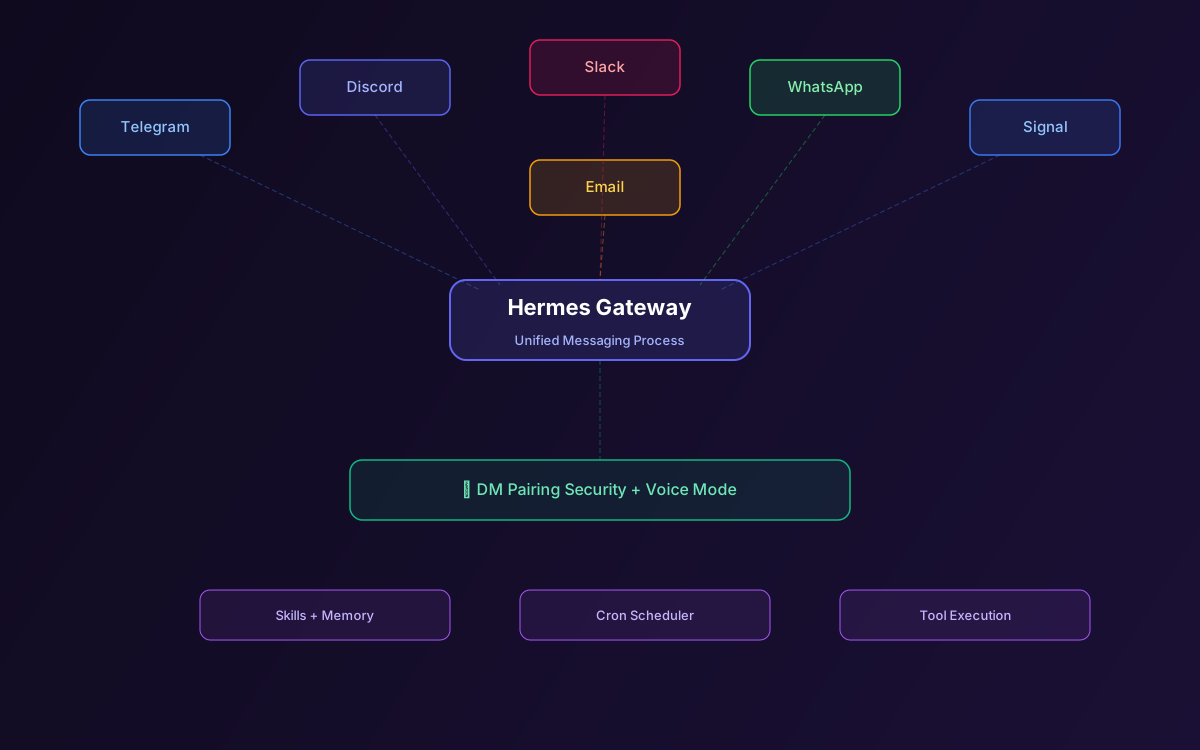
Hermes's unified messaging gateway connects six platforms through a single process: Telegram, Discord, Slack, WhatsApp, Signal, and Email. One hermes gateway command, and your self-improving AI agent is reachable from all of them simultaneously. It even supports voice mode in Discord channels with real-time transcription and text-to-speech.
This guide walks through setting up each channel, the DM pairing security model, voice mode, group chat behavior, running the gateway as a system service, and production deployment tips.
📋 Table of Contents
- 1.The Unified Gateway Architecture
- 2.Setting Up Telegram
- 3.Setting Up Discord (Text & Voice)
- 4.Setting Up Slack
- 5.Setting Up WhatsApp
- 6.Setting Up Signal & Email
- 7.DM Pairing Security Model
- 8.Voice Mode: Talk to Your Agent
- 9.Group Chat Behavior
- 10.Running as a System Service
- 11.Production Deployment Tips
- 12.Why Lushbinary for Your Hermes Gateway
1The Unified Gateway Architecture
The gateway is a single long-running process that manages connections to all configured messaging platforms. It runs independently from the CLI — you can chat with Hermes in your terminal and on Telegram at the same time, sharing the same memory, skills, and session history.
Under the hood, the gateway maintains a background ticker thread that fires every 60 seconds. This ticker handles cron job execution, message polling for platforms that don't support webhooks, and health checks for each channel connection.
Setup is interactive. Run hermes gateway setup and the wizard walks you through connecting each platform. You can add channels one at a time or configure all six in one session.
2Setting Up Telegram
Telegram is the most popular channel for Hermes users. The setup takes about two minutes:
- Open Telegram and message @BotFather
- Send
/newbot, choose a name and username - Copy the bot token
- Run
hermes gateway setup, select Telegram, paste the token - Start the gateway:
hermes gateway
Once running, message your bot on Telegram. The first message triggers DM pairing — you'll need to provide the pairing code shown in the gateway logs. After pairing, you can chat normally, send voice memos (auto-transcribed), share files, and receive scheduled task results.
💡 Telegram Tips
Telegram voice memos are automatically transcribed by Hermes using the configured speech-to-text provider. The agent responds with text by default, but you can enable voice replies in the gateway config. Telegram also supports inline images — Hermes can send screenshots, charts, and generated images directly in the chat.
3Setting Up Discord (Text & Voice)
Discord setup requires creating a bot application in the Discord Developer Portal:
- Create a new application, then create a bot under the Bot tab
- Enable the Message Content Intent and Server Members Intent
- Copy the bot token
- Generate an invite URL with
botandapplications.commandsscopes - Invite the bot to your server
- Run
hermes gateway setup, select Discord, paste the token
Discord is the only platform where Hermes supports full voice interaction. The agent can join voice channels, listen to participants, transcribe speech in real-time, and respond with spoken audio. This makes it possible to have live voice conversations with your AI agent during team calls.
In text channels, Hermes responds when mentioned (@YourBot) or in DMs. In group channels, it only responds to direct mentions to avoid noise.
4Setting Up Slack
Slack integration uses the Slack Bot API with Socket Mode (no public URL needed):
- Create a new Slack app at api.slack.com/apps
- Enable Socket Mode and generate an app-level token
- Add bot token scopes:
chat:write,im:history,im:read,im:write - Install the app to your workspace
- Copy the Bot User OAuth Token and App-Level Token
- Run
hermes gateway setup, select Slack, paste both tokens
Hermes responds in DMs and in channels where it's mentioned. Thread support means the agent can maintain context within a Slack thread, making it useful for team discussions where you want AI input without cluttering the main channel.
5Setting Up WhatsApp
WhatsApp integration uses the WhatsApp Business API through Meta's Cloud API. This requires a Meta Business account and a verified phone number:
- Create a Meta Business account and set up WhatsApp Business API access
- Register a phone number for the bot
- Generate a permanent access token
- Configure the webhook URL (Hermes provides a callback endpoint)
- Run
hermes gateway setup, select WhatsApp, enter the credentials
WhatsApp is the most complex channel to set up due to Meta's verification requirements, but it's invaluable for reaching your agent from any phone. Voice memos are transcribed automatically, and the agent can send images, documents, and formatted text.
6Setting Up Signal & Email
Signal uses the Signal CLI or signal-cli-rest-api as a bridge. You'll need a dedicated phone number registered with Signal. The setup is more involved than Telegram but provides end-to-end encrypted communication with your agent.
Email integration connects via IMAP/SMTP. Configure your email server credentials in the gateway setup, and Hermes will monitor an inbox for incoming messages and reply via email. This is useful for agents that need to process support tickets, send reports, or handle email-based workflows.
Both channels support the same DM pairing security model as the other platforms.
7DM Pairing Security Model
Hermes doesn't let just anyone talk to your agent. The DM pairing system ensures only authorized users can interact:
- When the gateway starts, it generates a unique pairing code
- The code is displayed in the gateway logs and CLI
- When a new user messages the bot, they're prompted for the pairing code
- After successful pairing, the user is permanently authorized
- Unpaired users receive a generic "not authorized" response
This is a critical security boundary. Without DM pairing, anyone who discovers your bot's username could interact with an agent that has access to your files, databases, and tools. The pairing code acts as a shared secret that proves the user is authorized.
⚠️ Security Best Practice
Never share your pairing code publicly. If you suspect it's been compromised, regenerate it by restarting the gateway with the --new-pairing-code flag. Previously paired users remain authorized.
8Voice Mode: Talk to Your Agent
Hermes supports full voice interaction across CLI and messaging platforms. The voice pipeline works in three stages:
- Speech-to-text — Incoming audio is transcribed using the configured provider (OpenAI Whisper, Deepgram, or local Whisper)
- Agent processing — The transcribed text is processed like any other message, with full tool access and skill loading
- Text-to-speech — The agent's response is converted to audio using the configured TTS provider (OpenAI TTS, ElevenLabs, or local models)
On Discord, this happens in real-time in voice channels. On Telegram and WhatsApp, voice memos are transcribed on receipt and the agent can optionally reply with voice messages.
Voice mode is configured in the gateway settings. You can set the STT and TTS providers independently, choose voice profiles, and control whether voice replies are enabled per channel.
9Group Chat Behavior
Hermes handles group chats differently from DMs to avoid being noisy:
- Telegram groups — Responds only when mentioned by name or replied to directly
- Discord channels — Responds only when @mentioned
- Slack channels — Responds when @mentioned or in threads where it's been tagged
In all cases, the agent maintains context within the conversation thread. If someone asks a follow-up question in a Slack thread, Hermes has the full thread context available.
10Running as a System Service
For 24/7 availability, install the gateway as a systemd service:
# Install as system service
hermes gateway install

# Check status
systemctl status hermes-gateway

# View logs
journalctl -u hermes-gateway -f

# Restart after config changes
systemctl restart hermes-gateway
The service starts automatically on boot and restarts on failure. Logs are managed by journald, so you get rotation and persistence for free. On macOS, Hermes uses launchd instead of systemd with the same hermes gateway install command.
11Production Deployment Tips
- Use a VPS — A $5/month VPS (Hetzner, DigitalOcean) is enough to run the gateway 24/7. The gateway itself uses minimal resources; the LLM API calls are the real cost.
- Separate gateway from CLI — Run the gateway on a server and use the CLI locally. They share the same config and memory directory.
- Monitor channel health — The gateway logs connection status for each channel. Set up alerts for disconnection events.
- Rate limiting — Each platform has its own rate limits. Hermes handles these internally, but be aware that high-frequency cron jobs can hit limits on platforms like WhatsApp.
- Backup credentials — Store your bot tokens and API keys securely. If you lose them, you'll need to reconfigure each channel.
12Why Lushbinary for Your Hermes Gateway
Setting up one messaging channel is easy. Running six channels reliably in production with proper security, monitoring, and failover is a different story. Lushbinary deploys Hermes messaging gateways for teams that need their AI agent accessible everywhere — from executive Telegram groups to engineering Slack channels to customer-facing WhatsApp bots.
🚀 Free Consultation
Want Hermes Agent running on Telegram, Discord, and Slack for your team? Lushbinary handles the full gateway setup, security hardening, and production deployment — no obligation.
❓ Frequently Asked Questions
What messaging platforms does Hermes Agent support?
Telegram, Discord, Slack, WhatsApp, Signal, and Email - all through a single gateway process.
How do I set up Hermes Agent on Telegram?
Create a bot via BotFather, copy the token, run hermes gateway setup, select Telegram, paste the token, and start with hermes gateway.
Does Hermes Agent support voice in Discord?
Yes. Hermes can join voice channels, transcribe speech in real-time, and respond with spoken audio.
Can I run Hermes Agent as a system service?
Yes. Run hermes gateway install to create a systemd (Linux) or launchd (macOS) service for 24/7 availability.
What is DM pairing in Hermes Agent?
A security model where new users must provide a pairing code before they can interact with the agent, preventing unauthorized access.
Sources
- Hermes Agent Telegram Documentation
- Hermes Agent Voice Mode
- Hermes Agent Security Model
- Hermes Agent Official Site
Content was rephrased for compliance with licensing restrictions. Technical details sourced from official Nous Research documentation as of April 2026. Features may change — always verify on the official documentation.
Reach Your AI Agent From Anywhere
Need Hermes Agent running on Telegram, Discord, Slack, and WhatsApp for your team? Let's set it up.
Ready to Build Something Great?
Get a free 30-minute strategy call. We'll map out your project, timeline, and tech stack - no strings attached.
Prefer email? Reach us directly: