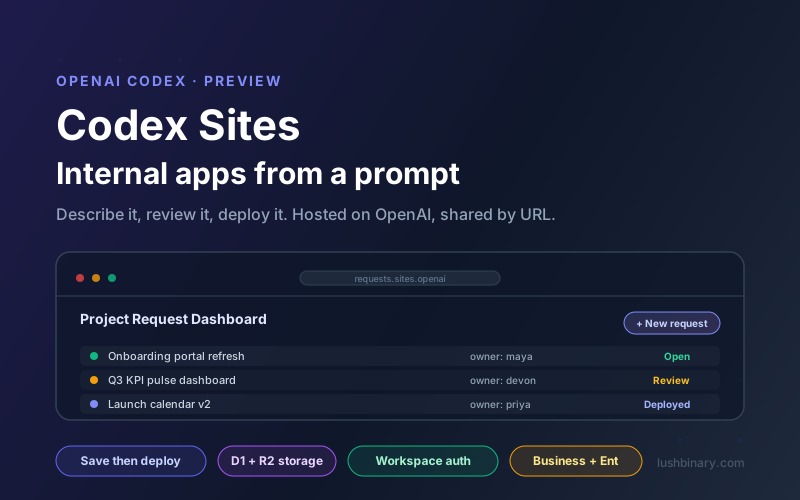
On June 2, 2026, OpenAI expanded Codex well beyond pure engineering with a new plugin called Sites. The pitch is simple: describe an internal app in plain English, and Codex builds it, hosts it on OpenAI infrastructure, and hands you a shareable URL. No deploy pipeline, no separate hosting account, no DevOps ticket. For the dashboards, review rooms, and internal tools that never earn a sprint, that gap just got a lot smaller.
Most internal tooling dies in the backlog. A team needs a request tracker, a KPI dashboard, or an onboarding hub, but it never clears the priority bar against revenue work. Codex Sites targets exactly that class of software: useful, interactive, low-stakes apps that a non-developer can describe and a developer can refine, then publish behind workspace authentication in minutes.
This guide explains what Codex Sites actually is, how the build and deploy workflow works under the hood, how data, storage, and access control are handled, and a set of concrete use cases worth building. We also cover where Sites fits next to tools like Retool, Lovable, and a plain Cloudflare or Vercel deploy, and where it is the wrong choice. Everything here is sourced from OpenAI's official Codex documentation as of June 2026.
What This Guide Covers
- What Codex Sites Is and Why It Matters
- How Codex Sites Works: Prompt to Production URL
- Save vs Deploy: The Critical Workflow
- Data, Storage & Access Control
- Getting Started: Enable, Prompt, Ship
- Eight Use Cases Worth Building
- Codex Sites vs Retool, Lovable & DIY Deploy
- Limitations & When Not to Use It
- Why Lushbinary for Internal Tooling & AI Apps
- FAQ
1What Codex Sites Is and Why It Matters
Codex Sites is a plugin for the Codex app that lets Codex create, save, deploy, and inspect websites, web apps, and games that are hosted by OpenAI. You give Codex a prompt, or point it at a compatible existing project, and it turns that into a live site with its own link. The whole point is to skip the separate deployment workflow: there is no Vercel project to wire up, no Cloudflare account to configure, no CI step to babysit.
It shipped as part of a larger June 2, 2026 Codex update that pushed the product beyond engineering and into knowledge work. Alongside Sites, OpenAI introduced role-specific plugins for jobs like data analytics, creative production, sales, product design, equity investing, and investment banking, plus in-app annotations for visual feedback. OpenAI reports more than 5 million weekly Codex users, with non-developers growing faster than engineers. Sites is the hosted output layer for that fast-growing, less technical audience.
The one-line summary
Sites adds managed hosting inside Codex so teams ship internal apps without standing up a separate deploy stack. Describe it, review it, deploy it, share the URL. The output runs as Cloudflare Worker-compatible ES modules on OpenAI-operated hosting.
That last detail matters for anyone evaluating the architecture. The sites Codex builds are Cloudflare Worker-compatible ES modules, with optional Cloudflare-style D1 and R2 bindings for data and files, but the hosting itself is operated by OpenAI rather than something you manage in your own Cloudflare account. If you already run edge apps, the runtime model will feel familiar. If you do not, you never have to think about it.
Sites slots into the same product surface as the rest of Codex: parallel cloud sandboxes, GitHub integration, and the role plugins. If you have read our guide to OpenAI Codex subagents, think of Sites as the layer that takes the output of all that agentic work and makes it something a teammate can actually open in a browser.
2How Codex Sites Works: Prompt to Production URL
The end-to-end flow is short. You start in a Codex thread, name the Sites plugin, and describe the app. Codex builds the deployable output as Cloudflare Worker-compatible ES modules. You then choose to save a reviewable version or deploy a live one. Once deployed, workspace users reach it through a URL inside your ChatGPT Business or Enterprise workspace.
A Sites project links a local source project to hosting managed through Sites. Codex stores that linkage, plus any storage binding names, in a small .openai/hosting.json file. A fresh starter can begin without a project_id; Sites adds one after it provisions the hosted project. A provisioned site that uses a relational database binding and no file storage looks like this:
{
  "project_id": "<project-id>",
  "d1": "DB",
  "r2": null
}
You do not edit this file by hand to add secrets. Environment variables and secret values belong in the Sites panel inside the app, not in hosting.json and not in committed .env files. Keep your local .env and .env.example aligned with the keys your app needs for local development, and let the hosted runtime read its values from the panel.
3Save vs Deploy: The Critical Workflow
This is the single most important thing to internalize about Sites: every deployed Sites URL is a production deployment. There is no staging tier hiding behind the link. To keep teams from accidentally shipping a half-built app to colleagues, OpenAI split publishing into two distinct stages.
| Stage | What happens | When to use it |
|---|---|---|
| Save a version | Codex builds the deployable site and associates the build with the source Git commit. Nothing goes live. | When you want a reviewable candidate before anyone can open it. |
| Deploy a version | Codex publishes a saved version and reports the production URL once deployment succeeds. | Only when you intend the selected audience to use the site. |
Because each saved version is linked to a Git commit, you get a clean audit trail. You can ask Codex to list or inspect saved versions to identify a previous candidate, then deploy the exact one you intend to publish. Before widening access, review the source changes and any database migrations in the Codex review pane, confirm the build succeeded, and verify the selected version is the one you mean to ship.
Practical rule
For anything touching real data or a real audience, always save and review first, then deploy. Treat "deploy" as the moment a colleague could be looking at it, because it is.
4Data, Storage & Access Control
Sites can host more than static content. When your app needs to remember things, you tell Codex about the behavior you need and it selects the right shape. The guidance from OpenAI maps cleanly onto a few options.
| You need | Sites uses |
|---|---|
| A content-led page with no persistent state | Static site, no database |
| Saved records, user progress, or game scores | D1, a relational database for durable structured data |
| Images, documents, audio, video, or uploads | R2, object storage for files |
| Uploaded files with searchable metadata | D1 for metadata plus R2 for the file bytes |
| The current workspace user's identity | Workspace-authenticated user identity |
| Public sign-in or an external IdP | An authentication-enabled Sites project |
A useful discipline here: do not request durable storage for temporary presentation state like a theme choice or a dismissed banner. Reserve D1 and R2 for product data that people genuinely expect the site to remember between visits.
Access control is set before you share a URL. New sites default to the most restrictive posture, and you can move up the ladder as you gain confidence in the content and data handling.
| Mode | Who can access |
|---|---|
| admins_only | The site owner and workspace admins (default for new sites) |
| workspace_all | All active users in the workspace |
| custom | Specific users or groups you choose; the owner always retains access |
Security note
Keep new sites at admins_only until you have reviewed the content, the data handling, and the intended audience. Widen access deliberately. Sensitive internal dashboards should not jump straight to workspace_all before review. For broader patterns on protecting AI-driven apps, see our production guardrails guide.
5Getting Started: Enable, Prompt, Ship
Sites is in preview and currently available for ChatGPT Business and Enterprise workspaces, with more plans rolling out later. Setup is a few steps.
- Enable it (Enterprise only). On ChatGPT Enterprise, an admin turns Sites on through role-based access control in the ChatGPT admin settings. Business workspaces can skip this because Sites is enabled by default.
- Add the Sites plugin. Open Plugins in the Codex app, find Sites, and add it. Start a new thread after installing any plugin.
- Start a Sites task. Describe the site you want. Name the plugin explicitly with
@Sites, especially when the task should end in a hosted deployment. - Decide save or deploy. Ask Codex to validate the build, then either save a reviewable version or deploy the approved one.
- Return anytime. Open Sites in the app sidebar to revisit projects, inspect saved versions, check deployment status, or change who can access a deployed site.
A good prompt names the audience, the core experience, and the data the app needs to keep. Here is the pattern from OpenAI's docs for a brand new internal tool:
@Sites Build a project request dashboard for my operations team.
Let team members submit requests, see who owns each one, update
the status, and filter the list. Require people to sign in with
their workspace account, and keep the request data saved between
visits.
To publish an existing project, point Sites at it and ask it to check compatibility first:
@Sites Deploy this project. Check whether it is compatible with
Sites, make any required changes, and give me the deployment URL.
When a site needs durable data or uploads, say so directly, for example: "Add persistent player scores and avatar uploads to this game. Use the appropriate Sites storage and deploy the updated game." Codex picks D1, R2, or both based on the request. For live third-party data, you can supply API keys through the Sites panel or use thread automations: a scheduled plugin run fetches data, Codex updates the app, and redeploys, which suits reporting views that need to track Slack, docs, or warehouse exports without manual copy-paste.
6Eight Use Cases Worth Building
The sweet spot for Sites is interactive internal tooling that would otherwise live in a neglected spreadsheet or never get built at all. Several of these come straight from OpenAI's own Sites showcase; the rest are natural extensions. Each pairs a clear audience with a concrete data need.
Project request dashboard
Operations teams submit requests, assign owners, update status, and filter the queue. Workspace sign-in plus D1 for persistent records.
Onboarding hub
A new hire's first-week view: progress checklist, scheduled meetings, and assigned tasks in one place instead of five tabs.
Pulse / KPI dashboard
Executive KPIs with targets and health signals, refreshed on a schedule via thread automations against your data sources.
Sparkboard (idea intake)
Idea submission with voting, comments, and rankings. Uses D1 for data and workspace auth so only your team participates.
Launch calendar
Cross-team planning with filters and risk flags so marketing, product, and support see the same dates and dependencies.
Scenario planner
Interactive assumptions and sliders instead of a tangle of spreadsheet tabs, so stakeholders can model outcomes live.
Enablement library
A searchable index of learning paths, playbooks, and updates for sales or support, kept current with scheduled refreshes.
Internal review room
A focused space to walk through a proposal, dashboard, or design with comments, so decisions happen in one shared link.
The common thread is that none of these are public products. They are the connective tissue of how a team operates, the kind of work that is obviously valuable but rarely worth a dedicated engineering project. If you are thinking about a more ambitious AI-driven product instead, our guide to AI-native SaaS architecture is a better starting point than an internal hosting tool.
7Codex Sites vs Retool, Lovable & DIY Deploy
Sites overlaps with several existing categories, but the fit is specific. It is strongest when the people who need the app already live inside ChatGPT and the app should stay internal. Here is how it lines up against the obvious alternatives.
| Approach | Best for | Trade-off |
|---|---|---|
| Codex Sites | Internal apps for ChatGPT Business/Enterprise teams, built and hosted without a deploy stack | Preview only, tied to your workspace, not aimed at public sites |
| Retool / internal tool builders | Database-backed admin panels with mature connectors and permissions | More setup, per-seat pricing, component-driven rather than prompt-driven |
| Lovable / Replit (vibe coding) | Public-facing apps and prototypes with their own hosting and full code ownership | You manage hosting and auth yourself; less tied to a single workspace identity |
| DIY deploy (Vercel / Cloudflare) | Full control over runtime, scaling, custom domains, and production SLAs | Requires engineering time, CI/CD, and ongoing ops ownership |
Notably, several of those vibe-coding platforms (including Lovable, Replit, Webflow, Wix, Base44, and Emergent) are launch partners for the broader Sites and plugins ecosystem rather than pure competitors. If you want to weigh the AI coding tools themselves, our AI coding agents comparison covers Codex alongside Cursor, Claude Code, Kiro, Copilot, and Windsurf.
8Limitations & When Not to Use It
Sites is genuinely useful, but it is a preview feature with a specific purpose. A few honest caveats before you build something important on it.
- It is built for internal tools, not public products. The default access is owner-and-admins, and OpenAI explicitly frames Sites around dashboards and shared workspaces. Do not reach for it as a public marketing site without reviewing the auth docs first.
- Preview status means change. It is currently limited to ChatGPT Business and Enterprise workspaces, included during the preview, with future pricing to be determined. Plan for terms to evolve.
- Workspace lock-in. Sharing happens through a URL inside your ChatGPT workspace. That is a feature for internal apps, but it means the audience and identity model are tied to OpenAI's workspace, not your own systems unless you set up an external IdP.
- Supported site shapes are constrained. Output must build to Cloudflare Worker-compatible ES modules. For an existing project, confirm the build can produce compatible artifacts before you request a deployment.
- Production by default. Every deployed URL is live. Without the save-then-review discipline, it is easy to expose something before it is ready.
If you need a customer-facing application with its own domain, compliance requirements, multi-region scaling, or deep integration with your existing infrastructure, a purpose-built deployment is still the right call. Sites is for the long tail of internal apps, not your flagship product.
9Why Lushbinary for Internal Tooling & AI Apps
Codex Sites lowers the bar for one-off internal tools, and that is a good thing. But the moment an app needs to talk to your production databases, enforce real compliance, run on your own domain, or scale past a single workspace, you are back in engineering territory. That's where Lushbinary comes in. We build AI-powered internal tools and customer-facing products that are designed to grow up gracefully.
Here is what we bring to internal tooling and AI app projects:
- Internal tools that scale. Dashboards, request trackers, and review apps built on a stack you own, with proper auth, audit logging, and access control from day one.
- Codex and multi-model integration. We wire Codex, Claude, and Gemini into real workflows, including the kind of agentic automation that keeps a dashboard current without manual copy-paste.
- Edge and serverless deployment. Production hosting on Cloudflare Workers, AWS, or Vercel with custom domains, CI/CD, and monitoring, so your app is not boxed into a single vendor's preview.
- Data and storage design. Relational schemas, file storage, and search done right, so the app remembers the things it should and protects the things it must.
- Security and compliance. SOC 2, HIPAA, and data-handling reviews for internal tools that touch sensitive information.
🚀 Free Consultation
Prototyped something useful in Codex Sites and want to turn it into a real product? Lushbinary scopes your project, recommends the right stack, and gives you a realistic timeline with no obligation. We'll help you decide what stays in Sites and what deserves a production build.
10Frequently Asked Questions
What is OpenAI Codex Sites?
Codex Sites is a Codex plugin that lets Codex create, save, deploy, and inspect websites, web apps, and games hosted by OpenAI. You describe an interactive experience in a prompt (or point Codex at an existing project), and it produces a live, workspace-private site with its own shareable URL. It launched in preview on June 2, 2026 for ChatGPT Business and Enterprise workspaces.
How much does Codex Sites cost?
During the preview, Codex Sites is included for eligible ChatGPT Business and Enterprise workspaces, and OpenAI has said future pricing is to be determined. Treat the current terms as provisional and verify availability and billing in your workspace settings before depending on it for production workloads.
What is the difference between saving and deploying a Codex Site?
Every deployed Sites URL is a production deployment. Saving a version builds the site and links it to the source Git commit, leaving a reviewable candidate that is not yet live. Deploying publishes a saved version and returns the live production URL. The two-step split prevents teams from accidentally shipping half-finished builds.
Can Codex Sites store data and require sign-in?
Yes. Sites supports D1 for relational data (SQLite-style records, user progress, scores) and R2 for object storage (images, documents, uploads). For access control, you can require workspace sign-in and choose admins_only, workspace_all, or a custom list of users and groups. Auth-enabled projects can also use an external identity provider for public sign-in.
Should you use Codex Sites for public marketing websites?
Codex Sites is built for internal tools, dashboards, and shared workspaces, not public marketing sites. The default access posture keeps a new site limited to the owner and workspace admins. If you plan to expose a site publicly, review the authentication and data-handling docs first and treat it as a deliberate decision rather than a default.
📚 Sources
- OpenAI Developers - Sites (Codex documentation)
- OpenAI Developers - Build and deploy internal apps
- OpenAI Developers - Sites showcase
- OpenAI - Codex for every role, tool, and workflow
- TechCrunch - OpenAI launches new Codex tools for white-collar work
Content was rephrased for compliance with licensing restrictions. Feature details, workflow stages, storage options, and access modes sourced from official OpenAI Codex documentation as of June 2026. Codex Sites is in preview and its capabilities, availability, and pricing may change. Always verify on OpenAI's developer documentation before relying on it for production work.
From Prototype to Production
Codex Sites is great for a quick internal tool. When you need it to scale, integrate, and stay secure, Lushbinary builds the real thing. Let's talk about your internal tools and AI apps.
Ready to Build Something Great?
Get a free 30-minute strategy call. We'll map out your project, timeline, and tech stack - no strings attached.
Prefer email? Reach us directly: