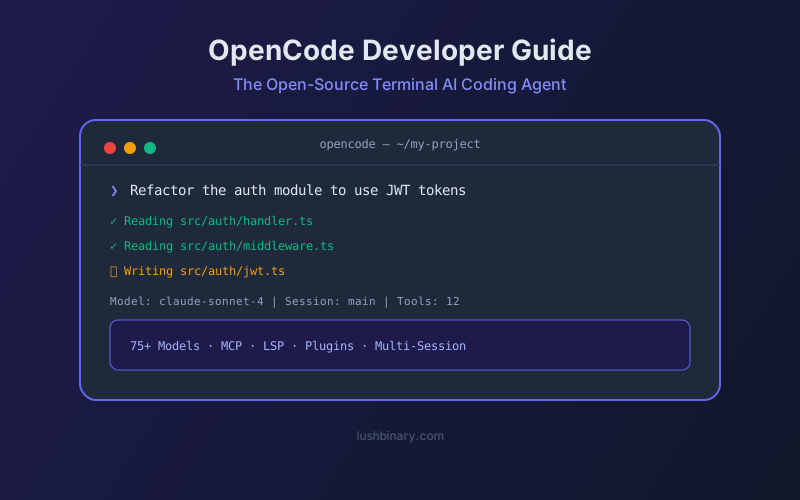
OpenCode has become the standard-bearer for open-source AI coding agents. With over 120,000 GitHub stars and support for 75+ model providers, it brings AI-assisted development directly into your terminal - no IDE lock-in, no vendor lock-in, and no subscription fees. Built in Go by the team at SST (Anomaly), it's designed for developers who want full control over their AI workflow.
Whether you prefer Claude, GPT, Gemini, or fully local models via Ollama, OpenCode treats them all as interchangeable - you can even switch mid-session. This guide covers everything from installation to advanced configuration, MCP integration, and plugin development.
If you've been using Claude Code, Cursor, or GitHub Copilot and want an open-source alternative that doesn't compromise on features, OpenCode is worth a serious look.
📑 What This Guide Covers
- What Is OpenCode & Why It Matters
- Installation & First Run
- Core Architecture: TUI, CLI & Server
- Model Configuration & Provider Setup
- Key Features: LSP, Multi-Session & Tools
- Custom Instructions with AGENTS.md
- MCP Server Integration
- Plugin System & Custom Tools
- OpenCode for Teams & Enterprise
- Why Lushbinary Uses OpenCode
1What Is OpenCode & Why It Matters
OpenCode is an open-source, terminal-native AI coding agent built in Go. Unlike cloud-based SaaS tools like Claude Code or Cursor, OpenCode is 100% open-source (MIT license) and entirely provider-agnostic. You bring your own API key - or run models locally - and OpenCode handles the rest.
📊 OpenCode by the Numbers (April 2026)
120K+ GitHub stars · 75+ model providers · 650K+ developers · MIT license · Built in Go · TUI + CLI + Desktop + IDE extension
The "BYOK" (Bring Your Own Key) philosophy means you're never locked into a single provider. Today you might use Claude Opus 4.7 for complex refactoring, switch to GPT-5.4 for code generation, and fall back to a local Qwen 3.6 model for sensitive codebases - all within the same session.
Key Differentiators
- Provider-agnostic: Claude, OpenAI, Google, Groq, Fireworks, Together AI, OpenRouter, Azure, AWS Bedrock, and local models via Ollama
- Native terminal UI: A beautiful TUI built with Bubble Tea (Go) - not a web wrapper
- Multi-session support: Run multiple conversations in parallel, each with its own context
- LSP integration: Language Server Protocol for intelligent code understanding
- MCP support: Extend with external tools via Model Context Protocol
- Plugin system: TypeScript/JavaScript plugins with 25+ lifecycle hooks
- Client/Server architecture: Run the server headlessly and connect from multiple clients
2Installation & First Run
OpenCode installs in under 60 seconds on macOS, Linux, and Windows. The recommended method is the official install script:
curl -fsSL https://opencode.ai/install | bash
Alternative installation methods:
# Homebrew (macOS/Linux)
brew install opencode
# npm (global)
npm install -g opencode
# Go install
go install github.com/sst/opencode@latest
After installation, navigate to your project directory and run:
opencode
On first launch, OpenCode detects your project structure, initializes a .opencode/ directory, and prompts you to configure a model provider. The TUI opens with a chat interface where you can immediately start asking questions about your codebase.
3Core Architecture: TUI, CLI & Server
OpenCode operates in three modes, each suited to different workflows:
TUI Mode
Interactive terminal UI with chat, file browser, and session management. The default experience.
CLI Mode
Single-shot commands for scripting and CI/CD. Run `opencode -m "fix the tests"` and get output.
Server Mode
Headless server that exposes an API. Connect from desktop apps, IDE extensions, or custom clients.
The client/server architecture is particularly powerful for teams. You can run the OpenCode server on a shared machine and have multiple developers connect to it, sharing context and sessions. The server also enables the desktop app and IDE extensions (VS Code, Cursor) to communicate with the same backend.
4Model Configuration & Provider Setup
OpenCode's model configuration lives in opencode.json at your project root. Here's a typical multi-provider setup:
{
  "$schema": "https://opencode.ai/config.json",
  "provider": {
    "anthropic": {
      "api_key": "env:ANTHROPIC_API_KEY"
    },
    "openai": {
      "api_key": "env:OPENAI_API_KEY"
    },
    "ollama": {
      "api_url": "http://localhost:11434/v1"
    }
  },
  "model": {
    "default": "anthropic/claude-sonnet-4",
    "fast": "openai/gpt-4o-mini"
  }
}
Key configuration concepts:
- Provider block: Define API keys and endpoints for each provider. Use
env:prefix to read from environment variables. - Model routing: Set a
defaultmodel for complex tasks and afastmodel for quick operations. Switch between them with/modelin the TUI. - Azure & Bedrock: OpenCode supports Azure OpenAI and AWS Bedrock with custom endpoint configuration, including prompt caching.
- OpenRouter: Use OpenRouter as a meta-provider to access 200+ models through a single API key.
5Key Features: LSP, Multi-Session & Tools
LSP Integration
OpenCode connects to your project's Language Server to provide intelligent code understanding. This means the AI can see type information, function signatures, import paths, and diagnostics - not just raw text. LSP support covers TypeScript, Python, Go, Rust, Java, and most languages with an LSP server.
Built-in Tools
OpenCode ships with a comprehensive set of built-in tools that the AI can invoke:
readRead files and directories
writeCreate and edit files
bashExecute shell commands
globSearch files by pattern
grepSearch file contents
fetchMake HTTP requests
patchApply unified diffs
todoread/todowriteManage task lists
Multi-Session Support
Unlike most AI coding tools that maintain a single conversation, OpenCode supports multiple concurrent sessions. Each session has its own context window, conversation history, and model configuration. This is ideal for working on multiple features simultaneously or keeping a "research" session separate from an "implementation" session.
6Custom Instructions with AGENTS.md
OpenCode assembles system prompts through a layered approach. You can provide custom instructions by creating AGENTS.md files at different levels:
# Project-level (highest priority)
./AGENTS.md
# Directory-level (scoped to that directory)
./src/AGENTS.md
# Global (applies to all projects)
~/.config/opencode/AGENTS.md
Use AGENTS.md to define coding standards, preferred libraries, testing conventions, and project-specific context. The AI reads these instructions before every interaction, ensuring consistent behavior across your team.
7MCP Server Integration
OpenCode supports the Model Context Protocol (MCP) for extending the AI with external tools. Once configured, MCP tools are automatically available alongside built-in tools.
{
  "mcp": {
    "github": {
      "type": "local",
      "command": ["npx", "@modelcontextprotocol/server-github"],
      "env": {
        "GITHUB_TOKEN": "env:GITHUB_TOKEN"
      }
    }
  }
}
⚠️ Context Budget Warning
MCP servers add tool definitions to your context window. Be selective - the GitHub MCP server alone can consume significant tokens. Enable only the servers you actively need.
8Plugin System & Custom Tools
OpenCode's plugin system lets you extend the agent with TypeScript or JavaScript modules. Plugins can add custom tools, hook into lifecycle events, and modify behavior.
There are two ways to add plugins:
- Local files: Place
.tsor.jsfiles in.opencode/plugins/(project) or~/.config/opencode/plugins/(global) - npm packages: Add package names to the
pluginarray inopencode.json
Custom tools are even simpler - place a file in .opencode/tool/ using the tool() helper from @opencode-ai/plugin, and the filename becomes the tool name. The AI can then call your tool just like any built-in tool.
9OpenCode for Teams & Enterprise
OpenCode's open-source nature makes it particularly attractive for enterprise teams:
- No per-seat licensing: The tool itself is free. You only pay for the model API usage.
- Self-hosted models: Run entirely on your infrastructure with Ollama or vLLM for complete data sovereignty.
- Shared AGENTS.md: Commit project-level instructions to version control for consistent AI behavior across the team.
- Server mode: Deploy a shared OpenCode server with centralized model routing and cost controls.
- Audit trail: Session logs provide a record of every AI interaction and code change.
💡 Cost Optimization Tip
Use model routing to send simple tasks (linting, formatting) to cheap/fast models and reserve expensive frontier models for complex refactoring and architecture decisions. A typical team saves 60-70% on API costs with this approach.
10Why Lushbinary Uses OpenCode
At Lushbinary, we use OpenCode as part of our AI-augmented development workflow. The provider flexibility lets us route tasks to the best model for the job - Claude for complex architecture, GPT for rapid prototyping, and local models for client projects with strict data requirements.
If you're building an AI-powered product and want a team that understands the full spectrum of AI coding tools - from OpenCode to Claude Code to custom agent frameworks - we can help you ship faster without compromising on quality.
🚀 Free Consultation
Want to integrate AI coding agents into your development workflow? Lushbinary specializes in AI-augmented software development. We'll assess your stack, recommend the right tools, and help your team ship 2-3x faster — no obligation.
❓ Frequently Asked Questions
Is OpenCode really free?
Yes. OpenCode is MIT-licensed and completely free. You only pay for the AI model API usage (e.g., Anthropic, OpenAI). If you use local models via Ollama, the total cost is $0.
Can OpenCode replace Claude Code or Cursor?
For terminal-first developers, yes. OpenCode matches or exceeds Claude Code and Cursor in model flexibility and extensibility. It lacks a built-in IDE, but the VS Code extension bridges that gap.
What models work best with OpenCode?
Claude Sonnet 4 and Claude Opus 4.7 are the most popular choices for complex coding tasks. GPT-4o is great for fast iterations. For local use, Qwen 3.6-35B-A3B offers the best quality-to-resource ratio.
Does OpenCode support MCP servers?
Yes. OpenCode supports both local and remote MCP servers. You can add GitHub, PostgreSQL, filesystem, and custom MCP tools through the opencode.json configuration.
How does OpenCode handle privacy?
OpenCode doesn't store your code or context data on any external server. When using local models via Ollama, your code never leaves your machine. With cloud providers, data handling follows each provider's privacy policy.
📚 Sources
Content was rephrased for compliance with licensing restrictions. Feature details sourced from official OpenCode documentation and GitHub repository as of April 2026. Features may change - always verify on the official site.
Build Faster with AI-Augmented Development
Lushbinary integrates OpenCode, Claude Code, and custom AI agents into production workflows. Let's talk about accelerating your next project.
Ready to Build Something Great?
Get a free 30-minute strategy call. We'll map out your project, timeline, and tech stack - no strings attached.
Prefer email? Reach us directly: