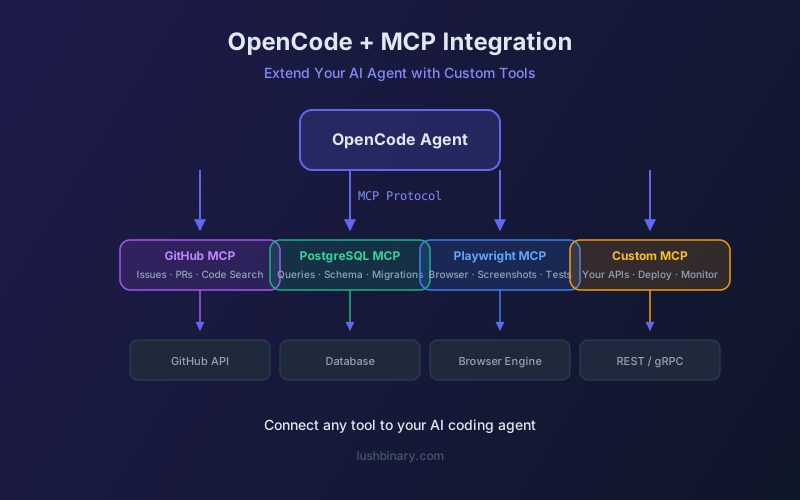
OpenCode's built-in tools cover file operations, shell commands, and web requests - but real-world development often needs more. Database queries, GitHub issue management, Jira tickets, Slack notifications, and custom API calls are all part of a developer's daily workflow. That's where Model Context Protocol (MCP) comes in.
MCP lets you plug external tools into OpenCode so the AI can call them just like built-in tools. Once configured, you can ask OpenCode to "check the latest GitHub issues" or "query the production database" and it will use the appropriate MCP server automatically.
This guide covers local and remote MCP server setup, popular server configurations, context management strategies, and how to build your own MCP tools for OpenCode.
📑 What This Guide Covers
- How MCP Works in OpenCode
- Configuring Local MCP Servers
- Configuring Remote MCP Servers
- Popular MCP Servers for Developers
- Context Budget Management
- Building a Custom MCP Server
- MCP Security Best Practices
- Debugging MCP Connections
- Real-World MCP Workflows
- Lushbinary MCP Integration Services
1How MCP Works in OpenCode
MCP is a standardized protocol that lets AI models access external tools and data sources. In OpenCode, MCP servers are defined in your opencode.json configuration. When OpenCode starts, it connects to each configured MCP server and registers the available tools. The AI can then call these tools alongside built-in ones.
2Configuring Local MCP Servers
Local MCP servers run as child processes on your machine. OpenCode starts them automatically and communicates via stdio. Add them to the mcp section of opencode.json:
{
  "mcp": {
    "filesystem": {
      "type": "local",
      "command": ["npx", "@modelcontextprotocol/server-filesystem"],
      "args": ["/path/to/allowed/directory"]
    },
    "github": {
      "type": "local",
      "command": ["npx", "@modelcontextprotocol/server-github"],
      "env": {
        "GITHUB_TOKEN": "env:GITHUB_TOKEN"
      }
    }
  }
}
The command array specifies the executable and its arguments. Use env to pass environment variables securely - the env: prefix reads from your shell environment.
3Configuring Remote MCP Servers
Remote MCP servers run on a separate machine and communicate over HTTP/SSE. This is useful for shared team tools or cloud-hosted services:
{
  "mcp": {
    "company-tools": {
      "type": "remote",
      "url": "https://mcp.yourcompany.com/sse",
      "headers": {
        "Authorization": "Bearer env:MCP_API_KEY"
      }
    }
  }
}4Popular MCP Servers for Developers
| Server | Tools Provided | Context Cost |
|---|---|---|
| GitHub | Search code, manage issues/PRs, read repos | High (~5K tokens) |
| PostgreSQL | Query databases, describe schemas | Medium (~2K tokens) |
| Filesystem | Read/write files outside project | Low (~500 tokens) |
| Playwright | Browser automation, screenshots | Medium (~3K tokens) |
| Slack | Send messages, read channels | Low (~1K tokens) |
| Sentry | Query errors, manage issues | Medium (~2K tokens) |
5Context Budget Management
⚠️ Critical: MCP Servers Consume Context
Every MCP server adds tool definitions to your context window. The GitHub MCP server alone adds ~5,000 tokens. With 4-5 servers, you can easily consume 15-20K tokens before the conversation even starts. Be selective about which servers you enable.
Best practices for managing MCP context:
- Enable only the MCP servers you need for the current task
- Use project-level config to scope servers to specific repos
- Prefer servers with fewer, focused tools over Swiss-army-knife servers
- Monitor token usage - OpenCode shows context consumption in the TUI
- Consider building custom MCP servers with only the tools you need
6Building a Custom MCP Server
Building a custom MCP server for OpenCode is straightforward with the official SDK. Here's a minimal TypeScript example:
import { McpServer } from "@modelcontextprotocol/sdk/server/mcp.js";
import { StdioServerTransport } from
  "@modelcontextprotocol/sdk/server/stdio.js";
import { z } from "zod";

const server = new McpServer({
  name: "my-project-tools",
  version: "1.0.0",
});

server.tool(
  "check_deploy_status",
  { environment: z.enum(["staging", "production"]) },
  async ({ environment }) => {
    // Your deployment status logic here
    return {
      content: [{
        type: "text",
        text: `Deployment to ${environment}: healthy`,
      }],
    };
  }
);

const transport = new StdioServerTransport();
await server.connect(transport);
Register it in opencode.json and OpenCode will automatically discover and expose the check_deploy_status tool to the AI.
7MCP Security Best Practices
- Never hardcode API keys - always use
env:prefix - Scope MCP server permissions to the minimum required access
- Use read-only database credentials for query-only MCP servers
- Audit MCP server source code before adding third-party servers
- Use network isolation for production database MCP servers
- Rotate API keys regularly and use short-lived tokens where possible
8Debugging MCP Connections
When an MCP server isn't working, check these common issues:
- Server not starting: Run the command manually in your terminal to check for errors
- Tools not appearing: Check that the server implements the
tools/listmethod correctly - Environment variables: Verify that referenced env vars are set in your shell
- Permission errors: Ensure the MCP server has access to the resources it needs
9Real-World MCP Workflows
Here are practical MCP workflows we use at Lushbinary:
Bug Triage
Sentry MCP pulls error details → GitHub MCP creates an issue → OpenCode writes the fix → GitHub MCP opens a PR.
Database Migrations
PostgreSQL MCP describes the current schema → OpenCode generates migration SQL → Bash tool runs the migration.
Code Review
GitHub MCP fetches PR diff → OpenCode analyzes changes → Slack MCP posts review comments to the team channel.
Deploy Verification
Custom MCP checks deploy status → Playwright MCP runs smoke tests → Slack MCP notifies the team.
10Lushbinary MCP Integration Services
At Lushbinary, we build custom MCP servers that connect AI coding agents to your specific infrastructure - internal APIs, proprietary databases, CI/CD pipelines, and monitoring systems. We also help teams design MCP architectures that balance capability with context efficiency.
🚀 Free Consultation
Need custom MCP servers for your AI coding workflow? Lushbinary builds production-grade MCP integrations for OpenCode, Claude Code, and custom agents. We'll scope your integration needs and deliver working tools — no obligation.
❓ Frequently Asked Questions
How many MCP servers can I use with OpenCode?
There's no hard limit, but each server consumes context tokens. In practice, 3-5 focused servers work well. Beyond that, context pressure reduces the AI's effectiveness.
Can I use the same MCP servers with Claude Code?
Yes. MCP is a standard protocol. Most servers work with both OpenCode and Claude Code with minimal configuration changes.
Do MCP servers slow down OpenCode?
Server startup adds 1-3 seconds on first use. After that, tool calls are fast - typically under 500ms for local servers. Remote servers depend on network latency.
Can MCP servers modify my code?
MCP servers provide tools that the AI can call. The AI decides when to use them. You can configure OpenCode to require confirmation before executing MCP tool calls.
📚 Sources
Content was rephrased for compliance with licensing restrictions. Configuration examples sourced from official OpenCode documentation as of April 2026. APIs may change - always verify on the official site.
Need Custom MCP Integrations?
Lushbinary builds production-grade MCP servers for AI coding agents. Connect your tools, databases, and APIs to OpenCode.
Ready to Build Something Great?
Get a free 30-minute strategy call. We'll map out your project, timeline, and tech stack - no strings attached.
Prefer email? Reach us directly: