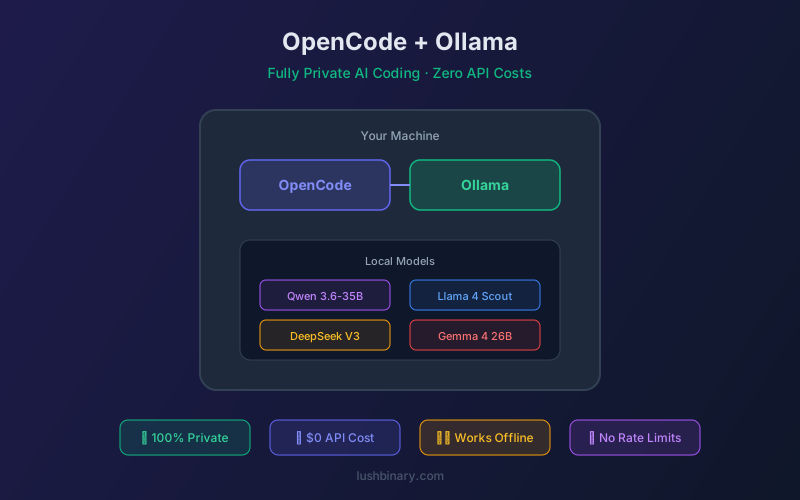
Every line of code you send to a cloud AI provider leaves your machine. For many developers - especially those working on proprietary software, regulated industries, or air-gapped environments - that's a non-starter. OpenCode + Ollama solves this: a fully private AI coding agent that runs entirely on your hardware with zero API costs and zero data leaks.
With models like Qwen 3.6-35B-A3B (73.4% SWE-bench with only 3B active parameters), local AI coding has reached a quality threshold where it's genuinely useful for production work - not just a novelty.
This guide covers model selection, hardware requirements, configuration, performance tuning, and hybrid local/cloud setups for the best of both worlds.
📑 What This Guide Covers
- Why Run AI Coding Locally?
- Installing Ollama
- Best Models for Coding (April 2026)
- Hardware Requirements
- Connecting OpenCode to Ollama
- Performance Tuning
- Hybrid Local + Cloud Setup
- Air-Gapped & Enterprise Deployment
- Limitations & When to Use Cloud
- Lushbinary Private AI Services
1Why Run AI Coding Locally?
🔒 Total Privacy
Code never leaves your machine. No third-party data processing.
💰 Zero API Costs
No per-token charges. Run unlimited requests on your hardware.
🚫 No Rate Limits
Process as many requests as your GPU can handle. No throttling.
✈️ Offline Capable
Works without internet. Perfect for travel, air-gapped environments.
⚡ Low Latency
No network round-trip. Responses start in milliseconds.
🏢 Compliance Ready
Meet SOC 2, HIPAA, and GDPR requirements without data processing agreements.
2Installing Ollama
Ollama is the easiest way to run LLMs locally. It handles model downloading, quantization, and serving behind an OpenAI-compatible API:
# macOS / Linux
curl -fsSL https://ollama.com/install.sh | sh
# Verify installation
ollama --version
# Pull a coding model
ollama pull qwen3.6:35b-a3b
Ollama runs a local server on http://localhost:11434 that exposes an OpenAI-compatible API. OpenCode connects to this endpoint directly.
3Best Models for Coding (April 2026)
| Model | Size | SWE-bench | Min VRAM |
|---|---|---|---|
| Qwen 3.6-35B-A3B | 35B (3B active) | 73.4% | ~24 GB |
| DeepSeek Coder V3 | 236B MoE | ~70% | ~48 GB |
| Llama 4 Scout | 109B MoE | ~65% | ~32 GB |
| Gemma 4 26B | 26B MoE | ~60% | ~16 GB |
| Qwen 3.6-8B | 8B | ~45% | ~8 GB |
💡 Our Pick: Qwen 3.6-35B-A3B
Qwen 3.6-35B-A3B offers the best quality-to-resource ratio for local coding. With only 3B active parameters (MoE architecture), it runs on a 24 GB GPU while scoring 73.4% on SWE-bench Verified - competitive with cloud models costing $3-15/M tokens.
4Hardware Requirements
| Setup | Hardware | Best Model | Speed |
|---|---|---|---|
| Budget | M1/M2 Mac (16 GB) | Qwen 3.6-8B | ~15 tok/s |
| Mid-range | M3 Pro/Max (36 GB) | Qwen 3.6-35B-A3B | ~25 tok/s |
| High-end | RTX 4090 (24 GB) | Qwen 3.6-35B-A3B | ~40 tok/s |
| Workstation | 2x RTX 4090 (48 GB) | DeepSeek Coder V3 | ~30 tok/s |
5Connecting OpenCode to Ollama
Add Ollama as a provider in your opencode.json:
{
  "$schema": "https://opencode.ai/config.json",
  "provider": {
    "ollama": {
      "api_url": "http://localhost:11434/v1"
    }
  },
  "model": {
    "default": "ollama/qwen3.6:35b-a3b",
    "fast": "ollama/qwen3.6:8b"
  }
}
Start Ollama, then launch OpenCode:
# Start Ollama (if not running as service)
ollama serve
# Launch OpenCode
opencode
6Performance Tuning
Get the most out of local models with these optimizations:
- Context window: Set
num_ctxto match your available VRAM. Larger context = more memory. Start with 8192 and increase if needed. - GPU layers: Ensure all layers are offloaded to GPU with
num_gpu: -1(auto). CPU inference is 10-50x slower. - Quantization: Use Q4_K_M for the best quality/speed balance. Q8_0 for maximum quality if VRAM allows.
- Keep alive: Set
keep_alive: "30m"to keep the model loaded between requests, avoiding reload delays. - Batch size: Increase
num_batchto 512 or 1024 for faster prompt processing on high-VRAM systems.
# Create a Modelfile for optimized settings
FROM qwen3.6:35b-a3b
PARAMETER num_ctx 16384
PARAMETER num_batch 1024
PARAMETER temperature 0.1
PARAMETER top_p 0.9
7Hybrid Local + Cloud Setup
The most practical approach combines local and cloud models. Use local models for routine tasks and cloud models for complex reasoning:
{
  "provider": {
    "ollama": {
      "api_url": "http://localhost:11434/v1"
    },
    "anthropic": {
      "api_key": "env:ANTHROPIC_API_KEY"
    }
  },
  "model": {
    "default": "ollama/qwen3.6:35b-a3b",
    "fast": "ollama/qwen3.6:8b",
    "reasoning": "anthropic/claude-opus-4"
  }
}
Use /model in the TUI to switch between local and cloud models on the fly. Routine file edits and simple questions go to Ollama (free). Complex architecture decisions and multi-file refactors go to Claude (paid but worth it).
8Air-Gapped & Enterprise Deployment
For fully air-gapped environments:
- Pre-download models on a connected machine, then transfer via USB/network share
- Install OpenCode and Ollama from local binaries (no internet required at runtime)
- Use
AGENTS.mdto enforce coding standards without cloud connectivity - Deploy Ollama on a shared GPU server for team-wide access
- All session logs stay on your infrastructure - full audit trail
9Limitations & When to Use Cloud
Local models have real limitations:
- Complex reasoning: Claude Opus 4.7 and GPT-5.4 still outperform local models on multi-step reasoning and large refactors
- Context window: Local models typically max out at 32K-128K tokens vs 200K+ for cloud models
- Speed on large prompts: Processing a 50K-token codebase is slow on consumer hardware
- Hardware cost: A capable GPU (RTX 4090) costs $1,500-2,000 upfront
10Lushbinary Private AI Services
Lushbinary helps teams deploy private AI coding infrastructure - from single-developer Ollama setups to team-wide GPU servers with model routing and access controls. We also build custom AI tools that work entirely within your network.
🚀 Free Consultation
Need a private AI coding setup for your team? Lushbinary deploys self-hosted AI infrastructure with OpenCode, Ollama, and custom model routing. We'll assess your hardware, recommend models, and set up the full stack — no obligation.
❓ Frequently Asked Questions
Can local models really replace cloud AI for coding?
For 70-80% of daily coding tasks (file edits, bug fixes, simple features), yes. Qwen 3.6-35B-A3B scores 73.4% on SWE-bench. For complex multi-file refactors, cloud models still have an edge.
What's the minimum hardware for useful local AI coding?
An M1 Mac with 16 GB RAM can run Qwen 3.6-8B at ~15 tokens/second. For the best experience, an M3 Pro/Max with 36+ GB or an RTX 4090 is recommended.
How much does a local AI coding setup cost?
Software cost: $0 (OpenCode + Ollama are free). Hardware: $0 if you already have a capable Mac or GPU. A dedicated RTX 4090 setup costs ~$1,500-2,000 but pays for itself in 3-6 months of saved API costs.
Can I use Ollama and cloud models together in OpenCode?
Yes. OpenCode's model routing lets you define local and cloud providers simultaneously. Switch between them with /model in the TUI or set different defaults for different task types.
📚 Sources
Content was rephrased for compliance with licensing restrictions. Benchmark data sourced from official model documentation as of April 2026. Performance varies by hardware - always benchmark on your own system.
Deploy Private AI Coding Infrastructure
Lushbinary sets up self-hosted AI coding environments with OpenCode, Ollama, and custom model routing for your team.
Ready to Build Something Great?
Get a free 30-minute strategy call. We'll map out your project, timeline, and tech stack - no strings attached.
Prefer email? Reach us directly: