

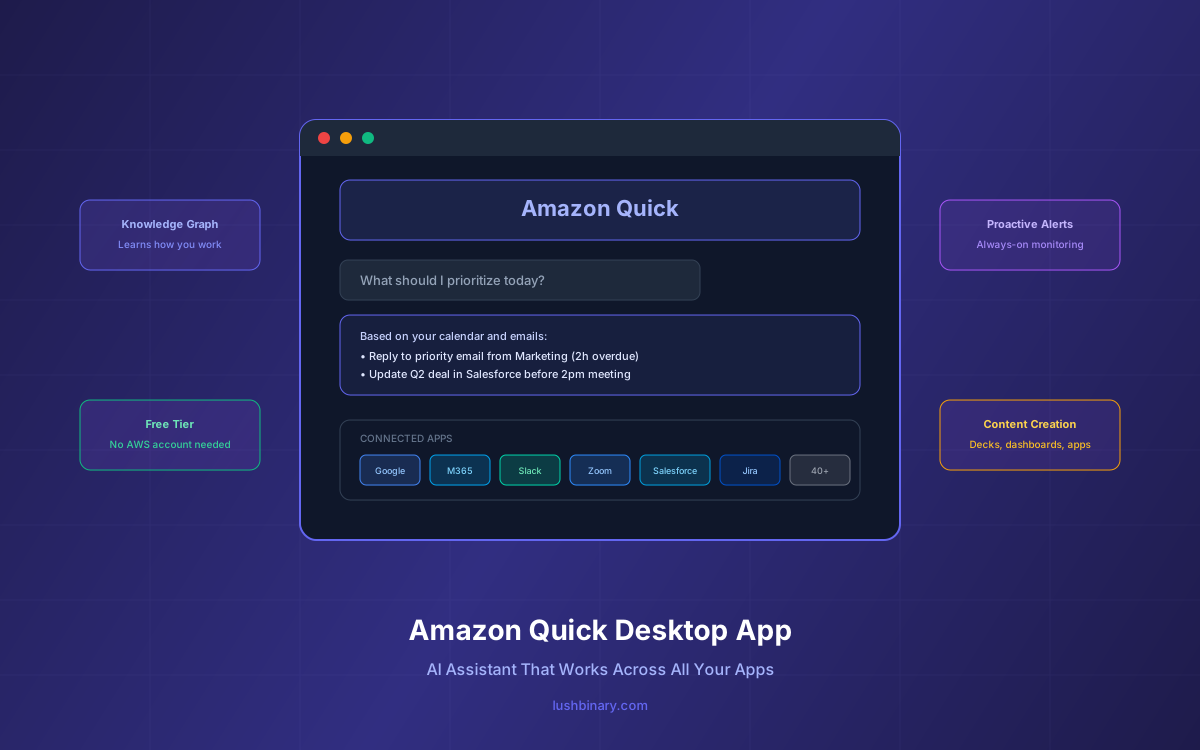
Amazon just launched a desktop app for Amazon Quick, and it's not just another chatbot window. It's a native AI assistant that lives on your machine, connects to your local files, monitors your calendar and email in the background, and proactively surfaces what you need before you ask. Think of it as the AI work companion that Microsoft Copilot and Google Gemini promised—but one that actually works across ecosystems instead of locking you into a single vendor.
The problem Quick is solving is real: your work context is scattered across dozens of apps—Slack threads, Jira tickets, Google Docs, Salesforce records, email chains. Most AI assistants only work within their own ecosystem. Quick breaks through those walled gardens by integrating with 40+ apps across Google Workspace, Microsoft 365, Zoom, Salesforce, and more, all from a single desktop interface that learns how you work over time.
In this guide, we'll cover everything developers and teams need to know: what the desktop app actually does, how the personal knowledge graph works, the full integration list, pricing breakdown (including the new Free tier), how it compares to Copilot and Gemini, and how to get started building with it today.
What's in This Guide
- What Is Amazon Quick Desktop App?
- Key Features: Proactive AI, Knowledge Graph & Content Creation
- Full Integration List: 40+ Connectors
- Pricing Breakdown: Free, Plus, Professional & Enterprise
- Amazon Quick vs Microsoft Copilot vs Google Gemini
- Architecture & How the Desktop App Works
- Enterprise Security & Governance
- Getting Started: Setup in Under 5 Minutes
- Real-World Use Cases & Customer Results
- Why Lushbinary for Amazon Quick Integration
1What Is Amazon Quick Desktop App?
Amazon Quick is an agentic AI-powered workspace that evolved from Amazon QuickSight (rebranded in October 2025). The desktop app, launched on April 28, 2026, takes Quick from a web-based experience to a native application that runs directly on your computer. It's available for macOS and Windows, with no AWS account required to get started.
Unlike browser-based AI tools that only activate when you open a tab, the Quick desktop app runs continuously in the background. It connects to your local files, monitors your calendar and email, and builds a persistent understanding of your work context. The more you use it, the smarter it gets—remembering your preferences, team contacts, project context, and communication style.
Key Distinction
Amazon Quick is not the same as Amazon Q Developer (the coding assistant) or Amazon Q Business (the enterprise knowledge bot). Quick is the consumer/prosumer AI assistant for everyday work—think email, presentations, dashboards, and cross-app automation. It sits alongside Q Developer and Q Business in Amazon's AI product family.
The desktop app also connects to developer tools like Kiro CLI and Claude Code, and can automate browser-based workflows. You can ask Quick to pull information from an internal tool in the browser, analyze it with a local Python script, and paste results into a document—all in a single request.
2Key Features: Proactive AI, Knowledge Graph & Content Creation
Personal Knowledge Graph
Quick builds a personal knowledge graph from your desktop interactions. It indexes your documents, learns your communication patterns, and maps your professional network. This isn't just keyword search—it understands relationships between people, projects, and priorities. Ask "What am I missing today?" or "What should I prioritize?" and it responds with context-aware answers grounded in your actual work data.
Proactive, Always-On Assistance
Most AI tools are reactive—you prompt, they respond. Quick flips this model. It continuously monitors your connected apps and surfaces what needs attention:
- Reminds you about priority emails that still need a reply
- Alerts you to deals that need updating in Salesforce
- Surfaces relevant Slack threads and docs before your next meeting
- Catches double-bookings and urgent deadlines before they become problems
- Suggests action items based on recent conversations
Content Creation & Artifact Generation
Available today, Quick can generate polished deliverables directly from the chat interface:
Presentations
PowerPoint decks customized for specific audiences, pulling from internal data and context
Dashboards
Live, intelligent dashboards connected to real business data that update automatically
Documents
Reports, briefs, and memos drafted with your brand voice and team context
Images & Infographics
Visual assets generated on the fly without design skills
Custom Apps
Intelligent web apps and pages built with natural language, deployed to teammates
Data Analysis
Complex queries across multiple data sources with visualizations
Shared Spaces for Teams
Quick provides shared Spaces where dashboards, agents, automations, and knowledge compound across team members. One person's insight becomes the whole team's advantage. This is particularly powerful for sales teams sharing customer intelligence, marketing teams collaborating on campaign data, and ops teams monitoring shared KPIs.
3Full Integration List: 40+ Connectors
As of April 2026, Amazon Quick supports 13 new built-in action connectors with managed authentication, bringing the total to over 40 integrations. All connectors support secure sign-in so Quick handles the OAuth flow on your behalf.
| Category | Integrations |
|---|---|
| Google Workspace | Gmail, Google Sheets, Docs, Calendar, Drive, Slides, Meet, Analytics |
| Microsoft 365 | Outlook, Word, PowerPoint, Excel, Teams (extensions in preview) |
| Communication | Slack, Zoom, Microsoft Teams |
| CRM & Sales | Salesforce, HubSpot |
| Project Management | Jira, Airtable, Linear, Monday.com, Notion |
| Developer Tools | GitHub, Kiro CLI, Claude Code |
| Storage & Files | Dropbox, Box, Google Drive, local files |
| Finance & Support | QuickBooks, Intercom, ServiceNow |
| Design & Content | Canva, Hugging Face |
Each connector supports managed authentication—Quick handles the secure account authorization flow so you connect in a few clicks without manual credential setup. Third-party AI agents are also supported, allowing you to bring specialized agents into your Quick workspace.
4Pricing Breakdown: Free, Plus, Professional & Enterprise
Amazon Quick now offers four pricing tiers. The Free and Plus plans launched April 28, 2026, and require no AWS account—just an email address or existing Google, Apple, GitHub, or Amazon credentials.
| Plan | Price | Key Features |
|---|---|---|
| Free | $0 | Basic chat, limited integrations, no AWS account needed |
| Plus | TBD | Enhanced features for individual power users |
| Professional | $20/user/mo | Chat agents, Spaces, Quick Sight, Quick Research, Quick Flows, 4 hrs agent time |
| Enterprise | $40/user/mo | All Professional features + Quick Automate authoring, Quick Sight dashboards, 8 hrs agent time |
Agent hours are metered per second and cover desktop app activity, custom AI-powered app usage, Quick Research, Quick Flows, and Quick Automate. Professional subscribers get 2 hours for agentic capabilities + 2 hours for Research (4 total). Enterprise subscribers get 4 + 4 (8 total). Additional hours cost $3/hour for agentic capabilities and $6/hour for Quick Research.
There's also a flat $250/month infrastructure fee per account for Professional and Enterprise plans, covering the underlying AI infrastructure. A 30-day free trial waives this fee and subscription costs for up to 25 users.
💡 Cost Optimization Tip
Users who exceed their agent hour entitlement can consume into their research hour entitlement (and vice versa), allowing flexible sharing between the two pools. This means you won't hit a hard wall if you use more automation than research in a given month.
5Amazon Quick vs Microsoft Copilot vs Google Gemini
| Feature | Amazon Quick | Microsoft Copilot | Google Gemini |
|---|---|---|---|
| Price | Free – $40/user/mo | $30/user/mo (requires M365) | $30/user/mo (Workspace add-on) |
| Ecosystem Lock-in | Cross-ecosystem (Google + Microsoft + others) | Microsoft 365 only | Google Workspace only |
| Desktop App | Native (macOS, Windows) | Embedded in Office apps | Browser-based |
| Proactive Alerts | Yes (always-on background monitoring) | Limited (within Office context) | Limited (within Workspace) |
| Knowledge Graph | Personal + team (learns over time) | Microsoft Graph | Google Knowledge Graph |
| Free Tier | Yes (no AWS account needed) | No (requires M365 subscription) | Bundled with some Workspace plans |
| BI & Dashboards | Built-in (Quick Sight) | Separate (Power BI) | Separate (Looker) |
The biggest differentiator is Quick's cross-ecosystem approach. If your organization uses a mix of Google and Microsoft tools (which most do), Copilot and Gemini each only cover half your workflow. Quick connects to both, plus Salesforce, Jira, Slack, and dozens more—all from one interface.
The pricing advantage is also significant. At $20/user/month for Professional (vs $30 for Copilot or Gemini Enterprise), Quick undercuts both competitors while offering broader integration coverage. The Free tier with no AWS account requirement also lowers the barrier to entry dramatically.
6Architecture & How the Desktop App Works
The Quick desktop app architecture is designed around three core principles: persistent context, cross-app orchestration, and privacy-first personalization.
The desktop layer handles local file indexing, calendar monitoring, and the proactive alert system. The cloud services layer provides the heavy compute for research, automation, and BI. The integration layer connects to third-party apps via managed OAuth connectors. All data flows are encrypted, and your personal knowledge graph remains private—Quick never uses your data to train models for other users.
Agent hours are metered per second across the cloud services layer. The desktop app itself runs locally and doesn't consume agent hours for basic monitoring and alerting—only active AI tasks (research, automation, app generation) count against your allocation.
7Enterprise Security & Governance
Quick is built on AWS infrastructure, which means enterprise customers get the same security, compliance, and governance they already trust. Key security features include:
- Data privacy: Your personal knowledge graph is private. Quick never uses your data to train models for other users or organizations.
- Enterprise governance: Multi-tiered permission management spanning account, role, and user levels for precise access controls.
- Custom permissions: Admins can restrict which features, integrations, and data sources are available to specific user groups.
- AWS IAM integration: Professional and Enterprise plans integrate with existing AWS Identity and Access Management for SSO and role-based access.
- Managed authentication: All third-party connectors use managed OAuth flows—no manual credential storage or sharing.
- Compliance: Built on AWS with SOC 2, ISO 27001, and GDPR compliance inherited from the underlying infrastructure.
Security-conscious organizations like New York Life (the largest mutual life insurer in the US) and financial services firms are already adopting Quick, citing its enterprise-grade security posture as a key differentiator over consumer AI tools.
8Getting Started: Setup in Under 5 Minutes
Getting started with Amazon Quick is straightforward. Here's the process:
- Sign up at quick.aws.com — Use your email, Google, Apple, GitHub, or Amazon credentials. No AWS account required.
- Download the desktop app — Available for macOS and Windows from the Quick download page.
- Connect your apps — A guided onboarding walks you through connecting your email, calendar, and key tools. Each connector uses managed OAuth (a few clicks, no manual credentials).
- Choose your role — Quick offers role-specific workflows for sales, marketing, finance, operations, and engineering to personalize the experience from day one.
- Let it learn — Quick starts building your personal knowledge graph immediately. The more you use it, the more personalized and proactive it becomes.
For Enterprise Teams
If you need enterprise governance, SSO, and admin controls, provision Quick through the AWS Management Console instead. This gives you access to Professional and Enterprise plans with custom permissions, usage monitoring, and centralized billing. A 30-day free trial covers up to 25 users with no infrastructure fee.
9Real-World Use Cases & Customer Results
Major enterprises are already seeing measurable results with Amazon Quick:
Amazon Books
80% reduction in time spent developing coordination documents
Amazon Engineering
67% reduction in factory test times
3M Sales
5+ hours saved per rep per week gathering information for customer meetings
New York Life
Single conversational agent replaces multiple reports and analyst wait times for institutional life insurance workflows
Other adopters include 3M, GoDaddy, AstraZeneca, BMW, Kitsa, Mondelez International, NFL, Southwest Airlines, and DXC Technology (which deployed Quick across 115,000 employees). Mondelez reported teams "completing tasks in minutes instead of hours" after deployment.
Common use cases across these organizations include:
- Sales: Prioritizing leads, generating personalized outreach, drafting customer win notes with full stakeholder context
- Marketing: Campaign performance analysis, content creation, competitive intelligence gathering
- Finance: Automated reconciliation, compliance reporting, premium processing workflows
- Operations: Real-time dashboard monitoring, incident ticket generation, pipeline health tracking
- Engineering: Pull request summaries, deployment status monitoring, documentation generation
10Why Lushbinary for Amazon Quick Integration
Amazon Quick is powerful out of the box, but enterprises get the most value when it's deeply integrated with their existing systems, custom data sources, and specific workflows. That's where Lushbinary comes in.
We specialize in AWS-native AI integration and can help your team:
- Design and deploy custom Quick automations tailored to your business processes
- Build intelligent dashboards and apps within Quick connected to your proprietary data
- Configure enterprise governance, custom permissions, and SSO integration
- Develop custom connectors for internal tools not covered by built-in integrations
- Optimize agent hour usage and implement cost-effective multi-tier strategies
- Train teams on Quick best practices and role-specific workflows
🚀 Free Consultation
Want to deploy Amazon Quick across your organization with custom integrations and governance? Lushbinary specializes in AWS AI workspace deployments. We'll assess your current tool landscape, recommend the right Quick tier, and build a rollout plan—no obligation.
❓ Frequently Asked Questions
What is Amazon Quick desktop app?
Amazon Quick desktop app is a native AI assistant that lives on your computer, connects to your local files, calendar, email, and 40+ third-party apps like Google Workspace, Microsoft 365, Zoom, and Salesforce. It builds a personal knowledge graph and proactively surfaces information before you ask.
How much does Amazon Quick cost?
Amazon Quick offers a Free tier (sign up with email, no AWS account needed), a Plus tier for individual power users, a Professional tier at $20/user/month with 4 hours of agent time, and an Enterprise tier at $40/user/month with 8 hours of agent time plus advanced BI and automation capabilities.
How does Amazon Quick compare to Microsoft Copilot?
Amazon Quick starts at $20/user/month (Professional) vs Microsoft Copilot at $30/user/month. Quick differentiates with cross-ecosystem integration (Google Workspace + Microsoft 365 + Salesforce), a proactive always-on desktop presence, personal knowledge graph, and no vendor lock-in to a single productivity suite.
What apps does Amazon Quick integrate with?
Amazon Quick integrates with 40+ apps including Gmail, Google Sheets, Google Docs, Google Calendar, Google Drive, Zoom, Microsoft 365, Microsoft Teams, Salesforce, Slack, Jira, Airtable, Dropbox, QuickBooks, GitHub, Notion, Canva, HubSpot, Linear, and more.
Do I need an AWS account to use Amazon Quick?
No. Starting April 2026, you can sign up for Amazon Quick using your personal email or existing Google, Apple, GitHub, or Amazon credentials. No AWS account is required for the Free and Plus plans.
Sources
- About Amazon: AWS launches Amazon Quick desktop AI assistant
- AWS: Amazon Quick Free and Plus pricing plans
- AWS: Amazon Quick expands integrations (13 new connectors)
- AWS: Amazon Quick Pricing
- SiliconANGLE: Amazon revamps Quick as a proactive desktop app
Content was rephrased for compliance with licensing restrictions. Pricing and feature data sourced from official AWS announcements as of April 29, 2026. Pricing may change—always verify on the official pricing page.
Deploy Amazon Quick for Your Enterprise
Get custom integrations, governance setup, and team training for Amazon Quick. We'll help you maximize ROI from day one.
Ready to Build Something Great?
Get a free 30-minute strategy call. We'll map out your project, timeline, and tech stack - no strings attached.
Prefer email? Reach us directly:


