

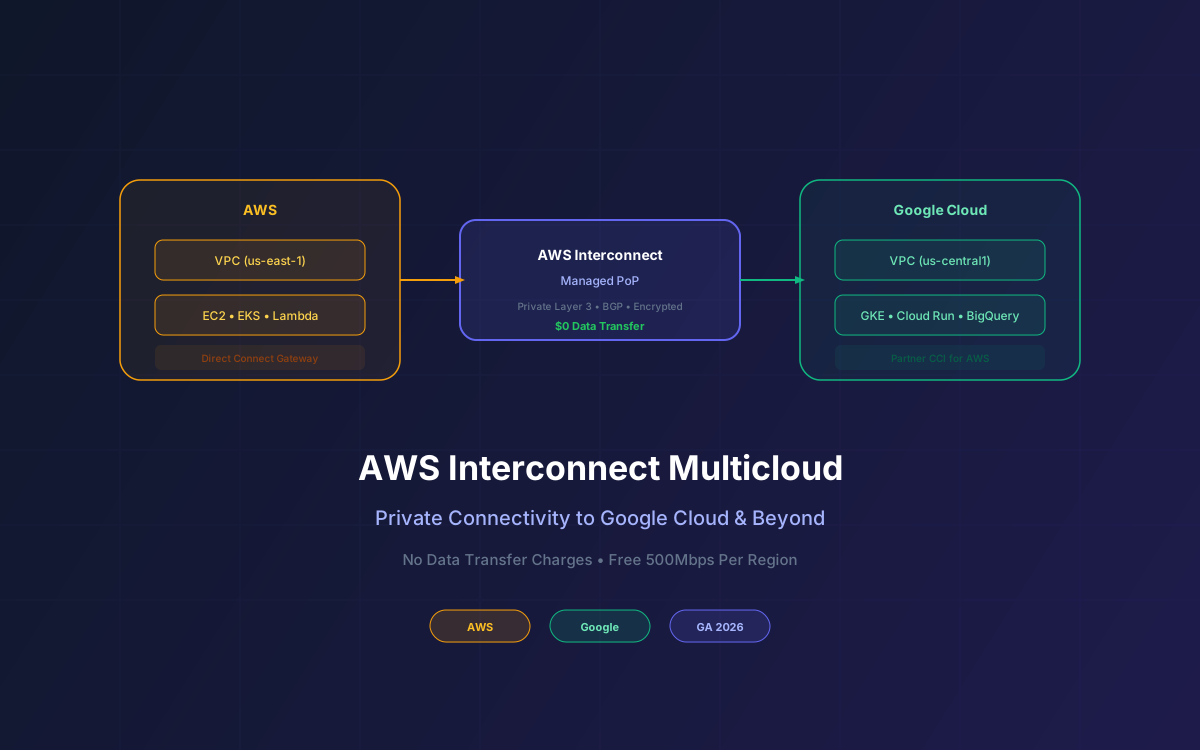
For years, connecting AWS to another cloud provider meant VPN tunnels, colocation facilities, or third-party network services. On April 14, 2026, AWS made multicloud networking a first-class product with the general availability of AWS Interconnect - multicloud: managed private Layer 3 connectivity between your AWS VPCs and other cloud providers, starting with Google Cloud.
The pricing model is what makes this interesting: you pay only for bandwidth capacity (time-based), with no per-GB data transfer charges. Plus, every region gets one free 500Mbps interconnect starting May 2026. For teams running workloads across AWS and Google Cloud, this removes the biggest financial barrier to multicloud architecture.
This guide covers the architecture, pricing, setup process, use cases, and how Interconnect compares to Direct Connect, VPN, and third-party solutions.
📋 What This Guide Covers
- What AWS Interconnect Multicloud Is
- Architecture & How It Works
- Pricing: No Data Transfer Charges
- Free Tier: 500Mbps Per Region
- Supported Cloud Providers
- Setup & Configuration
- Use Cases & Architecture Patterns
- Interconnect vs Direct Connect vs VPN
- AWS Interconnect - Last Mile
- Security & Compliance
- Why Lushbinary for Multicloud Architecture
1What AWS Interconnect Multicloud Is
AWS Interconnect - multicloud is a managed connectivity service that establishes private, high-speed network connections between your Amazon VPC and VPCs on other cloud providers. Key characteristics:
- Managed Layer 3 - AWS handles BGP peering, route propagation, and failover. No manual router configuration.
- Pre-provisioned capacity - Connections run through AWS-managed Points of Presence (PoPs) with dedicated bandwidth.
- No colocation required - Unlike traditional cross-cloud setups, you don't need physical presence in a data center.
- Private traffic - Data never traverses the public internet. Encrypted in transit by default.
🎤 AWS re:Invent 2025 Context
AWS Interconnect - multicloud was first announced at re:Invent 2025 in preview. The April 14, 2026 GA launch adds Google Cloud as the first production partner, introduces the free 500Mbps tier, and confirms Azure and OCI support for later in 2026.
2Architecture & How It Works
The service operates through AWS-managed interconnect Points of Presence that sit between cloud providers:
Traffic flows from your AWS VPC through a Direct Connect Gateway to the AWS-managed PoP, then across to the partner cloud's interconnect endpoint. On the Google Cloud side, this maps to Partner Cross-Cloud Interconnect (CCI). The entire path is private and encrypted.
3Pricing: No Data Transfer Charges
This is the headline feature. AWS Interconnect - multicloud charges only for bandwidth capacity on a time basis. There are no per-GB data transfer fees. This is a fundamental shift from standard cross-cloud pricing where egress costs can dominate your bill.
| Approach | Data Transfer Cost | Bandwidth Model |
|---|---|---|
| AWS Interconnect | $0 per GB | Time-based bandwidth fee |
| Standard AWS egress | $0.09/GB (first 10TB) | Per-GB |
| VPN over internet | $0.09/GB + VPN hourly | Per-GB + hourly |
| Third-party (Megaport, etc.) | Varies ($0.02-0.05/GB) | Port + per-GB |
For a team transferring 10TB/month between AWS and Google Cloud, standard egress would cost ~$900/month. With Interconnect, you pay only the bandwidth capacity fee regardless of how much data you move. The more data-intensive your cross-cloud workload, the bigger the savings.
4Free Tier: 500Mbps Per Region
Starting May 2026, every AWS Region gets one free local 500Mbps interconnect. This is enough for:
- Development and staging environments that need cross-cloud access
- Low-traffic production workloads (API calls, metadata sync, auth flows)
- Disaster recovery replication for smaller datasets
- Testing multicloud architectures before committing to higher bandwidth
500Mbps sustained is roughly 162TB/month of theoretical throughput - more than enough for most non-streaming workloads.
5Supported Cloud Providers
| Provider | Status | Integration |
|---|---|---|
| Google Cloud | GA (April 14, 2026) | Partner Cross-Cloud Interconnect |
| Microsoft Azure | Coming later in 2026 | ExpressRoute (expected) |
| Oracle Cloud (OCI) | Coming later in 2026 | FastConnect (expected) |
The Google Cloud integration uses Google's Partner Cross-Cloud Interconnect for AWS, which means setup is coordinated from both the AWS and Google Cloud consoles. AWS handles the BGP configuration on their side; Google handles theirs.
6Setup & Configuration
Setting up AWS Interconnect - multicloud involves steps on both cloud providers. Here's the high-level flow for AWS-to-Google Cloud:
- AWS Console - Navigate to Direct Connect → Interconnect. Create a new multicloud interconnect, selecting the target region and bandwidth tier.
- Google Cloud Console - Create a Partner Cross-Cloud Interconnect for AWS. Select the matching region and bandwidth.
- Pairing - AWS generates a pairing key. Enter it in the Google Cloud console to establish the connection.
- BGP Configuration - AWS auto-configures BGP sessions. Verify route propagation in both VPC route tables.
- Testing - Ping between instances in both VPCs to confirm private connectivity.
The entire process takes 15-30 minutes for a basic setup. No physical hardware, no colocation contracts, no third-party vendors.
7Use Cases & Architecture Patterns
Common patterns we see teams adopting with AWS Interconnect:
Pattern 1: AI/ML Pipeline Split
Train models on Google Cloud TPUs, deploy inference on AWS (SageMaker or Bedrock). Interconnect moves model artifacts and training data between clouds without egress fees. Particularly relevant for teams using Google's Vertex AI for training but AWS for production serving.
Pattern 2: Best-of-Breed Services
Use BigQuery for analytics (Google Cloud) while running your application on AWS (ECS/EKS). Interconnect provides the private, low-latency link between your app servers and your analytics warehouse without routing through the public internet.
Pattern 3: Disaster Recovery
Replicate critical data from AWS to Google Cloud (or vice versa) for true multicloud DR. The zero data transfer cost makes continuous replication financially viable at any scale.
Pattern 4: Regulatory Compliance
Some regulations require data to be accessible from multiple independent infrastructure providers. Interconnect provides the private link without exposing data to the public internet, satisfying both availability and security requirements.
8Interconnect vs Direct Connect vs VPN
| Feature | Interconnect | Direct Connect | Site-to-Site VPN |
|---|---|---|---|
| Use case | Cloud-to-cloud | On-prem to AWS | Any-to-AWS (encrypted) |
| Data transfer cost | $0/GB | $0.02/GB (out) | $0.09/GB (out) |
| Setup time | 15-30 minutes | Days to weeks | Minutes |
| Physical hardware | None | Required (colo) | None |
| Bandwidth | 500Mbps - 100Gbps | 1Gbps - 100Gbps | ~1.25Gbps max |
| Private path | Yes | Yes | No (over internet) |
The key distinction: Interconnect is for cloud-to-cloud, Direct Connect is for on-prem-to-cloud. If you need both, they work together - your on-prem connects via Direct Connect to AWS, and AWS connects to Google Cloud via Interconnect.
9AWS Interconnect - Last Mile
Alongside the multicloud GA, AWS also launched Interconnect - last mile, a separate capability that simplifies how you establish high-speed private connections to AWS from your own facilities. It's essentially a streamlined onramp to Direct Connect without needing to manage colocation relationships yourself.
Last mile is relevant for hybrid architectures where you need both on-prem connectivity (last mile → Direct Connect) and cross-cloud connectivity (Interconnect multicloud). AWS manages the physical layer for both.
10Security & Compliance
- Private path - Traffic never touches the public internet
- Encryption - Data encrypted in transit between PoPs
- IAM integration - Control who can create and manage interconnects via IAM policies
- VPC isolation - Only specified VPCs can route traffic over the interconnect
- CloudTrail logging - All management actions logged for audit
- Compliance - Inherits AWS compliance certifications (SOC, ISO, HIPAA eligible)
For teams with strict data residency requirements, note that traffic routes through AWS-managed PoPs. Verify the PoP locations align with your compliance requirements before deployment.
11Why Lushbinary for Multicloud Architecture
At Lushbinary, we design and implement cost-optimized cloud architectures for teams that need to operate across multiple providers. We help with:
- Multicloud network design with AWS Interconnect, Direct Connect, and VPN
- Cross-cloud data replication and disaster recovery architecture
- Cost modeling to determine when Interconnect saves money vs alternatives
- Security and compliance review for multicloud data flows
- Migration planning from VPN or third-party solutions to native Interconnect
🚀 Free Consultation
Running workloads across AWS and Google Cloud? Lushbinary can design your multicloud networking architecture, estimate cost savings with Interconnect, and handle the implementation — no obligation.
❓ Frequently Asked Questions
What is AWS Interconnect multicloud?
A managed private connectivity service providing Layer 3 connections between AWS VPCs and other cloud providers. GA since April 14, 2026 with Google Cloud. Azure and OCI coming later in 2026.
How much does AWS Interconnect multicloud cost?
Only bandwidth capacity (time-based), with no per-GB data transfer fees. Each region gets one free 500Mbps interconnect starting May 2026. Significantly cheaper than standard cross-cloud egress.
Which cloud providers does AWS Interconnect support?
Google Cloud (GA April 2026), Microsoft Azure (coming later 2026), Oracle Cloud Infrastructure (coming later 2026). Uses pre-provisioned capacity at global Points of Presence.
What is the difference between AWS Interconnect and Direct Connect?
Direct Connect provides private connectivity from on-premises to AWS. Interconnect multicloud provides private connectivity between AWS and other cloud providers. They serve different use cases but can be used together.
Is there a free tier for AWS Interconnect?
Yes. Starting May 2026, each AWS Region gets one free local 500Mbps interconnect - enough for dev/test or low-traffic production workloads needing cross-cloud connectivity.
📺 Related re:Invent Sessions
- NET301: Multicloud Networking with AWS Interconnect- Architecture patterns and setup walkthrough
- NET401: Advanced Hybrid & Multicloud Connectivity on AWS- Direct Connect, Interconnect, and Transit Gateway integration
📚 Sources
- AWS Interconnect - Multicloud Product Page
- AWS Interconnect GA Announcement - April 14, 2026
- AWS Interconnect Overview - AWS
- Partner Cross-Cloud Interconnect for AWS - Google Cloud Docs
Content was rephrased for compliance with licensing restrictions. Pricing and availability details sourced from official AWS and Google Cloud documentation as of April 2026. Pricing may change - always verify on the vendor's website.
Need Multicloud Architecture Help?
Let Lushbinary design your cross-cloud networking with AWS Interconnect. Private connectivity, zero egress fees, and production-ready architecture.
Ready to Build Something Great?
Get a free 30-minute strategy call. We'll map out your project, timeline, and tech stack - no strings attached.
Prefer email? Reach us directly:


