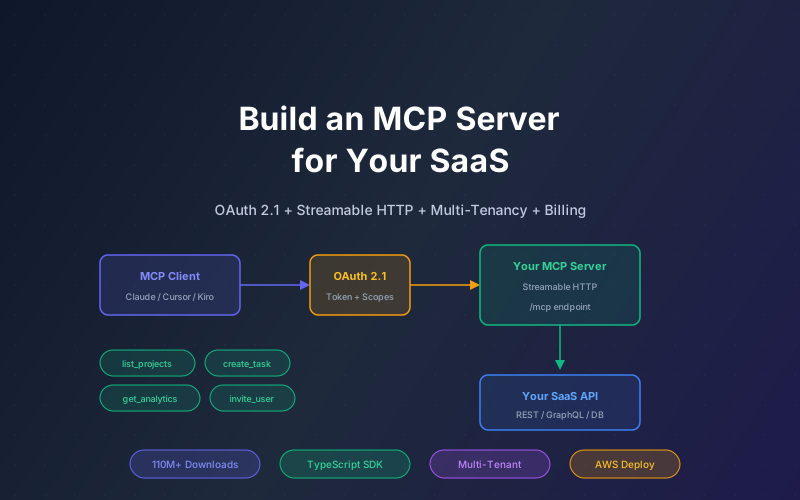

MCP (Model Context Protocol) crossed 110 million monthly downloads in early 2026. What started as Anthropic's open standard for connecting AI agents to external tools has become the connective tissue of the agentic automation ecosystem, with contributions from OpenAI, Google, Microsoft, and hundreds of enterprise vendors. If your SaaS product doesn't have an MCP server, your customers' AI agents can't interact with your product.
This guide covers how to build a production MCP server for your SaaS product with OAuth 2.1 authentication, multi-tenant isolation, billing integration, and deployment on AWS. We use the official TypeScript SDK with Streamable HTTP transport (the current recommended protocol) and cover the patterns that separate a demo from a production system.
For a broader introduction to MCP concepts, see our MCP Developer Guide and MCP Server Development Guide.
What This Guide Covers
- Why Your SaaS Needs an MCP Server in 2026
- Architecture: Remote MCP with Streamable HTTP
- OAuth 2.1 Authentication for Multi-Tenant SaaS
- Designing Your Tool Schema
- Implementation: TypeScript SDK + Express
- Multi-Tenancy and Data Isolation
- Billing and Usage Metering
- Deployment on AWS (ECS Fargate)
- Testing and Debugging MCP Servers
- Why Lushbinary for Your MCP Server Build
1Why Your SaaS Needs an MCP Server in 2026
The shift is simple: your customers are increasingly interacting with software through AI agents rather than directly through your UI. When a customer asks Claude "create a new project in [YourApp] and invite the team," that request needs to reach your API through a standardized protocol. Without MCP, every AI platform requires a custom integration.
The Business Case
- Distribution: MCP servers are discoverable by any MCP-compatible client (Claude, Cursor, Kiro, VS Code, custom agents). One server, many clients
- Retention: Customers whose AI workflows depend on your MCP server have higher switching costs
- Upsell: AI-driven usage often exceeds manual usage. Customers who connect via MCP tend to make more API calls, which drives usage-based revenue
- Competitive moat: Early MCP adopters (Sentry, Linear, Notion, Cal.com) are capturing the AI-native workflow market before competitors
Market Signal
Microsoft Azure AI Foundry, Google Cloud, and AWS all added MCP support in 2026. The protocol was donated to the Linux Foundation's Agentic AI Foundation in December 2025. This is not a single-vendor bet anymore. It is the emerging standard.
2Architecture: Remote MCP with Streamable HTTP
The MCP architecture has three layers: Host (the AI application), Client (the protocol handler inside the host), and Server (your service that exposes tools). For SaaS, you always build a remote server.
Why Streamable HTTP (Not SSE)
MCP spec version 2025-03-26 deprecated SSE (Server-Sent Events) in favor of Streamable HTTP. The key differences:
| Feature | SSE (Deprecated) | Streamable HTTP |
|---|---|---|
| Endpoints | Separate /sse and /messages | Single /mcp endpoint |
| Session Management | Connection-based | Mcp-Session-Id header (stateful or stateless) |
| Batching | Not supported | JSON-RPC batching supported |
| Load Balancing | Difficult (sticky sessions) | Standard HTTP load balancing |
| Tool Annotations | Basic metadata | Comprehensive (read-only, destructive, idempotent) |
3OAuth 2.1 Authentication for Multi-Tenant SaaS
The MCP spec treats your MCP server as a resource server in OAuth terms. The authentication flow works like this:
- MCP client discovers your server's OAuth metadata at
/.well-known/oauth-authorization-server - Client redirects user to your authorization endpoint for consent
- User authenticates with your SaaS (existing login flow)
- Your auth server issues a scoped access token with tenant claims
- Client includes the token in every request to your MCP server
- Your MCP server validates the token and extracts tenant context on each tool invocation
Token Design for Multi-Tenancy
Your access tokens should include custom claims that scope what the AI agent can do:
// JWT payload for MCP access token
{
  "sub": "user_abc123",
  "tenant_id": "org_xyz789",
  "scope": "mcp:read mcp:write mcp:admin",
  "allowed_tools": ["list_projects", "create_task", "get_analytics"],
  "data_scope": "team:engineering",
  "rate_limit_tier": "standard",
  "exp": 1716000000,
  "iss": "https://auth.yourapp.com"
}
Security Warning
Obsidian Security published research showing common MCP OAuth pitfalls that lead to one-click account takeover. The most common mistake: treating the MCP server as both the authorization server and resource server. Keep them separate. Your existing auth infrastructure issues tokens; your MCP server only validates them.
4Designing Your Tool Schema
MCP tools are the functions your server exposes to AI agents. Good tool design is critical because AI agents use tool names and descriptions to decide which tool to call. Poor naming or vague descriptions lead to incorrect tool selection.
Tool Design Principles
- Verb-noun naming:
create_project,list_tasks,update_user. AI agents parse these semantically - Specific descriptions: "Creates a new project in the authenticated user's workspace with the given name and optional description" beats "Creates a project"
- Flat input schemas: MCP uses JSON Schema for tool inputs. Keep parameters flat rather than deeply nested. AI agents handle flat schemas more reliably
- Tool annotations: Mark tools as
readOnlyHint,destructiveHint, oridempotentHintso clients can apply appropriate confirmation flows - Pagination: For list operations, include
cursorandlimitparameters. AI agents will paginate automatically if you return anextCursor
Example Tool Definition
server.tool(
  "create_task",
  "Creates a new task in the specified project. " +
    "Returns the created task with its ID, status, and assignee.",
  {
    project_id: z.string().describe("The project ID to create the task in"),
    title: z.string().describe("Task title (max 200 characters)"),
    description: z.string().optional().describe("Task description in markdown"),
    assignee_email: z.string().email().optional()
      .describe("Email of the user to assign the task to"),
    priority: z.enum(["low", "medium", "high", "urgent"])
      .default("medium")
      .describe("Task priority level"),
    due_date: z.string().optional()
      .describe("Due date in ISO 8601 format (YYYY-MM-DD)"),
  },
  { annotations: { destructiveHint: false, idempotentHint: false } },
  async ({ project_id, title, description, assignee_email, priority, due_date }, extra) => {
    const tenantId = extra.authContext.tenant_id;
    const task = await yourApi.createTask(tenantId, {
      project_id, title, description, assignee_email, priority, due_date,
    });
    return {
      content: [{ type: "text", text: JSON.stringify(task, null, 2) }],
    };
  }
);5Implementation: TypeScript SDK + Express
The official @modelcontextprotocol/sdk package (available on npm) provides the server primitives. We pair it with Express for HTTP handling and Streamable HTTP transport.
Project Setup
mkdir your-saas-mcp-server && cd your-saas-mcp-server
npm init -y
npm install @modelcontextprotocol/sdk express zod jsonwebtoken
npm install -D typescript @types/express @types/node tsx
Server Skeleton
import { McpServer } from "@modelcontextprotocol/sdk/server/mcp.js";
import { StreamableHTTPServerTransport } from
  "@modelcontextprotocol/sdk/server/streamableHttp.js";
import express from "express";
import { z } from "zod";
import { verifyToken } from "./auth.js";

const app = express();
app.use(express.json());

// Create MCP server instance
const server = new McpServer({
  name: "your-saas-mcp",
  version: "1.0.0",
});

// Register tools
server.tool(
  "list_projects",
  "Lists all projects accessible to the authenticated user",
  { cursor: z.string().optional(), limit: z.number().default(20) },
  { annotations: { readOnlyHint: true } },
  async ({ cursor, limit }, extra) => {
    const tenantId = extra.authContext.tenant_id;
    const projects = await yourApi.listProjects(tenantId, { cursor, limit });
    return {
      content: [{ type: "text", text: JSON.stringify(projects, null, 2) }],
    };
  }
);

// Streamable HTTP endpoint
app.post("/mcp", async (req, res) => {
  // Validate OAuth token
  const authHeader = req.headers.authorization;
  if (!authHeader?.startsWith("Bearer ")) {
    return res.status(401).json({ error: "Missing bearer token" });
  }

  const token = authHeader.slice(7);
  const authContext = await verifyToken(token);
  if (!authContext) {
    return res.status(403).json({ error: "Invalid or expired token" });
  }

  // Create transport with auth context
  const transport = new StreamableHTTPServerTransport({
    sessionId: req.headers["mcp-session-id"] as string | undefined,
    authContext,
  });

  await server.connect(transport);
  await transport.handleRequest(req, res);
});

app.listen(3001, () => {
  console.log("MCP server running on port 3001");
});
Stateless vs. Stateful
For most SaaS MCP servers, stateless mode is preferred. Each request is independent, which makes horizontal scaling trivial. Use stateful sessions (with Mcp-Session-Id) only if your tools need to maintain conversation context across multiple invocations, like a multi-step wizard flow.
6Multi-Tenancy and Data Isolation
The most critical production concern for SaaS MCP servers is ensuring one tenant's AI agent cannot access another tenant's data. This must be enforced at multiple layers:
Isolation Layers
- Token-level: The OAuth token contains
tenant_id. Every tool invocation extracts this and passes it to your API layer. Never trust a tenant_id from the tool input parameters - Tool-level: The
allowed_toolsclaim restricts which tools a specific token can invoke. A read-only integration should not have access todelete_project - Data-level: Your API layer must filter all queries by tenant_id. This is the same row-level security you already implement for your web app
- Rate-limit-level: Per-tenant rate limits prevent one customer's AI agent from consuming all your server capacity
// Middleware: enforce tenant isolation on every tool call
function enforceTenantIsolation(handler) {
  return async (params, extra) => {
    const { tenant_id, allowed_tools } = extra.authContext;

    // Check tool-level access
    const toolName = extra.toolName;
    if (allowed_tools && !allowed_tools.includes(toolName)) {
      throw new Error(`Tool ${toolName} not authorized for this token`);
    }

    // Inject tenant context (never trust client-provided tenant_id)
    const enrichedParams = { ...params, _tenant_id: tenant_id };
    return handler(enrichedParams, extra);
  };
}7Billing and Usage Metering
MCP tool invocations are API calls. If your SaaS has usage-based pricing, MCP usage should count toward the customer's quota. If you offer a flat-rate plan, you need rate limiting to prevent AI agents from consuming disproportionate resources.
Metering Strategy
- Per-tool metering: Track invocations per tool per tenant. Some tools (read operations) may be free while others (create/update) count toward usage
- Async event emission: Emit usage events to your billing system (Stripe Meters, AWS Marketplace Metering, or custom) asynchronously so billing doesn't add latency to tool responses
- Quota enforcement: Check remaining quota before executing expensive tools. Return a clear error message so the AI agent can inform the user
- Tiered rate limits: Free tier: 100 calls/day. Pro: 10,000 calls/day. Enterprise: custom. Encode the tier in the OAuth token claims
// Usage metering middleware
async function meterUsage(toolName, tenantId, tier) {
  // Check quota
  const usage = await redis.get(`usage:${tenantId}:${today()}`);
  const limit = TIER_LIMITS[tier]; // { free: 100, pro: 10000, enterprise: Infinity }

  if (usage >= limit) {
    throw new McpError(
      ErrorCode.InvalidRequest,
      `Daily API quota exceeded (${limit} calls). Upgrade plan or wait until tomorrow.`
    );
  }

  // Increment counter
  await redis.incr(`usage:${tenantId}:${today()}`);

  // Emit billing event (async, non-blocking)
  billingQueue.emit({
    tenant_id: tenantId,
    tool: toolName,
    timestamp: Date.now(),
    billable: BILLABLE_TOOLS.includes(toolName),
  });
}8Deployment on AWS (ECS Fargate)
For production SaaS MCP servers, ECS Fargate provides the right balance of scalability, cost, and operational simplicity. Your MCP server is a stateless HTTP service, which maps perfectly to container-based deployment.
Infrastructure Components
Application Load Balancer
HTTPS termination, path-based routing to /mcp endpoint, health checks
ECS Fargate Service
Auto-scaling 2-10 tasks based on request count, 0.5 vCPU / 1GB per task
ElastiCache (Redis)
Rate limiting counters, session state (if stateful), usage metering buffer
CloudWatch + X-Ray
Request logging, latency tracing, error alerting, usage dashboards
Estimated Monthly Cost
For a SaaS MCP server handling 50,000-200,000 tool invocations per day:
- ECS Fargate (4 tasks avg): ~$120/month (0.5 vCPU, 1GB each)
- ALB: ~$25/month + $0.008 per 1K requests
- ElastiCache (t4g.micro): ~$15/month
- CloudWatch: ~$20/month
- Total: ~$180-$250/month for moderate traffic
9Testing and Debugging MCP Servers
MCP servers are harder to test than REST APIs because the client behavior (AI agent deciding which tool to call) is non-deterministic. Here is the testing strategy:
Testing Layers
- Unit tests: Test each tool handler in isolation with mocked API responses. Verify input validation, error handling, and response format
- Integration tests: Use the MCP Inspector tool (official debugging client) to send JSON-RPC requests and verify responses
- Auth tests: Verify token validation, tenant isolation, and tool-level access control with expired, invalid, and cross-tenant tokens
- End-to-end tests: Connect Claude Desktop or Cursor to your server and verify real tool invocations work correctly
- Load tests: Simulate concurrent multi-tenant usage to verify rate limiting and isolation under load
// Example: Testing tenant isolation
describe("tenant isolation", () => {
  it("prevents cross-tenant data access", async () => {
    const tokenA = createTestToken({ tenant_id: "org_a" });
    const tokenB = createTestToken({ tenant_id: "org_b" });

    // Create a project as tenant A
    const project = await callTool("create_project", {
      name: "Secret Project",
    }, tokenA);

    // Attempt to list projects as tenant B
    const result = await callTool("list_projects", {}, tokenB);

    // Tenant B should NOT see tenant A's project
    expect(result.projects).not.toContainEqual(
      expect.objectContaining({ id: project.id })
    );
  });
});10Why Lushbinary for Your MCP Server Build
Building a production MCP server involves more than the protocol itself. You need OAuth integration with your existing auth system, multi-tenant data isolation, billing metering, deployment infrastructure, and ongoing maintenance as the MCP spec evolves. Lushbinary has built MCP servers for SaaS products across project management, analytics, and developer tools.
What We Deliver
- Full MCP server implementation: TypeScript, Streamable HTTP, OAuth 2.1, multi-tenant isolation, tool annotations
- Integration with your existing API: We wrap your REST/GraphQL endpoints as MCP tools with proper error handling and pagination
- Billing integration: Usage metering connected to Stripe, AWS Marketplace, or your custom billing system
- AWS deployment: ECS Fargate, ALB, CloudWatch monitoring, auto-scaling, CI/CD pipeline
- Testing suite: Unit, integration, auth, and load tests with CI integration
- Documentation: Developer docs for your customers showing how to connect their AI agents to your MCP server
Pricing
| Scope | Timeline | Cost |
|---|---|---|
| Basic (5-10 tools, single-tenant, OAuth) | 2-4 weeks | $8K-$15K |
| Production (15-30 tools, multi-tenant, billing, monitoring) | 6-12 weeks | $25K-$60K |
| Ongoing maintenance | Monthly | $2K-$5K/mo |
Free Consultation
Have a SaaS product and want to add MCP support for Claude, Cursor, and other AI agents? Lushbinary will scope your tool surface, design the auth flow, and give you a realistic timeline. 30-minute call, no obligation.
Frequently Asked Questions
What is an MCP server for a SaaS product?
An MCP server exposes your SaaS product's APIs to AI agents like Claude, ChatGPT, and Gemini through a standardized JSON-RPC protocol. It lets AI agents read data, create records, and trigger workflows in your product without custom integrations per AI platform. MCP crossed 110 million monthly downloads in early 2026.
Should I build a local or remote MCP server for my SaaS?
Remote. Local MCP servers (stdio transport) require users to install and run your server on their machine. Remote servers (Streamable HTTP) run on your infrastructure, handle OAuth centrally, and work with any MCP client without installation. For B2B SaaS, remote is the only production-viable option.
What transport protocol should my MCP server use?
Streamable HTTP. It replaced SSE as the recommended remote transport in MCP spec version 2025-03-26. It uses a single /mcp endpoint, supports stateless and stateful sessions, and integrates with standard HTTP middleware. SSE is deprecated for new implementations.
How do I handle authentication in a multi-tenant MCP server?
Use OAuth 2.1 as specified in the MCP authorization extension. Your MCP server validates access tokens issued by your auth server. Each tenant gets scoped tokens with custom claims (tenant_id, allowed_tools, data_scope) that are validated on every tool invocation.
How much does it cost to build an MCP server for a SaaS product?
A basic server (5-10 tools, OAuth, single-tenant) costs $8K-$15K and takes 2-4 weeks. A production multi-tenant server with billing, rate limiting, and monitoring costs $25K-$60K and takes 6-12 weeks. Ongoing maintenance runs $2K-$5K/month.
Sources
- MCP Specification (2025-03-26)
- MCP TypeScript SDK V2 - Server Guide
- Cloudflare MCP Authorization Docs
- Microsoft - Building a Secure MCP Server with OAuth 2.1
- Obsidian Security - MCP OAuth Pitfalls
- @modelcontextprotocol/sdk on npm
Content was rephrased for compliance with licensing restrictions. Protocol specifications sourced from official MCP documentation as of May 2026. Pricing estimates based on Lushbinary project history and AWS pricing calculator. Always verify current pricing on vendor websites.
Build Your SaaS MCP Server
Let your customers' AI agents interact with your product through the standard protocol. We handle OAuth, multi-tenancy, billing, and deployment.
Ready to Build Something Great?
Get a free 30-minute strategy call. We'll map out your project, timeline, and tech stack - no strings attached.
Prefer email? Reach us directly: