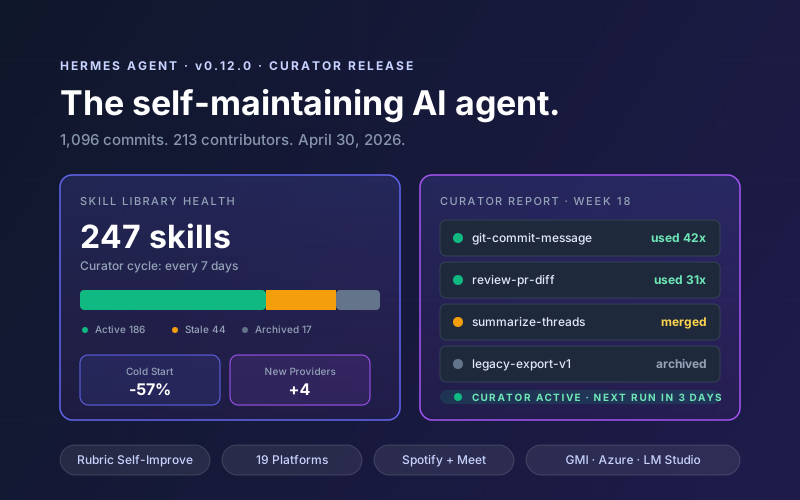

On April 30, 2026, Nous Research shipped Hermes Agent v0.12.0, codenamed The Curator Release. 1,096 commits, 550 merged PRs, 213 community contributors, and one big idea: your AI agent should clean up after itself. The headline feature is a new autonomous Curator that grades, consolidates, and prunes your skill library on a 7-day cycle. The self-improvement loop got a substantial rewrite. Four new inference providers landed. The 19th messaging platform (Microsoft Teams) shipped. TUI cold start dropped 57%.
If you've been running Hermes for more than a few months, your skill library is probably bloated with near-duplicates, stale drafts, and skills you wrote once and never used again. v0.12 addresses that directly. Skills you don't use get archived. Skills that overlap get merged. Skills you actively touch get prioritized for refinement. The agent maintains its own knowledge base, so you don't have to.
This guide walks through every major v0.12 feature with concrete commands, config snippets, and upgrade steps. For context on what Hermes is and why it differs from session-based agents, see our Hermes Agent developer guide.
📋 What This Guide Covers
- 1.The Curator: Autonomous Skill Library Maintenance
- 2.Self-Improvement Loop: The Rubric Rewrite
- 3.Four New Providers + LM Studio Upgrade
- 4.19 Messaging Platforms: Teams, Yuanbao, Pluggable Gateway
- 5.Bundled Integrations: Spotify, Google Meet, ComfyUI, TouchDesigner
- 6.Performance: 57% Faster Cold Start
- 7.Security & Reliability Changes
- 8.New CLI Commands: hermes -z, hermes fallback, update --check
- 9.Migration & Upgrade Walkthrough
- 10.Breaking Changes & Reverts
- 11.Why Lushbinary for Your Hermes v0.12 Deployment
1The Curator: Autonomous Skill Library Maintenance
Hermes has always generated skills autonomously. The problem: after six months of heavy use, your skills/ directory looks like a closet you haven't cleaned in years. Duplicates. Drafts. Skills that solved a one-off problem and never got touched again. Skills that drifted from the workflow they were written for.
The Curator is a background agent that fixes this. It runs on the gateway's cron ticker with a 7-day cycle by default, inherits the parent configuration, and has unbounded iterations per cycle. You can pick which model it uses from hermes model under auxiliary.curator, and configure it from the dashboard.
# Check curator status - ranks skills by usage
hermes curator status

# Output includes:
#  - Most-used skills (promoted, active)
#  - Least-used skills (candidates for archival)
#  - Recently consolidated pairs
#  - Per-run reports at logs/curator/run.json and REPORT.md
Each run produces two artifacts you can audit: a machine-readable run.json and a human-readable REPORT.md. Archived skills are classified as either consolidated (merged into another skill) or pruned (removed for lack of use) using a model plus heuristic. Skills you explicitly pin are protected from mutation, and bundled/hub skills have defense-in-depth gates that block the Curator from rewriting them.
Configure the Curator in config.yaml:
auxiliary:
  curator:
    provider: openrouter
    model: deepseek-v4-flash  # cheap aux model is fine
    enabled: true

# Override the default cycle if needed
curator:
  cycle_days: 7
  max_prunes_per_run: 20
  min_skill_age_days: 3  # protect very new skills
💡 Practical Tip
Run the Curator on a cheap auxiliary model like DeepSeek V4 Flash ($0.14 input / $0.28 output per 1M tokens) rather than your primary coding model. The Curator is a high-volume, low-stakes workload. A 7-day cycle on a 500-skill library typically costs less than a single coding session.
2Self-Improvement Loop: The Rubric Rewrite
The Curator handles library-wide maintenance. The self-improvement loop handles per-turn learning: after each conversation turn, a background review fork decides what memories and skills to save or update. v0.12 rewrote this system top to bottom.
What changed:
- Class-first prompt. The old review was a free-form "should we update this skill?" question. The new one is rubric-based with explicit criteria, which stops the model from second-guessing obvious wins.
- Active-update bias. The fork now prefers updating the skill the agent just loaded, and correctly handles
references/andtemplates/sub-files inside a skill. - Runtime inheritance. The fork inherits the parent's live provider, model, and credentials. Previously, config could drift and the review fork would fail silently.
- Scoped toolsets. The review fork is restricted to the memory and skills toolsets. It cannot accidentally touch shell, web, or the filesystem outside its lane.
- Clean shutdown. Memory providers exit properly when the fork finishes, fixing a long-running connection leak on busy gateways.
- Clean context. Prior-turn tool messages are excluded from the review summary so the fork sees the conversation shape, not a wall of JSON.
The practical result: skill updates are faster, more targeted, and less likely to introduce regressions. If you were previously disabling self-improvement because it was noisy or expensive, v0.12 is worth a second look.
3Four New Providers + LM Studio Upgrade
v0.12 adds four new inference providers and upgrades LM Studio to first-class status:
| Provider | Type | Auth | Best For |
|---|---|---|---|
| gmi-cloud | Hosted | API key | DeepSeek, Qwen, Llama at scale |
| azure-ai-foundry | Hosted | Auto-detect | Enterprise Azure shops |
| minimax | Hosted | PKCE OAuth | MiniMax M2.7 agentic work |
| tencent-tokenhub | Hosted | API key | China-region deployments |
| lm-studio | Local | Local | Offline dev, air-gapped |
The LM Studio upgrade is the most impactful for local-first users. Previously it rode on the generic custom-endpoint path, which meant no hermes doctor checks, no reasoning transport, and no live /models listing. v0.12 promotes it to a native provider with dedicated authentication, diagnostic checks, proper reasoning content handling, and dynamic model discovery.
Model catalog changes worth noting:
openai/gpt-5.5andgpt-5.5-pronow in OpenRouter and Nous Portal catalogs.deepseek-v4-proanddeepseek-v4-flashadded, withreasoning_contentreplay preserved across cross-provider histories.qwen3.6-plusadded to Alibaba-supported models.- Remote model catalog manifest: OpenRouter and Nous Portal catalogs now pull from a remote manifest so new models appear without requiring a Hermes release.
⚠️ Heads Up: Gemini Free-Tier Blocked at Setup
Free-tier Gemini API keys are now blocked at setup with 429 guidance surfacing. If your onboarding flow was relying on free-tier Gemini for testing, you will need to either swap to a paid key, use a different provider for setup, or install your key post-setup.
419 Messaging Platforms: Teams, Yuanbao, Pluggable Gateway
The gateway is now a plugin host. Drop-in messaging adapters live outside the core, and Microsoft Teams is the first plugin-shipped platform. Tencent Yuanbao (元宝) joined natively as the 18th platform, with Teams as the 19th via plugin.
Why this matters: you can now ship a private messaging integration without patching the Hermes core. Build it as a plugin, publish it, and users install it alongside their gateway config. For enterprises running internal messaging platforms (Mattermost forks, in-house chat, domain-specific tools), this is the path forward.
Other gateway changes:
- Native multi-image sending across Telegram, Discord, Slack, Mattermost, Email, and Signal. No more single-image attachments when the model generates a gallery.
- Centralized audio routing with FLAC support and Telegram document fallback for codec mismatches.
- Slack channel_skill_bindings: bind specific skills to specific channels. Your
#devopschannel only sees infrastructure skills, your#designchannel only sees Figma and Claude Design skills. - Signal native formatting: markdown renders as Signal's
bodyRanges, reply quotes work, reactions surface as first-class. - Plugin hooks:
pre_gateway_dispatch,pre_approval_request, andpost_approval_responselet plugins intercept the approval and dispatch flow.
5Bundled Integrations: Spotify, Google Meet, ComfyUI, TouchDesigner
v0.12 promotes several integrations from optional to bundled-by-default:
🎵 Spotify
7 tools (play, search, queue, playlists, devices) behind PKCE OAuth. Interactive setup wizard, bundled skill, cron usage documented. Agent can run a morning music routine, playlist a project, or queue based on calendar context.
📞 Google Meet
Join calls, transcribe, speak, follow up. Realtime OpenAI transport plus a Node bot server. Full pipeline ships as a plugin, so the agent can be a participant on recurring meetings.
🎨 ComfyUI v5
Official CLI plus REST plus hardware-gated local install. Ask the agent for an image, it composes the workflow and runs it. Moved from optional to built-in, so no extra setup.
🎛️ TouchDesigner-MCP
Bundled by default with GLSL, post-FX, audio, and geometry references. Nine new reference docs shipped. For visual artists running audio-reactive work, the agent is now a live collaborator.
Other new bundled or refreshed skills: Humanizer (strips AI-isms from text), claude-design (HTML artifact skill), design-md (Google's DESIGN.md spec), airtable (salvaged with .env API key wiring), pretext (creative browser demos), spike + sketch (throwaway experiments, HTML mockups).
You can now install skills from a direct HTTP(S) URL: hermes skills install <url>. A /reload-skills slash command reloads without a full restart.
# Install a skill directly from a URL
hermes skills install https://example.com/my-skill.zip

# Reload all skills without restarting
/reload-skills

# List enabled and disabled skills
hermes skills list

# Pin a skill to protect it from the Curator and self-improvement
hermes skills pin my-critical-skill
6Performance: 57% Faster Cold Start
Cold start was a persistent complaint in the v0.11 series. v0.12 cut visible TUI cold start by roughly 57% through a set of targeted optimizations:
- Lazy agent init (thanks @OutThisLife) delays the heaviest setup until it's actually needed.
- Lazy imports for OpenAI, Anthropic, Firecrawl, and
account_usage. You don't pay the import cost for providers you don't use. - mtime-cached
load_config()avoids redundant config reloads when nothing changed on disk. - Memoized
get_tool_definitions()with TTL-cachedcheck_fnresults. Tool discovery gets much cheaper on repeat calls. - Precompiled DANGEROUS_PATTERNS and HARDLINE_PATTERNS eliminates regex compilation on the hot path.
Other perf work: long-session scrolling is stable (no more TUI jank at 1,000+ messages), virtual history heights are lazily seeded, and Ink text measurements are cached across yoga flex re-passes.
There's also a new configurable prompt_caching.cache_ttl. The 5-minute default stays, but you can opt into a 1-hour TTL for bursty sessions where keeping the cache warm saves real money.
7Security & Reliability Changes
The biggest security-flavored change is also the most contentious: secret redaction is off by default. The old default was causing corruption in patches and API payloads because secret-shaped substrings were being replaced with placeholders, breaking tool outputs that happened to contain those substrings.
Opt back in explicitly:
# config.yaml
redaction:
  enabled: true
  patterns:
    - type: api_key
    - type: aws_key
    - type: ssh_key
🛡️ Action Required
If you were relying on redaction for compliance (for example, a SOC 2 audit requirement), you must explicitly re-enable it after upgrading. The default flip is a reliability win, but it is a compliance regression if you miss it.
Other security and reliability wins:
- Hardline blocklist expanded for unrecoverable commands (
rm -rf /,ddto disk devices, destructivegitoperations). - [SYSTEM:] marker renamed to [IMPORTANT:] because Azure's content filter was flagging the old marker as a jailbreak attempt.
- Symlinks preserved during atomic file writes instead of being silently replaced with regular files.
- Canonical
mask_secrethelper used everywhere so logs no longer leak secrets through inconsistent masking. - Probe
/dev/ttyby opening it, not by bare existence check. Fixes spurious TTY detection on containerized runners. - Background reviewer scoped to memory and skills toolsets only. No more accidental web or shell escapes during the review fork.
For deeper security patterns including prompt injection defense, sandboxing, and credential hygiene, see our AI agent security guide and production guardrails playbook.
8New CLI Commands: hermes -z, hermes fallback, update --check
Three new commands are worth adding to your muscle memory:
# Non-interactive one-shot mode (great for CI, scripts, cron)
hermes -z "summarize the git log since last Friday"
hermes -z --model deepseek-v4-flash "run pytest and fix failures"
HERMES_INFERENCE_MODEL=gpt-5.5 hermes -z "review this PR"

# Preview an upgrade before applying
hermes update --check

# Manage provider fallback chain
hermes fallback add anthropic
hermes fallback list
hermes fallback remove openrouter
hermes -z is the killer feature here. It opens up Hermes for CI pipelines, git hooks, and cron jobs without needing a TUI session. Pair it with --model for cheap models on non-critical paths and the full model on release-gate checks.
Additional TUI additions:
- LaTeX rendering in the TUI for math-heavy conversations.
/reloadhot-reloads your.envwithout restarting.- Opt-in auto-resume of the most recent session on launch.
- Delete sessions from the
/resumepicker withd. - A
/mousetoggle that kills ConPTY's phantom mouse injection (fixes the WSL2 ghost-mouse bug). - A mini help menu on
?inside the input field.
9Migration & Upgrade Walkthrough
The upgrade from v0.11 to v0.12 is a standard hermes update, but a few new safety mechanisms are worth using:
# Step 1: preview the update (new in v0.12)
hermes update --check

# Step 2: opt into the pre-update HERMES_HOME backup
# (add to config.yaml before running update)
update:
  backup_hermes_home: true

# Step 3: run the update
hermes update

# Step 4: if you use redaction for compliance, re-enable it
redaction:
  enabled: true

# Step 5: verify providers still authenticate
hermes doctor

# Step 6: configure the Curator
hermes model
# Pick a cheap aux model for auxiliary.curator
If you're coming from OpenClaw, v0.12 includes several migration hardening fixes:
- Plan-first apply with redaction and pre-migration backup.
- Case-preserving brand rewrite.
- One-time
~/.openclawresidue banner so you know if stale files are still on disk. openclawworkspace files resolved fromagents.defaults.workspace.- Model aliases resolved against the real OpenClaw catalog schema.
For a deeper migration walkthrough, see our OpenClaw to Hermes migration guide.
10Breaking Changes & Reverts
A handful of items to be aware of before you upgrade production:
/providerand/planslash commands dropped. Usehermes modelandhermes fallbackinstead.flush_memoriesremoved entirely. Memory flushing now happens automatically on clean shutdown.- Kanban multi-profile collaboration board reverted. Landed in #16081, rolled back in #16098 pending a design rework.
- computer-use cua-driver reverted. Three preparatory PRs landed then were reverted.
- BOOT.md built-in hook removed. The new hooks tutorial shows how to rebuild the same workflow as a shell hook.
- Secret redaction default flipped to off. Already covered in the security section, but worth repeating.
If you're running Hermes on NixOS, check extraPackages behavior: it now works via per-user profile rather than the system profile, which is a fix but will look different in your package list.
11Why Lushbinary for Your Hermes v0.12 Deployment
We've deployed Hermes Agent in production for healthcare SaaS, e-commerce operations, and developer tooling teams since v0.8. v0.12 is the most meaningful release since the introduction of profiles, and getting the migration right matters for teams running agents at scale.
What we do for teams upgrading to Hermes v0.12:
- Zero-downtime migration: staged upgrades across profiles with rollback paths, compliance-aware redaction re-enablement, and audit logging throughout.
- Curator tuning: dial in cycle cadence, aux model choice, and prune thresholds for your library size. A 50-skill solo setup and a 500-skill team setup need different knobs.
- Provider architecture: pick the right mix of LM Studio (local), GMI Cloud or Azure (hosted), and OpenRouter (fallback) for your latency, cost, and data-residency constraints.
- Plugin development: build the messaging platform, observability tool, or domain skill your org actually needs as a Hermes plugin rather than a core fork.
- AWS production deployment: ECS, RDS for memory, proper IAM boundaries, and infrastructure as code so your agent deployment looks like the rest of your stack.
🚀 Free Hermes v0.12 Consultation
Upgrading to v0.12 or evaluating whether to adopt Hermes Agent? Lushbinary has shipped Hermes in production since v0.8. We'll review your current setup, recommend the right Curator and self-improvement configuration, and give you a realistic migration plan, no obligation.
❓ Frequently Asked Questions
What is the Hermes Agent v0.12 Curator?
The Curator is an autonomous background agent that maintains your skill library on a 7-day cycle. It grades skills by usage, consolidates overlapping skills, prunes dead ones, and writes per-run reports to logs/curator/run.json and REPORT.md. Run hermes curator status to see most-used and least-used skills.
When was Hermes Agent v0.12.0 released?
Hermes Agent v0.12.0 was released on April 30, 2026 by Nous Research. The release includes 1,096 commits and 550 merged PRs from 213 community contributors since v0.11.0, touching 1,270 files with 217,776 insertions.
What new providers does Hermes v0.12 support?
Hermes v0.12 adds four new inference providers: GMI Cloud (first-class), Azure AI Foundry with auto-detection, MiniMax with PKCE OAuth, and Tencent Tokenhub. LM Studio was also upgraded from a custom-endpoint alias to a full first-class provider with dedicated auth, hermes doctor checks, reasoning transport, and live /models listing.
How do I upgrade to Hermes Agent v0.12?
Run hermes update --check to preview the upgrade, then hermes update to apply it. v0.12 adds an opt-in pre-update HERMES_HOME backup. After upgrading, new installs auto-reconfigure existing setups. If you hit issues, v0.12 also introduced hermes -z for non-interactive one-shot testing.
What security changes ship in Hermes v0.12?
The biggest security change is secret redaction being flipped off by default because it was corrupting patches and API payloads with fake-key substitutions. The hardline blocklist for unrecoverable commands was expanded, DANGEROUS_PATTERNS are now precompiled for faster checks, symlinks are preserved during atomic file writes, and the [SYSTEM:] marker was renamed to [IMPORTANT:] to dodge Azure content filters.
Does the Curator replace the self-improvement loop?
No. The Curator and the self-improvement loop are separate systems that work together. The self-improvement loop runs after each turn to decide what memories and skills to save or update (now rubric-based and class-first). The Curator runs on a longer 7-day cycle to perform library-wide maintenance: grading, consolidating, pruning, and reporting across the whole skill collection.
📚 Sources
- Hermes Agent v0.12.0 Official Release Notes (GitHub)
- Curator Feature Documentation (Nous Research)
- Hermes Agent Documentation
Content was rephrased for compliance with licensing restrictions. Release data sourced from the official Nous Research release notes as of May 2026. Features and defaults may change in subsequent releases. Always verify on the official Hermes Agent documentation.
Upgrade to Hermes v0.12 with Confidence
We help teams migrate to Hermes Agent v0.12, configure the Curator, and build custom plugins for their messaging and workflow stack. Get in touch for a free consultation.
Ready to Build Something Great?
Get a free 30-minute strategy call. We'll map out your project, timeline, and tech stack - no strings attached.
Prefer email? Reach us directly: