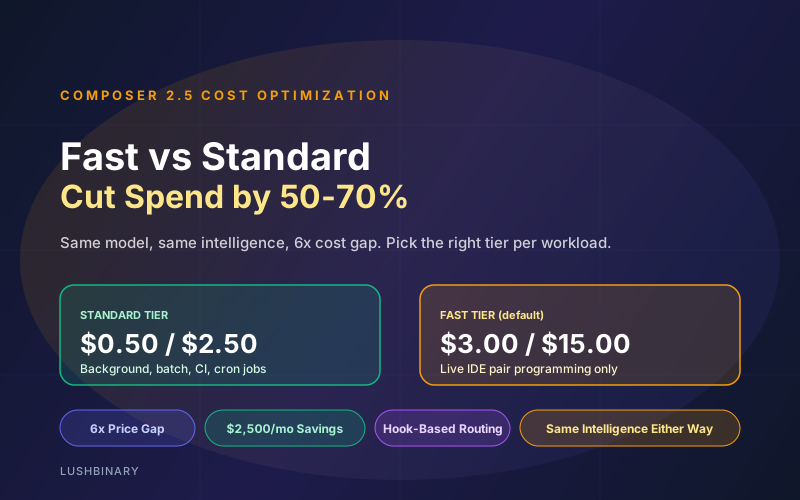
Composer 2.5 shipped with two pricing tiers and the same intelligence on both. Standard at $0.50 input and $2.50 output per million tokens, Fast at $3.00 and $15.00. Picking the wrong default is the easiest way to make Composer 2.5 spend balloon (source).
The price gap is 6x on both input and output. The intelligence delta is zero. The only thing Fast buys you is higher inference throughput, which matters when a developer is watching the agent work and does not matter at all when the agent is running in CI at 3am. Most teams default to Fast because it is the IDE default and pay for it.
This guide is a tactical playbook for splitting Composer 2.5 traffic between Fast and Standard so your team gets responsive interactive coding without paying Fast prices for unattended work. Includes a decision matrix, configuration patterns, and worked cost examples.
Table of Contents
- Pricing: Fast vs Standard at a Glance
- What Fast Actually Buys You
- Decision Matrix: When to Use Each Tier
- Switching Between Tiers in Cursor
- Switching Between Tiers in the SDK
- Routing by Task Type with Hooks
- Worked Cost Examples
- Team-Level Cost Controls
- Beyond Tier Selection: Three More Cost Levers
- Why Lushbinary for Cursor Cost Engagements
1Pricing: Fast vs Standard at a Glance
| Dimension | Standard | Fast (default in IDE) |
|---|---|---|
| Input price ($/M tokens) | $0.50 | $3.00 |
| Output price ($/M tokens) | $2.50 | $15.00 |
| Intelligence | Identical | Identical |
| Latency | Lower throughput | Higher throughput |
| Best for | Background, batch, CI, cron | Live IDE pair programming |
2What Fast Actually Buys You
Cursor sells Fast as the responsive default for interactive sessions. The 6x premium pays for higher inference throughput, which translates to:
- Faster first token when you ask Composer for a code change in the IDE
- Higher tokens per second while it streams the response
- Less queueing during peak demand, especially during US business hours
What Fast does not buy you: smarter responses, better tool use, longer context handling, or higher reliability. It is the same model. If a developer is reading the agent's output token by token while it works, the throughput delta matters. If the agent is running unattended in CI, it does not.
3Decision Matrix: When to Use Each Tier
| Workload | Tier | Why |
|---|---|---|
| Pair programming in the IDE | Fast | Latency directly hits productivity |
| Inline code completion / Tab | Fast | Sub-second response required |
| Cloud Agent runs (background) | Standard | Runs in the background, no human waiting |
| CI fixers and PR auto-comment | Standard | Runs on event triggers, not in real time |
| Cron jobs / scheduled refactors | Standard | Often runs overnight |
| Eval and benchmark runs | Standard | Throughput limited by your harness, not the model |
| Doc generation, release notes | Standard | Async use, output reviewed later |
| Bug-bash / pair-debugging session | Fast | Active back-and-forth with the developer |
4Switching Between Tiers in Cursor
- Open the Composer panel with
Cmd+Ion macOS orCtrl+Ion Windows / Linux. - Click the model selector. Composer 2.5 will be there if you have upgraded Cursor.
- Pick Composer 2.5 Fast for interactive sessions, Composer 2.5 (Standard) for background or async use.
- For Cloud Agent and Background Agent runs, set the default in Settings > Models > Composer 2.5 to the Standard variant. The Cursor app remembers this per-feature.
5Switching Between Tiers in the SDK
The model identifier on Agent.create picks the tier:
// Fast for interactive workloads
const agent = await Agent.create({
  model: "composer-2.5-fast",
  workspace: "./",
});

// Standard for background, CI, cron, batch
const bgAgent = await Agent.create({
  model: "composer-2.5",
  workspace: "./",
});
A simple wrapper: pick the tier from an environment variable or config field so you can change defaults without redeploying:
const TIER = process.env.AGENT_TIER ?? "standard";
const model = TIER === "fast" ? "composer-2.5-fast" : "composer-2.5";

const agent = await Agent.create({ model, workspace: "./" });6Routing by Task Type with Hooks
Cursor hooks let you change tier dynamically based on task metadata. A pattern that works well: tag tasks at the trigger point (CI label, manual command flag, prompt prefix), then use a pre-tool-use hook that swaps tiers.
// .cursor/hooks/route-tier.ts
import type { PreAgentHook } from "@cursor/sdk";

export const onAgentCreate: PreAgentHook = async (ctx) => {
  const tags = ctx.task?.tags ?? [];
  if (tags.includes("interactive") || tags.includes("pair")) {
    ctx.config.model = "composer-2.5-fast";
  } else {
    ctx.config.model = "composer-2.5";
  }
  return ctx;
};
That single hook is often enough to drop monthly spend by 50-70% on teams that previously left Fast as the default for everything.
7Worked Cost Examples
Three real-world workloads with worked-out math.
Example 1: Engineer using Cursor Composer 8 hours a day
Assume 1.5M tokens per day at a 70/30 input/output split (1.05M input, 450K output) of interactive work.
- On Fast: 1.05 * 3.00 + 0.45 * 15.00 = $3.15 + $6.75 = $9.90/day. Across 22 working days, $217.80/month per engineer.
- On Standard: 1.05 * 0.50 + 0.45 * 2.50 = $0.525 + $1.125 = $1.65/day. Across 22 days, $36.30/month.
Most teams need Fast for interactive work, so the Fast cost is the realistic number for active IDE time. Standard would feel slower in real use even though the model is identical.
Example 2: Background CI fixer running 50 times per week
Each run averages 800K tokens at 70/30 split (560K input, 240K output).
- On Standard: 0.56 * 0.50 + 0.24 * 2.50 = $0.28 + $0.60 = $0.88/run. 50 runs/week = $44/week, ~$190/month.
- On Fast: 0.56 * 3.00 + 0.24 * 15.00 = $1.68 + $3.60 = $5.28/run. 50 runs/week = $264/week, ~$1,144/month.
For unattended background work, picking Fast here adds about $950/month with zero quality gain. Standard is the obvious choice.
Example 3: Overnight refactor agent, weekly
One large run per week, 4M tokens at 70/30 split (2.8M input, 1.2M output).
- On Standard: 2.8 * 0.50 + 1.2 * 2.50 = $1.40 + $3.00 = $4.40/run. ~$19/month.
- On Fast: 2.8 * 3.00 + 1.2 * 15.00 = $8.40 + $18.00 = $26.40/run. ~$114/month.
$95 a month difference for a workload where nobody is watching the screen.
8Team-Level Cost Controls
- Per-team usage limits. Cursor exposes monthly spend caps per team in the admin dashboard. Set hard limits and email alerts before the cap.
- Per-developer dashboards. Track Composer 2.5 spend per seat. Outliers are usually missing routing rules, not heavy users.
- Per-project tagging. Tag SDK runs with the project they belong to. Roll up spend by project so you can justify budget per cost center.
- Budget alerts. Tie alerts to expected spend curves, not absolute thresholds. A spike in Fast usage from a misconfigured hook will show up days before a hard cap.
- Quarterly tier audits. Re-run the Fast vs Standard split at the end of each quarter. Workloads change. What was interactive last quarter might be a scheduled background job this quarter.
9Beyond Tier Selection: Three More Cost Levers
- Cap maxIterations. Long-horizon agent runs consume tokens faster than you expect. A maxIterations cap of 100-200 prevents runaway loops.
- Tighter system prompts. Verbose system prompts multiply input cost on every turn. Trim repeated context, lean on Cursor rules instead of inlining the same instructions.
- Multi-model routing. Use Composer 2.5 as the default. Reach for Opus 4.7 or GPT-5.5 only on the 5-10% of tasks that justify the cost premium. See our comparison guide for routing patterns.
10Why Lushbinary for Cursor Cost Engagements
We do Cursor cost optimization as a service. That means analyzing your team's current spend, identifying tier mismatches, and wiring routing so the right tier gets used by default.
- Composer 2.5 spend audits with per-developer and per-project breakdowns
- Hook and rule design so background work routes to Standard automatically
- Multi-model routing to Composer 2.5 / Opus 4.7 / GPT-5.5 for the right tasks
- Budget dashboards integrated with your existing observability stack
- Quarterly tier-mix reviews so workloads stay matched to the cheapest correct tier
Free Consultation
Want to cut Composer spend by 50% without slowing the team down? Lushbinary audits your current usage and wires routing rules tailored to your workflow, no obligation.
Sources
- Cursor: Introducing Composer 2.5
- Cursor: Composer 2.5 changelog
- Cursor pricing
- Cursor Composer 2.5 Developer Guide (Lushbinary)
Content was rephrased for compliance with licensing restrictions. Pricing sourced from official Cursor announcements as of May 19, 2026 and may change. Always verify on cursor.com before committing budget.
Frequently Asked Questions
What is the difference between Composer 2.5 Standard and Fast?
Same model, same intelligence. Fast costs more per token but runs at higher inference throughput so the agent feels responsive in front of a developer. Standard is $0.50 input / $2.50 output per million tokens. Fast is $3.00 / $15.00, six times more expensive on both axes.
Should I use Standard or Fast as my default?
Use Fast for live IDE pair programming where latency matters. Use Standard for everything else: background agents, CI fixers, scheduled jobs, exploratory long-horizon runs. The 6x price gap on Fast does not pay back unless a human is actively waiting in front of the screen.
How much can I save by routing more to Standard?
If a team currently runs everything on Fast and shifts background and batch work (typically 40-60% of token volume) to Standard, monthly Composer spend drops by roughly 50-70%. For a team spending $5,000 a month on Fast, that is $2,500-$3,500 a month back.
Is there a cost difference between Composer 2 Fast and Composer 2.5 Fast?
Yes. Composer 2 Fast was $1.50 input and $7.50 output per million tokens. Composer 2.5 Fast is $3.00 input and $15.00 output, exactly double. Standard pricing on Composer 2.5 is the same as Composer 2 Standard.
How can I cap my team's Composer 2.5 spend?
Use Cursor's per-team usage limits in the admin dashboard, plus per-task token budgets in your SDK wrapper. Route background and batch jobs to Standard by default. Add Cursor hooks that switch to Standard automatically for tasks tagged background or batch.
Cut Composer 2.5 Spend by Half Without Slowing the Team Down
We audit your usage and wire tier routing rules so the right traffic lands on Standard without anyone noticing.
Ready to Build Something Great?
Get a free 30-minute strategy call. We'll map out your project, timeline, and tech stack - no strings attached.
Prefer email? Reach us directly: