Running AI agents locally used to mean choosing between capability and cost. Cloud APIs drain budgets fast — a single OpenClaw session with Claude Opus 4.6 can burn through $5-10 in tokens during a complex multi-step workflow. Hermes Agent on GPT-5.4 isn't much cheaper. But as of April 2026, you can run both agents on your own hardware with Google's Gemma 4 — and pay exactly $0 in inference costs.
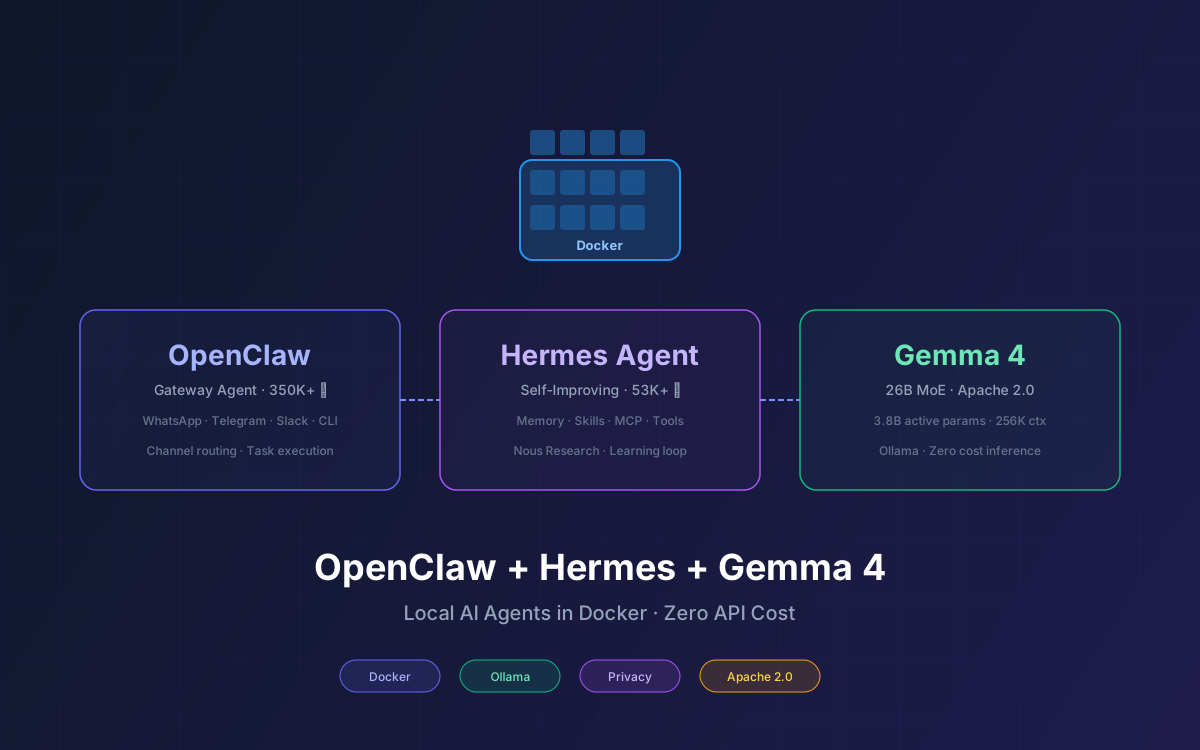
This guide walks you through setting up OpenClaw (350K+ GitHub stars, the most popular open-source AI agent framework) and Hermes Agent (53K+ stars, Nous Research's self-improving agent runtime) side by side in Docker, both powered by a local Gemma 4 model served through Ollama. No API keys. No cloud dependencies. No data leaving your machine.
By the end, you'll have two complementary AI agents running locally — OpenClaw for broad task execution across messaging channels, and Hermes for self-improving workflows that get smarter the longer you use them. Both sharing the same Gemma 4 brain.
📋 What This Guide Covers
- Why Run AI Agents Locally with Gemma 4
- Prerequisites & Hardware Requirements
- Setting Up Ollama with Gemma 4 in Docker
- Installing OpenClaw in Docker
- Connecting OpenClaw to Local Gemma 4
- Installing Hermes Agent in Docker
- Connecting Hermes to Local Gemma 4
- Running Both Agents Side by Side
- Performance Tuning & Model Selection
- Troubleshooting Common Issues
- Why Lushbinary for Your AI Agent Infrastructure
1Why Run AI Agents Locally with Gemma 4
The economics of cloud-hosted AI agents don't scale. A team running OpenClaw with Claude Opus 4.6 for daily DevOps automation easily spends $150-300/month in API costs alone. Hermes Agent on GPT-5.4 is comparable. And that's before you factor in the privacy risk of sending proprietary code, credentials, and internal docs through third-party APIs.
Google's Gemma 4 changed the equation. Released on April 2, 2026 under the Apache 2.0 license, the 26B MoE variant activates only 3.8B parameters per token while delivering reasoning quality that competes with models 5-10x its size. It runs on a single consumer GPU with 16 GB VRAM. The 31B Dense model ranks #3 among all open models on the Arena AI text leaderboard.
Pairing Gemma 4 with Docker-containerized agents gives you:
- Zero inference cost — no API keys, no per-token billing, no usage caps
- Complete data privacy — nothing leaves your network, ideal for proprietary code and sensitive workflows
- Reproducible environments — Docker Compose makes the entire stack portable and version-controlled
- Two complementary agents — OpenClaw for broad channel-based automation, Hermes for self-improving task execution
- Apache 2.0 freedom — no monthly active user limits, no acceptable-use restrictions from the model creator
💡 Why Both Agents?
OpenClaw excels at connecting to messaging platforms (WhatsApp, Telegram, Slack, Discord) and executing tasks across channels. Hermes excels at learning from completed work and building reusable skills autonomously. Running both gives you the best of gateway-first and runtime-first architectures. See our detailed comparison for more.
2Prerequisites & Hardware Requirements
Before you start, make sure your system meets these requirements. The bottleneck is GPU VRAM for running Gemma 4 — the agents themselves are lightweight.
Hardware Requirements
| Component | Minimum | Recommended |
|---|---|---|
| GPU | 8 GB VRAM (Gemma 4 E4B) | 16+ GB VRAM (Gemma 4 26B MoE) |
| RAM | 16 GB | 32 GB |
| Storage | 20 GB free | 50 GB free (SSD) |
| OS | Linux, macOS, Windows (WSL2) | Linux or macOS (Apple Silicon) |
🍎 Apple Silicon Note
M2 Pro, M3, M4, and M4 Pro Macs with 32 GB+ unified memory run Gemma 4 26B MoE comfortably via Ollama. Unified memory means the GPU and CPU share the same pool — no separate VRAM needed. A MacBook Pro M3 with 36 GB handles this entire stack well.
Software Requirements
- Docker Desktop (v4.37+) or Docker Engine (v27+) with Docker Compose v2
- NVIDIA Container Toolkit (Linux with NVIDIA GPU) or Docker Desktop GPU support (macOS/Windows)
- Git for cloning repositories
- curl for testing API endpoints
3Setting Up Ollama with Gemma 4 in Docker
Ollama is the inference server that hosts Gemma 4 and exposes an OpenAI-compatible API. Both OpenClaw and Hermes connect to it. We run it in Docker so the model weights, runtime, and configuration are fully containerized.
Step 1: Create the Project Directory
mkdir ~/ai-agents && cd ~/ai-agents
Step 2: Create the Docker Compose File
Create a docker-compose.yml that defines the Ollama service. We'll add OpenClaw and Hermes services in later steps.
# docker-compose.yml
version: "3.8"

services:
  ollama:
    image: ollama/ollama:latest
    container_name: ollama
    ports:
      - "11434:11434"
    volumes:
      - ollama_data:/root/.ollama
    # For NVIDIA GPU support, uncomment:
    # deploy:
    #   resources:
    #     reservations:
    #       devices:
    #         - driver: nvidia
    #           count: 1
    #           capabilities: [gpu]
    restart: unless-stopped

volumes:
  ollama_data:
🖥️ GPU Configuration
On Linux with NVIDIA GPUs, uncomment the deploy section and ensure the NVIDIA Container Toolkit is installed. On macOS with Apple Silicon, Ollama uses Metal acceleration automatically — no extra config needed.
Step 3: Start Ollama and Pull Gemma 4
# Start the Ollama container
docker compose up -d ollama

# Pull Gemma 4 26B MoE (recommended, ~16 GB)
docker exec ollama ollama pull gemma4

# Or pull the smaller E4B variant (~5 GB)
# docker exec ollama ollama pull gemma4:e4b

# Verify the model is available
docker exec ollama ollama list
The default gemma4 tag pulls the 26B MoE variant, which activates only 3.8B parameters per token. This is the sweet spot for agent workloads — fast enough for interactive use, smart enough for multi-step reasoning. For a deeper dive into all Gemma 4 variants, see our Gemma 4 Developer Guide.
Step 4: Test the Ollama API
# Test the OpenAI-compatible endpoint
curl http://localhost:11434/v1/chat/completions \
  -H "Content-Type: application/json" \
  -d '{
    "model": "gemma4",
    "messages": [
      {"role": "user", "content": "Hello, what model are you?"}
    ]
}'4Installing OpenClaw in Docker
OpenClaw ships with official Docker support. The recommended approach uses the prebuilt image from ghcr.io to skip the 30+ minute local build. We'll add it as a service in our existing Docker Compose file.
Step 1: Clone the OpenClaw Repository
git clone https://github.com/openclaw/openclaw.git
cd openclaw
Step 2: Run the Docker Setup Script
# Use the prebuilt image (recommended)
export OPENCLAW_IMAGE=ghcr.io/openclaw/openclaw:latest

# Run the setup script
./docker-setup.sh
The setup script creates the Docker image, generates a stub config file, and prepares the environment. Alternatively, you can add OpenClaw directly to the Docker Compose file:
Step 3: Add OpenClaw to Docker Compose
# Add to docker-compose.yml under services:
  openclaw:
    image: ghcr.io/openclaw/openclaw:latest
    container_name: openclaw
    ports:
      - "18789:18789"
    volumes:
      - ./openclaw-data:/root/.openclaw
      - ./workspace:/workspace
    environment:
      - OPENCLAW_DIR=/root/.openclaw
      - OPENCLAW_WORKSPACE_DIR=/workspace
    depends_on:
      - ollama
    restart: unless-stopped
Step 4: Start OpenClaw and Run Onboarding
# Start the OpenClaw container
docker compose up -d openclaw

# Run the onboarding wizard
docker compose exec openclaw openclaw onboard

# Access the dashboard
# Open http://localhost:18789 in your browser
5Connecting OpenClaw to Local Gemma 4
OpenClaw supports local models through its AI Gateway routing. Since Ollama exposes an OpenAI-compatible API, OpenClaw treats it like any other provider. For a comprehensive walkthrough, see our OpenClaw + Gemma 4 setup guide.
Step 1: Configure the Ollama Provider
Edit the OpenClaw configuration file at openclaw-data/openclaw.json:
{
  "llm": {
    "provider": "ollama",
    "model": "gemma4",
    "baseUrl": "http://ollama:11434"
  }
}
🔗 Docker Networking
Notice the base URL uses http://ollama:11434 instead of localhost. Inside Docker Compose, services communicate via their service names. The ollama hostname resolves to the Ollama container automatically.
Step 2: Test the Connection
# Enter the OpenClaw container
docker compose exec openclaw bash

# Test with a simple command
openclaw "What is 2 + 2?"

# You should see Gemma 4 respond through OpenClaw
Step 3: Configure Model Routing (Optional)
For production setups, you can configure OpenClaw to use Gemma 4 for routine tasks and fall back to a cloud model for complex reasoning:
{
  "llm": {
    "provider": "ollama",
    "model": "gemma4",
    "baseUrl": "http://ollama:11434"
  },
  "llm_fallback": {
    "provider": "openrouter",
    "model": "anthropic/claude-sonnet-4",
    "apiKey": "your-openrouter-key"
  }
}6Installing Hermes Agent in Docker
Hermes Agent supports Docker as a first-class deployment option. The official install script handles most of the setup, but we'll integrate it into our Docker Compose stack for a unified deployment. For more on Hermes architecture, see our Hermes Agent Developer Guide.
Step 1: Add Hermes to Docker Compose
# Add to docker-compose.yml under services:
  hermes:
    image: ghcr.io/nousresearch/hermes-agent:latest
    container_name: hermes
    ports:
      - "3000:3000"
    volumes:
      - ./hermes-data:/root/.hermes
      - ./workspace:/workspace
    environment:
      - HERMES_HOME=/root/.hermes
    depends_on:
      - ollama
    restart: unless-stopped
Step 2: Alternative — Install via Script Inside Docker
If you prefer the official install script (which handles dependency resolution automatically):
# Run a base container with Node.js
docker run -it --name hermes-setup \
  -v $(pwd)/hermes-data:/root/.hermes \
  -v $(pwd)/workspace:/workspace \
  --network ai-agents_default \
  node:22-slim bash

# Inside the container, install Hermes
curl -fsSL https://raw.githubusercontent.com/NousResearch/hermes-agent/main/scripts/install.sh | bash

# Run the setup wizard
hermes setup
Step 3: Start Hermes
# Start the Hermes container
docker compose up -d hermes

# Check logs to confirm it's running
docker compose logs hermes --tail 20
7Connecting Hermes to Local Gemma 4
Hermes Agent connects to Ollama through its OpenAI-compatible endpoint. The setup is straightforward — Hermes auto-detects models available on the Ollama instance. For more on Hermes + Gemma 4 specifically, see our Hermes + Gemma 4 guide.
Step 1: Configure the Provider
During the Hermes setup wizard, select "Custom endpoint" and point it to the Ollama container:
# Inside the Hermes container
hermes model

# Select: More providers...
# Select: Custom endpoint (enter URL manually)
# API base URL: http://ollama:11434/v1
# API key: (leave blank)
# Hermes auto-detects: gemma4
# Use this model? Y
# Context length: (leave blank for auto-detect)
Or configure it directly in the Hermes config file at hermes-data/config.yaml:
# hermes-data/config.yaml
provider: custom
model:
  default: gemma4
api:
  baseUrl: http://ollama:11434/v1
  apiKey: ""
context:
  maxTokens: 131072
Step 2: Verify the Connection
# Enter the Hermes container
docker compose exec hermes bash

# Start a chat session
hermes chat

# Type a test message
> What model are you running on?
# Should respond identifying as Gemma 4
Step 3: Connect Messaging (Optional)
Hermes supports Telegram, Discord, Slack, WhatsApp, Signal, and Email as messaging channels. To connect one:
# Run the gateway setup
hermes setup gateway

# Follow the prompts to connect your preferred platform
# Example: Telegram requires a bot token from @BotFather
8Running Both Agents Side by Side
Here's the complete Docker Compose file that runs all three services together — Ollama (model server), OpenClaw (gateway agent), and Hermes (self-improving agent):
# docker-compose.yml - Complete Stack
version: "3.8"

services:
  ollama:
    image: ollama/ollama:latest
    container_name: ollama
    ports:
      - "11434:11434"
    volumes:
      - ollama_data:/root/.ollama
    # Uncomment for NVIDIA GPU:
    # deploy:
    #   resources:
    #     reservations:
    #       devices:
    #         - driver: nvidia
    #           count: 1
    #           capabilities: [gpu]
    restart: unless-stopped

  openclaw:
    image: ghcr.io/openclaw/openclaw:latest
    container_name: openclaw
    ports:
      - "18789:18789"
    volumes:
      - ./openclaw-data:/root/.openclaw
      - ./workspace:/workspace
    environment:
      - OPENCLAW_DIR=/root/.openclaw
      - OPENCLAW_WORKSPACE_DIR=/workspace
    depends_on:
      - ollama
    restart: unless-stopped

  hermes:
    image: ghcr.io/nousresearch/hermes-agent:latest
    container_name: hermes
    ports:
      - "3000:3000"
    volumes:
      - ./hermes-data:/root/.hermes
      - ./workspace:/workspace
    environment:
      - HERMES_HOME=/root/.hermes
    depends_on:
      - ollama
    restart: unless-stopped

volumes:
  ollama_data:
Launch Everything
# Start all services
docker compose up -d

# Pull Gemma 4 (first time only)
docker exec ollama ollama pull gemma4

# Check all containers are running
docker compose ps

# Expected output:
# NAME       STATUS    PORTS
# ollama     running   0.0.0.0:11434->11434/tcp
# openclaw   running   0.0.0.0:18789->18789/tcp
# hermes     running   0.0.0.0:3000->3000/tcp
Architecture Overview
Both agents mount the same /workspace volume, so files created by OpenClaw are visible to Hermes and vice versa. The Ollama container serves as the shared inference backend — both agents send requests to http://ollama:11434 via Docker's internal network.
🔄 Complementary Workflows
Use OpenClaw for channel-based tasks (respond to Telegram messages, process Slack commands, automate WhatsApp workflows). Use Hermes for persistent tasks that benefit from learning (code reviews, log analysis, deployment automation). Both share the same Gemma 4 brain and workspace files.
9Performance Tuning & Model Selection
Gemma 4 comes in four variants. Choosing the right one depends on your hardware and workload. Here's how each performs for agent tasks:
| Model | Active Params | VRAM (Q4) | Agent Suitability |
|---|---|---|---|
| Gemma 4 E2B | 2.3B | ~2 GB | ⚠️ Too small for reliable tool use |
| Gemma 4 E4B | 4.5B | ~5 GB | ✅ Basic tasks, fast responses |
| Gemma 4 26B MoE ⭐ | 3.8B | ~16 GB | ✅ Best balance of speed and quality |
| Gemma 4 31B Dense | 31B | ~20 GB | ✅ Best reasoning, slower inference |
Ollama Performance Flags
Tune Ollama's behavior with environment variables in your Docker Compose file:
  ollama:
    image: ollama/ollama:latest
    environment:
      # Keep model loaded in memory (seconds, 0 = unload immediately)
      - OLLAMA_KEEP_ALIVE=3600
      # Number of parallel requests
      - OLLAMA_NUM_PARALLEL=2
      # Maximum loaded models
      - OLLAMA_MAX_LOADED_MODELS=1
      # Flash attention (faster on supported GPUs)
      - OLLAMA_FLASH_ATTENTION=1
Setting OLLAMA_KEEP_ALIVE=3600 keeps Gemma 4 loaded in VRAM for an hour after the last request, eliminating cold-start delays when switching between OpenClaw and Hermes. Setting OLLAMA_NUM_PARALLEL=2 allows both agents to send concurrent requests without queuing.
Context Window Configuration
Gemma 4 26B MoE supports up to 256K tokens of context, but larger contexts use more VRAM. For agent workloads, 32K-64K is usually sufficient:
# Set context window when running the model
docker exec ollama ollama run gemma4 --num-ctx 65536

# Or configure per-request via the API
curl http://localhost:11434/api/generate \
-d '{"model": "gemma4", "options": {"num_ctx": 65536}}'10Troubleshooting Common Issues
Here are the most common problems and their fixes:
"Connection refused" from OpenClaw/Hermes to Ollama
This usually means the containers aren't on the same Docker network. Verify with:
# Check network connectivity
docker compose exec openclaw ping ollama
docker compose exec hermes ping ollama

# If ping fails, ensure all services are in the same
# docker-compose.yml file (they share a network by default)
Out of Memory (OOM) Errors
If Ollama crashes with OOM, your GPU doesn't have enough VRAM for the selected model:
- Switch to a smaller model:
ollama pull gemma4:e4b - Reduce context window: set
num_ctxto 8192 or 16384 - Use a more aggressive quantization:
ollama pull gemma4:q3_K_S - Close other GPU-intensive applications
Slow Inference Speed
- Verify GPU is being used:
docker exec ollama ollama psshould show the model loaded on GPU - Enable flash attention:
OLLAMA_FLASH_ATTENTION=1 - On Apple Silicon, ensure Docker Desktop has sufficient memory allocated (Settings → Resources → Memory)
- Reduce
OLLAMA_NUM_PARALLELto 1 if both agents are competing for GPU time
Hermes Can't Find the Model
# Verify Ollama has the model
docker exec ollama ollama list

# If gemma4 isn't listed, pull it
docker exec ollama ollama pull gemma4

# Re-run Hermes model detection
docker compose exec hermes hermes model
11Why Lushbinary for Your AI Agent Infrastructure
Setting up local AI agents is the easy part. The hard part is building production-grade infrastructure around them — custom skills, secure deployments, monitoring, and integration with your existing systems.
At Lushbinary, we've deployed OpenClaw and Hermes Agent for clients across industries. Our team builds:
- Custom AI agent deployments — Docker-based, GPU-optimized, with monitoring and auto-recovery
- Hybrid local/cloud architectures — local Gemma 4 for routine tasks, cloud fallback for complex reasoning
- Custom skill development — OpenClaw skills and Hermes learning loops tailored to your workflows
- MCP server integrations — connecting agents to your databases, APIs, and internal tools
- Security hardening — sandboxed execution, permission scoping, and audit logging
🚀 Free Consultation
Want to deploy AI agents on your own infrastructure? Lushbinary specializes in self-hosted AI agent deployments with OpenClaw, Hermes, and local LLMs. We'll scope your project, recommend the right architecture, and give you a realistic timeline — no obligation.
❓ Frequently Asked Questions
Can I run OpenClaw and Hermes Agent together on the same machine?
Yes. Both agents connect to Ollama via its OpenAI-compatible API at http://localhost:11434/v1. Run Ollama in one Docker container, OpenClaw in another, and Hermes in a third. They share the same Gemma 4 model weights without duplicating VRAM.
What hardware do I need to run Gemma 4 locally with OpenClaw and Hermes?
For the 26B MoE variant (recommended): 16 GB VRAM GPU (RTX 4090, RTX 4080, or Apple M2 Pro+ with 32 GB unified memory). For the E4B variant: 8 GB RAM is sufficient. CPU-only inference works but is 5-10x slower.
How much does this entire setup cost?
Zero ongoing cost. Gemma 4 is Apache 2.0 licensed, OpenClaw and Hermes Agent are both open-source (MIT), Ollama is free, and Docker is free for personal use. The only cost is your existing hardware and electricity.
What is the difference between OpenClaw and Hermes Agent?
OpenClaw is a gateway-first platform with 350K+ GitHub stars that routes messages across channels (WhatsApp, Telegram, CLI) and executes tasks via skills. Hermes Agent is a runtime-first agent from Nous Research with 53K+ stars that self-improves by creating reusable skills from completed tasks. They complement each other well.
Which Gemma 4 model should I use for AI agents?
The 26B MoE variant is the sweet spot - it activates only 3.8B parameters per token while drawing on 26B of learned capacity, giving you fast inference with strong reasoning. The 31B Dense is better for complex multi-step tasks if you have 24 GB+ VRAM.
📚 Sources
- Google Gemma 4 Official Documentation
- OpenClaw GitHub Repository
- Hermes Agent GitHub Repository
- Ollama Hermes Integration Docs
- Hermes Agent Provider Configuration
Content was rephrased for compliance with licensing restrictions. Technical specifications sourced from official documentation as of April 2026. GitHub star counts, model benchmarks, and software versions may change — always verify on the respective project pages.
Need Help Deploying AI Agents Locally?
Our team builds production-grade AI agent infrastructure with OpenClaw, Hermes, and local LLMs. Tell us about your project.
Ready to Build Something Great?
Get a free 30-minute strategy call. We'll map out your project, timeline, and tech stack - no strings attached.
Prefer email? Reach us directly: