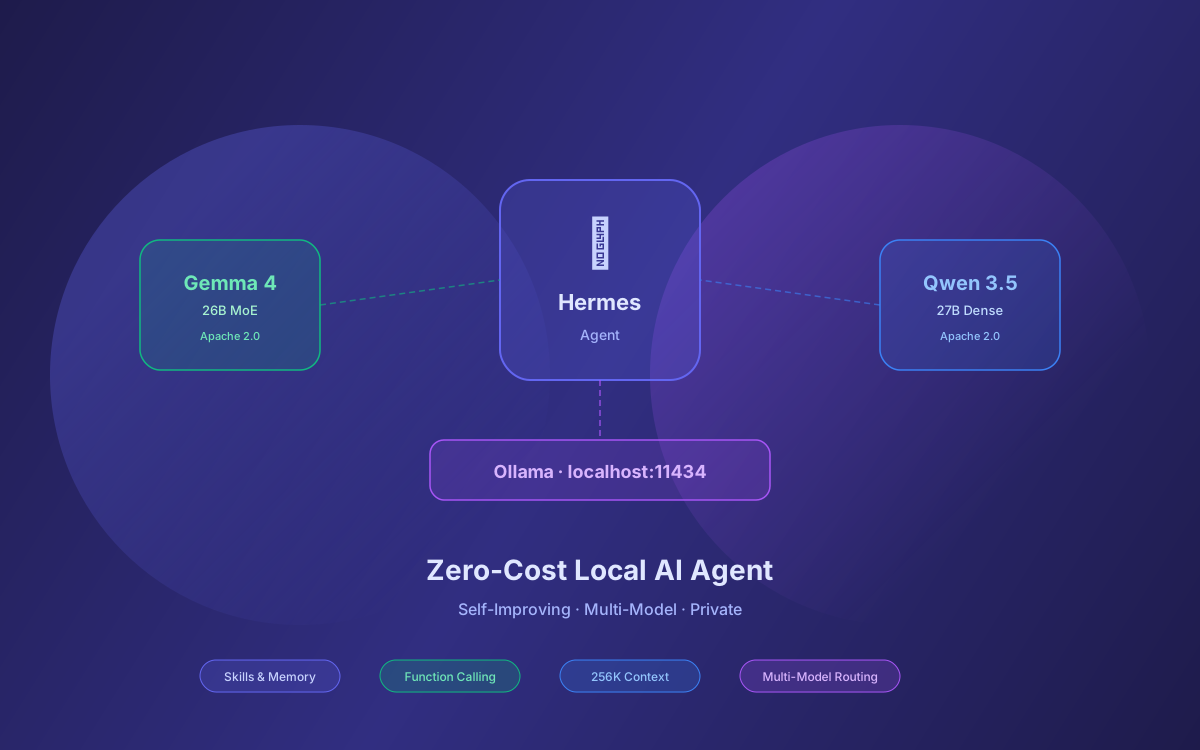
Running an AI agent that learns from experience, remembers across sessions, and costs nothing per token sounds too good to be true. But that's exactly what you get when you pair Hermes Agent with local open-weight models through Ollama.
The problem with most AI agent setups is the recurring API bill. Claude, GPT, and Gemini are powerful, but at $30–$65/month for heavy agent use, costs add up fast. Meanwhile, open-weight models have caught up dramatically: Google's Gemma 4 (released April 2, 2026 under Apache 2.0) and Alibaba's Qwen 3.5 (released February 16, 2026 under Apache 2.0) both deliver frontier-adjacent intelligence that runs entirely on consumer hardware.
This guide walks you through setting up Hermes Agent with both model families via Ollama, compares their strengths for agentic workflows, shows you how to configure multi-model routing, and covers production deployment patterns — all with zero API costs.
📑 What This Guide Covers
- Why Local Models + Hermes Agent
- Gemma 4 Model Family Overview
- Qwen 3.5 Model Family Overview
- Installing Ollama & Pulling Models
- Setting Up Hermes Agent with Ollama
- Gemma 4 vs Qwen 3.5 for Agentic Workflows
- Multi-Model Routing: Best of Both
- Memory, Skills & the Self-Improving Loop
- Hardware Requirements & Performance Tuning
- Production Deployment Patterns
- Why Lushbinary for Your AI Agent Stack
1Why Local Models + Hermes Agent
Hermes Agent is the self-improving AI agent from Nous Research. Released February 25, 2026 under MIT license, it has crossed 64,000+ GitHub stars and become the go-to framework for developers who want an agent that compounds knowledge over time. As of v0.8 (April 2026), it features pluggable memory backends, 40+ built-in tools, MCP server mode, multi-instance profiles, and six terminal backends.
The key insight: Hermes is model-agnostic. It works with any OpenAI-compatible API endpoint. That means you can swap between cloud providers and local inference with a single config change — no code modifications, no lock-in.
Running local models gives you three advantages that cloud APIs can't match:
- Zero marginal cost — No per-token billing. Run thousands of agent tasks per day without watching a usage dashboard.
- Complete privacy — Your data never leaves your machine. Critical for enterprise workflows, healthcare data, financial analysis, or any sensitive context.
- No rate limits — Cloud APIs throttle heavy agent use. Local inference runs as fast as your hardware allows, with no queuing or 429 errors.
The tradeoff has always been quality. But in April 2026, that gap has narrowed dramatically. Gemma 4 31B ranked #3 among open models on the Arena AI text leaderboard at launch. Qwen 3.5 27B ties GPT-5 mini on SWE-bench Verified at 72.4. These aren't toy models — they're production-grade.
2Gemma 4 Model Family Overview
Gemma 4 is Google DeepMind's fourth-generation open-weight model family, released April 2, 2026 under the Apache 2.0 license — a first for the Gemma family. It spans four sizes designed for different deployment scenarios:
| Variant | Params | Type | VRAM | Best For |
|---|---|---|---|---|
| E2B | 2.3B effective / 5.1B total | Dense + PLE | ~4 GB | Phones, IoT, Raspberry Pi |
| E4B | 4B effective | Dense + PLE | ~8 GB | Laptops, balanced local trial |
| 26B A4B (MoE) | 26B total / 4B active | MoE (128 experts, 8+1 active) | ~20 GB | Sweet spot for local agents |
| 31B Dense | 31B | Dense | ~24 GB | Maximum quality, workstations |
All Gemma 4 variants are multimodal (text + image input, with audio on edge models), support 140+ languages, and offer context windows up to 256K tokens. The architecture uses Per-Layer Embeddings (PLE) on edge models and a shared KV cache design that makes multi-turn conversations memory-efficient.
For Hermes Agent, the 26B MoE variant is the sweet spot: it activates only 4B parameters per token (fast inference) while drawing on 26B total parameters for quality. It fits comfortably on an RTX 4090 or M-series Mac with 24+ GB unified memory.
3Qwen 3.5 Model Family Overview
Qwen 3.5 is Alibaba's latest model family, released February 16, 2026 under Apache 2.0. The flagship 397B MoE model activates only 17B parameters per token and beat Claude 4.5 Opus on the HMMT math benchmark. But the real story for local deployment is the smaller variants:
| Variant | Architecture | VRAM | Context | Best For |
|---|---|---|---|---|
| 0.8B | Dense + DeltaNet | ~2 GB | 262K | Edge, phones |
| 9B | Dense + DeltaNet | ~8 GB | 262K | Laptops, budget GPUs |
| 27B | Dense + DeltaNet | ~20 GB | 262K | Coding, long-context reasoning |
| 35B-A3B (MoE) | MoE + DeltaNet | ~12 GB | 1M | Efficient agentic workflows |
The architectural innovation in Qwen 3.5 is the hybrid Gated DeltaNet attention. It alternates between linear attention layers and full softmax attention in a 3:1 ratio. The linear layers maintain constant memory complexity regardless of sequence length, while the full attention blocks handle precision-critical reasoning. This enables up to 19x faster inference at 256K context compared to standard transformer attention.
The 9B model is particularly impressive — it beats GPT-OSS-120B on multiple knowledge benchmarks despite being 13x smaller. For Hermes Agent, the 27B dense model is the recommended pick: it achieves 72.4 on SWE-bench Verified (tying GPT-5 mini) and handles complex multi-step tool-calling workflows reliably.
💡 Key Difference
Gemma 4 uses Per-Layer Embeddings (PLE) for parameter efficiency on edge models. Qwen 3.5 uses Gated DeltaNet for inference speed on long contexts. Both are Apache 2.0. Choose based on your primary workload: multimodal + structured output → Gemma 4. Long-context coding + reasoning → Qwen 3.5.
4Installing Ollama & Pulling Models
Ollama is the fastest path to running both model families locally. It handles quantization, model management, and serves an OpenAI-compatible API that Hermes connects to natively. Ollama v0.20.0 added same-day support for Gemma 4 on April 3, 2026.
Install Ollama
# macOS
brew install ollama
# Linux
curl -fsSL https://ollama.com/install.sh | sh
# Start the Ollama server
ollama serve
Pull Gemma 4 Models
# Edge model (~8 GB VRAM)
ollama pull gemma4:e4b
# MoE sweet spot (~20 GB VRAM) - recommended for Hermes
ollama pull gemma4:26b
# Maximum quality (~24 GB VRAM)
ollama pull gemma4:31b
Pull Qwen 3.5 Models
# Compact powerhouse (~8 GB VRAM)
ollama pull qwen3.5:9b
# Best for coding & reasoning (~20 GB VRAM) - recommended for Hermes
ollama pull qwen3.5:27b
# MoE variant, efficient (~12 GB VRAM)
ollama pull qwen3.5:35b-a3b
Verify your models are available:
ollama list
# Should show gemma4:26b, qwen3.5:27b, etc.
5Setting Up Hermes Agent with Ollama
Hermes Agent connects to Ollama through its custom endpoint configuration. The setup takes under two minutes.
Step 1: Install Hermes Agent
# Linux / macOS / WSL2
curl -fsSL https://raw.githubusercontent.com/NousResearch/hermes-agent/main/scripts/install.sh | bash
# Reload your shell
source ~/.bashrc # or source ~/.zshrc
Step 2: Configure Ollama as Provider
Run the model selection wizard:
hermes model
# Select "More providers…"
# Select "Custom endpoint (enter URL manually)"
# API base URL: http://127.0.0.1:11434/v1
# API key: (leave blank)
# Hermes auto-detects your downloaded models
# Select gemma4:26b or qwen3.5:27b
⚠️ Context Length Requirement
Hermes Agent requires a minimum of 64K tokens of context. When running local models, set the context size explicitly: ollama run gemma4:26b --ctx-size 65536. Ollama auto-detects this during Hermes setup, but verify if you see startup errors.
Step 3: Start Chatting
hermes
# You'll see a welcome banner showing your model,
# available tools, and loaded skills
❯ What can you help me with?
That's it. Hermes is now running entirely on your machine with zero API costs. The agent has access to web search, file operations, terminal commands, and more out of the box.
Quick Model Switching
Want to try a different model? Switch without restarting:
# Switch to Qwen 3.5 27B
hermes model
# Select qwen3.5:27b from detected models
# Or use the /model slash command inside chat
/model
6Gemma 4 vs Qwen 3.5 for Agentic Workflows
Both model families are strong for agent use, but they make different tradeoffs. Here's how they compare on the dimensions that matter most for Hermes Agent workflows:
| Dimension | Gemma 4 (26B MoE) | Qwen 3.5 (27B) |
|---|---|---|
| Function calling | ✅ Native, reliable structured output | ✅ Strong, occasional format drift on complex chains |
| Coding | Good (competitive at ~30B class) | ✅ Excellent (72.4 SWE-bench Verified) |
| Long context | 256K tokens | ✅ 262K–1M tokens (DeltaNet, 19x faster at 256K) |
| Multimodal | ✅ Vision + audio (edge models) | Vision (Qwen3.5-Omni adds audio/video) |
| Inference speed | ✅ Fast (only 4B active params in MoE) | Good (27B dense, but DeltaNet helps at long context) |
| VRAM | ~20 GB | ~20 GB |
| Multilingual | ✅ 140+ languages | ✅ Strong multilingual (CJK especially) |
| License | Apache 2.0 | Apache 2.0 |
When to Choose Gemma 4
- Your agent workflows rely heavily on structured JSON output and function calling — Gemma 4's native function calling is more consistent
- You need multimodal input (analyzing images, screenshots, documents) as part of agent tasks
- You want the fastest inference at the ~20 GB VRAM tier (MoE activates only 4B params)
- You're building agents that serve multilingual users across 140+ languages
When to Choose Qwen 3.5
- Your agent does heavy coding tasks — code generation, refactoring, debugging, PR reviews
- You need long-context reasoning over large codebases, documents, or conversation histories (up to 1M tokens with the 35B-A3B MoE variant)
- You want the strongest math and reasoning at the ~27B parameter class
- You're working primarily with Chinese, Japanese, or Korean content where Qwen has a natural advantage
🎯 Our Recommendation
For most Hermes Agent users, start with Gemma 4 26B MoE for general-purpose agent tasks (fast, reliable function calling, good quality). Switch to Qwen 3.5 27B for coding-heavy sessions. Use multi-model routing (next section) to get the best of both automatically.
7Multi-Model Routing: Best of Both
One of Hermes Agent's most powerful features is its ability to switch models on the fly. With both Gemma 4 and Qwen 3.5 pulled in Ollama, you can configure multi-instance profiles to route different task types to the optimal model.
Profile-Based Routing
Hermes v0.6.0 introduced multi-instance profiles. You can run separate agent instances, each configured with a different model:
# Create a Gemma 4 profile for general tasks
hermes profile create general --model gemma4:26b
# Create a Qwen 3.5 profile for coding tasks
hermes profile create coder --model qwen3.5:27b
# Run the general agent
hermes --profile general
# Run the coding agent in another terminal
hermes --profile coder
Hybrid Local + Cloud Routing
For the best cost-quality balance, use local models for routine tasks and fall back to a cloud model for complex reasoning:
🏠 Local (90% of tasks)
- Gemma 4 26B for file ops, web search, scheduling
- Qwen 3.5 27B for code generation, debugging
- Cost: $0/month
☁️ Cloud (10% of tasks)
- Claude or GPT for complex multi-step reasoning
- Fallback when local model struggles
- Cost: $2–5/month typical
8Memory, Skills & the Self-Improving Loop
Hermes Agent's self-improving loop is what sets it apart from every other agent framework. It works identically with local models — the learning system is model-agnostic.
How the Learning Loop Works
- Task completion — After finishing a complex task, Hermes analyzes what it did and extracts reusable patterns
- Skill creation — It writes these patterns as Markdown skill files stored in
~/.hermes/skills/ - Skill loading — When a similar task comes up, Hermes loads the relevant skill into context before starting
- Self-evaluation — Every 15 tasks, the agent evaluates its performance and refines its approach
- Skill improvement — Skills that produce better outcomes get updated; underperforming ones get revised
Four-Tier Memory Architecture
As of v0.7.0, Hermes uses a four-tier memory system designed to maximize provider-side prompt caching:
Working Memory
Current conversation context. Fits within the model's context window.
Session Memory
SQLite + FTS5 full-text search. Persists across restarts within a session.
Long-Term Memory
LLM-summarized history. Recalled via semantic search when relevant.
Skill Memory
Markdown skill files. Loaded into context when matching tasks are detected.
With v0.7.0's pluggable memory backends, you can swap in vector stores, Honcho, or custom databases for the long-term memory tier. This is especially useful when running local models, since you can keep everything on your own infrastructure.
Installing Community Skills
Hermes has a growing skills ecosystem. You can browse and install community-contributed skills:
# Search for skills
hermes skills search kubernetes
hermes skills search react --source skills-sh
# Install a skill
hermes skills install openai/skills/k8s
hermes skills install official/security/1password
9Hardware Requirements & Performance Tuning
Running Hermes with local models requires enough VRAM (or unified memory on Apple Silicon) to hold the model weights plus the KV cache for the context window. Here's a practical hardware guide:
| Hardware | Memory | Recommended Models | Tokens/sec (approx) |
|---|---|---|---|
| MacBook Air M2/M3 (8 GB) | 8 GB unified | Gemma 4 E4B, Qwen 3.5 9B | 15–25 tok/s |
| MacBook Pro M3/M4 (16–24 GB) | 16–24 GB unified | Gemma 4 26B MoE, Qwen 3.5 27B | 10–20 tok/s |
| RTX 4090 (24 GB) | 24 GB VRAM | Gemma 4 31B, Qwen 3.5 27B | 25–40 tok/s |
| Mac Studio M4 Ultra (64–192 GB) | 64+ GB unified | All variants, multiple simultaneous | 20–35 tok/s |
Performance Tuning Tips
- Context size tradeoff: Larger context windows consume more memory. Start with
--ctx-size 65536(64K, Hermes minimum) and increase only if your workflows need it. - Quantization: Ollama defaults to Q4_K_M quantization, which is a good balance. For maximum quality on capable hardware, use
ollama pull gemma4:31b-fp16. - GPU offloading: On systems with limited VRAM, Ollama automatically splits layers between GPU and CPU. More GPU layers = faster inference.
- Concurrent models: If running both Gemma 4 and Qwen 3.5 for multi-model routing, ensure you have enough total memory for both. Ollama keeps recently used models in memory.
- Batch size: For agent workflows (single-user, sequential), the default batch size is fine. Don't increase it unless you're serving multiple users.
10Production Deployment Patterns
Running Hermes with local models in production requires a few additional considerations beyond the basic setup.
Pattern 1: Personal VPS Agent
The simplest production setup. Run Hermes + Ollama on a GPU VPS and connect via messaging platforms:
# On your VPS (e.g., Lambda Labs, Vast.ai, RunPod)
# 1. Install Ollama + pull models
curl -fsSL https://ollama.com/install.sh | sh
ollama pull gemma4:26b
ollama pull qwen3.5:27b
# 2. Install Hermes
curl -fsSL https://raw.githubusercontent.com/NousResearch/hermes-agent/main/scripts/install.sh | bash
# 3. Configure Ollama endpoint
hermes setup
# 4. Connect messaging (Telegram, Discord, etc.)
hermes gateway setup
# 5. Start the gateway (runs 24/7)
hermes gateway start
Cost: A GPU VPS with 24 GB VRAM (enough for Gemma 4 26B or Qwen 3.5 27B) runs $0.30–$0.80/hour on spot instances, or roughly $50–$150/month for always-on. Compare that to $30–$65/month in API costs for heavy cloud model usage — and you get unlimited tokens.
Pattern 2: Sandboxed Docker Deployment
For security, run Hermes in a Docker container with sandboxed terminal access:
# Configure Docker sandboxing
hermes config set terminal.backend docker
# Or use SSH for remote server isolation
hermes config set terminal.backend ssh
Pattern 3: MCP Server Mode
Hermes v0.6.0 added native MCP server capabilities. You can expose Hermes as an MCP server that other tools (VS Code, Kiro, JetBrains) can connect to:
pip install 'hermes-agent[acp]'
hermes acp
Pattern 4: Scheduled Automation
Hermes can set up cron jobs that run automatically via the messaging gateway. This is powerful with local models because there's no per-invocation cost:
# Inside Hermes chat:
❯ Every morning at 9am, check Hacker News for AI news
and send me a summary on Telegram.
# Hermes creates a cron job automatically
# Runs via the gateway with zero API cost
0System Architecture
11Why Lushbinary for Your AI Agent Stack
Setting up Hermes Agent with local models is straightforward for a single developer. But deploying it as part of a production system — with proper security, monitoring, multi-model routing, and integration with your existing infrastructure — requires expertise across AI, DevOps, and application architecture.
At Lushbinary, we've deployed Hermes Agent, Gemma 4, and Qwen 3.5 in production environments for clients across industries. Our team specializes in:
- Local AI agent architecture — Designing multi-model routing systems that balance cost, quality, and latency
- GPU infrastructure — Selecting and configuring the right hardware (cloud GPU, on-prem, Apple Silicon) for your workload
- Hermes customization — Building custom skills, MCP integrations, and messaging gateway configurations
- Security hardening — Docker sandboxing, SSH isolation, and access control for production agent deployments
- AWS deployment — Running Ollama + Hermes on EC2 GPU instances with auto-scaling and cost optimization
🚀 Free Consultation
Want to deploy a self-improving AI agent that runs on your own infrastructure with zero API costs? Lushbinary specializes in local AI agent deployments with Hermes, Gemma 4, and Qwen 3.5. We'll scope your project, recommend the right model and hardware configuration, and give you a realistic timeline — no obligation.
❓ Frequently Asked Questions
Can Hermes Agent run with local models like Gemma 4 and Qwen 3.5?
Yes. Hermes Agent supports any OpenAI-compatible endpoint, including Ollama. You can run Gemma 4 (E4B, 26B, or 31B) or Qwen 3.5 (9B, 27B, or 35B-A3B) locally via Ollama and point Hermes to http://127.0.0.1:11434/v1 as a custom endpoint.
What hardware do I need to run Hermes with Gemma 4 or Qwen 3.5 locally?
Gemma 4 E4B needs ~8 GB VRAM, Gemma 4 26B MoE needs ~20 GB, and Gemma 4 31B Dense needs ~24 GB. Qwen 3.5 9B needs ~8 GB, Qwen 3.5 27B needs ~20 GB, and Qwen 3.5 35B-A3B MoE needs ~12 GB. An M-series Mac with 16-32 GB unified memory or an RTX 4090 covers most variants.
Which model is better for Hermes Agent: Gemma 4 or Qwen 3.5?
Gemma 4 31B excels at structured output, function calling, and multimodal tasks. Qwen 3.5 27B is stronger at long-context reasoning (up to 1M tokens with hybrid DeltaNet attention) and coding benchmarks. For agentic workflows, Gemma 4 26B MoE offers the best balance of speed and quality at lower VRAM cost.
How does Hermes Agent's self-improving loop work with local models?
Hermes creates reusable skill documents from completed tasks, stores them as Markdown files, and loads them when similar tasks arise. Every 15 tasks it self-evaluates. This works identically with local models - the learning loop is model-agnostic and runs entirely on your machine.
Is running Hermes Agent with local models free?
Yes. Hermes Agent is MIT-licensed and free. Ollama is free. Gemma 4 is Apache 2.0 and Qwen 3.5 is Apache 2.0. The only cost is your hardware electricity. A $5/month VPS can run smaller variants like Gemma 4 E4B or Qwen 3.5 9B.
📚 Sources
- Google AI — Gemma 4 Release Notes
- Hugging Face — Gemma 4 Blog
- Nous Research — Hermes Agent Quickstart
- Ollama — Hermes Agent Integration
- Hugging Face — Qwen 3.5 Architecture Deep Dive
Content was rephrased for compliance with licensing restrictions. Model specifications sourced from official release documentation as of April 2026. Pricing and availability may change — always verify on the vendor's website.
Deploy a Self-Improving AI Agent on Your Infrastructure
Let Lushbinary set up Hermes Agent with Gemma 4 and Qwen 3.5 on your hardware — zero API costs, complete privacy, and an agent that gets smarter every day.
Ready to Build Something Great?
Get a free 30-minute strategy call. We'll map out your project, timeline, and tech stack - no strings attached.
Prefer email? Reach us directly: