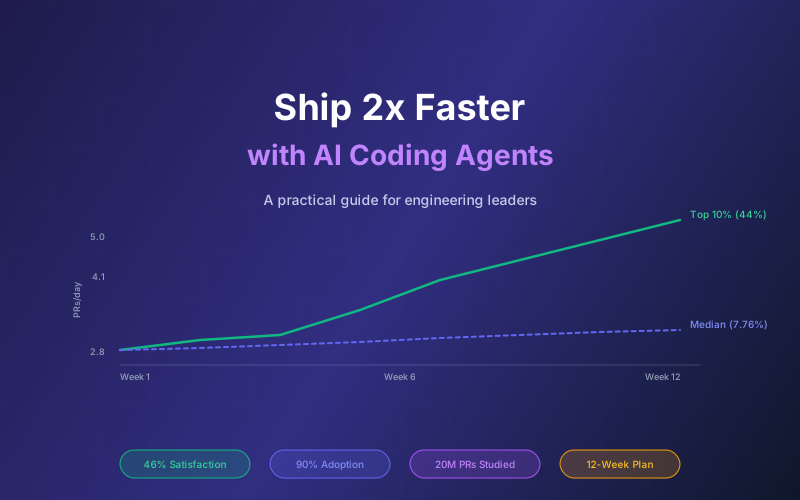

63% of companies now use AI tools for most coding (Jellyfish, March 2026). Top adopters nearly doubled their weekly pull requests. But the median team saw only 7.76% throughput gain despite 65% more AI tool usage. The difference between 2x output and marginal improvement is not which tool you buy. It is how you deploy it across your team.
This guide is for engineering leaders who need to roll out AI coding agents across a team and demonstrate measurable ROI. We cover tool selection, workflow design, measurement frameworks, and the anti-patterns that turn a productivity investment into a quality liability. Every claim is backed by the 2025 DORA report, DX Research benchmarks, and Jellyfish's 20-million-PR study.
For a detailed tool-by-tool comparison, see our AI Coding Agents Comparison. For team-level AI architecture, see Claude Code Agent Teams.
What This Guide Covers
- The 2026 AI Coding Landscape: Who Uses What
- Tool Selection Framework for Teams
- The Golden-Path Workflow Model
- Prompt Libraries and Context Engineering
- Redesigning Code Review for AI Output
- The Measurement Framework That Convinces Leadership
- Rollout Playbook: Week-by-Week
- Anti-Patterns and Quality Guardrails
- Cost Optimization at Scale
- Why Lushbinary for AI Adoption Strategy
1The 2026 AI Coding Landscape: Who Uses What
90% of developers now use at least one AI coding tool (Stack Overflow 2026 Developer Survey). The median developer spends 2 hours per day with AI coding tools. But adoption is fragmented across tools and use cases.
| Tool | Primary Adoption | Strength | Best For |
|---|---|---|---|
| Claude Code | 28% | Agentic multi-file work | Complex refactors, architecture, full features |
| Cursor | 24% | Autocomplete + inline editing | Fast iteration, small edits, exploration |
| GitHub Copilot | Largest installed base | Enterprise distribution | Microsoft ecosystem, procurement ease |
| Kiro | Growing | Spec-driven development | Structured features, AWS-native teams |
| OpenAI Codex | Emerging | Autonomous sub-agents | Parallel task execution, CI integration |
Key Finding
Most developers run a 3-tool stack rather than committing to one (Digital Applied, 2026 survey). The winning pattern is Claude Code for agentic work + Cursor or Copilot for inline assistance + a specialized tool for your domain (Kiro for spec-driven, Codex for parallel tasks).
2Tool Selection Framework for Teams
Choosing tools for a team is different from individual selection. You need to consider procurement, security review, shared workflows, and cost at scale.
Decision Criteria
| Criterion | Claude Code | Cursor | Copilot |
|---|---|---|---|
| Team plan cost | $100/seat/mo | $40/seat/mo | $19/user/mo |
| SSO/SAML | Enterprise only | Enterprise only | Enterprise ($39/user) |
| Admin controls | Team plan | Business plan | Business plan |
| Shared context/rules | CLAUDE.md, project files | .cursorrules, team rules | .github/copilot-instructions |
| Agentic capability | Strongest (Agent Teams) | Good (Auto mode) | Growing (Copilot Workspace) |
| Data retention policy | No training on Team/Enterprise | Privacy mode available | No training on Business/Enterprise |
Recommended Stack by Team Size
- 2-5 engineers (startup): Claude Code Pro ($20/mo each) + Cursor Pro ($20/mo each) = $40/dev/mo. Total: $80-$200/mo
- 5-20 engineers (growth): Claude Code Team ($100/seat/mo) + Cursor Business ($40/seat/mo) = $140/dev/mo. Total: $700-$2,800/mo
- 20-50 engineers (scale): Claude Enterprise + Cursor Enterprise or Copilot Enterprise ($39/user/mo). Custom pricing, typically $80-$150/dev/mo blended
3The Golden-Path Workflow Model
A golden-path workflow is a pre-defined, AI-assisted sequence for common development tasks. Instead of letting each developer figure out their own prompting strategy, you define the optimal path and make it the default. This reduces variance between developers and creates a quality floor that even junior engineers can hit consistently.
The concept is borrowed from platform engineering: just as internal developer platforms provide golden paths for infrastructure, AI workflow design provides golden paths for coding tasks. Teams that define these paths see the highest productivity gains because every developer benefits from the best prompting patterns, not just the early adopters.
Feature Scaffolding Workflow
- Trigger: Developer creates a new feature branch and runs the scaffolding command
- AI tool: Claude Code reads the project context file (CLAUDE.md), generates boilerplate matching team conventions
- Human checkpoint: Developer reviews generated structure, adjusts naming and architecture decisions
- Quality gate: Linter passes, type-check passes, generated tests run green before any implementation begins
Bug Fix Workflow
- Trigger: Bug ticket assigned, developer pastes the error trace into the AI tool
- AI tool: Claude Code or Cursor analyzes the stack trace, identifies root cause, proposes a fix with a regression test
- Human checkpoint: Developer validates the root cause analysis, confirms the fix addresses the actual issue (not just the symptom)
- Quality gate: Regression test proves the bug is fixed, existing test suite still passes, no new warnings introduced
Refactoring Workflow
- Trigger: Tech debt ticket or pre-feature cleanup identified in planning
- AI tool: Claude Code performs multi-file refactoring with full context of the codebase architecture
- Human checkpoint: Senior engineer reviews architectural decisions, confirms the refactor maintains backward compatibility
- Quality gate: Full test suite passes, no public API changes without explicit approval, performance benchmarks unchanged
Documentation Workflow
- Trigger: New feature merged, or documentation debt flagged in sprint retro
- AI tool: Claude Code reads the implementation, generates API docs, usage examples, and architecture decision records
- Human checkpoint: Developer verifies accuracy of examples, adds context that only a human would know (why decisions were made, tradeoffs considered)
- Quality gate: Documentation builds without errors, code examples compile and run, links resolve correctly
Why Golden Paths Work
Without golden paths, your best developer might get 40% productivity gains while your average developer gets 5%. Golden paths compress that variance by encoding the best prompting patterns, context strategies, and review checkpoints into repeatable workflows that everyone follows.
4Prompt Libraries and Context Engineering
Shared prompt libraries are the difference between a team where everyone reinvents the wheel and a team where institutional knowledge compounds. When one developer discovers a prompting pattern that produces better output, the entire team benefits immediately. This creates a quality floor: even on day one, a new hire produces output at the team's established standard.
Context engineering is the new skill that separates top performers from average AI users. It is the practice of structuring project information so AI tools can access the right context at the right time. Developers who invest in context files, prompt templates, and domain knowledge documents consistently outperform those who rely on ad-hoc prompting.
Project Context Files
Every major AI coding tool supports a project-level context file that gets automatically included in every interaction. These files are the single highest-leverage investment for team productivity.
- CLAUDE.md: Project context for Claude Code, loaded automatically at session start
- .cursorrules: Rules and conventions for Cursor, applied to all AI interactions in the project
- .github/copilot-instructions.md: Instructions for GitHub Copilot across the repository
- .kiro/steering/: Steering files for Kiro that provide domain-specific guidance
Example CLAUDE.md Structure
# Project Context

## Architecture
- Next.js 15 App Router with TypeScript
- PostgreSQL via Prisma ORM
- Tailwind CSS for styling
- Deployed on AWS via CDK

## Conventions
- Use server components by default
- Client components only when interactivity needed
- All API routes return typed responses
- Error handling: use Result pattern, never throw

## Testing
- Vitest for unit tests
- Playwright for E2E
- Minimum 80% coverage on new code

## Domain Knowledge
- Users are called "members" in the UI
- Billing uses Stripe, webhooks in /api/webhooks/stripe
- Feature flags via LaunchDarkly

## Do Not
- Never use any-typed variables
- Never skip error handling
- Never commit .env files
- Never use default exports (except pages)
Task-Specific Prompts
Beyond project context, maintain a library of task-specific prompt templates that encode your team's best practices:
- Code review prompt: Includes your team's review checklist, security concerns, and performance criteria
- Migration prompt: Includes database migration safety rules, rollback requirements, and data validation steps
- API design prompt: Includes your REST/GraphQL conventions, pagination patterns, and error response formats
- Test writing prompt: Includes your testing philosophy, coverage expectations, and mocking strategies
Domain Knowledge Files
For complex domains (fintech, healthcare, legal), maintain separate knowledge files that AI tools can reference. These include business rules, regulatory requirements, domain terminology, and architectural constraints specific to your industry. Store them in a dedicated directory (like .kiro/steering/ or docs/ai-context/) and reference them from your main context file.
5Redesigning Code Review for AI Output
The 2025 DORA report found that AI adoption increased time spent in PR review by 441%. This is the most dangerous finding in the report: more AI-generated code creates a review bottleneck that burns out senior engineers and slows the entire team. If you double PR output without redesigning review, you have not improved productivity. You have moved the bottleneck.
The solution is tiered review: not all code changes carry the same risk, and not all AI output needs the same level of human scrutiny.
Tiered Review Model
- Tier 1 - Auto-approve (low risk): Documentation updates, test additions, dependency bumps with passing CI, formatting changes. These pass through automated checks only.
- Tier 2 - Light review (medium risk): Bug fixes with regression tests, feature additions to existing patterns, UI changes within design system. One reviewer, 4-hour SLA.
- Tier 3 - Deep review (high risk): New architecture patterns, security-sensitive code, database migrations, public API changes. Two reviewers, senior engineer required.
Automated Checks for AI Output
- Hallucination detection: Check for imports of non-existent packages, references to APIs that do not exist in your codebase, and invented function signatures
- Pattern compliance: Verify AI output follows your established patterns (error handling, logging, authentication checks) rather than introducing new ones
- Security scanning: Run SAST tools specifically looking for common AI mistakes: hardcoded secrets, SQL injection from string concatenation, missing input validation
- Test coverage gates: Require that AI-generated code includes tests, and that those tests actually exercise the new logic (not just boilerplate assertions)
Trust Levels Based on Experience
Not every developer has the same skill at directing AI tools. Establish trust levels: developers who consistently produce high-quality AI-assisted PRs earn lighter review requirements over time. New AI users start at Tier 3 review for all changes and graduate to lighter review as they demonstrate proficiency. This mirrors the existing pattern of senior engineers having more autonomy in code review.
6The Measurement Framework That Convinces Leadership
Engineering leaders need metrics that translate to business outcomes. Lines of code generated is a vanity metric that tells leadership nothing about value delivered. Here is the framework that works: lead with indicators that move fast, validate with lagging indicators that prove business impact, and protect with quality guardrails that prevent regression.
Leading Indicators (Move Within Weeks)
- PR throughput per developer: DX Research found daily Claude users average 4.1 PRs/day vs. 2.8 baseline. This is your fastest signal of adoption impact.
- Cycle time (commit to deploy): Measures how quickly code moves through your pipeline. AI should reduce this by accelerating both writing and review.
- Adoption rate: Percentage of developers actively using AI tools daily (not just installed). Target 80%+ daily active usage within 8 weeks.
- Time in review: Track whether review time is increasing (bottleneck forming) or stable (review process adapted successfully).
Lagging Indicators (Prove Business Value)
- Features shipped per sprint: The metric leadership cares about most. Track story points or features completed per two-week sprint.
- Cost per feature: Total engineering cost (salaries + tools) divided by features shipped. AI tools should reduce this even after accounting for tool costs.
- Time to market: Days from feature request to production deployment. This is the CFO metric that justifies continued investment.
Quality Guardrails (Prevent Regression)
- Change failure rate: Percentage of deployments that cause incidents. DORA found AI adoption increased incidents per PR by 242.7% for teams without guardrails.
- Revert rate: Percentage of PRs that get reverted within 48 hours. A rising revert rate signals quality problems regardless of throughput gains.
- Incident rate per PR: Normalize incidents by PR volume. If you ship 2x PRs but incidents stay flat, your quality per PR actually improved.
Avoid Vanity Metrics
Lines of code generated, suggestions accepted, and chat messages sent are activity metrics, not outcome metrics. A developer who accepts 200 AI suggestions per day but ships the same number of features is not more productive. Measure what reaches production and creates business value, not what happens inside the IDE.
7Rollout Playbook: Week-by-Week
A phased rollout with measurement at every stage is the only way to prove ROI and catch problems early. Rushing to full deployment without baselines means you can never prove the investment worked.
Week 1-2: Baseline and Setup
- Measure current state: Record PR throughput, cycle time, features per sprint, and change failure rate for the past 4 sprints
- Tool procurement: Complete security review, sign enterprise agreements, configure SSO and admin controls
- Pilot team selection: Choose 3-5 developers who are enthusiastic but representative of your team's skill distribution (not just your best engineers)
- Create initial context files: Write CLAUDE.md and .cursorrules with your project conventions, architecture, and domain knowledge
Week 3-4: Pilot Team Onboarding
- Hands-on training: 2-hour workshop covering tool basics, prompting patterns, and your golden-path workflows
- Initial prompt library: Seed with 5-10 task-specific prompts for your most common development tasks
- First golden paths: Implement the feature scaffolding and bug fix workflows, document them in your wiki
- Daily standups: Add a 2-minute AI tool check-in to standups. What worked? What did not? What prompts should we share?
Week 5-8: Expand and Iterate
- Expand to 2-3 teams: Onboard additional teams using lessons learned from the pilot. Pilot team members become mentors.
- Iterate on workflows: Refine golden paths based on pilot feedback. Add refactoring and documentation workflows.
- Measure delta: Compare pilot team metrics to baseline. Expect 20-40% PR throughput improvement for engaged users.
- Adjust review process: Implement tiered review if review time is increasing. Train reviewers on AI-specific review patterns.
Week 9-12: Full Rollout
- Organization-wide deployment: All engineering teams onboarded with access to tools, prompt libraries, and golden paths
- Leadership reporting: Present before/after metrics to engineering leadership and finance. Focus on features shipped and cost per feature.
- Role adjustment discussions: Begin conversations about how roles evolve. More time on architecture and review, less on boilerplate implementation.
- Continuous improvement: Establish a monthly cadence for updating prompt libraries, refining workflows, and sharing best practices across teams
Critical Rule
Measure before and after at every stage. Without baselines, you cannot prove ROI. Without ongoing measurement, you cannot detect quality regression. The teams that fail at AI adoption are almost always the ones that skipped measurement and jumped straight to "everyone use AI now."
8Anti-Patterns and Quality Guardrails
After working with dozens of engineering teams on AI adoption, these are the four most common failure modes. Each one turns a productivity investment into a quality liability.
Anti-Pattern: Spray and Pray
Buying seats for every developer without designing workflows, creating context files, or establishing golden paths. Result: inconsistent output quality, no measurable improvement, and leadership concludes AI tools "don't work." The tool is not the problem. The absence of workflow design is.
Anti-Pattern: Review Bypass
Skipping or rubber-stamping code review because "the AI wrote it so it must be correct." AI-generated code needs more scrutiny in some areas (hallucinated imports, subtle logic errors) and less in others (formatting, boilerplate). Bypassing review entirely is how you get the 242.7% incident increase DORA found.
Anti-Pattern: Context Starvation
Not providing project context to AI tools. Without CLAUDE.md, .cursorrules, or equivalent context files, the AI generates generic code that does not match your conventions, uses wrong patterns, and requires extensive rework. Context files take 2 hours to write and save hundreds of hours in corrections.
Anti-Pattern: Metric Gaming
Optimizing PR count without quality checks. Developers split work into tiny PRs to inflate throughput numbers, or accept AI suggestions without review to hit adoption targets. Always pair throughput metrics with quality guardrails (change failure rate, revert rate) to prevent gaming.
Quality Guardrails to Implement
- Automated SAST/DAST: Run static and dynamic application security testing on every PR. Tools like Semgrep, Snyk, and SonarQube catch common AI mistakes (SQL injection, hardcoded secrets, missing auth checks).
- AI-specific linting rules: Create custom lint rules that catch patterns AI tools commonly produce incorrectly: unused imports, overly broad type assertions, missing error handling in async code.
- Architecture compliance checks: Use tools like ArchUnit or custom CI checks to verify AI-generated code follows your layered architecture, dependency rules, and module boundaries.
- Mandatory test coverage: Require that AI-generated code includes tests with meaningful assertions. Block PRs where new code lacks corresponding test coverage.
9Cost Optimization at Scale
AI coding tools are not free, and costs add up quickly across a team. The right pricing strategy depends on usage patterns, team size, and how heavily developers lean on agentic features vs. autocomplete.
Subscription vs. Pay-As-You-Go
| Option | Cost | Best For |
|---|---|---|
| Claude Max (subscription) | $100-$200/mo per user | Heavy daily users who hit API limits |
| Claude API (pay-as-you-go) | Variable, typically $50-$300/mo | Teams with variable usage, budget control needed |
| Cursor Pro+ | $60/mo per user | Individual power users who want unlimited requests |
| Cursor Business | $40/seat/mo | Teams needing admin controls, centralized billing |
Model Selection by Task
Not every task needs the most expensive model. Smart teams route tasks to the appropriate model tier:
- Expensive models (Opus, GPT-4o): Architecture decisions, complex multi-file refactors, security-sensitive code, novel problem solving
- Mid-tier models (Sonnet, GPT-4o-mini): Feature implementation, bug fixes, code review, documentation generation
- Cheap models (Haiku, GPT-3.5): Autocomplete, simple formatting, boilerplate generation, commit message writing
Budget Formula
For a well-equipped engineering team, expect to budget $100-$200 per developer per month across all AI tools. This typically breaks down as: $60-$100 for the primary agentic tool (Claude Code or equivalent) + $40-$60 for the IDE assistant (Cursor or Copilot) + $20-$40 for supplementary tools and API usage.
ROI Math
Monthly tool cost per developer:     $150
Hours saved per week (conservative):  5 hours
Loaded cost per engineer hour:        $75
Monthly value of saved time:          5 hrs x 4.3 weeks x $75 = $1,612
Net monthly ROI per developer:        $1,612 - $150 = $1,462
Annual ROI per developer:             $1,462 x 12 = $17,550
ROI multiple:                         10.7x return on tool investment
Even at conservative estimates (5 hours saved per week), the ROI is compelling. The DX Research data showing 46% more PRs for daily users suggests the actual time savings may be higher for engaged teams. The key is ensuring those saved hours translate to shipped features, not just more code that sits in review.
10Why Lushbinary for AI Adoption Strategy
Rolling out AI coding tools across an engineering team is not a procurement exercise. It is a workflow transformation that touches tool selection, process design, measurement, training, and culture. Most teams that fail at AI adoption did not pick the wrong tool. They skipped the workflow design that makes any tool effective.
Lushbinary helps engineering teams ship faster with AI through a structured adoption program:
- Readiness assessment: Evaluate your current workflows, identify bottlenecks, and determine which AI tools fit your stack and team structure
- Tool selection and procurement: Navigate the fragmented AI tool landscape, negotiate enterprise agreements, and configure security controls
- Workflow design: Build golden-path workflows, prompt libraries, and context files tailored to your codebase and domain
- Measurement dashboards: Set up tracking for leading indicators, lagging indicators, and quality guardrails so you can prove ROI to leadership
- Team training: Hands-on workshops covering prompting patterns, context engineering, and AI-assisted code review for your specific tech stack
Free AI Adoption Consultation
Book a free 30-minute consultation to assess your team's AI readiness, identify quick wins, and get a customized rollout plan. We will review your current workflow, recommend the right tool stack, and outline the measurement framework for your specific situation.
Book Free ConsultationRelated Resources
- AI Coding Agents Comparison 2026: Cursor vs Claude Code vs Copilot vs Kiro
- Claude Code Agent Teams: Multi-Agent Development Guide
- AI Code Review Tools Comparison 2026
Frequently Asked Questions
Which AI coding agent ships the most code in 2026?
Claude Code leads PR throughput at 4.1 PRs/day for daily users (DX Research Q1 2026), up from 2.6 for weekly users one quarter prior. It also leads developer satisfaction at 46% in the March 2026 Stack Overflow survey. Claude Code (28%) and Cursor (24%) account for over half of primary-tool selections among developers.
What is the actual productivity gain from AI coding tools?
Median gains are modest: DX Research found 7.76% median PR throughput increase despite 65% more AI usage. But top performers (90th percentile) see approximately 44% gains. Jellyfish's 20-million-PR study found top adopters nearly doubled weekly PRs. The difference is workflow design, not just tool adoption. Teams that restructure reviews, build prompt libraries, and invest in context files see the highest returns.
How should engineering leaders measure AI coding tool ROI?
Track four metrics: PR throughput per developer (leading indicator), features shipped per sprint (business outcome), change failure rate (quality guardrail), and cost per feature (CFO metric). DX Research provides baseline benchmarks: 2.8 PRs/day pre-AI rising to 4.1 for daily Claude users. Avoid vanity metrics like "lines of code generated" which correlate poorly with business value.
Should my team use Claude Code, Cursor, or GitHub Copilot?
Most teams run a multi-tool stack. Claude Code dominates agentic work (multi-file changes, complex refactors, architecture tasks). Cursor wins autocomplete and inline editing. Copilot has the largest installed base due to Microsoft enterprise distribution. The DX Research data shows developers typically use 3 tools rather than committing to one. Start with Claude Code for agentic tasks and Cursor or Copilot for inline assistance.
What are the risks of adopting AI coding agents too fast?
The 2025 DORA report found AI adoption increased time-in-PR-review by 441% and incidents per PR by 242.7%. Without workflow redesign, more AI-generated code creates a review bottleneck that burns out senior engineers. Other risks include security vulnerabilities from hallucinated code, technical debt from AI solving immediate problems without architectural consideration, and over-reliance that degrades team skills over time.
Sources
- DORA 2025 Accelerate State of DevOps Report - AI adoption impact on review time and incident rates
- DX Research Q1 2026 Developer Benchmarks - PR throughput data for Claude Code daily users (4.1 PRs/day vs. 2.8 baseline)
- Jellyfish Engineering Intelligence Report (March 2026) - 20-million-PR study on AI adoption patterns and productivity outcomes
- Stack Overflow 2026 Developer Survey - 90% AI tool adoption rate, Claude Code satisfaction at 46%
- Anthropic Claude Code Documentation - Team plans, CLAUDE.md context files, Agent Teams feature
- Cursor Pricing Page - Pro+ ($60/mo), Business ($40/seat/mo) plan details
Content was rephrased for compliance with licensing restrictions. All statistics cited from primary sources linked above. Pricing accurate as of July 2025 and subject to change.
Ready to Ship Faster with AI Coding Agents?
Get a customized AI adoption strategy for your engineering team. We help you select tools, design workflows, and measure results.
Ready to Build Something Great?
Get a free 30-minute strategy call. We'll map out your project, timeline, and tech stack - no strings attached.
Prefer email? Reach us directly: