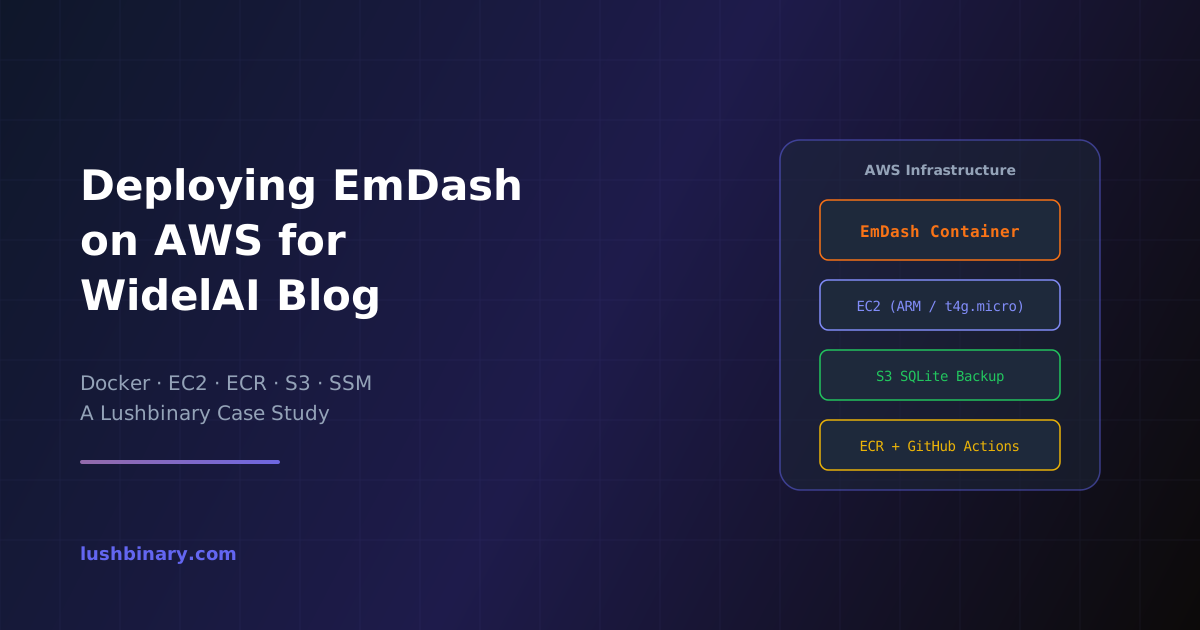
When WidelAI needed a modern blog to complement their AI platform, the team at Lushbinary chose EmDash - Cloudflare's open-source CMS built on Astro - and deployed it on AWS. This post walks through the architecture decisions, the infrastructure we built with Terraform, the CI/CD pipeline, and the lessons learned running EmDash in production on EC2 instead of Cloudflare Workers.
EmDash launched on April 1, 2026 as a spiritual successor to WordPress. It's written entirely in TypeScript, uses Astro 6 as its rendering engine, stores content in SQLite, and ships with sandboxed plugins, a built-in admin UI, and native MCP server support for AI agents. While Cloudflare designed it to run on Workers with D1, EmDash also runs on any standard Node.js environment - which is exactly what we leveraged for WidelAI.
📑 What This Case Study Covers
- Why EmDash Over WordPress or a Headless CMS
- Architecture Overview
- Terraform Infrastructure
- The EmDash Bootstrap Script
- CI/CD Pipeline with GitHub Actions
- SQLite Backup Strategy
- Self-Healing with Auto Scaling Groups
- Cost Breakdown
- EmDash on AWS vs. Cloudflare Workers
- Seed File and Content Schema
- Lessons Learned
- Monitoring and Alerts
1Why EmDash Over WordPress or a Headless CMS
WidelAI already had a Next.js frontend at widelai.com and a Node.js backend on EC2. Adding WordPress would have meant managing PHP, MySQL, and an entirely separate stack. A headless CMS like Contentful or Sanity would have added a third-party dependency and recurring SaaS costs.
EmDash fit the bill because:
Same Stack
TypeScript and Node.js, matching the existing WidelAI backend
SQLite Storage
No additional database to manage; the data file lives on disk and backs up to S3
Self-Hosted
Full control over data, no vendor lock-in, no per-seat pricing
Admin UI Included
Content editors get a polished admin panel at /_emdash/admin without extra setup
Astro-Powered Theming
Server-rendered pages with excellent SEO out of the box
Open Source (MIT)
No licensing concerns for commercial use
2Architecture Overview
The WidelAI infrastructure runs entirely in us-east-1 on AWS. The backend API and EmDash CMS share the same EC2 instance inside an Auto Scaling Group, each running as a separate Docker container.
| Component | Technology | Purpose |
|---|---|---|
| Compute | EC2 t4g.micro (ARM) | Runs both the backend API and EmDash containers |
| Container Registry | Amazon ECR | Stores Docker images for both services |
| Database (API) | RDS PostgreSQL | Shared RDS instance for dev and prod databases |
| Database (CMS) | SQLite on EBS | EmDash's built-in SQLite, persisted on the EC2 volume |
| Backup | S3 | SQLite database synced to S3 every 5 minutes via cron |
| Secrets | SSM Parameter Store | Environment variables injected at runtime |
| Frontend | S3 + CloudFront | Next.js static export for the main WidelAI site |
| CI/CD | GitHub Actions | Build, push to ECR, deploy via SSM |
💡 Key Insight
EmDash runs as a sidecar container on the same EC2 instance. No additional servers, no additional cost. The ARM-based t4g.micro instance handles both workloads comfortably for a blog with moderate traffic.
3Terraform Infrastructure
All infrastructure is managed with Terraform using workspace-based environment isolation. The dev and prod workspaces share the same module but differ in configuration:
# dev.tfvars (relevant EmDash config)
enable_emdash = true
emdash_ecr_repository_url = "<account-id>.dkr.ecr.<region>.amazonaws.com/emdash-dev"
When enable_emdash is true, Terraform provisions the ECR repository reference and passes the EmDash configuration into the EC2 user data script. The instance bootstraps both the backend API container and the EmDash container on startup.
Environment Isolation
| Setting | Dev | Prod |
|---|---|---|
| Instance Type | t4g.micro | t4g.micro |
| Spot Instances | Optional (cost savings) | Disabled (reliability) |
| Schedule | Business hours only | 24/7 |
| Log Retention | 1 day | 7 days |
| EmDash Domain | blog.dev.widelai.com | blog.widelai.com |
4The EmDash Bootstrap Script
The heart of the deployment is a shell script that runs during EC2 instance initialization. It's stored in S3 and downloaded by the instance's user data on boot. Here's what it does:
- Stops any existing EmDash container - Handles redeployments and ASG instance replacements cleanly
- Restores SQLite from S3 - If a backup exists, it syncs the database from S3 to the local volume before starting EmDash. A fresh instance picks up right where the previous one left off
- Pulls the Docker image from ECR - Authenticates with ECR and pulls the latest EmDash image with retry logic (up to 5 attempts)
- Starts the container - Runs EmDash with
--restart=always, host networking, and the SQLite data directory mounted as a volume - Configures S3 backup cron - Sets up a cron job that syncs the SQLite database to S3 every 5 minutes
# Core container run command
docker run -d --name emdash-cms \
--restart=always \
-e NODE_ENV=production \
-e HOST=0.0.0.0 \
-e PORT=${EMDASH_PORT} \
-e SITE_URL="${SITE_URL}" \
-v "${EMDASH_DATA}":/app/data \
--network host \
--log-driver json-file \
--log-opt max-size=10m \
--log-opt max-file=3 \
--platform linux/arm64 \
"$EMDASH_IMAGE"
Key decisions in this setup:
- Host networking - Avoids Docker bridge overhead and simplifies port management since the instance runs behind an Elastic IP anyway
- Volume mount for data - The
/home/ec2-user/emdash-datadirectory persists across container restarts. SQLite writes go to EBS, not the container's ephemeral filesystem - ARM64 platform - Graviton instances (t4g) offer better price-performance. The Docker image is built for
linux/arm64using QEMU and Buildx in CI
5CI/CD Pipeline with GitHub Actions
The deployment pipeline is triggered on pushes to dev or main branches. It builds a multi-architecture Docker image, pushes it to ECR, and deploys to the running EC2 instance via AWS Systems Manager (SSM) - no SSH required.
Pipeline Steps
- Checkout code and determine environment (
devorprod) based on branch - Configure AWS credentials using GitHub Secrets
- Set up QEMU + Docker Buildx for ARM64 cross-compilation
- Build and push the Docker image to ECR with both a commit SHA tag and
latest - Deploy via SSM - Sends a shell command to the EC2 instance that pulls the new image, stops the old container, and starts the new one
- Poll for completion - Waits up to 5 minutes for the SSM command to succeed, with detailed error output on failure
# Build for ARM64 (Graviton)
docker buildx build --platform linux/arm64 \
-t $ECR_REGISTRY/$ECR_REPOSITORY:$IMAGE_TAG \
-t $ECR_REGISTRY/$ECR_REPOSITORY:latest \
--push .
🔒 Why SSM Over SSH
The SSM-based deployment avoids opening SSH ports to the internet, uses IAM for authentication, and provides audit logging through CloudTrail. The EC2 instance is tagged with widelai-backend-{env}, and SSM targets instances by tag - so the pipeline doesn't need to know the instance's IP address.
6SQLite Backup Strategy
EmDash uses SQLite as its database, which is a single file on disk. This simplifies operations enormously but requires a solid backup strategy since there's no managed database service handling it for you.
Our approach:
- Cron-based S3 sync every 5 minutes - A simple
aws s3 syncwith--size-onlyflag to avoid unnecessary uploads - Restore on boot - When a new instance launches (ASG replacement, scaling event, or manual restart), the bootstrap script checks S3 for an existing backup and restores it before starting EmDash
- EBS snapshots via DLM - Daily and weekly disk snapshots provide an additional safety net beyond S3
# Backup cron (runs every 5 minutes)
*/5 * * * * root /usr/local/bin/emdash-backup.sh >> /var/log/emdash-backup.log 2>&1
# The backup script
#!/bin/bash
if [ -d "/home/ec2-user/emdash-data" ] && \
[ "$(ls -A /home/ec2-user/emdash-data 2>/dev/null)" ]; then
aws s3 sync "/home/ec2-user/emdash-data" \
"s3://${BUCKET}/${ENV}/emdash-backup" --quiet --size-only
fi
⏱️ Recovery Point Objective
This gives an RPO of roughly 5 minutes. For a blog, that's more than sufficient. If the instance terminates unexpectedly, the ASG launches a replacement, the bootstrap script restores from S3, and EmDash is back online - typically within 3-4 minutes.
7Self-Healing with Auto Scaling Groups
The EC2 instance runs inside an ASG with a desired capacity of 1. This isn't for scaling - it's for resilience. If the instance fails a health check, the ASG terminates it and launches a replacement automatically. The new instance:
- Claims the Elastic IP on boot
- Restores the EmDash SQLite database from S3
- Pulls the latest Docker images from ECR
- Starts both the backend API and EmDash containers
This self-healing behavior means we don't need to monitor the instance manually. AWS handles recovery, and the bootstrap script handles state restoration.
8Cost Breakdown
One of the biggest advantages of this architecture is cost. EmDash runs as a sidecar on an existing EC2 instance, so the incremental cost of adding the blog is minimal:
| Resource | Monthly Cost | Notes |
|---|---|---|
| EC2 (shared) | $0 incremental | Already running for the backend API |
| ECR Storage | ~$0.50 | EmDash Docker image (~200MB) |
| S3 Backup | ~$0.02 | SQLite file is typically under 50MB |
| Data Transfer | ~$0.50 | S3 sync + ECR pulls |
💰 Total: ~$1/month
Compare that to Contentful ($300+/month for teams), Sanity ($99+/month), or even a basic WordPress hosting plan ($10-30/month). For a startup watching every dollar, this is a significant win.
9EmDash on AWS vs. Cloudflare Workers
EmDash was designed for Cloudflare Workers with D1 (SQLite at the edge). So why did we deploy on AWS instead?
| Factor | AWS (EC2) | Cloudflare Workers |
|---|---|---|
| Existing infra | WidelAI already runs on AWS | Would require a separate platform |
| Database | SQLite on EBS + S3 backup | D1 (managed SQLite) |
| Image storage | Local disk + S3 | R2 (S3-compatible) |
| Cold starts | None (always running) | Minimal but present |
| Cost at low traffic | ~$1/mo incremental | ~$5/mo (Workers Paid plan) |
| Operational complexity | Managed via existing Terraform | Separate Wrangler config |
For WidelAI, keeping everything on AWS simplified operations. One Terraform codebase, one CI/CD pipeline pattern, one set of IAM policies, one monitoring stack. The blog didn't justify introducing a second cloud provider.
If you're starting fresh with no existing infrastructure, Cloudflare Workers is arguably the easier path for EmDash. But if you already have AWS infrastructure, deploying EmDash on EC2 is straightforward and cost-effective.
10Seed File and Content Schema
EmDash uses a seed.json file to define the content schema - collections, fields, taxonomies, menus, and widgets. For the WidelAI blog, we defined a posts collection with fields for title, slug, body (Portable Text), featured image, excerpt, author, and publish date. Taxonomies include categories and tags.
The seed file is validated with npx emdash seed seed/seed.json --validate and applied when the dev server starts. In production, the schema is baked into the Docker image, and content is managed through the admin UI.
11Lessons Learned
1. SQLite WAL Mode Matters
EmDash uses SQLite in WAL (Write-Ahead Logging) mode, which means the database consists of three files: data.db, data.db-shm, and data.db-wal. Our S3 backup script needed to sync all three files, not just the main database file. Missing the WAL file could result in data loss on restore.
2. Docker Image Size on ARM
The initial EmDash Docker image was over 1GB due to better-sqlite3 native bindings and Sharp for image processing. We used multi-stage builds and .dockerignore to get it down to ~200MB, which significantly improved pull times during deployment.
3. Environment Variables via SSM
Rather than baking environment variables into the Docker image or storing them in a .env file on the instance, we save critical config (like SITE_URL and EMDASH_PORT) to a local env file during bootstrap. This file is read by the CI/CD pipeline during redeployments, ensuring consistency between initial setup and subsequent deploys.
4. EmDash Is Still in Beta
EmDash launched as version 0.1 in April 2026. The plugin ecosystem is nascent, documentation is evolving, and breaking changes are expected. For a blog - where the core functionality is content creation and rendering - this is acceptable. For a complex site with custom plugins, you'd want to pin versions carefully and test upgrades in dev before promoting to prod.
12Monitoring and Alerts
The existing WidelAI monitoring stack covers EmDash automatically:
ASG Scaling Events
Email alerts when instances launch or terminate
Docker Container Logs
JSON log driver with 10MB rotation, accessible via docker logs emdash-cms
S3 Backup Logs
Cron output written to /var/log/emdash-backup.log
CloudWatch Metrics
Instance-level CPU, memory, and disk metrics with configurable retention
Wrapping Up
Deploying EmDash on AWS for WidelAI turned out to be a clean, cost-effective solution. By running it as a Docker container alongside the existing backend, we added a full CMS with admin UI, Astro-powered theming, and automated backups - all for about $1/month in incremental infrastructure cost.
The combination of Terraform for infrastructure, GitHub Actions for CI/CD, and SSM for deployment gives us a repeatable, auditable pipeline. The self-healing ASG with S3-based SQLite backup means the blog recovers automatically from instance failures with minimal data loss.
If you're considering EmDash for your own project and already have AWS infrastructure, this pattern works well. The CMS is lightweight enough to share an instance with other services, and the SQLite-based storage eliminates the need for a separate managed database.
Need help deploying EmDash or building your cloud infrastructure? Get in touch with Lushbinary - we specialize in AWS architecture, AI integration, and modern web development.
Work With Us
Ready to Build Something Great?
Get a free 30-minute strategy call. We'll map out your project, timeline, and tech stack - no strings attached.
Prefer email? Reach us directly: