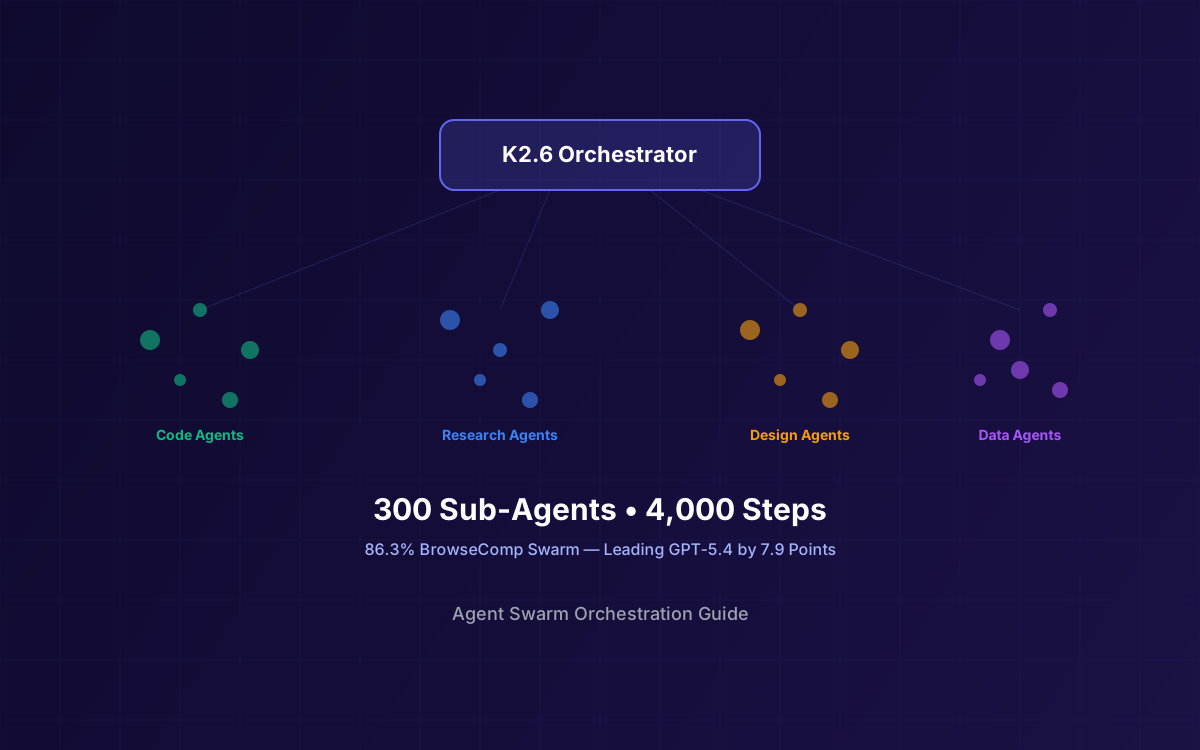
Single-agent workflows hit a ceiling. When you need to refactor 200 files, generate a complete marketing site, or synthesize research across dozens of sources, one model instance running sequentially simply can't keep up. Kimi K2.6's Agent Swarm changes the equation: an orchestrator that decomposes complex tasks across 300 parallel sub-agents executing up to 4,000 coordinated steps in a single autonomous run.
The results are measurable. On BrowseComp Swarm, K2.6 scores 86.3% versus GPT-5.4's 78.4% — a 7.9-point lead that reflects genuine coordination capability, not just raw model quality. K2.6's swarm doesn't just run agents in parallel; it dynamically routes tasks to domain-specialized sub-agents, manages dependencies, and merges outputs into coherent end-to-end deliverables.
This guide walks through the architecture, setup, scaling strategies, and real-world patterns for building production agent swarms with K2.6. Whether you're orchestrating 10 agents or 300, the principles are the same — K2.6 just lets you push the boundary further than any other open-source model available today.
What This Guide Covers
1What Is Agent Swarm Orchestration
Agent swarm orchestration is a multi-agent pattern where a central orchestrator breaks a complex task into smaller, parallelizable subtasks and delegates each to a specialized sub-agent. Unlike single-agent chains that process steps sequentially, swarms execute many tasks simultaneously — dramatically reducing wall-clock time for large workloads.
The concept borrows from distributed computing: you have a coordinator (the orchestrator) that understands the full problem, a pool of workers (sub-agents) with domain-specific capabilities, and a merge step that combines partial results into a unified output. The orchestrator handles task routing, dependency management, error recovery, and output aggregation.
What makes K2.6's swarm different from ad-hoc multi-agent setups is that the orchestration logic is native to the model. K2.6 doesn't need an external framework to manage agent coordination — it understands how to decompose tasks, assign roles, track progress, and merge results as part of its core agentic capability. This is why it achieves 86.3% on BrowseComp Swarm while GPT-5.4 manages only 78.4% with external orchestration.
Key Concept
A swarm is not just "running many agents." It's a coordinated system where the orchestrator maintains a global task graph, routes work based on agent specialization, handles failures gracefully, and produces a single coherent output. The coordination overhead is what separates a swarm from a batch job.
For a broader overview of K2.6's capabilities beyond swarms, see our Kimi K2.6 Developer Guide.
2K2.6 Swarm Architecture
K2.6's swarm architecture follows a three-tier model: orchestrator, domain agents, and output aggregation. The orchestrator receives the user's prompt, analyzes the task complexity, and generates a decomposition plan. It then spawns domain-specialized sub-agents, each with a tailored system prompt and tool set.
Each domain agent operates independently within its scope, executing multi-step tool chains (code generation, web browsing, file manipulation, data analysis). The orchestrator monitors progress, handles inter-agent dependencies, and triggers the merge phase once all subtasks complete. The result is a single, coherent output that spans multiple formats and domains.
The orchestrator uses K2.6's thinking mode to reason about task decomposition before spawning agents. This planning phase is critical — a well-decomposed task graph minimizes inter-agent dependencies and maximizes parallelism. The orchestrator also maintains a shared context window that sub-agents can reference for global constraints (coding standards, brand guidelines, output format requirements).
3K2.5 vs K2.6 Swarm Comparison
K2.5 introduced agent swarm capabilities with support for up to 100 parallel sub-agents. K2.6 triples that ceiling and adds significant improvements to coordination, error handling, and output quality. For a detailed comparison of K2.6 against other frontier models, see our K2.6 vs Claude Opus vs GPT-5.4 comparison.
| Capability | K2.5 | K2.6 |
|---|---|---|
| Max Sub-Agents | 100 | 300 |
| Max Coordinated Steps | ~1,200 | 4,000 |
| BrowseComp (Swarm) | — | 86.3% |
| BrowseComp (Single) | 78.1% | 83.2% |
| Native Multimodal | Vision only | Vision + Video |
| Error Recovery | Basic retry | Adaptive re-routing |
| Task Decomposition | Static | Dynamic + thinking |
| Coding-Driven Design | No | Yes |
| SWE-Bench Verified | 72.4% | 80.2% |
The jump from 100 to 300 agents isn't just a number increase. K2.6's dynamic decomposition with thinking mode means the orchestrator reasons about the optimal number of agents for each task rather than spawning a fixed pool. A simple task might use 15 agents; a complex codebase refactor might use all 300. The orchestrator adapts based on task complexity, available context, and inter-task dependencies.
4Setting Up Your First Swarm
The fastest way to build a K2.6 swarm is through the Moonshot API using the OpenAI-compatible Python client. The pattern is straightforward: define an orchestrator, define sub-agent roles, and let the orchestrator manage coordination.
import openai
import asyncio
from typing import List, Dict

client = openai.AsyncOpenAI(
    api_key="YOUR_API_KEY",
    base_url="https://api.moonshot.ai/v1"
)

# Define sub-agent roles
AGENT_ROLES = {
    "code_refactor": {
        "system": "You are a code refactoring specialist. "
                  "Refactor the given module for readability and performance. "
                  "Return only the refactored code.",
        "model": "kimi-k2.6"
    },
    "test_writer": {
        "system": "You are a test engineer. Write comprehensive unit tests "
                  "for the given module. Use pytest conventions.",
        "model": "kimi-k2.6"
    },
    "doc_generator": {
        "system": "You are a documentation writer. Generate clear API docs "
                  "for the given module in Markdown format.",
        "model": "kimi-k2.6"
    }
}

async def run_sub_agent(role: str, task: str) -> Dict:
    """Execute a single sub-agent with its specialized role."""
    config = AGENT_ROLES[role]
    response = await client.chat.completions.create(
        model=config["model"],
        messages=[
            {"role": "system", "content": config["system"]},
            {"role": "user", "content": task}
        ],
        max_tokens=8192,
        temperature=1.0,
        top_p=0.95
    )
    return {
        "role": role,
        "result": response.choices[0].message.content
    }

async def orchestrate_swarm(modules: List[str]):
    """Orchestrate parallel sub-agents across multiple modules."""
    tasks = []
    for module in modules:
        # Each module gets 3 parallel agents
        tasks.append(run_sub_agent("code_refactor", module))
        tasks.append(run_sub_agent("test_writer", module))
        tasks.append(run_sub_agent("doc_generator", module))

    # Execute all agents in parallel
    results = await asyncio.gather(*tasks)

    # Group results by module
    grouped = {}
    for i, module in enumerate(modules):
        grouped[module] = {
            "refactored": results[i * 3]["result"],
            "tests": results[i * 3 + 1]["result"],
            "docs": results[i * 3 + 2]["result"]
        }
    return grouped

# Run the swarm
modules = ["auth.py", "payments.py", "notifications.py"]
results = asyncio.run(orchestrate_swarm(modules))
Scaling Tip
Start with 3-5 sub-agents per task to validate your decomposition strategy. Once the output quality is consistent, scale up incrementally. Jumping straight to 300 agents without validating your task graph will produce inconsistent results and waste tokens.
5Task Decomposition Patterns
The quality of your swarm output depends almost entirely on how well you decompose the task. K2.6 supports three primary decomposition patterns, each suited to different workload types:
Pattern 1: Parallel Research
Assign each sub-agent a different research domain or source. Agents browse, extract, and summarize independently. The orchestrator merges findings into a unified report with cross-references and citations. This pattern works well for competitive analysis, literature reviews, and market research.
Pattern 2: Batch Refactoring
Split a codebase into independent modules and assign each to a sub-agent. Each agent refactors its module according to shared coding standards (passed via the orchestrator's context). The orchestrator validates cross-module interfaces after all agents complete. This is the most common pattern for large-scale code migrations.
Pattern 3: Multi-Format Output
Given a single source document or brief, spawn agents to produce different output formats simultaneously: one agent generates HTML, another produces Markdown documentation, a third creates a slide deck outline, and a fourth builds a data spreadsheet. The orchestrator ensures consistency across all formats.
- Parallel Research — Best for tasks where sub-agents don't need to share intermediate state. Each agent works on a completely independent slice.
- Batch Refactoring — Requires shared context (coding standards, API contracts) but independent execution. The orchestrator validates interfaces post-completion.
- Multi-Format Output — All agents share the same source material but produce different deliverables. The orchestrator ensures factual consistency across formats.
In practice, most production swarms combine these patterns. A marketing site generation task might use parallel research agents to gather competitor data, batch refactoring agents to generate page components, and multi-format agents to produce both the site code and accompanying documentation.
6Scaling to 300 Sub-Agents
Scaling from a handful of agents to 300 introduces coordination challenges that don't exist at smaller scales. Here are the key strategies for managing large swarms effectively:
Resource Management
- Rate limiting — The Moonshot API has per-account concurrency limits. Use semaphores or connection pools to stay within bounds. A typical production setup uses 50-100 concurrent requests with queuing for the remainder.
- Token budgets — Assign per-agent token budgets to prevent runaway costs. A 300-agent swarm with 8K output tokens each could consume 2.4M output tokens in a single run. At K2.6 pricing (~$3/M output tokens), that's ~$7.20 per swarm execution.
- Context sharing — Use a shared system prompt for global constraints and agent-specific prompts for task details. K2.6's automatic caching means the shared system prompt is cached after the first agent, reducing input costs by 75-83% for subsequent agents.
Coordination Strategies
- Dependency graphs — Model inter-agent dependencies as a DAG (directed acyclic graph). Agents with no dependencies run immediately; dependent agents wait for their prerequisites. This maximizes parallelism while respecting ordering constraints.
- Checkpoint merging — For long-running swarms, implement periodic checkpoint merges where the orchestrator aggregates partial results. This prevents data loss if individual agents fail and provides early visibility into output quality.
- Agent specialization tiers — Not all agents need the same model configuration. Use K2.6 thinking mode for complex reasoning tasks and instant mode for straightforward extraction or formatting tasks. This reduces latency and cost without sacrificing quality where it matters.
import asyncio
from dataclasses import dataclass

@dataclass
class AgentTask:
    id: str
    role: str
    prompt: str
    depends_on: list[str] = None
    use_thinking: bool = True

async def run_swarm_with_deps(tasks: list[AgentTask]):
    """Execute agents respecting dependency ordering."""
    completed = {}
    semaphore = asyncio.Semaphore(80)  # Max concurrent

    async def execute(task: AgentTask):
        # Wait for dependencies
        if task.depends_on:
            while not all(d in completed for d in task.depends_on):
                await asyncio.sleep(0.1)

        async with semaphore:
            extra = {}
            if not task.use_thinking:
                extra = {"extra_body": {
                    "thinking": {"type": "disabled"}
                }}

            response = await client.chat.completions.create(
                model="kimi-k2.6",
                messages=[
                    {"role": "system", "content": AGENT_ROLES[task.role]["system"]},
                    {"role": "user", "content": task.prompt}
                ],
                max_tokens=8192,
                **extra
            )
            completed[task.id] = response.choices[0].message.content

    await asyncio.gather(*[execute(t) for t in tasks])
return completed7Real-World Use Cases
Agent swarms shine when the workload is large, parallelizable, and benefits from domain specialization. Here are four production patterns we've seen work well with K2.6:
Codebase Refactoring
Migrating a 200-file Express.js backend to a new API pattern is a perfect swarm task. Each file gets its own refactoring agent, a separate set of agents writes tests for the refactored code, and a validation agent checks cross-file imports and type consistency. A task that would take a single agent hours completes in minutes with 80+ parallel agents. For more on AI-powered coding agents, see our comparison of self-hosted AI agents.
Documentation Generation
Generate comprehensive documentation for an entire codebase in one run. Assign agents to different modules: one documents the API surface, another generates usage examples, a third produces architecture diagrams (using K2.6's coding-driven design capability), and a fourth creates a getting-started guide. The orchestrator ensures consistent terminology and cross-references across all documents.
Research Synthesis
Deploy 50+ research agents to browse different sources, extract key findings, and produce structured summaries. The orchestrator merges these into a comprehensive report with proper citations, identifies contradictions between sources, and highlights consensus findings. K2.6's 92.5% DeepSearchQA score makes it particularly effective for this pattern.
Marketing Site Generation
From a single product brief, spawn agents to generate: landing page HTML/CSS, product comparison tables, FAQ content, SEO metadata, blog post drafts, and social media copy. K2.6's coding-driven design capability means the UI agents produce production-ready layouts with animations and responsive design, not just placeholder markup.
Pattern Recognition
The common thread across all these use cases: the task is too large for a single agent to handle efficiently, but it can be decomposed into independent or loosely-coupled subtasks. If your task requires tight sequential reasoning where each step depends on the previous one, a single agent with thinking mode is usually better than a swarm.
8Performance & Cost Optimization
Running 300 agents isn't free. Here's how to keep costs manageable while maximizing output quality:
Caching Strategy
K2.6's automatic caching provides 75-83% savings on repeated input tokens. Structure your swarm so all agents share a common system prompt prefix (project context, coding standards, output format). This prefix gets cached after the first agent call, and every subsequent agent benefits from the reduced input cost. For a 300-agent swarm with a 2K-token shared prefix, this saves roughly 600K input tokens — about $0.36 at standard pricing.
Model Routing
Not every sub-agent needs K2.6 in thinking mode. Use a tiered approach:
- K2.6 Thinking — Complex reasoning tasks: architecture decisions, bug diagnosis, code refactoring with cross-file dependencies.
- K2.6 Instant — Straightforward tasks: formatting, template filling, simple extraction, documentation boilerplate. 2-3x faster and cheaper than thinking mode.
- Lighter models — For trivial subtasks like JSON formatting or string manipulation, consider routing to a smaller model entirely. The orchestrator can use K2.6 while delegating simple work to cheaper endpoints.
When to Use Swarm vs Single Agent
| Scenario | Recommended | Why |
|---|---|---|
| Refactor 5 files | Single agent | Coordination overhead exceeds parallelism benefit |
| Refactor 200 files | Swarm | Massive parallelism, independent subtasks |
| Debug a single complex bug | Single agent | Sequential reasoning with deep context needed |
| Generate full marketing site | Swarm | Multiple independent deliverables from one brief |
| Research across 30+ sources | Swarm | Each source is an independent research task |
| Write a single complex algorithm | Single agent | Tight logical dependencies, not parallelizable |
9Limitations & Best Practices
Agent swarms are powerful but not magic. Understanding the limitations helps you design better systems and avoid common pitfalls:
Coordination Overhead
Every agent adds coordination cost: the orchestrator needs to track its status, manage its output, and handle potential failures. Below ~10 subtasks, the overhead of swarm orchestration often exceeds the benefit of parallelism. The sweet spot for most workloads is 20-100 agents; scale to 300 only when the task genuinely requires it.
Error Handling
With 300 agents, failures are not exceptional — they're expected. Build retry logic with exponential backoff, set per-agent timeouts, and implement fallback strategies. K2.6's adaptive re-routing can reassign failed tasks to different agents, but your orchestration code needs to support this:
- Retry with backoff — 3 retries with exponential backoff (1s, 2s, 4s) handles transient API errors.
- Timeout per agent — Set a 120-second timeout per agent. If an agent exceeds this, kill it and reassign the task.
- Partial result acceptance — Design your merge logic to handle incomplete results. If 5 out of 300 agents fail, the swarm should still produce a useful output with clear indicators of what's missing.
- Idempotent subtasks — Ensure subtasks can be safely retried without side effects. This is critical for tasks that involve file writes or API calls.
Monitoring
At scale, you need visibility into swarm execution. Track these metrics:
- Agent completion rate — What percentage of agents complete successfully? Below 95%, investigate your task decomposition or prompt quality.
- Token consumption per agent — Identify agents that consistently use more tokens than expected. They may need better-scoped prompts.
- Wall-clock time distribution — If a few agents are significantly slower than others, they're likely bottlenecking the swarm. Consider splitting their tasks further.
- Output quality scores — Use a validation agent (or a lighter model) to score sub-agent outputs before merging. Reject low-quality results and retry.
Best Practice
Always run a small-scale test (10-20 agents) before scaling to production. Validate that your task decomposition produces consistent, mergeable outputs. Fix quality issues at small scale — they only get worse at 300 agents.
10Why Lushbinary for Agent Swarm Development
Building a production agent swarm is significantly more complex than calling an API. You need task decomposition strategies tailored to your domain, robust error handling for hundreds of concurrent agents, cost optimization through caching and model routing, monitoring infrastructure, and merge logic that produces consistent outputs. Lushbinary has deep experience building exactly these systems.
We've shipped AI-powered products that handle real-time coordination at scale — from live auction platforms with concurrent bidding to multi-agent AI deployments. Whether you need a custom swarm architecture for codebase migration, a research synthesis pipeline, or a full AI-powered product built on K2.6, we can design it, build it, and get it into production.
Our approach: start with your specific use case, design the task decomposition strategy, validate at small scale, then scale to production with proper monitoring and cost controls. No generic frameworks — just architecture that fits your problem.
🚀 Free Consultation
Ready to build an agent swarm with Kimi K2.6? Lushbinary specializes in multi-agent AI architectures for production workloads. We'll analyze your use case, design the decomposition strategy, and give you a realistic scope and timeline — no obligation.
❓ Frequently Asked Questions
What is an agent swarm in AI?
An agent swarm is a multi-agent orchestration pattern where a central orchestrator decomposes a complex task into parallel subtasks, delegates each to specialized sub-agents, and merges their outputs into a unified result. Kimi K2.6 supports swarms of up to 300 sub-agents executing 4,000 coordinated steps.
How do I set up a Kimi K2.6 agent swarm?
You can set up a K2.6 swarm through the Moonshot API at platform.moonshot.ai. Define an orchestrator prompt that describes the task decomposition strategy, configure sub-agent roles with specialized system prompts, and use the OpenAI-compatible API to spawn and coordinate agents programmatically.
What are the best use cases for K2.6 agent swarms?
K2.6 swarms excel at large-scale codebase refactoring, parallel research synthesis, multi-format documentation generation, full marketing site creation from a brief, and batch data processing. Any task that can be decomposed into independent or loosely-coupled subtasks benefits from swarm orchestration.
How does K2.6 scale to 300 sub-agents?
K2.6 uses dynamic task decomposition with domain-specialized sub-agents. The orchestrator manages resource allocation, coordinates dependencies between agents, and merges partial outputs. Native INT4 quantization and automatic caching keep per-agent costs low, making 300-agent swarms economically viable.
How does K2.6 swarm compare to K2.5?
K2.5 supported up to 100 parallel sub-agents, while K2.6 scales to 300 sub-agents with 4,000 coordinated steps. On BrowseComp Swarm, K2.6 scores 86.3% compared to GPT-5.4's 78.4%. K2.6 also adds improved coordination protocols, better error recovery, and more efficient resource utilization.
Sources
- Kimi K2.6 Model Card — Hugging Face
- Moonshot AI Platform — API Documentation
- Kimi Code CLI — Agent Framework
- Kimi K2 GitHub Repository
Content was rephrased for compliance with licensing restrictions. Benchmark data sourced from official Moonshot AI model card as of April 2026. Agent swarm capabilities and pricing may change — always verify on the vendor's website.
Build Your Agent Swarm With K2.6
From task decomposition design to production-scale orchestration, Lushbinary helps you ship multi-agent AI systems that actually work at scale.
Ready to Build Something Great?
Get a free 30-minute strategy call. We'll map out your project, timeline, and tech stack - no strings attached.
Prefer email? Reach us directly: