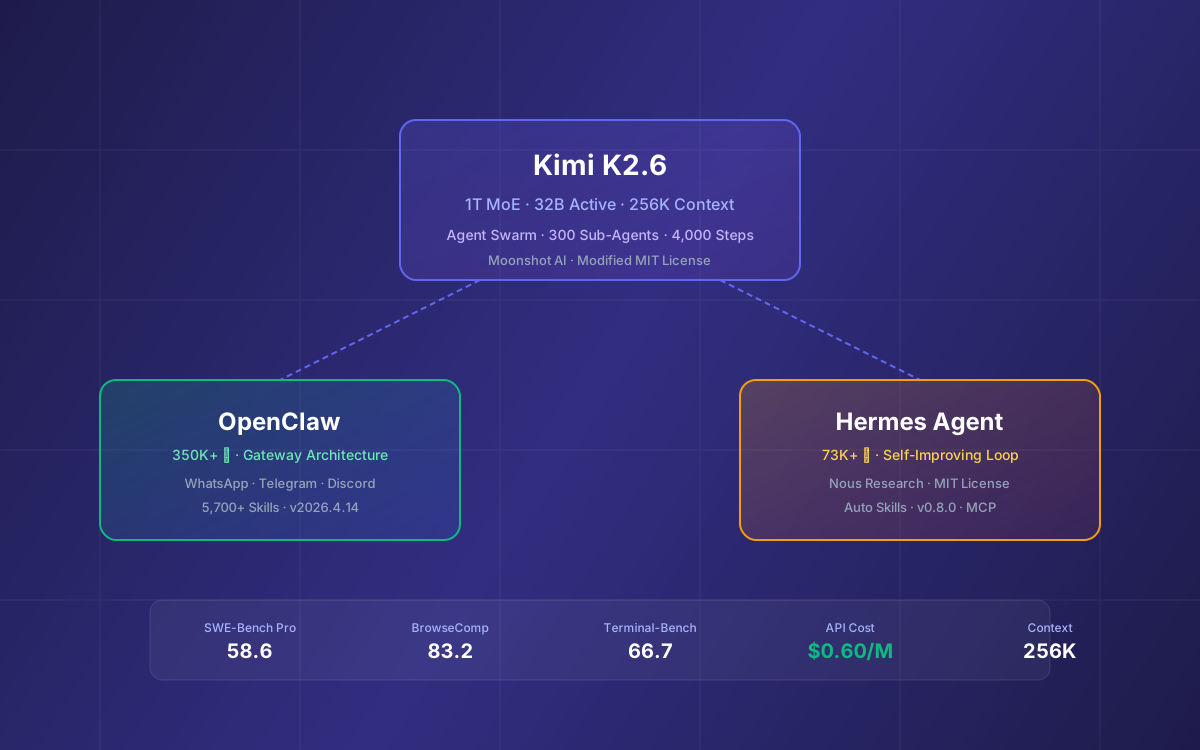
Moonshot AI released Kimi K2.6 in April 2026 as an open-weight model that goes head-to-head with GPT-5.4 and Claude Opus 4.6 on coding and agentic benchmarks — while costing a fraction of the price. The headline feature is Agent Swarm: up to 300 sub-agents executing 4,000 coordinated steps in a single autonomous run.
That kind of power is only useful if you can wire it into something. This guide walks you through connecting Kimi K2.6 to the two most popular open-source agent frameworks — OpenClaw (350K+ GitHub stars) and Hermes Agent (73K+ stars, Nous Research) — with step-by-step setup, configuration, and real-world usage patterns.
Whether you want a persistent WhatsApp/Telegram bot that handles research and scheduling, or a self-improving coding agent that learns from every task, this guide has you covered.
📋 What This Guide Covers
- What Is Kimi K2.6 — Architecture & Benchmarks
- Getting Your Moonshot API Key
- Connecting Kimi K2.6 to OpenClaw
- OpenClaw Skills & Workflows with K2.6
- Connecting Kimi K2.6 to Hermes Agent
- Hermes Self-Improving Skills with K2.6
- Leveraging K2.6 Agent Swarm
- OpenClaw vs Hermes: Which Framework for K2.6?
- Pricing & Cost Optimization
- Troubleshooting Common Issues
- Why Lushbinary for AI Agent Development
1What Is Kimi K2.6 — Architecture & Benchmarks
Kimi K2.6 is Moonshot AI's latest open-weight model, released in April 2026. It uses a Mixture-of-Experts (MoE) architecture with 1 trillion total parameters and 32 billion active parameters per token. The model supports a 256K context window, native multimodal input (images and video via the 400M-parameter MoonViT encoder), and both thinking and instant inference modes.
| Spec | Kimi K2.6 |
|---|---|
| Architecture | MoE — 384 experts, 8 selected per token + 1 shared |
| Total / Active Params | 1T / 32B |
| Context Window | 256K tokens |
| Attention | Multi-head Latent Attention (MLA) |
| Vision | MoonViT (400M params) — image + video |
| License | Modified MIT (credit required at 100M+ MAU or $20M+ revenue) |
Key Benchmarks
K2.6 lands on par with GPT-5.4 and Claude Opus 4.6 across coding and agentic tasks, while trailing slightly on pure reasoning and vision (source):
| Benchmark | K2.6 | GPT-5.4 | Opus 4.6 |
|---|---|---|---|
| SWE-Bench Verified | 80.2 | — | 80.8 |
| SWE-Bench Pro | 58.6 | 57.7 | 53.4 |
| HLE-Full (w/ tools) | 54.0 | 52.1 | 53.0 |
| BrowseComp | 83.2 | 82.7 | 83.7 |
| Terminal-Bench 2.0 | 66.7 | 65.4 | 65.4 |
| AIME 2026 | 96.4 | 99.2 | 96.7 |
| GPQA Diamond | 90.5 | 92.8 | 91.3 |
Key Takeaway
K2.6 matches or beats GPT-5.4 on SWE-Bench Pro (58.6 vs 57.7) and Terminal-Bench 2.0 (66.7 vs 65.4), making it the strongest open-weight model for agentic coding. It falls behind on pure math reasoning (AIME 2026: 96.4 vs 99.2) and vision tasks.
2Getting Your Moonshot API Key
Both OpenClaw and Hermes Agent connect to Kimi K2.6 via the Moonshot AI platform API. The API is OpenAI-compatible, so any tool that supports custom OpenAI endpoints works out of the box.
- Go to platform.moonshot.ai and create an account.
- Recharge your account — Moonshot recommends $20+ to reach Tier 2 for smoother rate limits.
- Navigate to API Keys and create a new key. Copy it somewhere safe.
💡 Alternative: OpenRouter
You can also access Kimi K2.6 through OpenRouter using the model ID moonshotai/kimi-k2.6. This is useful if you already have an OpenRouter account or want unified billing across multiple models.
3Connecting Kimi K2.6 to OpenClaw
OpenClaw (formerly Clawdbot/Moltbot) is the most popular open-source AI agent framework with 350K+ GitHub stars. It runs as a Node.js service, connects to messaging platforms (WhatsApp, Telegram, Discord, Slack, Signal), and supports extensible skills. OpenClaw v2026.4.14 has native Kimi K2.6 support.
Step 1: Install or Upgrade OpenClaw
curl -fsSL https://openclaw.ai/install.sh | bash
If you already have OpenClaw installed, running this command again will upgrade to the latest version. You need v2026.2.3 or later for Kimi support, but v2026.4.14+ is recommended for K2.6 model routing improvements.
Step 2: Configure Kimi K2.6 as the Provider
During the QuickStart wizard, select these options:
- Model.auth provider → Choose Moonshot AI (Kimi K2.5)
- Model AI auth method → Choose Kimi API key (.ai)
- Enter Moonshot API Key → Paste your API key
- Default model → Keep current (
moonshot/kimi-k2.6)
For the remaining options (Gateway Port, Skills, package manager), defaults work fine. The gateway port defaults to 18789.
Step 3: Manual Configuration (Optional)
If you prefer to edit the config file directly, update openclaw.json in your OpenClaw directory:
{
  "llm": {
    "provider": "moonshot",
    "model": "moonshot/kimi-k2.6",
    "apiKey": "YOUR_MOONSHOT_API_KEY"
  }
}
After configuration, access the chat interface at http://127.0.0.1:18789 to start interacting with K2.6 through OpenClaw.
OpenRouter Alternative
To use K2.6 via OpenRouter instead, set the provider to openrouter and the model to moonshotai/kimi-k2.6 in your openclaw.json. This lets you use a single OpenRouter API key for multiple models and take advantage of fallback routing.
4OpenClaw Skills & Workflows with K2.6
OpenClaw's skill system is what turns a chatbot into an agent. Skills are modular capabilities — web search, file management, code execution, API calls — that the model can invoke autonomously. With K2.6's ability to chain 4,000+ tool calls in a single session, OpenClaw skills become significantly more powerful.
Recommended Skills for K2.6
Web Search
K2.6 scored 83.2 on BrowseComp. Pair it with OpenClaw’s web search skill for deep research tasks.
Code Execution
K2.6 handles Rust, Go, and Python across front-end, DevOps, and performance optimization.
File Management
Read, write, and organize files. K2.6 can produce documents, spreadsheets, and websites in a single run.
Telegram / WhatsApp
Connect a messaging platform so K2.6 runs as a persistent 24/7 assistant you can reach from your phone.
Example: Research Workflow
With K2.6 powering OpenClaw, you can send a single message like "Research the top 5 competitors in the AI scheduling space, create a comparison spreadsheet, and draft a summary email" — and K2.6 will chain web search, document creation, and email skills together autonomously. The model's 256K context window means it can hold the entire research context without losing track.
For more on OpenClaw setup and skills, see our OpenClaw Latest Updates guide and OpenClaw Integrations guide.
5Connecting Kimi K2.6 to Hermes Agent
Hermes Agent is Nous Research's open-source, self-improving AI agent (73K+ GitHub stars, MIT license). Unlike OpenClaw's gateway-centric architecture, Hermes uses an agent-loop design with persistent memory, automatic skill creation, and a built-in learning loop that gets smarter the longer you use it. Hermes v0.8.0 (released April 2026) has native Kimi/Moonshot provider support.
Step 1: Install Hermes Agent
curl -fsSL https://raw.githubusercontent.com/NousResearch/hermes-agent/main/scripts/install.sh | bash
The installer handles everything automatically — Python, Node.js, ripgrep, ffmpeg, the repo clone, virtual environment, and the global hermes command. The only prerequisite is Git.
Step 2: Configure Kimi K2.6 as the Provider
After installation, reload your shell and run the model configuration wizard:
source ~/.bashrc   # or: source ~/.zshrc
hermes model       # Launch the model configuration wizard
In the wizard:
- Select Kimi / Moonshot as the provider
- Enter your Moonshot API key when prompted
- The default model will be set to
kimi-k2.6
Step 3: Manual Configuration (Optional)
You can also edit ~/.hermes/config.yaml directly:
provider: kimi
model: kimi-k2.6
Then set your API key as an environment variable or in your .env file:
export MOONSHOT_API_KEY="your_api_key_here"
Step 4: Start Chatting
hermes
This launches the CLI chat interface. Hermes will use Kimi K2.6 for all interactions, including tool calls, skill creation, and memory operations.
💡 OpenRouter Route
Hermes also supports Kimi K2.6 via OpenRouter. Set provider: openrouter and model: moonshotai/kimi-k2.6 in your config. This is useful for credential pooling or if you want automatic fallback to other models.
For a deeper dive into Hermes setup, see our Hermes Agent Developer Guide.
6Hermes Self-Improving Skills with K2.6
Hermes Agent's defining feature is its closed learning loop. After completing complex tasks, Hermes analyzes what it did, extracts reusable patterns, and writes them as Markdown skill files following the agentskills.io open standard. During subsequent use, these skills self-improve based on outcomes. Every 15 tasks, the agent evaluates its performance and refines its approach.
How K2.6 Enhances the Learning Loop
K2.6's long-horizon coding capability (80.2% SWE-Bench Verified) and 256K context window make it particularly well-suited for Hermes's skill creation process. The model can:
- Hold the full context of a multi-step task without truncation, producing more accurate skill extractions
- Generate higher-quality skill documents with better trigger conditions and step-by-step instructions
- Chain tool calls reliably across long sessions — K2.6 can handle 4,000+ sequential tool calls without degradation
- Produce code-heavy skills in Rust, Go, and Python that Hermes can reuse for DevOps and automation tasks
Example: Auto-Generated Deployment Skill
Ask Hermes (powered by K2.6) to deploy a Next.js app to AWS ECS. After completing the task, Hermes will automatically create a skill like:
---
name: deploy-nextjs-ecs
description: Deploy a Next.js app to AWS ECS Fargate
triggers:
  - deploy next.js to ecs
  - ecs fargate deployment
  - aws container deployment
---

## Prerequisites
- AWS CLI configured with appropriate IAM permissions
- Docker installed locally
- Next.js project with Dockerfile

## Steps
1. Build the Docker image...
2. Push to ECR...
3. Create ECS task definition...
4. Deploy service...
Next time you ask Hermes to deploy anything to ECS, it loads this skill automatically and executes faster with fewer errors. For more on skills, see our Hermes Custom Skills guide.
7Leveraging K2.6 Agent Swarm
K2.6's headline feature is Agent Swarm — the ability to orchestrate up to 300 sub-agents executing 4,000 coordinated steps in parallel. The system automatically decomposes tasks into domain-specialized subtasks and hands them off to specialized agents. A single run can produce finished outputs including documents, websites, slide decks, and spreadsheets.
Agent Swarm via Kimi Platform
Agent Swarm is currently available through the Kimi platform in agent mode. A preview feature called "claw groups" lets multiple agents and humans work together as a team, with K2.6 coordinating task distribution based on each agent's strengths.
Swarm-Like Patterns in OpenClaw & Hermes
While the full Agent Swarm orchestration is a Kimi platform feature, you can approximate swarm-like behavior in both frameworks:
OpenClaw
- Use OpenClaw's
/tasksbackground task board (v2026.4.1+) to run multiple K2.6-powered tasks in parallel - TaskFlows via webhook (v2026.4.7+) let external systems trigger and coordinate agent workflows
- Session branching allows forking a conversation into parallel investigation paths
Hermes Agent
- Use multi-agent profiles (v0.6.0+) to run specialized K2.6 agents in parallel
- Each profile gets its own config, memory, skills, and messaging channels
- Inter-agent communication via shared filesystem, MCP server bridge, or messaging relay
8OpenClaw vs Hermes: Which Framework for K2.6?
Both frameworks work well with K2.6, but they serve different use cases. Here's a quick comparison to help you decide:
| Feature | OpenClaw | Hermes Agent |
|---|---|---|
| Architecture | Gateway-centric (Node.js) | Agent-loop (Python) |
| GitHub Stars | 350K+ | 73K+ |
| Learning | Static skills (ClawHub) | Self-improving (auto-creates skills) |
| Messaging | 20+ platforms | 6 platforms + CLI + voice |
| Skills Ecosystem | 5,700+ on ClawHub | 118 bundled + agentskills.io |
| Memory | FTS5 + LLM summarization | 4-tier persistent memory |
| MCP Support | Client only | Client + Server (bidirectional) |
| Best For | Multi-platform bots, quick setup | Coding agents, compound learning |
| License | MIT | MIT |
Decision Framework
Choose OpenClaw if you need a multi-platform bot (WhatsApp + Telegram + Discord) with a large skill library and quick setup. Choose Hermes Agent if you want a coding-focused agent that learns from experience, supports MCP server mode for IDE integration, and compounds its capabilities over time. You can also run both side by side in Docker.
For a detailed comparison, see our Hermes vs OpenClaw comparison.
9Pricing & Cost Optimization
One of K2.6's biggest advantages is cost. At $0.60 per million input tokens and $3.00 per million output tokens on the Moonshot platform, it's significantly cheaper than GPT-5.4 or Claude Opus 4.6 for comparable performance on coding and agentic tasks.
| Model | Input / 1M tokens | Output / 1M tokens |
|---|---|---|
| Kimi K2.6 (Moonshot) | $0.60 | $3.00 |
| Kimi K2.6 (cached) | $0.10–$0.15 | $3.00 |
| GPT-5.4 (xhigh) | $10.00 | $30.00 |
| Claude Opus 4.6 | $15.00 | $75.00 |
Moonshot's automatic caching reduces input costs by 75–83% on repeated prompts, bringing the effective input cost down to $0.10–$0.15 per million tokens. This is especially impactful for agent workflows where system prompts and skill definitions are sent with every request.
Cost Optimization Tips
- Use instant mode for simple tasks: K2.6 supports both thinking and instant modes. Instant mode skips the reasoning chain and is faster and cheaper for straightforward queries.
- Leverage caching: Structure your system prompts and skill definitions to maximize cache hits. Moonshot's automatic caching handles this transparently.
- Hybrid routing: Use K2.6 for complex agentic tasks and a cheaper model (like Kimi K2 Turbo at $1.15/$8.00) for simple chat interactions. Both OpenClaw and Hermes support model routing.
- Self-host for high volume: If you're running thousands of requests daily, self-hosting K2.6 with vLLM or SGLang on GPU instances can be more cost-effective. See our K2.6 self-hosting guide for details.
Content was rephrased for compliance with licensing restrictions. Pricing data sourced from official Moonshot AI platform and third-party aggregators as of April 2026. Pricing may change — always verify on the vendor's website.
10Troubleshooting Common Issues
Here are the most common issues when connecting K2.6 to OpenClaw or Hermes, and how to fix them:
| Problem | Solution |
|---|---|
| API key not recognized | Ensure you’re using a key from platform.moonshot.ai (not kimi.com consumer). Check that your account has a positive balance. |
| Rate limit errors (429) | Recharge to Tier 2 ($20+) for higher rate limits. Add retry logic with exponential backoff in your agent config. |
| Model not found | Verify you’re using the correct model ID: moonshot/kimi-k2.6 for OpenClaw, kimi-k2.6 for Hermes. Update to the latest framework version. |
| Slow responses | K2.6 in thinking mode can take 10–30 seconds for complex tasks. Switch to instant mode for faster responses on simple queries. |
| Tool calls failing | K2.6 uses OpenAI-compatible function calling. Ensure your framework version supports the latest tool call format. OpenClaw v2026.4.14+ and Hermes v0.8.0+ are recommended. |
| hermes: command not found | Reload your shell: source ~/.bashrc or source ~/.zshrc. If still missing, check your PATH includes the Hermes install directory. |
| OpenClaw connection refused | Verify the gateway is running on port 18789. Check openclaw.json for correct provider configuration. Run openclaw doctor --fix for auto-repair. |
11Why Lushbinary for AI Agent Development
At Lushbinary, we've been building AI agent integrations since the early days of OpenClaw and Hermes. Our team has hands-on experience with Kimi K2.6, GPT-5.4, Claude Opus 4.6, and every major open-weight model. We help businesses:
- Design and deploy custom AI agents powered by K2.6 for customer support, research automation, and internal tooling
- Build multi-agent architectures using OpenClaw, Hermes, or hybrid setups
- Optimize LLM costs with model routing, caching strategies, and self-hosting on AWS
- Integrate AI agents with existing systems via MCP, webhooks, and messaging platforms
- Ship production-grade agent deployments with monitoring, security, and failover
🚀 Free Consultation
Want to deploy Kimi K2.6 agents for your business? Lushbinary specializes in AI agent architecture and deployment. We'll scope your project, recommend the right framework (OpenClaw, Hermes, or both), and give you a realistic timeline — no obligation.
❓ Frequently Asked Questions
What is Kimi K2.6 and how is it different from K2.5?
Kimi K2.6 is Moonshot AI’s latest open-weight model (1T total parameters, 32B active, MoE architecture). It upgrades K2.5 with Agent Swarm support (up to 300 sub-agents, 4,000 coordinated steps), improved long-horizon coding (80.2% SWE-Bench Verified), and native multimodal capabilities via MoonViT.
How do I connect Kimi K2.6 to OpenClaw?
Get an API key from platform.moonshot.ai, install OpenClaw via the one-line installer, then select Moonshot AI as the provider during setup. The default model resolves to moonshot/kimi-k2.6. OpenClaw v2026.4.14 or later is recommended.
How do I use Kimi K2.6 with Hermes Agent?
Install Hermes Agent with the one-line installer, run hermes model, select Kimi / Moonshot as the provider, and enter your Moonshot API key. Hermes v0.8.0 has native Kimi provider support.
How much does the Kimi K2.6 API cost?
Approximately $0.60 per million input tokens and $3.00 per million output tokens on the Moonshot platform. Automatic caching reduces input costs by 75–83%. This is 4–17x cheaper than GPT-5.4 and 5–6x cheaper than Claude Opus 4.6.
Can I run Kimi K2.6 locally?
Yes, the weights are on Hugging Face under a modified MIT license. Self-host with vLLM, SGLang, or KTransformers. The full 1T model requires multiple A100/H100 GPUs. For most users, the Moonshot API or OpenRouter is more practical.
📚 Sources
- Kimi K2.6 Model Card — Hugging Face
- Moonshot AI Platform — API & Pricing
- Kimi + OpenClaw Official Guide
- Hermes Agent Installation Docs
- Hermes Agent Provider Configuration
- OpenClaw Official Website
Content was rephrased for compliance with licensing restrictions. Benchmark data sourced from official Hugging Face model card as of April 2026. Pricing sourced from Moonshot AI platform and third-party aggregators. All data may change — always verify on the vendor's website.
Deploy Kimi K2.6 Agents for Your Business
From OpenClaw bots to self-improving Hermes agents — we build production-grade AI agent systems. Tell us what you need.
Ready to Build Something Great?
Get a free 30-minute strategy call. We'll map out your project, timeline, and tech stack - no strings attached.
Prefer email? Reach us directly: