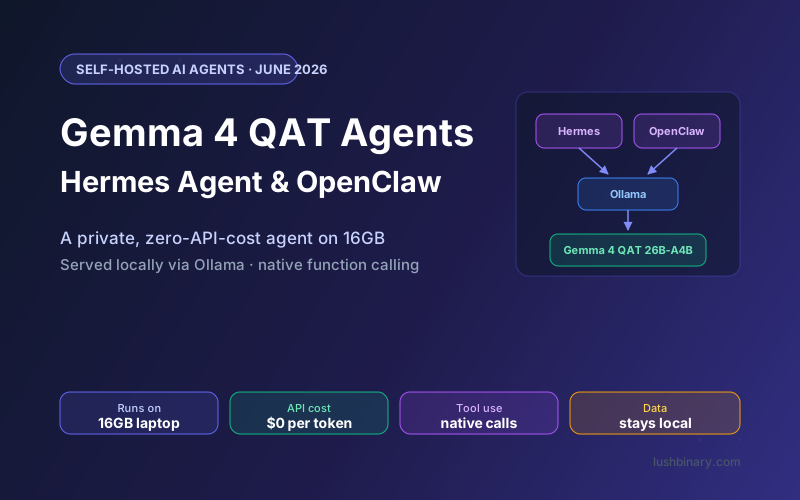
A self-hosted AI agent is only as practical as the hardware it demands. Until recently, running a model good enough for reliable tool calling meant a 24GB GPU or a cloud API bill. Google's Gemma 4 Quantization-Aware Training (QAT) checkpoints, released June 5, 2026, change that math: the 26B-A4B model that makes a capable agent now loads in roughly 15GB and runs on a 16GB laptop, with near-original quality (source).
That unlocks a genuinely useful setup: a private, zero-API-cost agent that lives on your machine. This guide pairs the Gemma 4 QAT models with two of the most popular self-hosted agent frameworks, Nous Research's Hermes Agent and OpenClaw, both served through Ollama. You will see which QAT model to pick, the exact Ollama tags, how to wire function calling correctly, model routing, and the specific mistakes that quietly break tool calling.
If you want the deep dive on QAT itself - the four formats, the memory math, and the conversion gotcha - read our Gemma 4 QAT self-hosting guide first. This article focuses on turning a QAT model into a working agent.
What This Guide Covers
- Why QAT Makes Local Agents Practical
- Hermes Agent vs OpenClaw: Quick Orientation
- Choosing the Right QAT Model for an Agent
- Serving Gemma 4 QAT with Ollama
- Wiring Up Hermes Agent
- Wiring Up OpenClaw
- Function Calling: Getting Tool Use Right
- Model Routing & Cloud Fallback
- Troubleshooting Common Issues
- Why Lushbinary for AI Agent Development
1Why QAT Makes Local Agents Practical
Agents are demanding in a way chatbots are not. Every turn may involve choosing a tool, formatting structured arguments, reading the result, and deciding the next step. Small quality losses that a chatbot would shrug off can break an agent: a malformed tool call stalls the whole workflow. That is why running a capable model mattered, and why memory was the blocker.
QAT removes the blocker without removing the quality. Because the compression is learned during training rather than bolted on afterward, the 4-bit model behaves close to the full-precision one. Google reports roughly 72% lower memory with quality higher than standard post-training quantization at the same compression. The practical effect for agents:
- Capable model, modest hardware. The 26B-A4B runs in ~15GB, so a 16GB laptop hosts an agent that reasons and calls tools reliably.
- Zero API cost. No per-token billing on a runaway agent loop. The only cost is electricity.
- Full privacy. Prompts, files, and tool outputs stay on your machine.
- Native function calling preserved. QAT does not touch the architecture, so structured tool use still works.
2Hermes Agent vs OpenClaw: Quick Orientation
Both are self-hosted agent frameworks that connect a local model to tools and messaging channels, but they suit different goals:
| Aspect | Hermes Agent | OpenClaw |
|---|---|---|
| Origin | Nous Research | Open-source community project |
| Strength | Self-improving loop, skills, multi-model routing | Messaging channels, large skill ecosystem |
| Model connection | OpenAI-compatible endpoint | Native Ollama provider |
| Best for | A learning assistant that improves over time | A chat-app assistant with broad integrations |
You can run either, or both. For a head-to-head, see our Hermes vs OpenClaw comparison. The good news: the Gemma 4 QAT serving setup is identical for both, so you configure Ollama once and point each framework at it.
3Choosing the Right QAT Model for an Agent
For agents, prioritize tool-calling reliability over raw size. The 26B-A4B QAT model is the recommended default. Here is the practical breakdown:
| Model | QAT Memory | Agent Fit |
|---|---|---|
| E4B | ~5GB | Simple tasks, single-tool calls, fallback tier |
| 12B | ~7GB | Solid all-rounder for 8-12GB GPUs |
| 26B-A4B ★ | ~15GB | Best quality-per-GB, multi-step tool chains |
| 31B | ~18GB | Max accuracy on a 24GB GPU |
Use the Unsloth dynamic GGUFs
Tool calling depends on accuracy. Naive Q4_0 conversion drops 26B-A4B top-1 accuracy to 70.2%, while Unsloth's dynamic UD-Q4_K_XL GGUFs restore it to 85.6% (source). For agents, that difference is the gap between reliable and flaky tool calls.
4Serving Gemma 4 QAT with Ollama
Both frameworks talk to Ollama, so set it up once. Install Ollama, pull a QAT model, and confirm the API is live.
# Install (macOS shown; Linux uses the install script)
brew install ollama
# Pull the recommended 26B-A4B QAT model
ollama pull gemma4:26b-it-qat
# Confirm it loaded and the API is up
curl http://localhost:11434/api/tags
For best tool-calling accuracy
Pull the Unsloth dynamic GGUF instead of the stock tag: ollama run hf.co/unsloth/gemma-4-26B-A4B-it-qat-GGUF. Set Gemma 4's recommended sampling everywhere: temperature 1.0, top_p 0.95, top_k 64.
5Wiring Up Hermes Agent
Hermes Agent connects to any OpenAI-compatible endpoint. Ollama exposes one at http://localhost:11434/v1. Point Hermes at your local Gemma 4 QAT model in its config:
# hermes config (model provider section)
models:
  default: gemma4-qat-local
  providers:
    gemma4-qat-local:
      type: openai
      base_url: http://localhost:11434/v1
      api_key: ollama            # placeholder, Ollama ignores it
      model: gemma4:26b-it-qat
      temperature: 1.0
      top_p: 0.95
With that in place, Hermes routes its reasoning, planning, and skill selection through the local model. The self-improving loop (Hermes calls it the learning loop) works the same way it would with a cloud model, except every call is free and private. For the full Hermes setup including channels and skills, see our Hermes Agent developer guide.
Note the endpoint difference between the two frameworks
Hermes uses the OpenAI-compatible /v1 endpoint and handles tool calls correctly through it. OpenClaw is the opposite: it wants the native Ollama API without /v1 (next section). Mixing these up is the single most common cause of broken tool calling.
6Wiring Up OpenClaw
OpenClaw stores config in ~/.openclaw/openclaw.json and ships a native Ollama provider. Use the native API URL http://localhost:11434 with no /v1 suffix:
{
  "agents": {
    "defaults": {
      "model": "ollama/gemma4:26b-it-qat"
    }
  },
  "models": {
    "providers": {
      "ollama": {
        "baseUrl": "http://localhost:11434"
      }
    }
  }
}
OpenClaw uses the provider/model format, so ollama/gemma4:26b-it-qat tells it to use the Ollama provider with the QAT model tag. The easiest path is the interactive wizard:
# Launch setup, then pick Ollama and the QAT model
openclaw onboard
For the complete OpenClaw walkthrough including channels, custom skills, and performance tuning, see our OpenClaw + Gemma 4 setup guide. Everything there applies; you are simply pointing it at a QAT tag instead of the full-precision model.
7Function Calling: Getting Tool Use Right
Function calling is the backbone of any agent. When you ask the agent to "check my calendar" or "open this PR," the model decides which tool to call and formats the arguments as JSON. Gemma 4 has native function calling, and QAT preserves it - but two things determine whether it is reliable in practice.
First, model accuracy. This is exactly where the Unsloth dynamic GGUFs earn their keep. A 15-point top-1 accuracy gap (70.2% naive vs 85.6% dynamic on 26B-A4B) shows up directly as malformed or missing tool calls. Use the dynamic GGUFs.
Second, the right endpoint. Tool calling flows through the model API, and the two frameworks expect different paths:
If the model returns tool-call JSON as plain text in the chat instead of executing it, you are almost certainly on the wrong endpoint for your framework. Hermes wants /v1; OpenClaw wants the native API without it.
8Model Routing & Cloud Fallback
QAT makes a tiered setup attractive. Run a small QAT model for routine turns and escalate only when needed. A common, cost-effective pattern:
- Tier 1 (default): Gemma 4 QAT E4B (~5GB) for quick classification, formatting, and single-tool calls. Fast and cheap.
- Tier 2 (primary): Gemma 4 QAT 26B-A4B (~15GB) for multi-step planning and reliable tool chains. The workhorse.
- Tier 3 (optional fallback): a cloud API for the rare query that needs a frontier model. Disable this for fully offline operation.
Hermes Agent supports multi-model routing natively, so you can configure these tiers and let it pick. OpenClaw lets you assign different models per agent or skill. Either way, QAT's small footprint means you can keep two local models resident on a single 24GB machine and switch between them without reloading from disk every time.
9Troubleshooting Common Issues
Tool calls appear as raw JSON in the chat
Wrong endpoint for the framework. OpenClaw must use the native Ollama API (http://localhost:11434, no /v1). Hermes must use the /v1 OpenAI-compatible path.
Tool calls are unreliable or malformed
You are likely on a naive Q4_0 conversion. Switch to the Unsloth dynamic UD-Q4_K_XL GGUF, which recovers the accuracy QAT was meant to preserve.
Out of memory when loading the model
The ~15GB figure for 26B-A4B is weights plus modest context. A long context window adds KV cache. Drop to the 12B (~7GB) or cap the context length, and close other GPU-heavy apps.
Responses are slow on first call
Cold start loads weights into memory. Keep Ollama warm, or use the MoE 26B-A4B, which activates only 3.8B parameters per token and runs near 4B speed once loaded.
10Why Lushbinary for AI Agent Development
A working demo agent and a dependable production agent are different animals. The hard parts are reliability under real tool use, sensible model routing, guardrails, observability, and a fallback strategy that does not blow your privacy or budget. That is the work we do at Lushbinary.
We build self-hosted and hybrid AI agents on Hermes Agent, OpenClaw, and custom stacks, tuned for the hardware you have and the tasks you actually run. If you want a private Gemma 4 QAT agent that handles real workflows without leaking data or surprising you with a bill, we can scope and ship it.
🚀 Free Consultation
Want a local AI agent that actually works in production? Lushbinary specializes in self-hosted, privacy-first agents. We'll scope your use case, recommend the right Gemma 4 QAT model and framework, and give you a realistic timeline with no obligation.
❓ Frequently Asked Questions
Why use Gemma 4 QAT for a local AI agent?
Quantization-Aware Training cuts Gemma 4's memory roughly 72% with near-original quality, so the 26B-A4B model that powers a capable agent now loads in about 15GB and runs on a 16GB laptop. That makes a private, zero-API-cost agent practical on hardware you already own. Function calling, the 256K context, and multimodal input are all preserved through QAT.
Which Gemma 4 QAT model is best for Hermes Agent and OpenClaw?
The 26B-A4B QAT model is the sweet spot. It is a Mixture-of-Experts model that activates only 3.8B parameters per token, so it runs near 4B speed while reasoning far better, and it loads in about 15GB. Use E4B (~5GB) as a lightweight fallback for simple tasks, and the 31B (~18GB) on a 24GB GPU when you want maximum tool-calling accuracy.
Do I use the OpenAI-compatible endpoint or the native Ollama API?
For OpenClaw, use the native Ollama API at http://localhost:11434 (no /v1). The /v1 path can break tool calling, causing the model to emit raw tool JSON as plain text. Hermes Agent connects to Ollama as an OpenAI-compatible endpoint and works reliably; configure the model id and base URL in its config.
Does Gemma 4 QAT support function calling for agents?
Yes. All Gemma 4 models have native function calling with structured JSON output, and QAT does not change that. The quality recovery from Unsloth's dynamic GGUFs matters here: naive Q4_0 conversion drops 26B-A4B top-1 accuracy to 70.2%, while the dynamic UD-Q4_K_XL GGUFs restore it to 85.6%, which keeps tool calls reliable.
Can I run the agent fully offline with no API costs?
Yes. With Gemma 4 QAT served by Ollama on your own machine, both Hermes Agent and OpenClaw run with zero per-token cost and no data leaving your network. The only ongoing cost is electricity. A common production pattern adds an optional cloud API fallback for the hardest queries, which you can disable for fully offline operation.
Sources
- Google: Gemma 4 QAT models announcement (June 5, 2026)
- Unsloth: Gemma 4 QAT documentation and dynamic GGUFs
- Google AI for Developers: Gemma 4 model card
Content was rephrased for compliance with licensing restrictions. Memory figures, accuracy numbers, and configuration details sourced from official Google and Unsloth documentation as of June 6, 2026. Framework behavior may change - always verify against the latest Hermes Agent and OpenClaw docs.
Build a Private AI Agent That Works in Production
Tell us your use case and we will scope the right Gemma 4 QAT model, framework, and architecture for a self-hosted agent. No obligation.
Ready to Build Something Great?
Get a free 30-minute strategy call. We'll map out your project, timeline, and tech stack - no strings attached.
Prefer email? Reach us directly: