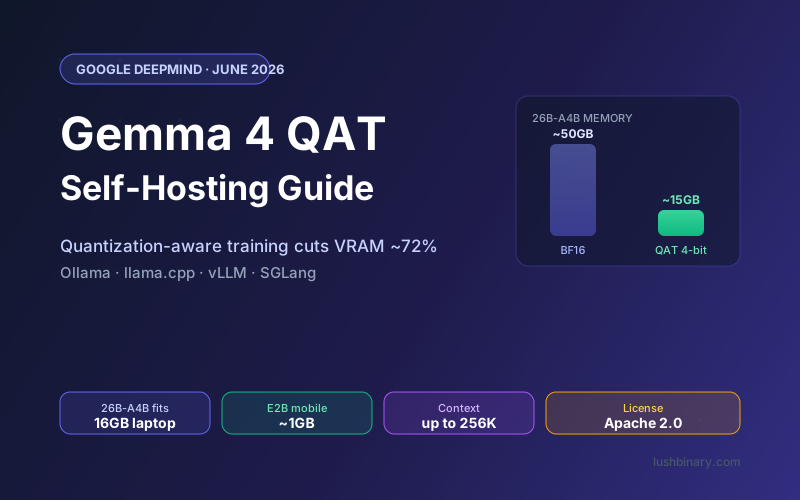
For most people, the hard part of running a capable open model locally was never the software. It was the memory. A 26B model at full precision wants more VRAM than a consumer GPU has, so you either pay for cloud inference or settle for a weaker model. On June 5, 2026, Google DeepMind shipped something that moves that line: Gemma 4 checkpoints optimized with Quantization-Aware Training (QAT) that cut memory roughly 72% while keeping near-original quality.
The practical result is striking. The 26B-A4B model now loads in about 15GB, so it fits on a 16GB laptop. The smallest model, E2B, drops to around 1GB with a new mobile format, and a text-only build runs in under 1GB. That is a phone-class footprint for a model that reasons, calls functions, and handles 140+ languages (source).
This guide explains what QAT actually changes, the four formats Google released, the real memory budget for each model size, and how to set it up with Ollama, llama.cpp, vLLM, and SGLang. We also cover a conversion gotcha that quietly degrades accuracy if you ignore it, and how to avoid it. Every number here is checked against the official model card and the launch announcement.
What This Guide Covers
- What Quantization-Aware Training Actually Does
- The Four QAT Formats (and When to Use Each)
- Memory Requirements for Every Model Size
- Picking the Right Model for Your Hardware
- Setup with Ollama (Easiest)
- Setup with llama.cpp (Most Control)
- Setup with vLLM & SGLang (Server Inference)
- The Q4_0 Conversion Gotcha
- Benchmarks: Does Quality Survive?
- QAT vs Cloud APIs: When Self-Hosting Wins
- Why Lushbinary for Self-Hosted AI
1What Quantization-Aware Training Actually Does
Quantization shrinks a model by storing its weights at lower precision. A weight that took 16 bits (BF16) becomes 4 bits. That is a 4x reduction in the raw weight storage, which is why quantized models fit on hardware the full-precision version never could. The catch is quality: rounding every weight introduces error, and that error compounds through dozens of transformer layers.
The usual approach is Post-Training Quantization (PTQ). You train the model in full precision, then round the weights down afterward. It works, but the model never had a chance to adapt to the rounding, so accuracy can slip, especially on reasoning and tool-use tasks where small errors change the output.
Quantization-Aware Training (QAT) flips the order. It simulates the low-precision math during training, so the model learns weights that survive being squeezed to 4-bit. Google describes it as integrating quantization directly into the training loop, and reports that QAT yields higher overall quality than standard PTQ baselines at the same compression (source).
The one-line version
PTQ compresses a model after it has finished learning and hopes for the best. QAT teaches the model to expect compression, so the 4-bit version behaves almost like the full-precision one. Same memory savings, much less quality loss.
2The Four QAT Formats (and When to Use Each)
Google did not ship a single file. The QAT release includes four distinct format families, each aimed at a different runtime. Picking the wrong one is the most common setup mistake, so here is the map (source):
| Format | Use With | Available For |
|---|---|---|
| GGUF (Q4_0) | llama.cpp, Ollama, LM Studio | E2B, E4B, 12B, 26B-A4B, 31B |
| Compressed Tensors (w4a16) | vLLM, SGLang | E2B, E4B, 12B, 31B |
| Mobile (wNa8o8) | LiteRT-LM, edge runtimes | E2B, E4B |
| Unquantized QAT (Q4_0) | Custom conversion, research | All sizes + drafters |
- GGUF (Q4_0) is the format you want for local desktop use. It plugs straight into llama.cpp and Ollama. In practice, prefer the Unsloth dynamic GGUFs over the raw Q4_0 (see Section 8 for why).
- Compressed Tensors (w4a16) pairs 4-bit weights with 16-bit activations and is built for server inference with vLLM and SGLang, where you want high throughput across many requests.
- Mobile (wNa8o8) is the new schema engineered for phones and edge accelerators. It uses static activations, channel-wise quantization, targeted 2-bit decoding layers, and KV cache optimization. This is what gets E2B to about 1GB.
- Unquantized QAT checkpoints are half-precision weights extracted from the QAT pipeline, meant for teams that want to compile or quantize into a custom downstream format.
There are also QAT versions of the Multi-Token Prediction (MTP) drafter checkpoints, which preserve the MTP inference speedup while quantized. If you are using speculative decoding, grab the matching MTP QAT drafter.
3Memory Requirements for Every Model Size
This is the table you came for. The figures below are the approximate total memory (RAM + VRAM, or unified memory on Apple Silicon) needed to load and run the model with modest context, using Unsloth's recommended UD-Q4_K_XL GGUFs (source). Long context windows add KV cache on top, so budget headroom if you plan to use the full 128K/256K window.
| Model | Type | QAT 4-bit Memory | Context | Typical Hardware |
|---|---|---|---|---|
| E2B | Dense | ~3GB (mobile ~1GB) | 128K | Phones, Raspberry Pi 5, any laptop |
| E4B | Dense | ~5GB | 128K | 8GB laptops, 6GB+ GPUs |
| 12B | Dense | ~7GB | 256K | 8-12GB GPUs, 16GB Macs |
| 26B-A4B ★ | MoE (3.8B active) | ~15GB | 256K | 16GB Macs, 16GB GPUs |
| 31B | Dense | ~18GB | 256K | 24GB GPUs, 32GB Macs |
Read memory figures as weights plus a little overhead, not the whole story
The numbers above cover the model weights plus a small runtime overhead at modest context. The KV cache grows with your context length and concurrent requests. If you load the 26B-A4B at the full 256K window, expect several extra GB of KV cache on top of the ~15GB. For a 16GB machine, keep context modest or use the 12B.
4Picking the Right Model for Your Hardware
QAT does not change which model is "best," it changes which ones you can afford to run. Match the model to your memory budget first, then to your task:
- Phone or 8GB laptop: E2B (mobile format) or E4B. Good for transcription, summarization, classification, and simple chat. E2B text-only fits in under 1GB.
- 16GB Mac or 8-12GB GPU: 12B is the comfortable choice. It is dense, encoder-free, multimodal, and handles a 256K context. Strong general-purpose pick.
- 16GB GPU or 16GB+ Mac and you want maximum quality per GB: the 26B-A4B MoE. It activates only 3.8B parameters per token, so it runs near 4B speed but reasons far better. This is the standout QAT unlock.
- 24GB GPU (RTX 3090/4090) or 32GB Mac: the 31B dense model for the highest accuracy on hard reasoning and coding.
If you want the full architecture and benchmark breakdown across the family, see our Gemma 4 Developer Guide and the dedicated Gemma 4 12B self-hosting guide.
5Setup with Ollama (Easiest)
Ollama is the fastest path to running QAT locally. Install it, pull a QAT tag, and you have an OpenAI-compatible endpoint on localhost:11434.
Step 1: Install Ollama
# macOS
brew install ollama
# Linux
curl -fsSL https://ollama.com/install.sh | sh
Step 2: Pull a QAT Model
Ollama exposes QAT variants with a -it-qat tag. Pull the size that fits your hardware:
# E4B QAT (laptops, ~5GB)
ollama pull gemma4:e4b-it-qat
# 26B-A4B QAT (16GB machines, ~15GB)
ollama pull gemma4:26b-it-qat
# 31B QAT (24GB GPUs, ~18GB)
ollama pull gemma4:31b-it-qat
Tip: prefer the Unsloth GGUFs for best accuracy
You can also pull Unsloth's dynamic GGUFs directly from Hugging Face into Ollama. They recover accuracy lost in naive Q4_0 conversion (Section 8). Browse the Unsloth Gemma 4 QAT collection and use ollama run hf.co/unsloth/<model>.
Step 3: Run and Verify
# Quick test
ollama run gemma4:26b-it-qat "Explain QAT in one sentence."
# Confirm the API is live
curl http://localhost:11434/api/tags
Set Gemma 4's recommended sampling for best results: temperature 1.0, top_p 0.95, top_k 64. These are the same settings the full-precision models use; QAT does not change them.
6Setup with llama.cpp (Most Control)
If you want direct control over context length, GPU offload, and the server, run llama.cpp yourself. The Unsloth GGUFs ship a single recommended quant (UD-Q4_K_XL), so you do not have to choose a precision.
Run a Model Directly
# 26B-A4B QAT via Hugging Face shorthand
./llama.cpp/llama-cli \
  -hf unsloth/gemma-4-26B-A4B-it-qat-GGUF:UD-Q4_K_XL \
  --temp 1.0 --top-p 0.95 --top-k 64
Deploy as an OpenAI-Compatible Server
llama-server gives you an HTTP endpoint any app can use. The --mmproj file enables multimodal (image) input, and you can toggle the thinking mode with a chat-template flag:
./llama.cpp/llama-server \
  --model gemma-4-26B-A4B-it-qat-UD-Q4_K_XL.gguf \
  --mmproj mmproj-BF16.gguf \
  --temp 1.0 --top-p 0.95 --top-k 64 \
  --port 8001 \
  --chat-template-kwargs '{"enable_thinking":true}'
Set enable_thinking to false to disable the reasoning trace for latency-sensitive workloads. On Apple Silicon, build with Metal (it is on by default); on NVIDIA, build with -DGGML_CUDA=ON to offload layers to the GPU.
7Setup with vLLM & SGLang (Server Inference)
For serving many concurrent requests, use the compressed-tensors w4a16 checkpoints with vLLM or SGLang. Both had day-zero support for Gemma 4 QAT (source). vLLM reads the w4a16 quantization directly from the checkpoint, so you do not pass a separate quant flag:
# vLLM with the w4a16 compressed-tensors checkpoint
vllm serve google/gemma-4-31B-it-qat-w4a16-ct \
  --max-model-len 32768 \
  --port 8000
A few practical notes for production serving:
- Cap
--max-model-lento what you actually use. Reserving the full 256K window allocates a large KV cache and limits concurrency. Most agent and chat workloads are fine at 16K-32K. - w4a16 is available for E2B, E4B, 12B, and 31B in compressed tensors. For the 26B-A4B MoE on a server, the GGUF path via llama.cpp is the better-supported route today.
- SGLang follows the same pattern and is a strong option if you want structured output and high throughput. Check the SGLang Gemma 4 cookbook for the exact launch command.
8The Q4_0 Conversion Gotcha
This is the detail that trips people up. If you naively convert the QAT BF16 checkpoint to llama.cpp's Q4_0 format, you lose a chunk of the accuracy QAT was supposed to preserve. The reason is technical but worth knowing: llama.cpp's Q4_0 uses F16 scales, while the QAT weights were trained against BF16 scales, and llama.cpp does not pick the scales optimally. Daniel Han of Unsloth measured naive conversion at only about 25% byte exactness to the true QAT weights (source).
The fix is to use Unsloth's dynamic GGUFs (named UD-Q4_K_XL), which force a better agreement between the llama.cpp format and the true QAT weights. The accuracy recovery is significant:
| Model | Naive Q4_0 Top-1 | Unsloth Dynamic Top-1 | Gain |
|---|---|---|---|
| 26B-A4B | 70.2% | 85.6% | +15.4% |
| 31B | 87.9% | 96.7% | +8.8% |
Practical takeaway
For llama.cpp and Ollama, use the Unsloth UD-Q4_K_XL GGUFs, not a hand-rolled Q4_0 conversion. They are smaller and more accurate. For vLLM and SGLang, use Google's w4a16 compressed-tensors checkpoints, which avoid the issue entirely.
9Benchmarks: Does Quality Survive?
The whole point of QAT is keeping quality while cutting memory. Google states QAT yields higher overall quality than standard PTQ at the same compression, and Unsloth's dynamic recovery (above) lands the quantized models within a few points of the BF16 originals. For reference, here are the full-precision Gemma 4 instruction-tuned scores the QAT versions aim to preserve (source):
| Benchmark | 31B | 26B-A4B | 12B |
|---|---|---|---|
| MMLU Pro | 85.2% | 82.6% | 77.2% |
| AIME 2026 (no tools) | 89.2% | 88.3% | 77.5% |
| LiveCodeBench v6 | 80.0% | 77.1% | 72.0% |
| GPQA Diamond | 84.3% | 82.3% | 78.8% |
The headline: a 26B-A4B model scoring in the 80s on MMLU Pro and LiveCodeBench, now running in roughly 15GB. Before QAT, that quality meant a much larger memory footprint or a cloud API bill.
10QAT vs Cloud APIs: When Self-Hosting Wins
QAT does not make self-hosting universally cheaper than an API, but it widens the set of cases where local makes sense. Self-hosting wins when:
- Privacy is non-negotiable. Data never leaves your machine or VPC. No third party sees the prompts.
- You have steady, high volume. Fixed hardware cost beats per-token billing once you saturate the GPU.
- You need offline or edge operation. The mobile QAT formats run with no network at all.
- You want predictable cost. No surprise bills from a runaway agent loop.
Cloud APIs still win for spiky, low-volume traffic or when you need a frontier model larger than anything you can host. A common pattern is to route most traffic to a local QAT model and fall back to a cloud API for the hardest queries. That is exactly what the agent setups in our companion guide do.
11Why Lushbinary for Self-Hosted AI
Getting a model running locally is the easy part. Building a production system around it - autoscaling, observability, model routing, security, and a fallback strategy - is where teams get stuck. That is what we do. Lushbinary designs and ships self-hosted and hybrid AI systems: private inference on your hardware or VPC, OpenAI-compatible gateways, and cost models that hold up under real traffic.
Whether you want a QAT model serving an internal tool, a fleet of edge devices running E2B offline, or a hybrid stack that routes to a cloud API only when needed, we can scope it, build it, and hand it over documented. Pair this guide with our QAT agent guide to turn a local model into a working assistant.
🚀 Free Consultation
Thinking about self-hosting an open model? Lushbinary will assess your workload, recommend the right Gemma 4 QAT variant and hardware, and give you a realistic cost and timeline with no obligation.
❓ Frequently Asked Questions
What is Gemma 4 QAT and how is it different from normal quantization?
Gemma 4 QAT (Quantization-Aware Training) bakes compression into training instead of applying it afterward. Standard post-training quantization (PTQ) rounds weights after training, which can degrade quality. QAT simulates 4-bit math during training so the model learns to tolerate it. Google reports QAT beats standard PTQ at the same compression, cutting memory roughly 72% with near-original quality. Released June 5, 2026.
How much VRAM does Gemma 4 QAT need?
Per Unsloth's recommended UD-Q4_K_XL GGUFs, approximate total memory is: E2B ~3GB, E4B ~5GB, 12B ~7GB, 26B-A4B ~15GB, and 31B ~18GB. The mobile format shrinks E2B to about 1GB, and text-only E2B without Per-Layer Embeddings runs in under 1GB. Add headroom for longer context windows.
Can I run Gemma 4 26B-A4B on a 16GB laptop with QAT?
Yes. The QAT 26B-A4B checkpoint loads in roughly 15GB at 4-bit, so a 16GB Apple Silicon Mac or a 16GB GPU can run it. It is a Mixture-of-Experts model that activates only 3.8B parameters per token, so it runs close to 4B speed while delivering far higher quality. Keep context modest on a 16GB machine.
Should I use Google's Q4_0 GGUF or Unsloth's dynamic GGUF?
Use Unsloth's dynamic UD-Q4_K_XL GGUFs for llama.cpp and Ollama. Naive conversion to llama.cpp's Q4_0 loses accuracy because of a scale mismatch. Unsloth recovers 26B-A4B top-1 accuracy from 70.2% to 85.6%, with smaller files. For vLLM and SGLang, use Google's w4a16 compressed-tensors checkpoints.
Does QAT change the model's context window or capabilities?
No. QAT only changes how weights are stored. Context windows stay at 128K (E2B, E4B) and 256K (12B, 26B-A4B, 31B). Multimodal support, 140+ languages, function calling, and the thinking mode are preserved. Sampling stays the same: temperature 1.0, top_p 0.95, top_k 64.
Sources
- Google: Gemma 4 QAT models announcement (June 5, 2026)
- Google AI for Developers: Gemma 4 model card
- Unsloth: Gemma 4 QAT documentation and dynamic GGUFs
- Hugging Face: Gemma 4 QAT Q4_0 collection
Content was rephrased for compliance with licensing restrictions. Memory figures, benchmarks, and format details sourced from official Google, Hugging Face, and Unsloth documentation as of June 6, 2026. Numbers may change - always verify on the vendor's website.
Ship a Self-Hosted AI System That Holds Up in Production
Tell us about your workload and we will scope the right Gemma 4 QAT setup, hardware, and architecture. No obligation.
Ready to Build Something Great?
Get a free 30-minute strategy call. We'll map out your project, timeline, and tech stack - no strings attached.
Prefer email? Reach us directly: