OpenAI's Codex has evolved from a code-completion tool into a full autonomous coding agent — and with GPT-5.5 (codename "Spud") powering it, the gap between "AI assistant" and "AI teammate" is closing fast. Released April 23, 2026, GPT-5.5 is the first fully retrained base model since GPT-4.5, and GPT-5-Codex layers specialized coding optimization on top of that foundation.
The result is a system that can resolve real GitHub issues across four languages, run multi-hour refactoring sessions autonomously, and embed directly into your CI/CD pipeline via the Codex SDK. Codex is now generally available with Slack integration, admin tools, and a pay-as-you-go SDK that lets you build the same agent into your own workflows.
This guide covers the architecture, benchmarks, pricing, and practical integration patterns for building autonomous coding agents with GPT-5-Codex. Whether you're evaluating it against other AI coding agents or planning a multi-agent development pipeline, this is the complete technical picture.
📋 What This Guide Covers
- Why GPT-5.5 Changes Agentic Coding
- GPT-5-Codex Architecture: How It Works
- Benchmark Deep-Dive: SWE-Bench Pro & Terminal-Bench
- Dynamic Reasoning Time: From Seconds to Hours
- Codex SDK: Embedding Agents in Your Workflows
- Building Multi-Agent Coding Teams
- Token Efficiency & Cost Optimization in Codex
- Codex Cloud vs CLI vs IDE Extension
- Why Lushbinary for GPT-5.5 Codex Projects
- FAQ
1Why GPT-5.5 Changes Agentic Coding
Every GPT model since GPT-5 — versions 5.1 through 5.4 — was built on the same base architecture, refined and optimized for specific capabilities. GPT-5.5 breaks that pattern entirely. It's a model trained from scratch, which is why OpenAI CEO Sam Altman described it as a foundation that could "really accelerate the economy." For coding agents specifically, this fresh base training means the model reasons about code differently at a fundamental level.
The previous GPT-5.x models delivered steady improvements to Codex — dedicated coding variants in 5.3, computer use in 5.4 — but each was constrained by the original GPT-5 architecture. GPT-5.5 removes that ceiling. The retrained base enables deeper understanding of code semantics, better multi-file reasoning, and significantly improved token efficiency when working inside Codex.
What makes this release particularly significant for agentic coding is the convergence of three things: a more capable base model, a mature Codex platform with SDK access, and OpenAI's strategic push toward a unified "super-app" that merges ChatGPT, Codex, and the Atlas browser agent into a single interface. The Codex app now merges designing, building, shipping, and maintaining software into one continuous workflow — and GPT-5.5 is the engine that makes that practical.
💡 Key Context
GPT-5-Codex is a version of GPT-5 further optimized for coding tasks and agent behaviors. It's not a separate model — it's the same GPT-5 architecture with additional tuning for autonomous code generation, test execution, and iterative debugging. With GPT-5.5 as the new base, Codex inherits all the improvements in reasoning, token efficiency, and multi-step planning. For a broader look at GPT-5.5's capabilities beyond coding, see our GPT-5.5 developer guide.
The timing is also deliberate. Anthropic's Claude Code has been gaining traction with developers who want autonomous coding agents. Cursor, Windsurf, and Copilot are all shipping agentic features. By making Codex generally available with SDK access, Slack integration, and admin tools, OpenAI is positioning GPT-5-Codex as the enterprise-grade answer to the autonomous coding question.
2GPT-5-Codex Architecture: How It Works
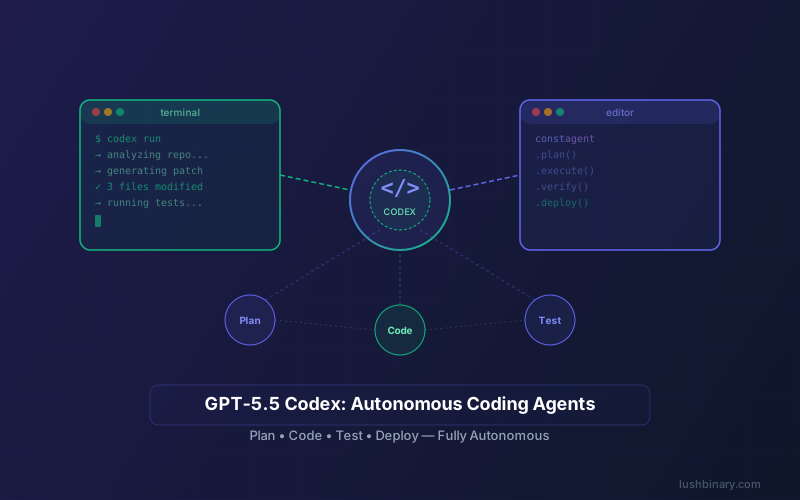
Codex is not just a model — it's a complete agent runtime. When you give Codex a task, it spins up a sandboxed cloud environment with your repository, executes a multi-step plan, and returns a pull request or set of changes. Understanding the architecture helps you build better integrations and debug issues when they arise.
The core loop works like this: Codex receives a natural-language task, reads the relevant files in your repository, formulates a plan, writes code, runs tests, reviews the output, and iterates until the task is complete or it determines it cannot proceed. Each step is logged and auditable.
The architecture has several important properties for production use:
- Sandboxed execution — every Codex task runs in an isolated environment with a clone of your repository. The agent cannot access your production systems, databases, or secrets unless you explicitly provide them
- Deterministic outputs — Codex produces diffs and pull requests, not direct commits. You always review before merging, maintaining human oversight in the loop
- Tool use — the agent can read files, write files, execute shell commands, run tests, and use package managers. It chains these tools together autonomously based on the task
- Iterative debugging — if tests fail after a code change, Codex reads the error output, diagnoses the issue, and attempts a fix. This loop continues until tests pass or the agent determines it needs human input
Codex can run in three environments: the VS Code extension for interactive development, the terminal CLI for scripted workflows, and the cloud for async runs that can take hours. The same agent powers all three — the difference is where the sandbox runs and how you interact with the output. For a deep dive into how subagents work within this architecture, see our Codex subagents guide.
3Benchmark Deep-Dive: SWE-Bench Pro & Terminal-Bench
OpenAI has shifted away from SWE-bench Verified as a primary coding benchmark, arguing that progress has plateaued and the benchmark no longer adequately measures frontier coding capabilities. Instead, GPT-5.5 is evaluated on two newer, more demanding benchmarks that better reflect real-world development work.
| Benchmark | GPT-5.5 Score | What It Measures | Why It Matters |
|---|---|---|---|
| SWE-Bench Pro | 58.6% | Real GitHub issue resolution across 4 languages | Tests multi-language, real-world bug fixing |
| Terminal-Bench 2.0 | 82.7% | Complex command-line workflows | Tests shell scripting, DevOps, system admin |
SWE-Bench Pro: Multi-Language Issue Resolution
SWE-Bench Pro is a significant step up from SWE-bench Verified. While the original benchmark focused primarily on Python repositories, SWE-Bench Pro tests issue resolution across four programming languages — Python, JavaScript/TypeScript, Java, and Go. The issues are sourced from real GitHub repositories and require the agent to understand project structure, read existing code, write a fix, and ensure existing tests still pass.
GPT-5.5's 58.6% score on SWE-Bench Pro means it successfully resolves nearly 6 out of 10 real-world GitHub issues across multiple languages without human intervention. That's a meaningful capability for teams that want to automate bug triage, fix routine issues, or accelerate code review. The multi-language aspect is particularly important for enterprise codebases that span multiple languages and frameworks.
Terminal-Bench 2.0: Command-Line Mastery
Terminal-Bench 2.0 evaluates an agent's ability to handle complex command-line workflows — the kind of tasks that DevOps engineers, SREs, and backend developers deal with daily. This includes multi-step shell scripting, package management, build system configuration, container orchestration, and system administration tasks.
GPT-5.5's 82.7% score here is particularly impressive because terminal workflows require precise syntax, understanding of system state, and the ability to chain commands together correctly. A single wrong flag or missing pipe can break an entire workflow. This score suggests GPT-5-Codex is reliable enough to handle infrastructure automation, CI/CD pipeline configuration, and deployment scripting with minimal human oversight.
⚠️ Benchmark Context
Benchmarks measure capability under controlled conditions. Real-world performance depends on repository complexity, code quality, test coverage, and how well you structure your prompts. Use these numbers as directional indicators, not guarantees. Always review Codex output before merging into production branches.
4Dynamic Reasoning Time: From Seconds to Hours
One of the most distinctive features of GPT-5-Codex is Dynamic Reasoning Time — the ability to adjust its "thinking" duration based on task complexity. Unlike traditional API calls that return in seconds, Codex can spend minutes or even hours reasoning through a complex problem before producing output.
The model autonomously decides how much compute to allocate. A simple task like renaming a variable across a file completes in seconds. A medium-complexity task like implementing a new API endpoint with tests might take 5–15 minutes. A large-scale refactor — like migrating a codebase from one framework to another or restructuring a database schema with all dependent code — can take 7+ hours of continuous reasoning.
| Task Complexity | Example | Typical Duration | Best Environment |
|---|---|---|---|
| Simple | Rename variable, fix typo, add comment | Seconds | IDE / CLI |
| Medium | New API endpoint with tests | 5–15 minutes | CLI / Cloud |
| Complex | Multi-file feature with integration tests | 30–90 minutes | Cloud |
| Major Refactor | Framework migration, schema restructure | 1–7+ hours | Cloud (async) |
This has practical implications for how you structure your workflow. For long-running tasks, Codex Cloud is the right choice — you submit the task, go work on something else, and come back to a completed pull request. The CLI and IDE extension are better suited for interactive, shorter tasks where you want to see progress in real time.
Dynamic Reasoning Time also means cost scales with complexity. A simple rename costs fractions of a cent. A 7-hour refactoring session consumes significantly more tokens. The tradeoff is that the agent produces higher-quality output for complex tasks because it has time to reason through edge cases, run tests iteratively, and refine its approach — something that wasn't possible with fixed-time API calls.
💡 Practical Tip
For long-running Codex tasks, break large refactors into smaller, well-defined subtasks. Instead of "migrate the entire app from Express to Fastify," try "migrate the authentication routes from Express to Fastify and update the corresponding tests." Smaller, focused tasks complete faster and produce more reviewable diffs.
5Codex SDK: Embedding Agents in Your Workflows
The Codex SDK is what turns Codex from a product into a platform. It lets you embed the same agent that powers Codex CLI into your own applications, CI/CD pipelines, and internal tools — without extra tuning or fine-tuning. You get the full agent capability programmatically.
The SDK exposes a straightforward interface: initialize with your OpenAI API key, point it at a repository or codebase, and issue natural-language tasks. The agent handles everything else — file reads, code edits, test execution, and iterative debugging. The output is a structured result with the changes made, tests run, and any issues encountered.
Basic SDK Usage
import { CodexAgent } from "@openai/codex-sdk";

// Initialize the agent with your API key
const agent = new CodexAgent({
  apiKey: process.env.OPENAI_API_KEY,
  model: "gpt-5-codex",
  // Point to your repository
  repoPath: "./my-project",
});

// Issue a natural-language task
const result = await agent.run({
  task: "Add input validation to the /api/users POST endpoint. "
    + "Validate email format, require name to be non-empty, "
    + "and return 400 with descriptive errors. Add tests.",
  // Optional: set a timeout for the task
  maxDurationMinutes: 30,
});

// Result contains the changes, test results, and metadata
console.log(result.filesChanged);  // ["src/routes/users.ts", "tests/users.test.ts"]
console.log(result.testsRun);      // { passed: 12, failed: 0 }
console.log(result.diff);          // Full diff of changes
CI/CD Integration Pattern
One of the most powerful uses of the Codex SDK is integrating it into your CI/CD pipeline. You can trigger Codex tasks on pull request events, issue creation, or scheduled runs. Here's a pattern for automated issue resolution:
// GitHub Action: Auto-resolve labeled issues
// Trigger: issue labeled with "codex-auto-fix"

import { CodexAgent } from "@openai/codex-sdk";
import { Octokit } from "@octokit/rest";

async function resolveIssue(issueNumber: number) {
  const octokit = new Octokit({ auth: process.env.GITHUB_TOKEN });
  const issue = await octokit.issues.get({
    owner: "my-org",
    repo: "my-repo",
    issue_number: issueNumber,
  });

  const agent = new CodexAgent({
    apiKey: process.env.OPENAI_API_KEY,
    model: "gpt-5-codex",
    repoPath: ".",
  });

  const result = await agent.run({
    task: `Resolve this GitHub issue:\n\n${issue.data.title}\n\n${issue.data.body}`,
    maxDurationMinutes: 60,
  });

  if (result.testsRun.failed === 0) {
    // Create a PR with the fix
    await createPullRequest(result.diff, issueNumber);
  }
}
The SDK also supports configuration for sandboxing, resource limits, and callback hooks so you can monitor progress on long-running tasks. You can set token budgets, restrict which files the agent can modify, and define custom test commands that must pass before the agent considers a task complete.
💡 SDK Best Practice
Always set maxDurationMinutes and token budgets when using the SDK in automated pipelines. Without limits, a complex task could run for hours and consume significant API credits. Start with conservative limits and increase based on observed task completion rates.
6Building Multi-Agent Coding Teams
The real power of GPT-5-Codex emerges when you move beyond single-agent tasks and build multi-agent coding teams. Instead of one agent handling everything, you orchestrate specialized agents that each handle a different aspect of the development workflow — one for backend code, one for frontend, one for testing, one for documentation.
Codex supports this through its subagent architecture. A primary agent can spawn subagents, each with their own sandbox and context, and coordinate their work. This is particularly effective for large features that span multiple services or require changes across the full stack. For a comprehensive guide on this pattern, see our Codex subagents and autonomous coding teams guide.
Multi-Agent Architecture Pattern
// Multi-agent team for full-stack feature development
import { CodexAgent } from "@openai/codex-sdk";

const featureSpec = "Add user profile editing with avatar upload";

// Orchestrator agent plans the work
const orchestrator = new CodexAgent({
  apiKey: process.env.OPENAI_API_KEY,
  model: "gpt-5-codex",
  repoPath: ".",
});

const plan = await orchestrator.plan({ task: featureSpec });

// Spawn specialized subagents
const backendAgent = orchestrator.createSubagent({
  scope: ["src/api/**", "src/models/**", "src/services/**"],
  task: plan.backendTasks,
});

const frontendAgent = orchestrator.createSubagent({
  scope: ["src/components/**", "src/pages/**", "src/hooks/**"],
  task: plan.frontendTasks,
});

const testAgent = orchestrator.createSubagent({
  scope: ["tests/**", "e2e/**"],
  task: plan.testTasks,
});

// Run agents in parallel
const results = await Promise.all([
  backendAgent.run(),
  frontendAgent.run(),
  testAgent.run(),
]);

// Orchestrator merges and validates
const merged = await orchestrator.merge(results);
This pattern works because each subagent operates in its own sandbox with a focused scope. The backend agent only sees and modifies backend files, the frontend agent only touches UI code, and the test agent focuses on test files. The orchestrator handles conflict resolution and ensures the combined changes work together.
Key considerations for multi-agent teams:
- Scope isolation — restrict each agent to specific directories or file patterns to prevent conflicts and reduce context size
- Shared interfaces — define API contracts and type definitions upfront so agents working on different layers produce compatible code
- Sequential dependencies — some tasks must complete before others can start. The orchestrator should handle dependency ordering
- Merge validation — after all agents complete, run the full test suite against the merged changes to catch integration issues
- Cost management — multiple agents running in parallel multiply your token consumption. Set per-agent budgets and monitor total spend
7Token Efficiency & Cost Optimization in Codex
One of the most practical improvements in GPT-5.5 is token efficiency. OpenAI specifically highlighted that GPT-5.5 uses fewer tokens than GPT-5.4 in Codex to complete the same tasks. For teams paying per token, this translates directly to lower costs per task — even before considering any pricing changes.
Here's how the cost structure breaks down for Codex usage:
| Cost Factor | GPT-5.4 in Codex | GPT-5.5 in Codex | Impact |
|---|---|---|---|
| API Input Price | $2.50/1M tokens | Same as GPT-5* | Comparable per-token |
| API Output Price | $15/1M tokens | Same as GPT-5* | Comparable per-token |
| Tokens Per Task | Baseline | Significantly fewer ✅ | Lower cost per task |
| Effective Cost/Task | Higher | Lower ✅ | Better ROI on agent tasks |
*GPT-5-Codex is priced the same as GPT-5. Full API access is delayed pending safety work. Pricing subject to change.
Cost Optimization Strategies
Beyond the inherent token efficiency of GPT-5.5, there are several strategies to optimize your Codex costs:
- Prompt caching — cache system prompts and repository context. GPT-5.4 offers a 90% discount on cached input tokens, and similar savings are expected with GPT-5.5
- Task decomposition — break large tasks into smaller, focused subtasks. Smaller tasks use fewer tokens and complete faster, reducing the risk of wasted compute on failed attempts
- Scope restriction — limit the files and directories the agent can access. Less context means fewer input tokens per reasoning step
- Token budgets — set explicit token limits per task. If the agent hits the budget, it returns partial results rather than consuming unlimited tokens
- Model tiering — use GPT-5-Codex for complex tasks and a smaller model (like GPT-5.4 mini) for simple linting, formatting, or documentation tasks
// Cost-optimized Codex configuration
const costOptimizedAgent = new CodexAgent({
  apiKey: process.env.OPENAI_API_KEY,
  model: "gpt-5-codex",
  repoPath: ".",
  config: {
    // Cache system prompts for 90% input savings
    enablePromptCaching: true,
    // Set per-task token budget
    maxTokensPerTask: 500_000,
    // Restrict file access to reduce context
    allowedPaths: ["src/**", "tests/**"],
    excludedPaths: ["node_modules/**", "dist/**", ".git/**"],
    // Use smaller model for simple subtasks
    subtaskModel: "gpt-5.4-mini",
    subtaskThreshold: "simple", // auto-classify task complexity
  },
});
Codex is available to Plus, Pro, Business, and Enterprise users. For teams on Business or Enterprise plans, the upgrade to GPT-5.5 in Codex is automatic — you get the token efficiency improvements without changing your workflow. For API users, GPT-5-Codex is priced the same as GPT-5, though full API access is delayed pending safety work.
8Codex Cloud vs CLI vs IDE Extension
Codex runs in three environments, each optimized for different workflows. The same GPT-5-Codex agent powers all three — the difference is where the sandbox runs, how you interact with the output, and what kinds of tasks each environment handles best.
| Environment | Best For | Task Duration | Interaction |
|---|---|---|---|
| VS Code Extension | Interactive coding, quick fixes, inline edits | Seconds to minutes | Real-time, in-editor |
| Terminal CLI | Scripted tasks, CI/CD, batch operations | Minutes to hours | Command-line, scriptable |
| Cloud (Async) | Large refactors, multi-hour tasks, background work | Hours (up to 7+) | Submit & review later |
VS Code Extension
The VS Code extension is the most interactive way to use Codex. It integrates directly into your editor, letting you highlight code, ask questions, request changes, and see diffs in real time. It's ideal for the kind of work you'd normally do with a pair programmer sitting next to you — quick fixes, refactoring a function, adding error handling, or generating tests for a specific file.
Terminal CLI
The CLI is where Codex becomes scriptable. You can pipe tasks to it, chain it with other tools, and integrate it into shell scripts and CI/CD pipelines. The CLI also supports the Codex SDK, so you can programmatically control the agent from Node.js or Python scripts. This is the right choice for automated workflows like issue resolution, code review, and batch refactoring.
Cloud (Async Runs)
Codex Cloud is designed for tasks that take too long for interactive use. You submit a task, Codex spins up a cloud sandbox with your repository, and the agent works autonomously for as long as needed. When it's done, you get a notification (including via Slack integration) with the results. This is the environment that supports Dynamic Reasoning Time up to 7+ hours.
The Slack integration is particularly useful for team workflows. You can submit Codex tasks from Slack, get progress updates in a channel, and review results without leaving your communication tool. Admin tools let team leads manage Codex access, set spending limits, and monitor usage across the organization.
💡 Environment Selection Guide
Use the IDE extension for tasks under 5 minutes where you want real-time feedback. Use the CLI for automated pipelines and scripted workflows. Use Cloud for anything that might take more than 15 minutes — you'll get better results because the agent has time to reason thoroughly, and you won't be blocked waiting for output.
9Why Lushbinary for GPT-5.5 Codex Projects
Building autonomous coding agents with GPT-5-Codex is straightforward for simple use cases. But shipping a production multi-agent system that's reliable, cost-effective, and secure takes real engineering work. Lushbinary has been building production AI integrations since the GPT-4 era, and we've shipped Codex-based systems for enterprise clients across SaaS, fintech, and e-commerce.
Here's what we bring to a GPT-5-Codex integration project:
- Multi-agent architecture — we design orchestration systems that coordinate multiple Codex agents across your codebase, with scope isolation, dependency management, and merge validation
- CI/CD integration — embed Codex into your existing GitHub Actions, GitLab CI, or Jenkins pipelines for automated issue resolution and code review
- Cost optimization — prompt caching, token budgets, model tiering, and task decomposition to keep Codex costs predictable and efficient
- Safety & guardrails — output validation, scope restrictions, human-in-the-loop review gates, and audit logging for enterprise compliance
- SDK custom integrations — build custom internal tools powered by the Codex SDK, from automated code review bots to self-healing infrastructure scripts
🚀 Free Consultation
Want to build autonomous coding agents with GPT-5-Codex? Lushbinary specializes in production Codex integrations with multi-agent orchestration, CI/CD pipelines, and cost optimization. We'll scope your project, recommend the right architecture, and give you a realistic timeline — no obligation.
10Frequently Asked Questions
What is GPT-5-Codex and how does it differ from GPT-5.5?
GPT-5-Codex is a version of GPT-5 further optimized for coding tasks and agent behaviors. GPT-5.5 (codename 'Spud') is the underlying base model released April 23, 2026 - the first fully retrained base model since GPT-4.5. GPT-5-Codex builds on this foundation with specialized tuning for autonomous code generation, multi-file refactoring, and agentic development workflows.
How does the Codex SDK let me embed coding agents into my own workflows?
The Codex SDK lets you embed the same agent that powers Codex CLI directly into your own applications and CI/CD pipelines without extra tuning. You initialize the SDK with your OpenAI API key, point it at a repository, and issue natural-language tasks. The agent handles file reads, code edits, test execution, and iterative debugging autonomously.
What is Dynamic Reasoning Time in GPT-5-Codex?
Dynamic Reasoning Time is a feature where GPT-5-Codex adjusts its 'thinking' duration based on task complexity. Simple tasks like renaming a variable complete in seconds, while complex multi-file refactors can take 7+ hours of continuous reasoning. The model autonomously decides how much compute to allocate based on the scope and difficulty of the coding task.
What are GPT-5.5's benchmark scores on SWE-Bench Pro and Terminal-Bench?
GPT-5.5 scores 58.6% on SWE-Bench Pro, which tests real-world GitHub issue resolution across 4 programming languages. It also achieves 82.7% on Terminal-Bench 2.0, which evaluates complex command-line workflows. These benchmarks measure practical coding ability rather than isolated problem-solving.
How much does GPT-5-Codex cost and who can access it?
Codex is available to Plus, Pro, Business, and Enterprise ChatGPT users. GPT-5-Codex is priced the same as GPT-5 via the API. GPT-5.4 API pricing is $2.50 per 1M input tokens and $15 per 1M output tokens. GPT-5.5 uses fewer tokens than GPT-5.4 in Codex, resulting in lower effective cost per task. Full API access is delayed pending safety work.
📚 Sources
- OpenAI Research — Introducing GPT-5.5
- OpenAI — Introducing Codex
- OpenAI — Codex Flexible Pricing for Teams
- OpenAI API Pricing (GPT-5.4 / GPT-5-Codex reference)
- OpenAI — Why SWE-bench Verified No Longer Measures Frontier Coding
- OpenAI — Codex Product Page
Content was rephrased for compliance with licensing restrictions. Pricing, benchmarks, and feature details sourced from official OpenAI announcements and documentation as of April 2026. Pricing and availability may change — always verify on the vendor's website.
Ready to Build Autonomous Coding Agents with Codex?
From multi-agent orchestration to CI/CD integration, Lushbinary builds production Codex systems that ship. Let's talk about your GPT-5-Codex project.
Ready to Build Something Great?
Get a free 30-minute strategy call. We'll map out your project, timeline, and tech stack - no strings attached.
Prefer email? Reach us directly: