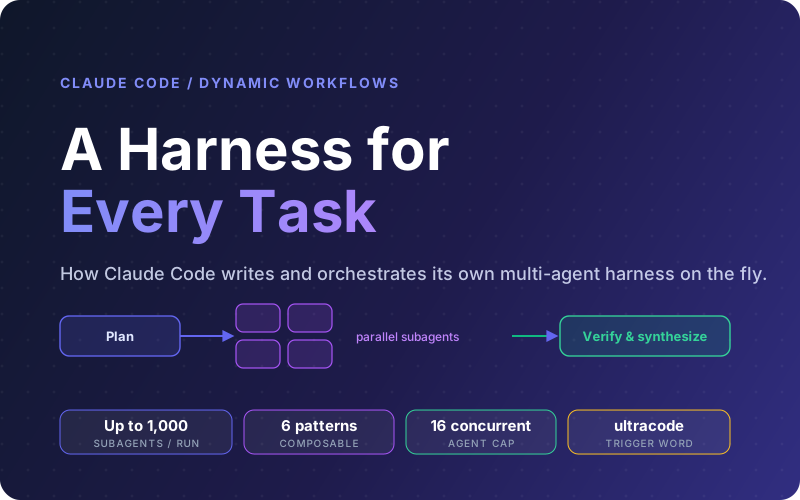
On June 2, 2026, Anthropic published "A harness for every task", a deep dive into dynamic workflows in Claude Code. The headline idea is simple but far-reaching: Claude can now write its own harness on the fly, custom-built for the task in front of it, instead of always running inside the one default harness shipped for coding.
A harness is the system around the model. It decides how work gets split, which subagents spawn, what tools each one gets, how their output is verified, which model handles which step, how work is isolated, and when the job is actually done. For a long time those decisions were either baked into a single default harness or hand-built by teams for specialized jobs like research, security analysis, or code review. Dynamic workflows let Claude build that scaffolding itself, per task.
This guide breaks down what a harness is, why the default one breaks on certain classes of work, the six orchestration patterns Claude composes, the real use cases (including the non-coding ones that surprise people), and how to drive workflows well without setting your token bill on fire.
What This Guide Covers
1What a Harness Actually Is
When people talk about an AI coding agent, they usually mean two things glued together: the model (the raw intelligence) and the harness (everything around it). The harness reads files, runs commands, manages context, spawns helpers, checks results, and decides when to stop. Swap a better model into a weak harness and you leave most of the gains on the table; the scaffolding is doing a huge amount of the work.
The default Claude Code harness is built for coding, and it turns out to be useful well beyond coding because many tasks resemble coding tasks. But Anthropic has historically had to build custom harnesses on top of Claude Code to hit peak performance on specific classes of work: deep research, automated security reviews, agent teams, and code review. Each of those was a bespoke engineering effort.
Dynamic workflows generalize that. Instead of Anthropic (or you) hand-building a harness for each scenario, Claude writes one on the fly for the task you describe, then a runtime executes it. The harness becomes a first-class, reusable artifact: a script you can read, rerun, edit, and share. This capability shipped alongside Claude Opus 4.8, which is finally intelligent enough to author a custom harness rather than just run inside a generic one.
Static vs dynamic harnesses
You could already build a static workflow with the Claude Agent SDK or claude -p to coordinate multiple Claude Code instances. But a static workflow has to handle every edge case up front, so it tends to be generic. A dynamic workflow is written for the one task at hand, so it can be specific. Think of it as the difference between a general-purpose framework and a script you wrote for exactly this job.
2Why a Single Context Window Breaks Down
When you ask the default harness to do a task, it has to both plan and execute in the same context window. For most coding work that is fine. But the longer Claude works on a complex, multi-part task in one context, the more it becomes vulnerable to three specific failure modes that Anthropic names directly:
Agentic laziness
Claude stops before finishing a complex, multi-part task and declares it done after partial progress, for example addressing 35 of 50 items in a security review.
Self-preferential bias
Claude tends to prefer its own results when asked to verify or judge them against a rubric. It grades its own homework generously.
Goal drift
Across many turns, and especially after each lossy compaction step, fidelity to the original objective degrades. Edge-case requirements and 'do not do X' constraints quietly get lost.
A workflow attacks all three structurally. By orchestrating separate subagents, each with its own context window and a single focused goal, the work cannot quietly drift, laziness in one agent does not stall the whole job, and verification is done by a different agent than the one that produced the result. The fix is architectural, not a better prompt. This is the same lesson behind context engineering for agents: managing what is in the window matters as much as the model itself.
3How Dynamic Workflows Run
A dynamic workflow is a JavaScript script that orchestrates subagents at scale. You describe the task in plain language, Claude writes the script, and a separate runtime executes it in the background while your main session stays responsive. The script includes special functions for spawning and coordinating subagents, plus standard JavaScript like JSON, Math, and Array to process data. Crucially, it can decide which model each agent uses and whether a subagent runs in its own worktree, so Claude picks the right intelligence level and isolation per step.
The intermediate tool traces never hit your main context. Your session only ingests the final, converged result, which is what keeps the window clean even when hundreds of agents ran underneath. Per the Claude Code docs, the runtime caps a run at 16 concurrent agents (fewer on machines with limited CPU cores) and 1,000 agents total per run to prevent runaway loops.
Runs are resumable within the same session: if you interrupt a workflow or quit the terminal, resuming lets it pick up where it left off, with completed agents returning cached results. Exit Claude Code entirely while a workflow runs, though, and the next session starts it fresh.
Permissions during a run
Your permission mode only controls the launch prompt. The subagents a workflow spawns always run in acceptEdits mode and inherit your tool allowlist, so file edits auto-approve. Shell commands, web fetches, and MCP tools that are not on your allowlist can still pause the run for approval. For a long unattended run, add the commands the agents need to your allowlist first.
4The Six Orchestration Patterns
Building a mental model for how workflows compose helps you know when to reach for one and how to nudge Claude through your prompt. Anthropic calls out six patterns that Claude mixes and matches when it builds a harness:
Classify-and-act
A classifier agent decides the type of each item, then routes it to a different agent or behavior. Useful at the start to triage work, or at the end to shape output.
Fan-out-and-synthesize
Split a job into many small steps, run an agent on each with its own clean context so they do not cross-contaminate, then merge their structured outputs in a synthesize step that waits for all of them.
Adversarial verification
For every agent that produces a result, run a separate agent whose job is to challenge that result against a rubric. This counters the model's tendency to trust its own output.
Generate-and-filter
Generate many candidate ideas, then filter them by a rubric or verification, dedupe near-duplicates, and return only the highest-quality survivors.
Tournament
Instead of dividing the work, have N agents each attempt the same task with a different approach, then have judge agents compare them pairwise until one wins. Comparative judgment is more reliable than absolute scoring.
Loop-until-done
For tasks with an unknown amount of work, keep spawning agents until a stop condition is met (no new findings, no remaining errors) instead of running a fixed number of passes.
These are not mutually exclusive. A research workflow might fan out web searches, run adversarial verification on each source, then generate-and-filter the surviving claims into a cited report. The skill is describing your task so Claude reaches for the right combination. For a broader catalogue of orchestration shapes, see our multi-agent orchestration patterns guide.
5Use Cases, Including Non-Coding Work
The coding use cases are obvious: large migrations and refactors, repo-wide bug sweeps, and renaming a model everywhere. (Anthropic notes Bun was rewritten from Zig to Rust using workflows, by breaking the job into callsites, failing tests, and modules, then spinning a subagent per fix in a worktree with an adversarial reviewer before merge.) If you have a framework upgrade in the backlog, our migration-focused walkthrough covers that path in depth.
What surprises people is how often workflows are more useful for non-technical work. A few examples drawn from Anthropic's post:
Deep research
The built-in /deep-research workflow fans out web searches, fetches sources, adversarially verifies claims, and synthesizes a cited report.
Fact-checking a draft
Have one agent extract every factual claim from a document, then spin off a subagent to verify each one in detail before you ship it.
Sorting at scale
Rank 1,000+ support tickets by severity using a pairwise-comparison tournament, since comparative judgment beats absolute scoring.
Resume screening
Rank a folder of 80 resumes for a role, double-check the top ten, and build the rubric interactively with AskUserQuestion.
Root-cause investigation
Generate independent hypotheses from disjoint evidence (logs, files, data) and face each one with verifiers and refuters. Works for sales dips and pipeline failures too.
Mining your own sessions
Comb your last 50 sessions for corrections you keep making, cluster them, verify each candidate, and distill survivors into CLAUDE.md rules.
Naming and taste
Brainstorm many options for a CLI tool name or a design, then run a tournament against a rubric to pick the top few.
Triage at scale
Classify each item in a backlog, dedupe against what is already tracked, and either attempt the fix or escalate. Pair with /loop to run continuously.
The quarantine pattern for triage
When a triage workflow reads untrusted public content (support tickets, scraped pages, inbound email), bar the agents that read that content from taking high-privilege actions. Let a separate set of agents act on the information instead. This quarantine boundary is a practical defense against prompt injection in autonomous runs.
6Triggering, Saving & Sharing Workflows
There are three ways to get a workflow going, per the Claude Code docs:
- Ask in plain language. "Use a workflow" or "run a workflow" in your prompt is treated as an opt-in.
- Use the keyword. Include
ultracodein your prompt to force a single task to run as a workflow. (Before v2.1.160 the literal keyword wasworkflow.) - Let Claude decide. Set
/effort ultracodeand Claude plans a workflow for every substantive task in the session, combiningxhighreasoning with automatic orchestration. It resets when you start a new session.
When a run does what you wanted, open /workflows, select it, and press s to save the script as a command. You can store it in .claude/workflows/ (shared with everyone who clones the repo) or ~/.claude/workflows/ (available in every project, just for you). It then runs as /<name> in future sessions, and can accept input through an args global.
To distribute a workflow more broadly, put the JavaScript files in a skill and reference them in SKILL.md. Anthropic suggests prompting Claude to treat workflow files in a skill as a template rather than a script to run verbatim, which keeps them flexible across projects. Pair repeatable workflows with /loop to run on a schedule and /goal to set a hard completion requirement, and cap spend with a token budget by prompting something like "use 10k tokens."
7When Not to Use a Workflow
Workflows are new, and they often use significantly more tokens than working a task turn by turn. They are best suited for complex, high-value tasks: long-running, massively parallel, highly structured, or adversarial work. They are not needed for every task.
| Reach for a workflow when | Skip it when |
|---|---|
| Work splits into many independent units | The change is small and self-contained |
| Each step benefits from a clean context | One context window holds the whole task fine |
| Output needs adversarial cross-checking | A single pass is trustworthy enough |
| Scale exceeds what one conversation coordinates | A handful of edits gets it done |
The litmus test Anthropic offers for ordinary coding tasks: ask whether it really needs more compute. Most traditional coding tasks do not need a panel of five reviewers. A good habit is to start small, run a workflow on one directory or a narrow question first to gauge cost and quality, then widen the scope once it earns it.
8Why Lushbinary for Agentic Workflows
Dynamic workflows reward teams that have done the unglamorous groundwork: solid test suites, clean CI gates, sensible tool allowlists, and a branching strategy that lets you review a big change before it lands. The model can write the harness, but the quality of the result still depends on how trustworthy your verification gates are.
Lushbinary helps engineering teams get production-ready for agentic development. We harden your test coverage and CI, design safe orchestration patterns (including quarantine boundaries for untrusted input), wire up custom workflows and skills your team can reuse, and set cost controls so a 1,000-agent run never surprises you on the invoice. Whether you are running a large migration, standing up a deep research pipeline, or automating a triage queue, we scope it and operate it with human review checkpoints.
🚀 Free Consultation
Have a backlog task that screams for parallel agents, a migration, a research pipeline, or a triage queue? Lushbinary will assess whether a dynamic workflow fits, prep your test and permission gates, and scope the run with cost controls. No obligation.
❓ Frequently Asked Questions
What does 'a harness for every task' mean in Claude Code?
It is Anthropic's framing for dynamic workflows: instead of relying on the default coding harness, Claude Code can now write a custom harness (the system around the model that decides how work is split, which subagents run, what tools they get, how output is verified, and when the job is done) tailored to the specific task. Claude writes a JavaScript orchestration script and a separate runtime executes it.
How do I trigger a dynamic workflow in Claude Code?
Ask for one in plain language ('use a workflow') or include the keyword 'ultracode' in your prompt. You can also set /effort ultracode so Claude plans a workflow for every substantive task in the session. Dynamic workflows require Claude Code v2.1.154 or later and are in research preview on paid plans.
What are the main dynamic workflow patterns?
Anthropic describes six composable patterns: classify-and-act, fan-out-and-synthesize, adversarial verification, generate-and-filter, tournament, and loop-until-done. Claude composes these when it builds a harness, and you can nudge it toward a specific pattern in your prompt.
What failure modes do dynamic workflows solve?
Long single-context runs suffer from agentic laziness (stopping after partial progress), self-preferential bias (trusting its own results when verifying), and goal drift (losing fidelity to the original objective across many turns and compactions). Giving subagents their own isolated context windows and focused goals structurally counters all three.
When should you not use a dynamic workflow?
Workflows use significantly more tokens, so they are best reserved for complex, high-value, parallel, or adversarial tasks. Most routine coding tasks do not need a panel of five reviewers. For a normal change, ask whether it really needs more compute before reaching for a workflow.
Can dynamic workflows be used for non-coding work?
Yes. Anthropic notes workflows are often even more useful for non-technical work: ranking resumes, triaging support tickets, deep research, fact-checking a document, mining past sessions for recurring corrections, naming a product via a tournament, and post-mortem root-cause analysis for sales or data pipelines.
Sources
- Anthropic - A harness for every task: dynamic workflows in Claude Code (June 2, 2026)
- Claude Code Docs - Orchestrate subagents at scale with dynamic workflows
- Anthropic - Introducing Claude Opus 4.8
Content was rephrased for compliance with licensing restrictions. Feature details, version numbers, and agent limits sourced from official Anthropic publications as of June 3, 2026. Dynamic workflows are in research preview and behavior may change, always verify on the vendor's website.
Put Agentic Workflows to Work
Lushbinary preps your test and permission gates, designs safe orchestration patterns, and operates Claude Code dynamic workflows with cost controls and human review so your high-leverage tasks ship without surprises.
Ready to Build Something Great?
Get a free 30-minute strategy call. We'll map out your project, timeline, and tech stack - no strings attached.
Prefer email? Reach us directly: